Codons
Every hank is built from codons: self-contained blocks of agent work, each with a clear purpose. If a hank is a program, a codon is a function—a single, focused task.
What is a Codon?
A codon is a single instruction for an AI agent. It packages a prompt, a model, and a list of files to watch. When Hankweave runs a codon, it spawns an agent (like Claude or Gemini), gives it the prompt, and monitors the files you specified for changes.
┌─────────────────────────────────────────────────────┐
│  CODON: build-schema                                │
├─────────────────────────────────────────────────────┤
│                                                     │
│  PROMPT                                             │
│  "Read the CSV files in data/ and create           │
│   strict Zod schemas in src/schema/"               │
│                                                     │
│  MODEL: claude-sonnet                               │
│  TRACKS: ["src/schema/**/*.ts"]                    │
│                                                     │
└─────────────────────────────────────────────────────┘
When the codon completes, Hankweave creates a checkpoint—a git commit that captures the exact state of the files. The behavior is captured, not emergent, meaning it’s repeatable and deterministic, not unpredictable.
Codon Execution Lifecycle
When Hankweave runs a codon, it follows this sequence:
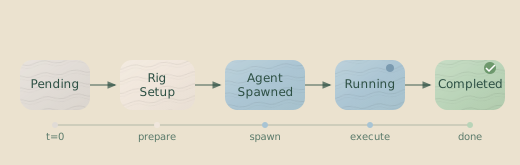
- Pending — The codon is in the execution plan, waiting its turn.
- Rig Setup — Deterministic setup commands run (if any).
- Agent Spawned — The agent (Claude, Gemini, etc.) starts.
- Running — The agent executes the prompt, reading and writing files.
- Checkpointing — Tracked files are committed to git.
- Completed — The codon finished successfully.
Key Insight: Codons are boundaries. Problems in one codon don’t leak into the next. When something breaks, you know exactly where to look.
Anatomy of a Codon
Here’s a minimal codon:
{
  "hank": [
    {
      "id": "build-schema",
      "name": "Build Zod Schemas",
      "model": "sonnet",
      "continuationMode": "fresh",
      "promptText": "Read the CSV files in read_only_data_source/ and create strict Zod schemas."
    }
  ]
}
And here’s a full-featured codon using most available options:
{
  "id": "codon-1",
  "name": "Codon 1: Generate Schemas",
  "promptFile": ["./prompts/schema-builder.md", "./prompts/context.md"],
  "model": "sonnet",
  "continuationMode": "fresh",
  "rigSetup": [
    {
      "type": "command",
      "command": {
        "run": "mkdir -p src/schema",
        "workingDirectory": "project"
      }
    }
  ],
  "appendSystemPromptFile": ["./prompts/system-context.md"],
  "description": "Generate Zod schemas from CSV data",
  "checkpointedFiles": ["src/schema/**/*.ts"],
  "env": {
    "DEBUG": "true"
  },
  "outputFiles": [
    {
      "copy": ["src/schema/*.ts"],
      "beforeCopy": [
        {
          "type": "command",
          "command": {
            "run": "bun run typecheck",
            "workingDirectory": "project"
          }
        }
      ]
    }
  ],
  "sentinels": [
    {
      "sentinelConfig": "./sentinels/narrator.sentinel.json"
    }
  ],
  "onFailure": "retry",
  "retryConfig": {
    "maxAttempts": 2
  },
  "budget": {
    "maxDollars": 3.0,
    "maxTimeSeconds": 300,
    "onExceeded": "complete"
  }
}
Field Reference
Required Fields
| Field | Type | Description |
|---|---|---|
id | string | Unique identifier for this codon (e.g., "build-schema", "codon-1"). Used in logs, checkpoints, and rollback commands. |
name | string | Human-readable name displayed in the UI and logs. |
model | string | The AI model for the agent. This can be a short alias (like "sonnet") or a full model ID (like "claude-sonnet-4-20250514"). Aliases are configured in your API provider settings. |
continuationMode | "fresh" | "continue-previous" | Whether to start a new conversation (fresh) or continue from the previous codon (continue-previous). See Continuation Modes for details. |
You must also provide either promptText or promptFile:
| Field | Type | Description |
|---|---|---|
promptText | string | Inline prompt text. Good for short, simple prompts. |
promptFile | string | string[] | Path(s) to file(s) containing the prompt. If an array, files are concatenated. Paths are relative to the hank.json file. |
Optional Fields
| Field | Type | Description |
|---|---|---|
description | string | Optional description shown in the UI explaining what this codon does. |
appendSystemPromptFile | string | string[] | Path(s) to system prompt file(s) to append. Adds context or constraints to the agent. |
appendSystemPromptText | string | Inline system prompt text to append. Mutually exclusive with appendSystemPromptFile. |
checkpointedFiles | string[] | Glob patterns for files to checkpoint. These files are tracked in git and streamed to clients on change. |
rigSetup | array | Deterministic setup operations to run before the agent starts. See Rigs. |
env | object | Environment variables to set for the agent process. |
outputFiles | array | Files to copy to the output directory after completion. Can run commands first. |
sentinels | array | Parallel observers that watch the agent’s event stream. See Sentinels. |
onFailure | object | Failure handling policy. Controls what happens if the codon fails. See Failure Handling. |
exhaustWithPrompt | string | Prompt to continue the codon until context is exhausted. See Extensions. |
budget | object | Cost, time, and token limits for this codon. See Budgets. |
Continuation Modes
The continuationMode field controls whether a codon starts a new conversation or picks up where the previous one left off. This is one of the most important decisions you’ll make when designing a hank.
Important: Each model provider maintains its own conversation session. You
cannot continue a conversation with a different model than the one that
started it. If you switch models between codons, you must use
continuationMode: "fresh".
fresh — Start a New Conversation
{
  "id": "analyze-data",
  "continuationMode": "fresh",
  "model": "sonnet",
  "promptText": "Analyze the CSV files in read_only_data_source/..."
}
The agent starts with an empty conversation history. It sees only the current prompt and the state of the files. Use this for self-contained tasks, when switching models, or when the previous context would be confusing.
The first codon in any hank must use fresh.
continue-previous — Continue the Conversation
{
  "id": "refine-schema",
  "continuationMode": "continue-previous",
  "model": "sonnet",
  "promptText": "Now refine the schemas you just created to add validation..."
}
The agent continues from the previous codon’s conversation, retaining the full context. Use this when the agent needs to remember its previous actions and reasoning—when the phrase “you just created” in your prompt should actually mean something.
Model Matching: You cannot use continue-previous with a different model
than the previous codon. Different models cannot share session IDs. If you
need to switch models, use continuationMode: "fresh".
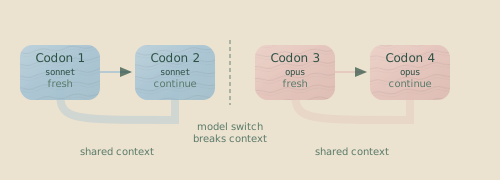
In this flow, Codons 1 and 2 share a conversation (blue), while Codons 3 and 4 share a different conversation (orange). Codon 3 must start fresh because it switches to a different model.
The Dual ID System
Codons have two types of IDs:
- Config ID — The ID you write in the
hank.jsonfile (e.g.,"review","codon-1"). - Runtime ID — A generated ID used during execution to handle loops (e.g.,
"review#0","review#1").
Outside of a loop, a codon’s config ID and runtime ID are the same. Inside a loop, the runtime ID includes the iteration number:
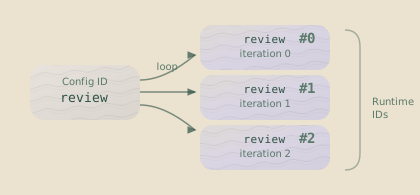
This matters when reading logs (which use runtime IDs), rolling back to a specific iteration, or debugging which iteration of a loop failed.
Prompts
Theory of Mind: When writing prompts, remember that you are not the audience. You have context the model doesn’t—why this task matters, what happened before, what “good” looks like. The model only knows what’s in the prompt. Every piece of implicit knowledge is a potential failure point. See Theory of Mind for Prompts for techniques to make your assumptions explicit.
Inline Prompts
For short, simple prompts, use promptText:
{
  "id": "quick-fix",
  "name": "Quick Fix",
  "model": "sonnet",
  "continuationMode": "fresh",
  "promptText": "Fix the TypeScript errors in src/"
}
File-Based Prompts
For longer prompts, use promptFile. This keeps your hank.json clean and makes prompts easier to edit and version control.
{
  "id": "generate-schemas",
  "name": "Generate Schemas",
  "model": "sonnet",
  "continuationMode": "fresh",
  "promptFile": "./prompts/schema-generator.md"
}
Multiple Prompt Files
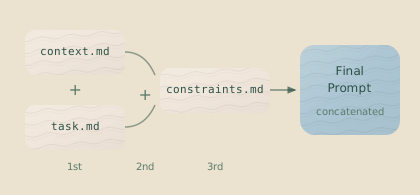
You can provide an array of files, which will be concatenated in order.
{
  "promptFile": [
    "./prompts/context.md",
    "./prompts/task.md",
    "./prompts/constraints.md"
  ]
}
This lets you compose prompts from reusable components.
Template Variables
Prompts support template variables that are replaced at runtime:
| Variable | Description |
|---|---|
<%EXECUTION_DIR%> | Full path to the execution directory. |
<%DATA_DIR%> | Full path to the read-only data source. |
<%PROJECT_DIR%> | Alias for <%EXECUTION_DIR%> (legacy). |
Read the CSV files in <%DATA_DIR%>/ and create Zod schemas.
Save the schemas to <%PROJECT_DIR%>/src/schema/.
Documenting Prompts with Comments
Use HTML comments to document your prompts without sending the comments to the LLM. Comments are stripped before the prompt is sent:
# Refactoring Task

Refactor the authentication module to use JWT tokens.

<!-- CONTEXT: Migrating from sessions to JWT for mobile app.
     See ENG-234 for requirements. -->

Preserve backward compatibility with /api/v1/\* endpoints.

<!-- WARNING: Don't touch OAuth flows - separate ticket (ENG-256). -->
The agent only sees:
# Refactoring Task

Refactor the authentication module to use JWT tokens.

Preserve backward compatibility with /api/v1/\* endpoints.
This keeps your prompts self-documenting for maintainers without wasting tokens on comments the agent doesn’t need.
System Prompts
System prompts add context or constraints that apply to the entire codon. They are a good place for rules that the agent should follow throughout its execution.
{
  "appendSystemPromptFile": "./prompts/no-todos.md"
}IMPORTANT: Never use TODO comments. Always implement functionality completely.You can also use an inline system prompt with appendSystemPromptText:
{
  "appendSystemPromptText": "Always use TypeScript strict mode. Never use the 'any' type."
}
You can use either appendSystemPromptFile or appendSystemPromptText in a
codon, but not both.
Checkpointed Files
The checkpointedFiles field tells Hankweave which files to track using glob patterns.
{
  "checkpointedFiles": ["src/schema/**/*.ts", "package.json"]
}
Checkpointed files are automatically committed to git, streamed to clients in real-time, and respect your project’s .gitignore file—any matching files are automatically excluded.
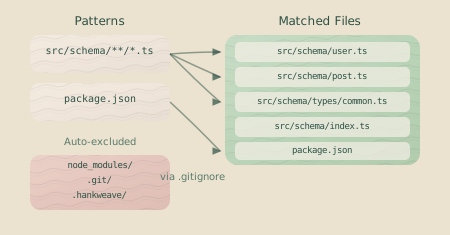
Patterns use standard glob syntax:
**/*.ts— All TypeScript files, any depth.src/schema/*.ts— TypeScript files directly insrc/schema/.notes/**/*— Everything innotes/, any depth.
Environment Variables
Use the env field to set environment variables for the agent’s process.
{
  "env": {
    "DEBUG": "true",
    "LOG_LEVEL": "verbose",
    "DATABASE_URL": "postgres://localhost:5432/test"
  }
}
The agent can read these like any other environment variable from its process.
Security: Environment variables in env are visible in hank.json. For
sensitive values, use system environment variables with the HANKWEAVE_
prefix. For example, a system variable HANKWEAVE_API_KEY will be available
to the agent as API_KEY. This keeps secrets out of your hank.json file,
logs, and checkpoints.
Output Files
The outputFiles field lets you copy files from the execution environment to a final output directory after the codon completes.
{
  "outputFiles": [
    {
      "copy": ["src/schema/*.ts", "package.json"],
      "beforeCopy": [
        {
          "type": "command",
          "command": {
            "run": "bun run typecheck",
            "workingDirectory": "project"
          }
        }
      ]
    }
  ]
}
The copy field specifies glob patterns for files to copy. The beforeCopy field runs commands first, which is useful for builds, tests, or linting before extracting results. Output files are placed in the configured outputDirectory (default: hankweave-results/).
Failure Handling
By default, if a codon fails (e.g., the agent crashes, times out, or exits with an error), Hankweave aborts the entire hank. The onFailure field lets you configure different behaviors.
{
  "id": "risky-operation",
  "name": "Risky Operation",
  "model": "sonnet",
  "continuationMode": "fresh",
  "promptText": "Attempt to refactor the legacy module...",
  "onFailure": "retry",
  "retryConfig": {
    "maxAttempts": 3
  }
}
Failure Policies
| Value | Description |
|---|---|
"abort" | (Default) Stop the entire hank immediately. The failure is logged, and no subsequent codons run. |
"retry" | Retry the codon up to maxAttempts times. If all retries fail, the hank aborts. |
"ignore" | Log the failure but continue to the next codon. Useful for optional or best-effort tasks. |
Retry Configuration
When onFailure is "retry", you can optionally provide a retryConfig object:
| Field | Type | Description |
|---|---|---|
maxAttempts | number | Maximum number of retry attempts (1-10). Default: 3. |
delayMs | number | Delay between retries in milliseconds (0-60000). Default: 1000. |
Use ignore carefully: If a later codon depends on files that a failed
codon was supposed to create, the hank may still fail in unexpected ways. Use
ignore only for truly independent or optional work.
Examples
Retry with backoff (retries are immediate, but you get multiple attempts):
{
  "id": "flaky-operation",
  "onFailure": "retry",
  "retryConfig": {
    "maxAttempts": 3
  }
}
Best-effort documentation generation:
{
  "id": "generate-docs",
  "name": "Generate Docs (Optional)",
  "promptText": "Generate API documentation for the new endpoints",
  "onFailure": "ignore"
}
Extensions
Extensions allow a single codon to continue executing until context is exhausted. This is useful for open-ended exploration tasks where you don’t know in advance how many iterations are needed.
Extensions vs Loops: A loop iterates multiple codons in sequence. An extension keeps a single codon running until the model’s context window is full. Use loops for structured iteration with clear boundaries; use extensions for unbounded exploration.
{
  "id": "explore-codebase",
  "name": "Deep Codebase Exploration",
  "model": "sonnet",
  "continuationMode": "fresh",
  "promptText": "Explore this codebase thoroughly. Document everything interesting you find.",
  "exhaustWithPrompt": "Please continue exploring. Any more patterns or insights?"
}
The exhaustWithPrompt field specifies a follow-up prompt that is automatically sent to the agent after each completion. The codon will:
- Run to completion normally
- Automatically continue with the
exhaustWithPromptprompt - Keep iterating until the model’s context window is full
- Create checkpoints after each iteration
This is useful for tasks like:
- Comprehensive codebase exploration
- Thorough documentation generation
- Exhaustive test writing
- Deep refactoring sessions
Key behaviors:
- One
codon.completedevent (not one per iteration) - One set of output files
- Sentinels fire once at true completion
- Rollback treats the entire extended codon as a single atomic unit
Cost Warning: Extensions can consume significant API credits since they run until context is exhausted. Monitor usage carefully when using this feature.
Common Patterns
Single-Purpose Codons
Keep codons focused on one task. Two codons that each do one thing well are better than one codon trying to do both. They are easier to debug, iterate on, and reuse.
{
  "id": "analyze",
  "name": "Analyze Data",
  "promptText": "Analyze the CSV structure and write observations to notes/observations.md"
}{
"id": "generate",
"name": "Generate Schemas",
"promptText": "Based on the observations, generate Zod schemas"
}Context Firewalling
Use fresh mode to prevent context from one task from polluting the next.
{
  "id": "step-1",
  "continuationMode": "fresh",
  "promptText": "Generate initial schemas..."
}{
"id": "step-2",
"continuationMode": "fresh", // Start fresh, no accumulated context
"promptText": "Review and validate the schemas in src/schema/"
}The second codon doesn’t inherit any conversation history from the first; it only reads the state of the files. This ensures its behavior is reproducible and not influenced by prior conversational turns.
Context Accumulation
Use continue-previous when the agent needs a memory of its past actions.
{
  "id": "write",
  "continuationMode": "fresh",
  "promptText": "Write three poems about nature"
}{
"id": "pick-favorite",
"continuationMode": "continue-previous",
"promptText": "Pick your favorite of the three and explain why"
}The second codon remembers what it wrote, allowing the agent to reason about its previous work without having to re-read files.
Common Mistakes
Don’t do this: Using continue-previous on the first codon.
{
  "id": "first-codon",
  "continuationMode": "continue-previous" // Error: nothing to continue from
}Instead: The first codon must always use continuationMode: "fresh".
Don’t do this: Switching models with continue-previous.
{
  "id": "step-1",
  "model": "sonnet",
  "continuationMode": "fresh"
}{
"id": "step-2",
"model": "gemini",
"continuationMode": "continue-previous" // Error: different model
}Instead: Use continuationMode: "fresh" whenever you switch models.
Don’t do this: Putting everything in one giant codon.
{
  "promptText": "Analyze the data, generate schemas, validate them, fix errors, write tests, and generate documentation"
}Instead: Split the work into multiple codons with clear, single purposes.
Codon vs Loop
A codon configuration can represent either a single execution or a loop, controlled by the optional type field.
| Type | Description |
|---|---|
"codon" (default) | A single execution block. |
"loop" | A repeating sequence of codons. |
If you omit the type field, it defaults to "codon". Loops are a powerful construct covered on their own page: Loops.
Next Steps
Now that you understand codons, you’re ready to explore related concepts: