Execution Thread
When you roll back, re-run a codon, or continue from a checkpoint, something interesting happens: Hankweave doesn’t just look at the current run. It reaches back through time, following the chain of continuations, and reconstructs a single, unified history from all related runs: the execution thread. This unified view tells you what happened, what’s happening now, and what should happen next.
Why Execution Threads?
Consider this scenario: you run three codons, codon-3 fails, you roll back to codon-1 and try again. Now you have two runs, each with its own state:
- Run 1: codon-1 (success), codon-2 (success), codon-3 (failed)
- Run 2: codon-2 (retried, success), codon-3 (success)
Which codon-2 matters? What’s the actual history of your project? Without some way to stitch these together, you’re left with two disconnected timelines. The execution thread solves this by walking the continuation chain and building a coherent narrative of what actually happened.
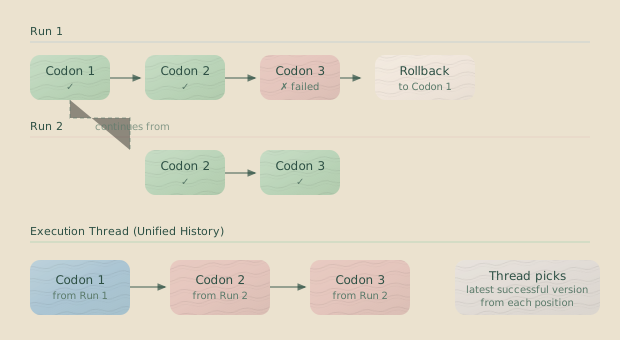
The execution thread shows what actually matters: codon-1 from Run 1, followed by codon-2 and codon-3 from Run 2. Run 1’s codon-2 and codon-3 are superseded—they existed, but they’re no longer part of the authoritative history.
How Threads Are Built
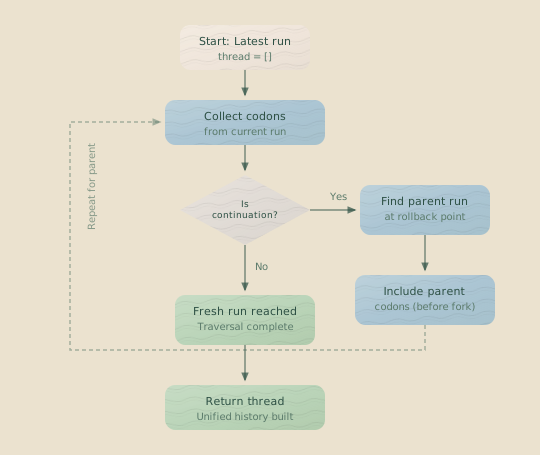
The thread-building algorithm walks backward through continuation chains, collecting codons from each run until it reaches a fresh start. It’s like unraveling a chain of linked lists, gathering relevant nodes along the way.
The Algorithm
- Start with the latest run. This is your current working context.
- Collect all executed codons from that run. These become part of the thread.
- Check the run’s starting conditions. Is this run a continuation with a parent run?
- If it’s a continuation, find the parent run. Look up the source run from
startingConditions.sourceRunId. - Determine which parent codons to include. This depends on the continuation type:
- For a normal continuation, include all parent codons up to and including the one execution resumed after.
- For a rig-setup continuation, include all parent codons except for the one being re-run.
- Repeat. Continue walking up the chain until you reach a fresh run (one with
startingConditions.type: "fresh").
Continuation Types
Hankweave supports two continuation types—two ways you can resume from a checkpoint. The type of continuation determines how the thread is built.
Normal continuation resumes after a completed codon. The completed codon is included in the thread from the parent run, and execution picks up with the following codon.
Rig-setup continuation re-runs a codon from its rig-setup checkpoint. The original execution of that codon is excluded from the parent’s contribution to the thread because it’s about to be re-executed.
This distinction matters. It determines which session ID to use for continue-previous mode and which checkpoint represents the current file state.
Rig-Setup Continuation: When you roll back to a rig-setup checkpoint, you’re saying “I want to re-run this codon from scratch, after its rig setup completed.” The execution thread excludes that codon from the parent run since it’s about to be re-executed.
ThreadCodon Structure
Each item in the thread is a ThreadCodon, which wraps a codon’s execution data with context about its run and position in the overall history.
interface ThreadCodon {
  // The codon execution data
  codon: CodonExecution;

  // Run context
  runId: RunId;
  runStatus: "running" | "completed" | "failed" | "crashed";
  runStartTime: string;
  runEndTime: string | null;
  gitBranch: string;

  // Position in execution history
  globalIndex: number;      // 0 is the most recent codon
  runIndex: number;         // 0 is from the latest run
  codonIndexInRun: number;  // Position within that run

  // Validated checkpoints (only SHAs that exist in git)
  validatedCheckpoints: CheckpointInfo[];

  // Session ID this codon continued from
  continuationSessionId: SessionId | null;
}
Key Fields
globalIndex tells you where this codon sits in the entire thread. The most recently executed codon has index 0, the one before it is 1, and so on. Need to find “the latest codon” or “what happened three steps ago”? Use the index.
runIndex tells you which run this codon came from. Index 0 means the latest run, 1 means the parent, and so on up the continuation chain. This is useful for understanding which run contributed which codons.
validatedCheckpoints contains only checkpoints that were confirmed to exist in your Git repository when the thread was built. If a checkpoint SHA from the state file is missing from Git (e.g., from a deleted branch), it won’t appear here. This protects rollback operations from targeting non-existent commits.
continuationSessionId records the session ID this codon used for a continue-previous operation. This makes it possible to trace conversational context across the entire thread.
Using the Execution Thread
The execution thread powers several critical operations in Hankweave.
Finding the Next Codon
The thread determines the nextCodonId by analyzing the full, reconstructed history. This is more sophisticated than simply finding the next codon in a static plan; it accounts for what’s already run, the current execution plan, and whether a rig-setup continuation means the same codon should run again.
// The thread tells you what's next
const thread = await stateManager.getExecutionThread();
const nextCodon = thread.nextCodonId; // e.g., "validate-schema"
Finding Session IDs for Continuation
When a codon uses continue-previous mode, Hankweave needs to find the session ID from the correct “previous” codon, which might be in a different run. The thread makes this straightforward by providing an ordered history.
function findContinuationSessionId(
  thread: ExecutionThread,
  codonId: CodonId,
  state: HankweaveState
): SessionId | null {
  // Find the codon before this one in the execution plan
  const previousCodonId = getPreviousCodonFromPlan(codonId, state);

  // Search the thread (newest to oldest) for that codon's execution
  for (const threadCodon of thread.codons) {
    if (threadCodon.codon.codonId !== previousCodonId) continue;

    // Must have a session ID and be in a continuable state
    if (threadCodon.codon.status === "completed" &&
        threadCodon.codon.claudeSessionId) {
      return threadCodon.codon.claudeSessionId;
    }
  }

  return null;
}
Because the thread is ordered from most recent to oldest, this search always finds the latest valid session for the target codon ID.
Session Validity: A session is only valid for continuation if the codon completed successfully OR was skipped with at least one assistant message. Failed codons may have partial sessions that can’t be resumed.
Detecting Failed State
To check if execution is blocked, use the thread’s failed property.
const thread = await stateManager.getExecutionThread();

if (thread.failed) {
  // The most recent codon failed, or the run crashed mid-codon.
  console.log("Execution blocked. A rollback or fix is required.");
} else {
  // Can proceed to the next codon.
  const next = thread.nextCodonId;
}
A thread is considered failed if its most recent codon failed or if the current run crashed. Failures in older, superseded runs (like the original codon-3 in our first example) do not affect the current thread’s status.
Checkpoint Validation
Here’s a problem: not all checkpoints recorded in the state file are still valid. Git branches get deleted, commits get garbage-collected, and history changes. If you tried to roll back to a checkpoint that no longer exists, you’d get an error.
The execution thread solves this by validating each checkpoint against the actual Git repository during its construction.
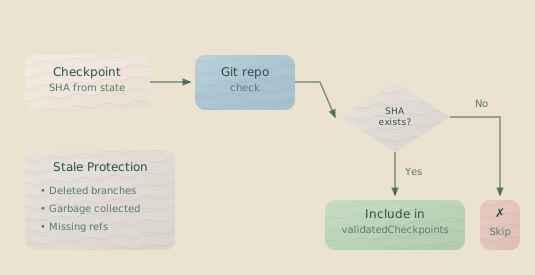
The validatedCheckpoints field on a ThreadCodon contains only SHAs that exist in Git. Rollback operations can trust these values.
Checkpoint Types in Thread
Each validated checkpoint includes its type, which tells you what state it captured:
| Type | Meaning | When Available |
|---|---|---|
rig-setup | State after rig commands completed | If codon had rigSetup |
completed | State after successful completion | If status: "completed" |
error | State when an error occurred | If status: "failed" |
skipped | State when the codon was skipped | If status: "skipped" |
Thread Traversal Patterns
The thread’s codons property is an array of ThreadCodon objects, ordered from newest to oldest. Here are common patterns for working with it.
Finding the Last Successful Codon
const thread = await stateManager.getExecutionThread();

const lastSuccess = thread.codons.find(
  tc => tc.codon.status === "completed"
);

if (lastSuccess) {
  console.log(`Last success: ${lastSuccess.codon.codonId}`);
  console.log(`Checkpoint: ${lastSuccess.validatedCheckpoints[0]?.sha}`);
}
Walking the History Chronologically
// Process codons from oldest to newest
const reversed = [...thread.codons].reverse();

for (const tc of reversed) {
  console.log(`[Run ${tc.runIndex}] ${tc.codon.codonId}: ${tc.codon.status}`);
}
Comparing Runs
// Find all codons from a specific run
const run1Codons = thread.codons.filter(tc => tc.runId === "run-001");

// Find which codon IDs were superseded by later runs
const supersededCodonIds = new Set(
  thread.codons
    .filter(tc => tc.runIndex > 0)  // From parent runs
    .map(tc => tc.codon.codonId)
);
Loop Context in Threads
When codons run as part of a loop, they carry loop context with them into the thread. This lets you understand not just what codon ran, but which iteration it was part of.
interface LoopContext {
  loopId: CodonId;           // ID of the parent loop
  iteration: number;         // 0-indexed iteration number
  codonIndexInLoop: number;  // Position within loop.codons
}
With this context, you can reconstruct the full loop structure from the thread:
// Find all iterations of a specific loop
const loopIterations = thread.codons.filter(
  tc => tc.codon.loopContext?.loopId === "refine-loop"
);

// Group by iteration
const byIteration = new Map<number, ThreadCodon[]>();
for (const tc of loopIterations) {
  const iter = tc.codon.loopContext!.iteration;
  if (!byIteration.has(iter)) {
    byIteration.set(iter, []);
  }
  byIteration.get(iter)!.push(tc);
}
API Reference
Here’s the complete interface for working with execution threads.
ExecutionThread Class
class ExecutionThread {
  // All codons in execution order (newest first)
  codons: ThreadCodon[];

  // Number of runs in the continuation chain
  totalRuns: number;

  // Whether any codon is currently running
  hasRunningCodon: boolean;

  // Next codon to execute (null if complete or failed)
  nextCodonId: CodonId | null;

  // Whether execution is blocked by failure
  get failed(): boolean;
}
Getting the Thread
// From StateManager
const thread = await stateManager.getExecutionThread();

// With checkpoint validation disabled (faster, but potentially unsafe)
const thread = await stateManager.getExecutionThread(
  undefined,  // targetRunId
  false       // includeCheckpointValidation
);

// For a specific historical run
const thread = await stateManager.getExecutionThread("run-001");
analyzeExecutionThread Function
For advanced use cases, you can call the thread analysis logic directly instead of going through StateManager:
import { analyzeExecutionThread } from "hankweave/server/execution-thread";

const thread = await analyzeExecutionThread(
  state,           // HankweaveState
  checkpointData,  // Map of SHA -> git metadata (optional)
  targetRunId,     // Specific run to analyze (optional)
  logger           // Logger for debugging (optional)
);
Related Pages
- Execution Flow — How codons execute
- Checkpoints — Git-based time travel
- State Machine — Codon state transitions
- Debugging — Using thread analysis for troubleshooting
Next Steps
Understanding execution threads helps you debug continuation issues (why was this session selected?), build custom tools that visualize execution history, and understand rollback behavior (what gets included after a rollback?).
For most users, the thread operates behind the scenes—you’ll never need to think about it. But when something unexpected happens across multiple runs, or when you’re building tooling that needs to understand execution history, the execution thread provides the complete picture.