Hanks
A hank is a declarative AI program. It’s a sequence of codons that execute in order, defining which models to run and how context flows between steps. If codons are functions, a hank is the program that calls them.
This design makes AI workflows reproducible: the same hank produces the same results for the same inputs. You define the logic once, run it many times, and get predictable behavior.
What is a Hank?
A hank defines what should happen when an AI agent runs: which codons execute, in what order, with what models, and how context flows between them.
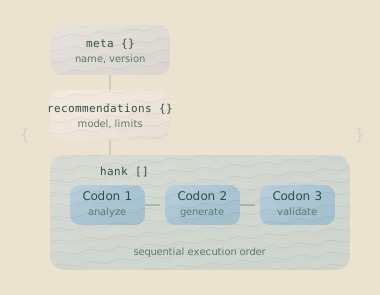
Each codon has a clear purpose. The hank orchestrates them, handling context flow, checkpointing, and continuation. You focus on what the agents should do; Hankweave handles the rest.
Key Insight: Hanks are declarative, not procedural. You describe what should happen, not how to make it happen. There are no conditionals or traditional loops (though Hankweave has Loops as a controlled iteration primitive).
Hank File Structure
A hank is defined in a hank.json file with up to three top-level sections.
{
  "meta": {
    "name": "Data Codebook Generator",
    "version": "1.0.0",
    "description": "Generate documented schemas from CSV files",
    "author": "Your Name"
  },
  "overrides": {
    "model": "sonnet",
    "dataHashTimeLimit": 10000
  },
  "hank": [
    {
      "id": "analyze",
      "name": "Analyze Data",
      "model": "sonnet",
      "continuationMode": "fresh",
      "promptText": "Analyze the CSV files in read_only_data_source/"
    },
    {
      "id": "generate",
      "name": "Generate Schemas",
      "model": "sonnet",
      "continuationMode": "continue-previous",
      "promptText": "Generate Zod schemas based on your analysis"
    }
  ]
}
The Top-Level Sections
| Section | Required | Purpose |
|---|---|---|
meta | No | Metadata for sharing and indexing: name, version, description, author. |
overrides | No | Runtime settings overrides: model preferences, timeouts, sentinel config, budgets. |
requirements | No | Declare required environment variables for fail-fast validation. |
globalSystemPromptFile | No | System prompt file(s) applied to ALL codons. |
globalSystemPromptText | No | Inline system prompt text applied to ALL codons. |
hank | Yes | The sequence of codons that forms the actual program. |
Only the hank array is required. A minimal hank can be just:
{
  "hank": [
    {
      "id": "do-work",
      "name": "Do the Work",
      "model": "sonnet",
      "continuationMode": "fresh",
      "promptText": "Your prompt here"
    }
  ]
}
Note on naming: The root codon array can also be named "strand". This is a legacy term; "hank" is now preferred.
Required Environment Variables
Declare required environment variables in the requirements section. Hankweave validates these during --validate and at startup, failing fast with clear error messages if any are missing.
{
  "requirements": {
    "env": ["ANTHROPIC_API_KEY", "DATABASE_URL", "API_TOKEN"]
  },
  "hank": [...]
}
The HANKWEAVE_ prefix is automatically supported: if your hank requires API_KEY, either API_KEY or HANKWEAVE_API_KEY will satisfy the requirement.
Global System Prompts
Apply a system prompt to ALL codons in a hank using globalSystemPromptFile or globalSystemPromptText. This is useful for enforcing conventions, coding standards, or constraints across the entire workflow.
{
  "globalSystemPromptFile": ["./prompts/coding-standards.md", "./prompts/safety-rules.md"],
  "hank": [...]
}
Or with inline text:
{
  "globalSystemPromptText": "Always explain your reasoning. Never use TODO comments.",
  "hank": [...]
}
The global system prompt is prepended before any codon-specific appendSystemPromptFile or appendSystemPromptText content.
Execution Order
Codons execute sequentially from top to bottom. Each codon must complete before the next one begins.
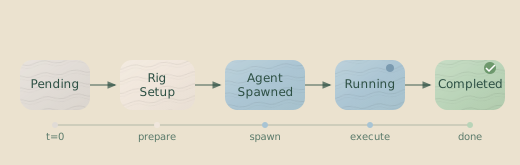
Between each codon, Hankweave creates a checkpoint—a git commit capturing the exact state of the project files. If an agent makes a mistake, you can roll back to any previous checkpoint.
Context Flow
The continuationMode field on each codon controls how conversational context flows from one codon to the next. This is a critical decision in hank design.
fresh: The Context Firewall
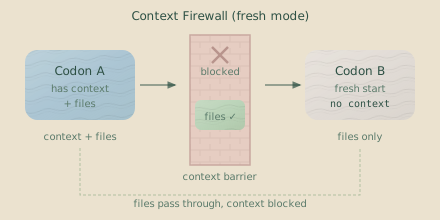
With "fresh", a codon starts a new conversation with the AI model. It sees only its prompt and the current files on disk; it has no memory of what previous codons discussed.
Use fresh when a task should:
- Start with a clean slate, free of prior context.
- Be self-contained, relying on files rather than conversation history.
- Switch to a different AI model.
continue-previous: Context Accumulation
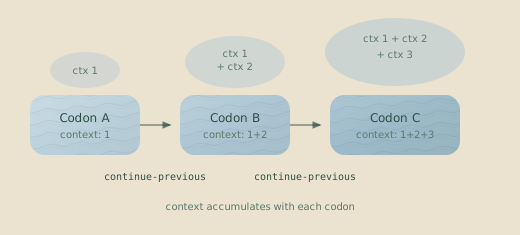
With "continue-previous", a codon resumes the conversation from the previous codon. The agent remembers its prior turns, allowing prompts like “based on the schemas you just created…” to work as expected.
Use continue-previous when a task needs to:
- Build directly on the work of the previous step.
- Refine or iterate on a previous result.
- Refer explicitly to “what you just did.”
Model Matching Required: continue-previous only works if the current
codon uses the same model as the previous one. Different models cannot share
conversation sessions.
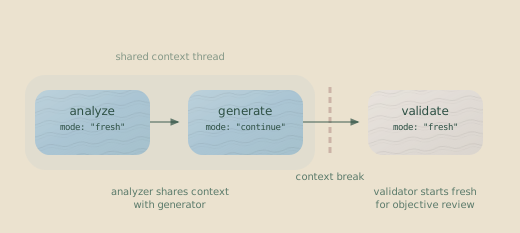
A Mixed-Mode Example
A common pattern is to mix modes for different phases of a task.
{
  "hank": [
    {
      "id": "analyze",
      "continuationMode": "fresh",
      "model": "sonnet",
      "promptText": "Analyze the CSV files..."
    },
    {
      "id": "generate",
      "continuationMode": "continue-previous",
      "model": "sonnet",
      "promptText": "Based on your analysis, generate schemas..."
    },
    {
      "id": "validate",
      "continuationMode": "fresh",
      "model": "sonnet",
      "promptText": "Review the schemas in src/schema/ for correctness..."
    }
  ]
}
Here, analyze and generate share a session, allowing the second codon to build on the first’s understanding. The validate codon starts fresh, forcing it to assess the generated files without relying on potentially flawed conversational context.
Session ID Chaining
When a codon uses continue-previous, Hankweave finds the session ID from the last executed codon and passes it to the agent harness, which then resumes the conversation.
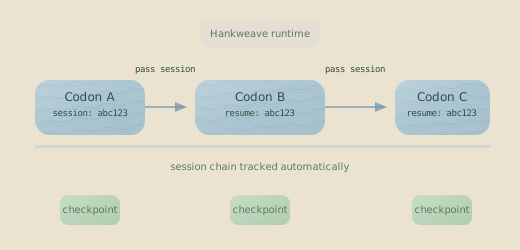
Hankweave tracks active sessions and manages this chaining automatically.
Skipped Codons: The session chain follows the sequence of executed
codons. If a codon is skipped, continue-previous will connect to the last
codon that actually ran and produced a session ID.
Template Variables
Codon prompts support template variables that expand at runtime, such as <%EXECUTION_DIR%> and <%DATA_DIR%>. This lets you write portable hanks that don’t rely on hardcoded paths. For a complete list, see Template Variables in Codons.
The 5-Layer Configuration System
Hankweave resolves configuration from five layers, with each layer overriding the one before it. Settings from the command line have the highest priority.
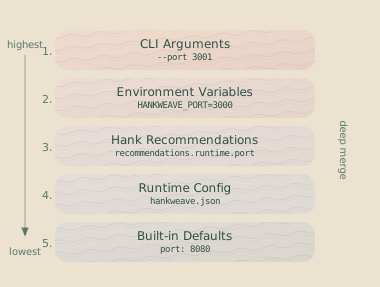
Configuration Precedence (from highest to lowest):
| Priority | Layer | Source | Example |
|---|---|---|---|
| 1 (Highest) | CLI Arguments | Flags passed at runtime | --port=9000 |
| 2 | Environment Variables | Prefixed with HANKWEAVE_RUNTIME_ | HANKWEAVE_RUNTIME_PORT=8080 |
| 3 | Hank Overrides | overrides block in hank.json | "model": "sonnet" |
| 4 | Runtime Config | hankweave.json file | {"port": 7778} |
| 5 (Lowest) | Built-in Defaults | Hardcoded in Hankweave | port: 0 |
How Layers Merge
Settings are combined using a deep merge. If you define sentinel settings in two different layers, their properties are merged rather than replaced. This allows you to combine project-wide settings with hank-specific ones.
Model Override Behavior
The model setting is special. Where you define it changes its behavior:
-
Global Override (Layers 1, 2, 4): When set via CLI arguments, environment variables, or the runtime config (
hankweave.json), the model is forced for all codons. This is useful for testing an entire hank with a different model, like running--model=opus. -
Default Fallback (Layers 3, 5): When set in hank overrides or as a built-in default, the model only applies to codons that do not have their own
modelfield defined. This allows a hank to suggest a default model without overriding specific choices.
Why the distinction? A CLI override is an explicit user command to force a change. A recommendation is a suggestion from the hank’s author that shouldn’t override other explicit choices.
Mixing Models
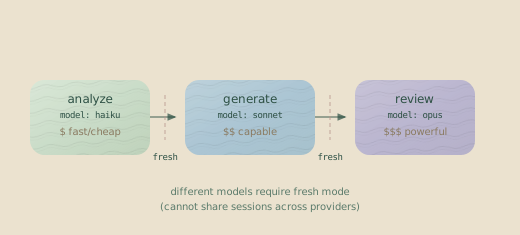
Each codon can specify a different model, letting you optimize for cost and capability at each step of your process.
{
  "hank": [
    {
      "id": "analyze",
      "model": "haiku",
      "continuationMode": "fresh",
      "promptText": "Analyze the CSV structure..."
    },
    {
      "id": "generate",
      "model": "sonnet",
      "continuationMode": "fresh",
      "promptText": "Generate comprehensive Zod schemas..."
    },
    {
      "id": "review",
      "model": "opus",
      "continuationMode": "fresh",
      "promptText": "Review the schemas for edge cases..."
    }
  ]
}
This hank uses a fast, cheap model for initial analysis, a more capable model for generation, and the most powerful model for a final review. Each codon must use continuationMode: "fresh" because conversation sessions cannot be shared across different models.
Real Example: Data Pipeline
Note on Loops: This example uses a Loop to iterate. Loops are a powerful
feature covered on the Loops page. For now, focus on the
sequence of codons outside the loop: observe → schema → document.
This realistic hank processes CSV data into documented TypeScript schemas.
{
  "meta": {
    "name": "CSV to Schema Pipeline",
    "version": "1.0.0"
  },
  "overrides": {
    "model": "sonnet"
  },
  "hank": [
    {
      "id": "observe",
      "name": "Observe Data Structure",
      "model": "haiku",
      "continuationMode": "fresh",
      "promptFile": "./prompts/observe.md",
      "checkpointedFiles": ["notes/**/*"],
      "rigSetup": [
        { "type": "command", "command": { "run": "mkdir -p notes" } }
      ]
    },
    {
      "id": "schema",
      "name": "Generate Schemas",
      "model": "sonnet",
      "continuationMode": "fresh",
      "promptFile": "./prompts/schema.md",
      "checkpointedFiles": ["src/schema/**/*.ts"],
      "rigSetup": [
        {
          "type": "copy",
          "copy": { "from": "./templates/typescript", "to": "src" }
        }
      ]
    },
    {
      "type": "loop",
      "id": "refine",
      "name": "Iterative Refinement",
      "terminateOn": { "type": "iterationLimit", "limit": 3 },
      "codons": [
        {
          "id": "validate",
          "name": "Validate Schemas",
          "model": "sonnet",
          "continuationMode": "fresh",
          "promptText": "Run the schema tests and fix any failures.",
          "checkpointedFiles": ["src/schema/**/*.ts"]
        }
      ]
    },
    {
      "id": "document",
      "name": "Generate Documentation",
      "model": "sonnet",
      "continuationMode": "fresh",
      "promptFile": "./prompts/document.md",
      "checkpointedFiles": ["docs/**/*"],
      "outputFiles": [{ "copy": ["src/schema/**/*.ts", "docs/**/*"] }]
    }
  ]
}
This hank follows a clear, multi-phase process:
- Observes the data structure with a fast, inexpensive model.
- Generates initial schemas with a more capable model.
- Refines the schemas using a validation loop (up to 3 attempts).
- Documents the final, validated schemas.
When to Split Codons
Split a task into multiple codons when:
- Different models fit different phases: Use a cheap model for analysis and a powerful one for generation.
- You want clear rollback points: Each codon creates a checkpoint.
- A long conversation would get noisy: Starting fresh can improve focus.
- The task has distinct stages: Observe, Generate, Validate, Document.
Keep tasks in a single codon when:
- The agent needs conversational memory: Refining a previous step requires context.
- Splitting would break an atomic task: Some operations are all-or-nothing.
Rule of thumb: If your prompt says “based on what you just did,” you
probably need continue-previous. If it says “look at the files in the src/
directory,” fresh is a better choice.
Common Mistakes
Anti-pattern: Using continue-previous after switching models.
{
  "hank": [
    { "id": "step-1", "model": "sonnet", "continuationMode": "fresh" },
    { "id": "step-2", "model": "opus", "continuationMode": "continue-previous" } // Error!
  ]
}Fix: Always use "fresh" when switching models. They cannot share conversation sessions.
Anti-pattern: Putting an entire workflow in one codon.
{
  "hank": [
    {
      "id": "everything",
      "promptText": "Analyze the data, generate schemas, validate them, fix errors, and write documentation."
    }
  ]
}Fix: Split the workflow into focused codons. A single failure in a mega-codon loses all progress. Split codons provide checkpoints, allowing you to resume or roll back.
Anti-pattern: Relying on context when you could use files.
{
  "hank": [
    {
      "id": "write",
      "continuationMode": "fresh",
      "promptText": "Write the schemas."
    },
    {
      "id": "validate",
      "continuationMode": "continue-previous",
      "promptText": "Validate what you wrote."
    }
  ]
}Fix: Consider using "fresh" for the validation step and prompting the agent to read the generated schema files. Conversational context can be unreliable; files are ground truth.
Related Pages
- Codons — The atomic units that hanks are built from
- Loops — The iteration primitive for repeating codons
- Rigs — Deterministic setup scaffolding for codons
- Budgets — Cost, time, and token limits at every level
- Checkpoints — Git-based version control for agent work
- Configuration Reference — Complete configuration options
Next Steps
Now that you understand hanks, explore:
- Building a Hank — A step-by-step tutorial for creating a complex hank.
- Loops — Learn how to iterate codons with controlled termination.
- Debugging — Strategies for when your hanks don’t work as expected.