Loops
Sometimes, one pass isn’t enough. You need an agent to iterate, refine, and improve its work. That’s what loops are for.
Loops are Hankweave’s iteration primitive. They let a set of codons repeat until a termination condition is met. The key insight is that loops expand lazily, one iteration at a time. Instead of planning 50 iterations upfront, Hankweave runs the current iteration and only adds the next one after it completes.
What is a Loop?
A loop wraps one or more codons and repeats them until a termination condition is met. Unlike traditional programming loops, Hankweave loops are declarative—you specify when to stop, not how to iterate.
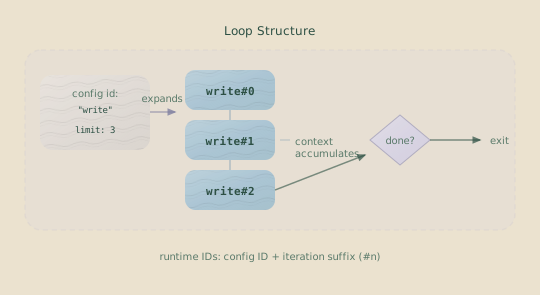
Each iteration creates new codon instances with unique IDs (write#0, write#1). When you use continue-previous, context flows between iterations, allowing the agent to build on its previous work.
Key Insight: Loops enable iterative refinement. An agent can write something, review it, and then improve it, repeating the cycle. It accumulates context across iterations, getting better with each pass.
Loop Structure
Here is the structure of a minimal loop:
{
  "hank": [
    {
      "type": "loop",
      "id": "refine-schema",
      "name": "Schema Refinement Loop",
      "terminateOn": {
        "type": "iterationLimit",
        "limit": 3
      },
      "codons": [
        {
          "id": "improve",
          "name": "Improve Schema",
          "model": "sonnet",
          "continuationMode": "continue-previous",
          "promptText": "Review and improve the schema based on what you've learned."
        }
      ]
    }
  ]
}
Required Fields
| Field | Type | Description |
|---|---|---|
type | "loop" | Discriminator—tells Hankweave this is a loop. |
id | string | Unique identifier for the loop (e.g., "iterative-refinement"). |
name | string | Human-readable name displayed in the UI and logs. |
terminateOn | object | The condition that stops the loop. |
codons | array | Codons to execute each iteration (at least one required). |
Optional Fields
| Field | Type | Description |
|---|---|---|
description | string | Explains what the loop does, for UI and docs. |
budget | object | Loop-level budget: maxDollars, maxTimeSeconds, allocation, shares, onExceeded. Shared across all iterations. See Budgets. |
Termination Modes
The terminateOn field determines when the loop stops. Hankweave offers two modes with fundamentally different behaviors and use cases.
Iteration Limit
Stops the loop after a fixed number of iterations.
{
  "terminateOn": {
    "type": "iterationLimit",
    "limit": 3
  }
}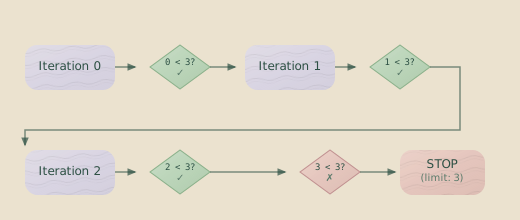
Important: Iterations are 0-indexed. A limit of 3 runs three total iterations: 0, 1, and 2.
| Limit | Iterations executed |
|---|---|
| 1 | 0 |
| 2 | 0, 1 |
| 3 | 0, 1, 2 |
| 5 | 0, 1, 2, 3, 4 |
Use an iteration limit when you know how many passes you need, such as three rounds of review or five refinement cycles.
Context Exceeded
Stops the loop when the model’s context window is full.
{
  "terminateOn": {
    "type": "contextExceeded"
  }
}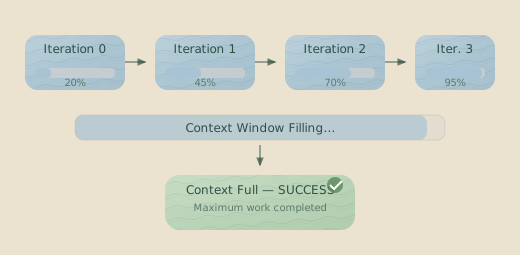
Context exceeded is success, not failure. When a contextExceeded loop
runs out of context, it has met its expected termination condition. Hankweave
marks the loop as complete and continues to the next step in the plan.
This may be counterintuitive if you’re used to context limits as errors. In this mode, running out of context means “the agent has done as much work as possible.” Use this for tasks like data processing, comprehensive analysis, or exhaustive exploration where you want to maximize the work done within the context budget.
Important Tradeoff: After a contextExceeded loop completes, the context
is exhausted. The next codon must use fresh because there is no context
left to continue. If you need context to persist beyond the loop, use
iterationLimit instead.
Budget Exhaustion
Loops can also terminate when their budget is exhausted. If a loop declares a budget with maxDollars or maxTimeSeconds, and that limit is hit during execution, the loop terminates immediately — even mid-iteration. Remaining codons in the current iteration are removed from the plan, and execution continues with the next item after the loop.
{
  "type": "loop",
  "id": "refine",
  "terminateOn": { "type": "iterationLimit", "limit": 20 },
  "budget": { "maxDollars": 3.0 },
  "codons": [...]
}
Here, the iteration limit is a safety valve (20 max), but the real control is the $3 budget. The loop runs as many iterations as it can afford. See Budgets for full documentation.
When to Use Each
| Scenario | Termination Mode |
|---|---|
| Fixed number of review passes | iterationLimit |
| Process items until context is full | contextExceeded |
| Known number of iterations | iterationLimit |
| Maximize work within a context budget | contextExceeded |
| Need predictable cost control | iterationLimit or loop budget |
| Fill context, then summarize | contextExceeded |
| Iterate as much as you can afford | loop budget |
Lazy Expansion
A key aspect of how loops work is lazy expansion. Hankweave does not expand all iterations upfront; it adds the next iteration to the execution plan only after the current one completes.
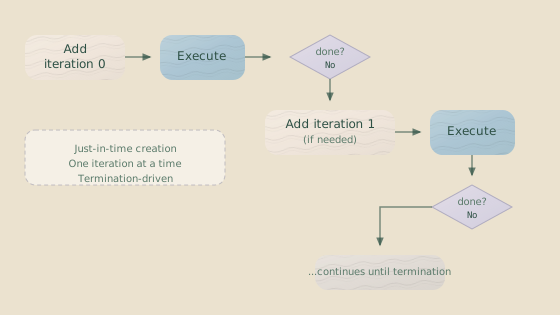
This behavior has important implications:
- Memory Efficiency: Only the codons for the current iteration exist in the plan at any time.
- Debug Visibility: You see what has already executed, not a long list of future steps.
- Dynamic Termination: It allows
contextExceededloops to stop as soon as the context is full, even mid-iteration. - Cost Predictability: Each iteration is a discrete decision point for the system.
Why lazy expansion? If Hankweave expanded all iterations at the start,
contextExceeded loops would be impossible, as you can’t know how many
iterations will run before the context actually fills up.
Runtime IDs
Inside a loop, codons get runtime IDs that include the iteration number, using the format codonId#iteration.
Original ID     →  Runtime ID (iteration 0)  →  Runtime ID (iteration 1)
─────────────────────────────────────────────────────────────────────────
write-poem      →  write-poem#0              →  write-poem#1
review-poem     →  review-poem#0             →  review-poem#1
You will see this ID format in logs, event journals, checkpoints, and state files. This is crucial for debugging, as an error in write-poem#2 tells you the failure occurred in the third iteration (iteration 2) of the write-poem codon.
Loop Context Metadata
When a codon runs inside a loop, Hankweave tracks additional metadata in the execution plan.
{
  "codonId": "write-poem#1",
  "loopContext": {
    "loopId": "iterative-refinement",
    "iteration": 1,
    "codonIndexInLoop": 0
  }
}| Field | Description |
|---|---|
loopId | The ID of the loop this codon belongs to. |
iteration | The current iteration number (0-indexed). |
codonIndexInLoop | The codon’s position in the loop’s codons array. |
This metadata allows Hankweave to manage the loop’s state, such as knowing when to expand the next iteration or how to roll back to a specific point.
Multi-Codon Loops
Loops can contain multiple codons that run in sequence during each iteration.
{
  "type": "loop",
  "id": "iterative-refinement",
  "name": "Iterative Poem Refinement",
  "terminateOn": {
    "type": "iterationLimit",
    "limit": 2
  },
  "codons": [
    {
      "id": "write-poem",
      "name": "Write Additional Poem",
      "model": "sonnet",
      "continuationMode": "continue-previous",
      "promptText": "Write another poem and save it to notes/additional_poem.txt"
    },
    {
      "id": "review-poem",
      "name": "Review Poem",
      "model": "sonnet",
      "continuationMode": "continue-previous",
      "promptText": "Review the poem you just wrote and save your review"
    }
  ]
}
With limit: 2, the execution order is:
Iteration 0:  write-poem#0 → review-poem#0
Iteration 1:  write-poem#1 → review-poem#1
Each iteration completes all of its codons before the next iteration begins.
Constraints and Rules
Loops have several important constraints. Understanding why they exist makes them easier to work with.
No Nested Loops
Loops cannot contain other loops. The codons array can only contain codons.
{
  "type": "loop",
  "codons": [
    {
      "type": "loop",  // ❌ Error: nested loops not supported
      "codons": [...]
    }
  ]
}
Why no nesting? Nested loops create exponential complexity in context management and make rollback behavior unpredictable. If you need nested iteration, consider chaining multiple loops or restructuring your workflow.
contextExceeded Loops Require continue-previous
In a contextExceeded loop, all codons must use continuationMode: "continue-previous".
{
  "type": "loop",
  "terminateOn": { "type": "contextExceeded" },
  "codons": [
    {
      "continuationMode": "continue-previous",  // ✓ Required
      ...
    }
  ]
}
Why this constraint? The goal of this loop type is to fill the context. If
a codon used fresh, it would reset the context on each iteration, preventing
it from ever filling up and creating an infinite loop. Hankweave raises a
validation error if this rule is violated.
Model Matching in continue-previous Chains
Within a loop, any sequence of codons using continue-previous must use the same model.
{
  "type": "loop",
  "codons": [
    {
      "id": "write",
      "model": "sonnet",
      "continuationMode": "continue-previous"
    },
    {
      "id": "review",
      "model": "opus", // ❌ Error: different model can't continue the session
      "continuationMode": "continue-previous"
    }
  ]
}
Why can’t models be mixed? Each model maintains its own conversation history (or session). When you use continue-previous, you are asking to continue the same conversation. A different model, like Claude Opus, cannot access a session started by Claude Sonnet. If you must switch models, you have to use fresh to start a new session, which is not allowed in contextExceeded loops.
Codons After contextExceeded Loops Must Use fresh
After a contextExceeded loop finishes, the context is full. Therefore, the next codon in the plan must use continuationMode: "fresh".
{
  "hank": [
    {
      "type": "loop",
      "terminateOn": { "type": "contextExceeded" },
      "codons": [...]
    },
    {
      "id": "summarize",
      "continuationMode": "fresh",  // ✓ Required, as context is exhausted
      "promptText": "Summarize what was accomplished"
    }
  ]
}
There is no context left to continue from. Attempting to use continue-previous would fail because there is no viable session to resume.
Rig Setup in Loops
A common pitfall with rig operations in loops is creating operations that are not idempotent. An operation might succeed on iteration 0 but fail on subsequent iterations because a file or directory already exists.
{
  "type": "loop",
  "codons": [
    {
      "id": "process",
      "rigSetup": [
        {
          "type": "command",
          "command": {
            "run": "cp template.txt notes/template.txt"
          },
          "allowFailure": true  // ✓ Prevents failure on subsequent iterations
        },
        {
          "type": "command",
          "command": {
            "run": "echo 'Starting iteration' >> notes/log.txt"
          }
        }
      ],
      ...
    }
  ]
}
Use allowFailure: true for idempotent rig operations in loops.
Operations that create resources (like copying a file or making a directory)
should set allowFailure to true. Otherwise, a rig failure on a later
iteration will terminate the entire loop.
Sentinels in Loops
Sentinels defined on a loop’s codons are loaded fresh for each iteration.
{
  "type": "loop",
  "codons": [
    {
      "id": "generate",
      "sentinels": [
        {
          "sentinelConfig": "./sentinels/progress-tracker.json"
        }
      ],
      ...
    }
  ]
}
For each iteration of the generate codon, the sentinel starts with a fresh history, processes events for that codon, and is then unloaded. While the sentinel’s output (e.g., a log file) accumulates across iterations, its internal state resets. This gives you a clean slate for monitoring each step.
Mid-Iteration Termination
In a contextExceeded loop, termination can occur after any codon, not just the last one in an iteration.
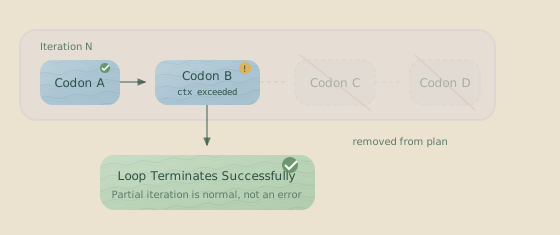
When context fills up mid-iteration:
- The current codon completes successfully, flagged as
contextExceeded. - Any remaining codons in that iteration are removed from the plan.
- The loop terminates successfully.
- Execution continues with the next top-level item after the loop.
This is expected behavior. The agent did as much work as possible before running out of context.
Common Patterns
Write → Test → Review
This pattern uses a fixed number of iterations to progressively refine a piece of work.
{
  "type": "loop",
  "id": "improve-code",
  "name": "Iterative Code Improvement",
  "terminateOn": { "type": "iterationLimit", "limit": 3 },
  "codons": [
    {
      "id": "write",
      "promptText": "Write or improve the code based on previous feedback"
    },
    {
      "id": "test",
      "promptText": "Run the tests and note any failures"
    },
    {
      "id": "review",
      "promptText": "Review test results and plan improvements"
    }
  ]
}
Fill Context Then Summarize
This pattern uses contextExceeded to do as much analysis as possible, then follows up with a fresh codon to synthesize the results.
{
  "hank": [
    {
      "type": "loop",
      "id": "analyze-all",
      "terminateOn": { "type": "contextExceeded" },
      "codons": [
        {
          "id": "analyze-file",
          "continuationMode": "continue-previous",
          "promptText": "Analyze the next unprocessed file in detail"
        }
      ]
    },
    {
      "id": "summarize",
      "continuationMode": "fresh",
      "promptText": "Summarize all the analysis you did before context filled up"
    }
  ]
}
Clean Workspace Per Iteration (Archiving)
When each iteration needs a fresh workspace but you want to preserve all results, use archiveOnSuccess:
{
  "type": "loop",
  "id": "process-items",
  "terminateOn": { "type": "iterationLimit", "limit": 5 },
  "codons": [
    {
      "id": "process",
      "continuationMode": "continue-previous",
      "promptText": "Process the next item from the queue",
      "rigSetup": [
        {
          "type": "copy",
          "copy": { "from": "./templates/workspace", "to": "current" }
        }
      ],
      "archiveOnSuccess": ["current/**/*"]
    }
  ]
}
After each successful iteration, files matching the archiveOnSuccess patterns are moved to rigArchive/process-items-N/. The next iteration gets a fresh template. This is like memoization in dynamic programming—compute, archive, continue.
Progressive Enhancement
This pattern adds one feature per iteration, using a rig to run checks before each attempt.
{
  "type": "loop",
  "id": "enhance",
  "terminateOn": { "type": "iterationLimit", "limit": 5 },
  "codons": [
    {
      "id": "add-feature",
      "continuationMode": "continue-previous",
      "promptText": "Add one new feature from the requirements list",
      "rigSetup": [
        {
          "type": "command",
          "command": { "run": "bun run typecheck" },
          "allowFailure": true
        }
      ]
    }
  ]
}
Common Mistakes
Forgetting allowFailure in loop rigs
Rig operations that create files or directories will succeed on iteration 0 but fail on subsequent iterations. Always use allowFailure: true for these operations to prevent the loop from crashing.
Using fresh in contextExceeded loops
Context can never fill up if you keep resetting it. Hankweave will raise a validation error, but this is a common mistake when changing a loop from iterationLimit to contextExceeded.
Mixing models in continue-previous chains
Different models cannot share conversation sessions. If you must switch models in a loop, you must use fresh—which means you cannot use contextExceeded termination.
Expecting to continue from a contextExceeded loop
The context is exhausted after a contextExceeded loop. The next codon must use fresh. If your workflow requires context to persist after the loop, use iterationLimit instead.
Debugging Loops
When a loop isn’t behaving as expected, check the following:
- Runtime IDs in Logs: Look for
codonId#iterationto pinpoint which iteration is causing problems. - Execution Plan: Check
state.jsonto see theexecutionPlan, which shows the currently expanded iteration. - Loop Context: In the plan, each codon entry will have a
loopContextobject with its iteration and position. - Termination Reason: The server logs will state why a loop stopped (e.g., limit reached, context exceeded).
# Find which iteration failed
grep "write-poem#" .hankweave/logs/server.log

# See the current execution plan
cat .hankweave/state.json | jq '.executionPlan'
Related Pages
- Codons — The atomic units executed inside loops.
- Hanks — The overall program structure that contains loops.
- Budgets — Cost and time limits, including loop-level budgets.
Next Steps
Now that you understand loops, you’re ready to:
- Learn about Rigs for setting up the environment for each iteration.
- Explore Sentinels for observing loop progress in detail.
- See loops in action in the Building a Hank guide.