Rigs
Every codon needs a stage to perform on. Rigs build that stage before the agent arrives, preparing the environment deterministically. They copy files, create directories, install dependencies—any setup that must exist for the agent to do its work.
What is a Rig?
Need a TypeScript project with dependencies installed before your agent starts coding? That’s a rig. Need a template structure copied into place? Rig. Directories created, config files prepared? Also rigs.
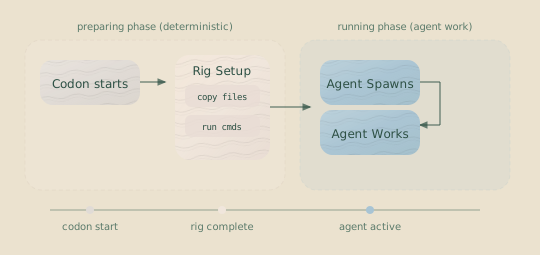
The defining property of rigs is that they’re deterministic. Same inputs, same outputs, every time. This is critical for reproducibility: when you roll back and re-run a codon, the rig sets up the exact same environment it did before.
Key Insight: Rigs run during the preparing phase, before the agent
spawns. If a rig fails, the codon fails immediately. This gives you fast
feedback on setup problems, rather than burning tokens on agent work that was
destined to fail.
Anatomy of a Rig
What is the execution directory? Hankweave creates an isolated workspace for each run, separate from your source files. The “execution directory” is where your codons run, rigs copy files, and the agent performs its work. This separation prevents accidental modifications to your project files.
Rigs are defined in the rigSetup field of a codon—an array of operations that execute in order:
{
  "hank": [
    {
      "id": "schema-generator",
      "name": "Generate Schemas",
      "model": "sonnet",
      "continuationMode": "fresh",
      "promptText": "Generate TypeScript schemas from the CSV files...",
      "rigSetup": [
        {
          "type": "copy",
          "copy": {
            "from": "./typescript_structure",
            "to": "typescript_code"
          }
        },
        {
          "type": "command",
          "command": {
            "run": "bun install",
            "workingDirectory": "lastCopied"
          }
        }
      ]
    }
  ]
}
This rig:
- Copies the
typescript_structuredirectory totypescript_codein the execution directory. - Runs
bun installinside the newly copiedtypescript_codedirectory.
Operation Types
Rigs support two types of operations: copying files and running commands. Most rigs use a combination of both.
Copy Operations
Copy operations move files or directories into the execution environment.
{
  "type": "copy",
  "copy": {
    "from": "./templates/react-app",
    "to": "frontend"
  }
}| Field | Description |
|---|---|
from | Source path. Can be relative to the config file or absolute. |
to | Target path. Must be relative to the execution directory. |
Path Resolution Examples:
Assume the config file is at /projects/my-hank/hank.json.
// Copy a sibling directory
{ "from": "./templates/app", "to": "my-app" }
// Source: /projects/my-hank/templates/app
// Target: <execution>/my-app

// Copy a file and rename it
{ "from": "./templates/base-config.json", "to": "src/config.json" }
// Source: /projects/my-hank/templates/base-config.json
// Target: <execution>/src/config.json

// Copy from an absolute source path
{ "from": "/shared/templates/common", "to": "libs/common" }
// Source: /shared/templates/common
// Target: <execution>/libs/commonImportant: The to path specifies the full destination, including the
name. The operation copies from as to, not into to. (See “Common
Mistakes” for a detailed example.)
Command Operations
Command operations run shell commands within the execution environment.
{
  "type": "command",
  "command": {
    "run": "npm install",
    "workingDirectory": "project"
  }
}| Field | Description |
|---|---|
run | The shell command to execute. |
workingDirectory | Where to run the command: "project" (the execution directory root) or "lastCopied" (the target directory of the previous copy operation). |
Rig setup commands inherit the codon’s env variables, so setup scripts can depend on the same environment configuration as the agent process. For example, a DATABASE_URL defined in the codon’s env block is available during npm install or any other rig command.
The lastCopied option is especially useful for running commands inside a directory you just copied:
{
  "rigSetup": [
    {
      "type": "copy",
      "copy": {
        "from": "./typescript_structure",
        "to": "typescript_code"
      }
    },
    {
      "type": "command",
      "command": {
        "run": "bun install",
        "workingDirectory": "lastCopied"
      }
    },
    {
      "type": "command",
      "command": {
        "run": "bun run build",
        "workingDirectory": "lastCopied"
      }
    }
  ]
}
Here, both bun install and bun run build execute inside the typescript_code directory.
Execution Order and Failure
Rig operations run sequentially. If any operation fails, the entire codon fails immediately—there’s no point spawning an agent into a broken environment.
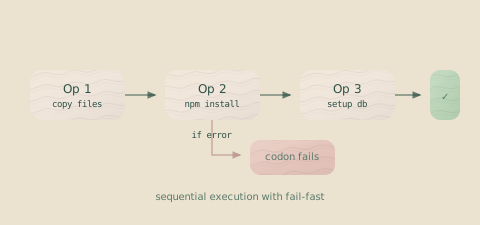
This fail-fast behavior is usually what you want, but some operations are expected to fail on certain runs.
The allowFailure Flag
The allowFailure flag lets an operation fail without halting the entire codon. This is critical for loops where an operation might only succeed after the first iteration.
You can also globally ignore all rig failures using the --ignore-rig-failures CLI flag, which is useful when resuming workflows where rig setup has already partially completed:
hankweave --execution ./my-run --ignore-rig-failures{
"type": "loop",
"id": "refinement-loop",
"codons": [
{
"id": "refine",
"rigSetup": [
{
"type": "command",
"command": {
"run": "cp output/result.json backup/result.json"
},
"allowFailure": true
}
]
}
]
}On the first iteration, output/result.json doesn’t exist yet. The cp command fails, but because allowFailure is true, the operation logs a warning and the codon continues. On subsequent iterations, the file exists and the copy succeeds.
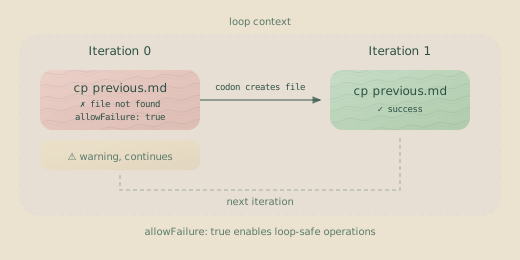
Critical for Loops: Any operation that might fail on some iterations
(e.g., copying a file that doesn’t exist on the first pass) should use
allowFailure: true. Without it, your loop will break unexpectedly.
When Rigs Run
Rigs execute during the preparing phase of a codon’s lifecycle, before the agent is spawned.
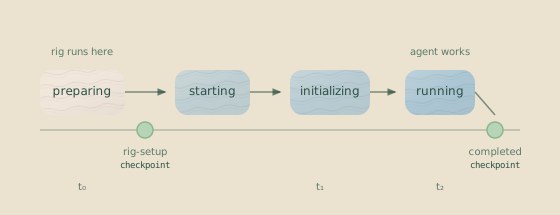
After the rig completes successfully, Hankweave creates a rig-setup checkpoint. This is important for rollbacks, as it allows you to re-run just the agent’s work without re-running the rig.
Rig Output Streaming
Rig setup commands emit real-time rig.output events with stdout and stderr lines, throttled to one event per second per stream. The TUI displays rig output inline and shows the last output line as a hint in the activity spinner (e.g., “Rig running: Installing dependencies…”). This replaces the previous silent wait during rig setup, giving you visibility into what’s happening.
Rig lifecycle events are also emitted: an info event when rig setup starts, progress events per operation, and a rig.setup.completed event with duration and success/failure counts when it finishes.
Checkpointing and Rollback
Rig setup gets its own checkpoint, separate from the one created when the agent finishes its work.
Checkpoint: rig-setup:schema-generator [run:abc123] Schema Generation
    └── Files copied, dependencies installed

Checkpoint: completed:schema-generator [run:abc123] Schema Generation
    └── Agent work complete, schemas generated
This separation enables more precise rollbacks:
| Scenario | Rollback To | Result |
|---|---|---|
| The agent made a mistake | rig-setup checkpoint | Re-run the agent with the same initial setup. |
| The setup itself was wrong | Previous codon’s checkpoint | Re-run both the rig and the agent. |
| Everything is wrong | Start of the hank | Re-run the entire process from scratch. |
Archiving Rig Files
When your rig copies large directories (like project templates), you can archive them after the codon completes successfully. This keeps the agent’s workspace (agentRoot/) clean across loop iterations while preserving the files for debugging.
{
  "id": "build-step",
  "rigSetup": [
    {
      "type": "copy",
      "copy": {
        "from": "./templates/large-project",
        "to": "project"
      }
    }
  ],
  "archiveOnSuccess": ["project/**/*"],
  "promptText": "Build the project..."
}
archiveOnSuccess is a codon-level field that takes an array of glob patterns. When the codon completes successfully:
- Files matching the patterns are moved from
agentRoot/torigArchive/<codonId>/ - For loops, archives are organized as
rigArchive/<loopId>-<iteration>/ - Rolling back automatically restores archived files
Archiving in Loops: The Dynamic Programming Pattern
Archiving is particularly powerful in loops where each iteration needs a clean workspace but you want to preserve results. This is similar to dynamic programming’s memoization—compute once, archive, continue:
{
  "type": "loop",
  "id": "process-reports",
  "terminateOn": { "type": "iterationLimit", "limit": 5 },
  "codons": [
    {
      "id": "generate-report",
      "rigSetup": [
        {
          "type": "copy",
          "copy": { "from": "./templates/report", "to": "current-report" }
        }
      ],
      "archiveOnSuccess": ["current-report/**/*"],
      "continuationMode": "continue-previous",
      "promptText": "Generate the next report from the queue..."
    }
  ]
}
After 3 iterations:
execution-dir/
├── agentRoot/
│   └── current-report/     # Only current iteration's files
├── rigArchive/
│   ├── process-reports-0/  # Iteration 0's completed report
│   │   └── current-report/
│   ├── process-reports-1/  # Iteration 1's completed report
│   │   └── current-report/
│   └── process-reports-2/  # Iteration 2's completed report
│       └── current-report/
└── .hankweave/
Each iteration gets a fresh template, works on it, and the result is preserved before the next iteration begins.
When to use archiving: Use archiveOnSuccess when large template
directories would otherwise accumulate across loop iterations, filling up your
workspace. Also useful when each iteration should start with a clean slate but
you need to preserve all intermediate results.
Path Security
To prevent unintended changes to your system, rig copy operations enforce several security constraints:
| Rule | Example | Result |
|---|---|---|
No .. in target paths | { "to": "../outside" } | Rejected |
| Target path must be relative | { "to": "/etc/passwd" } | Rejected |
| Target parent must exist | { "to": "nonexistent/file.txt" } | Fails at runtime |
| Source can be absolute | { "from": "/templates/app" } | Allowed |
The bottom line: you can copy from anywhere, but you can only write inside the isolated execution environment. No escaping.
Common Patterns
These are rig patterns we use most often in production.
Pattern 1: TypeScript Project Setup
Copy a template project structure and install its dependencies.
{
  "id": "typescript-setup",
  "rigSetup": [
    {
      "type": "copy",
      "copy": {
        "from": "./templates/typescript-api",
        "to": "api"
      }
    },
    {
      "type": "command",
      "command": {
        "run": "npm install",
        "workingDirectory": "lastCopied"
      }
    },
    {
      "type": "command",
      "command": {
        "run": "npm run build",
        "workingDirectory": "lastCopied"
      }
    }
  ],
  "promptText": "Implement the API endpoints in src/api/..."
}
Pattern 2: Directory Creation
Create empty directories that the agent will need to write to.
{
  "id": "analyze-data",
  "rigSetup": [
    {
      "type": "command",
      "command": {
        "run": "mkdir -p notes output/charts output/reports"
      }
    }
  ],
  "promptText": "Analyze the data and write findings to notes/..."
}
Pattern 3: Config File Setup
Copy standard configuration files like .eslintrc.json or tsconfig.json into the execution environment.
{
  "id": "setup-config",
  "rigSetup": [
    {
      "type": "copy",
      "copy": {
        "from": "./configs/base-eslint.json",
        "to": ".eslintrc.json"
      }
    },
    {
      "type": "copy",
      "copy": {
        "from": "./configs/base-tsconfig.json",
        "to": "tsconfig.json"
      }
    }
  ],
  "promptText": "Set up the application configuration..."
}
Pattern 4: Loop-Safe Backup
In a loop, back up the results from the previous iteration before starting the next one. This works even on the first iteration when there’s nothing to back up yet.
{
  "type": "loop",
  "id": "iterative-improvement",
  "terminateOn": { "type": "iterationLimit", "limit": 5 },
  "codons": [
    {
      "id": "improve",
      "rigSetup": [
        {
          "type": "command",
          "command": {
            "run": "cp -r src backup_src_$(date +%s)"
          },
          "allowFailure": true
        }
      ],
      "promptText": "Review and improve the code in the `src` directory..."
    }
  ]
}
On the first pass, src might not exist, causing the cp command to fail. With allowFailure: true, the operation logs a warning and continues. On subsequent iterations, the command succeeds.
Common Mistakes
These issues trip up even experienced users. Review them to save yourself some debugging time.
Mistake: Misunderstanding the to path
The to path specifies the full destination, including the final name. It copies from as to, not into to.
Example: Given a source directory ./templates:
templates/
└── tsconfig.json
This operation renames templates to app:
{ "from": "./templates", "to": "app" }Resulting structure:
app/
└── tsconfig.json
To copy the templates directory inside an app directory, be explicit:
// Correct
{ "from": "./templates", "to": "app/templates" }
This correctly creates app/templates/tsconfig.json.
Mistake: Forgetting allowFailure in loops
{
  "type": "loop",
  "codons": [
    {
      "rigSetup": [
        {
          "type": "command",
          "command": { "run": "cp output.json backup.json" }
          // Missing allowFailure: true!
        }
      ]
    }
  ]
}
On the first iteration, output.json likely doesn’t exist. The copy command fails, which causes the codon to fail, which stops the entire loop. Your 50-iteration refinement process dies before it even starts. Add allowFailure: true for any operation that isn’t guaranteed to succeed on every iteration.
Mistake: Assuming parent directories exist
{ "from": "./config.json", "to": "deep/nested/path/config.json" }If the deep/nested/path/ directory doesn’t exist in the execution environment, this copy operation will fail. You must first create the directory with a command operation (mkdir -p ...) before copying a file into it.
Mistake: Using lastCopied without a prior copy
The workingDirectory lastCopied refers to the destination of the most recent copy operation. If no copy operation has run yet in the rig, this value is undefined and the command will fail.
// Invalid rig setup
{
  "rigSetup": [
    {
      "type": "command",
      "command": {
        "run": "npm install",
        "workingDirectory": "lastCopied" // Fails: no preceding copy
      }
    }
  ]
}
Always ensure a copy operation precedes any command that uses lastCopied.
Rigs vs. Agent Work
When should setup happen in a rig versus in the agent’s prompt?
| Use a Rig When… | Use Agent Work When… |
|---|---|
| The setup is deterministic. | The setup requires judgment or creativity. |
| The same setup is needed for every run. | The setup depends on runtime data or context. |
| You need a checkpoint before agent work. | The setup is the core task for the agent. |
| You need to install dependencies. | You are creating novel files from scratch. |
Rule of thumb: If you could write a shell script to do it, use a rig. If it requires reasoning about the specific situation, let the agent handle it.
- “Copy a project template and install dependencies” → Rig
- “Create a new React component based on these requirements” → Agent
- “Run database migrations before starting” → Rig
- “Write new migration files for this schema change” → Agent
Related Pages
- Codons — The building blocks that contain rigs
- Loops — Where
allowFailurebecomes critical - Execution Flow — How rigs fit into the execution lifecycle
Next Steps
With rigs, your codons start from a known, reproducible state every time. This is the foundation for reliable and complex agent workflows.
Rig failures appear clearly in the event stream with specific error messages, making them straightforward to diagnose when things go wrong.