State Machine
Every codon in Hankweave follows a deterministic path from start to finish. This isn’t an implementation detail; it’s a formal state machine with 8 states, 13 event types, and strict validation to prevent impossible transitions. Understanding this model is critical for building custom tooling or contributing to the runtime.
The Codon State Machine
When a codon runs, it moves through a fixed sequence of phases. The state machine enforces which transitions are legal—you cannot skip steps or go backward.
The 8 States
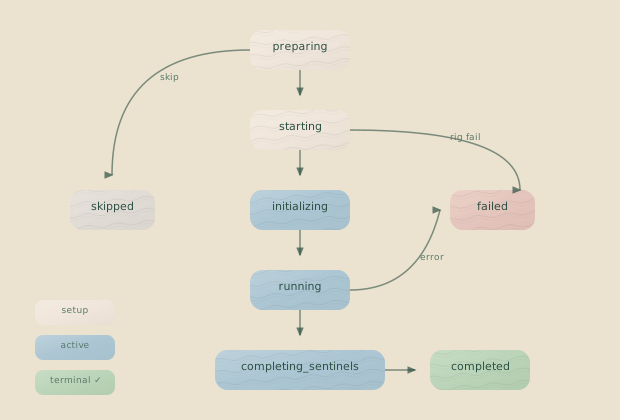
The following table details each state and the data available within it.
| State | Description | Data Available |
|---|---|---|
preparing | Rig setup running (copy files, run commands) | codonId, startTime, loopContext |
starting | Spawning agent process | + rigSetupCheckpoint, sentinels |
initializing | Process started, waiting for session ID | + claudePid, claudeLogPath, previousSessionId |
running | Agent is working | + claudeSessionId, currentCost, currentTokens, assistantMessageCount |
completing-sentinels | Draining sentinel queues | Same as running |
completed | Success (terminal) | + finalCost, finalTokens, completionCheckpoint, exitCode: 0 |
failed | Error (terminal) | + failureReason, failedDuring, partialCost, errorCheckpoint |
skipped | User skipped (terminal) | + skippedDuring, skipCheckpoint |
Valid Transitions
The state machine enforces a strict transition graph. An attempt to make an invalid transition throws an InvalidTransitionError.
export const CodonTransitions: Record<CodonStatus, CodonStatus[]> = {
  preparing:            ["starting", "failed", "skipped"],
  starting:             ["initializing", "failed", "skipped"],
  initializing:         ["running", "failed", "skipped"],
  running:              ["completing-sentinels", "completed", "failed", "skipped"],
  "completing-sentinels": ["completed", "failed", "skipped"],
  completed:            [], // Terminal - no transitions
  failed:               [], // Terminal - no transitions
  skipped:              [], // Terminal - no transitions
};
Normal execution flows forward. Any non-terminal state can transition to failed (on error) or skipped (on user intervention). Terminal states—completed, failed, and skipped—are final.
Terminal States Are Final: You cannot transition out of completed, failed, or skipped. To retry a failed codon, you must start a new run.
Why 8 States?
Eight states might seem like a lot, but each state captures a distinct phase where different things can go wrong. Knowing where something failed tells you why.
For example, a failure during preparing indicates a configuration problem, while a failure during starting suggests a process or environment issue. Likewise, a process can spawn successfully (starting) but fail to authenticate (initializing). These are different problems with different solutions.
The completing-sentinels state is necessary because agents and sentinels finish asynchronously. The agent might complete its work while sentinels still need time to drain their queues. Finally, the terminal states (completed, failed, skipped) carry distinct final data, such as costs and exit codes, that don’t apply to active states.
When you see failedDuring: "initializing", you know immediately: the process started, but it never produced output. That’s specific enough to act on.
State Transition Events
State changes are not applied directly; they are triggered by events. When an event is emitted, the state manager validates it and applies the resulting transition atomically. This provides an audit trail and prevents invalid state changes.
The 13 Event Types
Every possible state change has a corresponding event type. Some trigger state transitions, while others update metadata like costs or checkpoints.
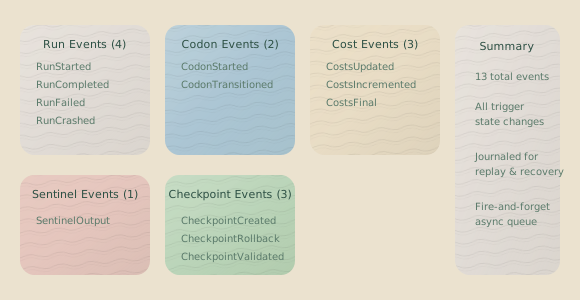
| Event | Purpose | When Triggered |
|---|---|---|
RunStarted | Creates new run entry | Server startup |
RunCompleted | Marks run as successfully finished | Last codon completes |
RunFailed | Marks run as failed | Codon fails, fatal error |
RunCrashed | Marks run as crashed (detected on recovery) | Stale lock file |
CodonStarted | Adds new codon to current run | Starting a codon |
CodonTransitioned | Changes codon state | State machine transition |
CostsUpdated | Sets absolute cost values | Token usage update |
CostsIncremented | Adds delta to costs | Incremental cost tracking |
AssistantMessageCountUpdated | Updates message counter | New assistant message |
CodonFinalCostSet | Sets authoritative final cost | Claude result message |
SentinelStatesUpdated | Updates sentinel tracking | Sentinel lifecycle events |
CheckpointCreated | Records checkpoint SHA | Git commit created |
InitialCheckpointSet | Records initial project state | First checkpoint |
CodonTransitioned in Detail
The CodonTransitioned event handles most state changes. It carries the from and to states, plus any metadata required for the transition. For example, you can’t transition to running without a claudeSessionId, or to completed without a checkpointSha.
{
  type: "CodonTransitioned";
  data: {
    runId: RunId;
    codonId: CodonId;
    from: CodonStatus;      // Current state
    to: CodonStatus;        // Target state
    metadata?: {
      // For starting → initializing
      claudePid?: number;
      claudeLogPath?: string;
      previousSessionId?: SessionId;

      // For initializing → running
      claudeSessionId?: SessionId;

      // For any → failed
      exitCode?: number;
      failureReason?: FailureReason;
      failedDuring?: CodonStatus;

      // For any → skipped
      skippedDuring?: CodonStatus;

      // For → completed
      resultMessageReceived?: boolean;
      checkpointSha?: string;
    };
  };
}
The state manager validates this required metadata using type guards:
// From state-transition-guards.ts
function validateTransitionMetadata(to: CodonStatus, metadata: unknown): void {
  switch (to) {
    case "initializing":
      // Requires claudePid, claudeLogPath
      if (!hasInitializingMetadata(metadata)) throw new MetadataValidationError(...);
      break;
    case "running":
      // Requires claudeSessionId
      if (!hasRunningMetadata(metadata)) throw new MetadataValidationError(...);
      break;
    case "completed":
      // Requires checkpointSha
      if (!hasCompletedMetadata(metadata)) throw new MetadataValidationError(...);
      break;
    case "failed":
      // Requires exitCode, failureReason, failedDuring
      if (!hasFailedMetadata(metadata)) throw new MetadataValidationError(...);
      break;
    case "skipped":
      // Requires skippedDuring
      if (!hasSkippedMetadata(metadata)) throw new MetadataValidationError(...);
      break;
  }
}
The Fire-and-Forget Pattern
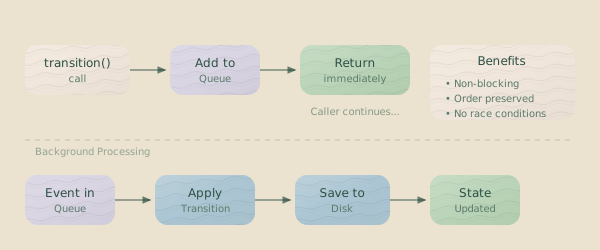
Here’s something that might surprise you: state transitions are asynchronous and queued. When you call stateManager.transition(), it returns immediately—the transition gets queued and processed in the background.
Why Use This Pattern?
This queue-based approach solves several problems:
- Non-blocking: The runtime doesn’t block on disk writes during hot paths.
- Ordered Execution: Events are processed in the order they were emitted, guaranteeing sequence.
- Race Condition Prevention: Only one transition processes at a time.
- Crash Safety: Each transition is persisted before the next one starts.
// From state-manager.ts
private transitionQueue: StateTransition[] = [];
private isProcessing = false;

// Public API - fire and forget!
transition(event: StateTransition): void {
  this.transitionQueue.push(event);
  this.processQueue(); // Don't await - let it run
}

private async processQueue(): Promise<void> {
  if (this.isProcessing) return;

  this.isProcessing = true;
  while (this.transitionQueue.length > 0) {
    const event = this.transitionQueue.shift();
    // Validate, apply, persist...
    await this.save();
  }
  this.isProcessing = false;
}
Eventual Consistency: State is eventually consistent. If you call getState() immediately after transition(), you might not see the change yet. Use event listeners to react to state changes as they are applied.
Cost Tracking
Cost tracking uses the same event system and can be handled in two ways.
Setting Absolute Costs: CostsUpdated
This event sets the total cost to a specific value.
stateManager.transition({
  type: "CostsUpdated",
  data: {
    runId,
    codonId,
    cost: 0.0234,      // New total
    tokens: { inputTokens: 1500, outputTokens: 800, ... }
  }
});
Incrementing Costs: CostsIncremented
This event adds a delta to the current cost. This approach is more resilient to race conditions, as it doesn’t require knowing the current total.
stateManager.transition({
  type: "CostsIncremented",
  data: {
    runId,
    codonId,
    costDelta: 0.0012,  // Amount to add
    tokensDelta: { inputTokens: 100, outputTokens: 50, ... }
  }
});
For performance, the state manager maintains an in-memory cache for fast cost queries.
private costCache = {
  total: 0,
  currentRun: 0,
  lastUpdated: null
};

getCurrentRunCost(): number {
  return this.costCache.currentRun;
}

getTotalCost(): number {
  return this.costCache.total;
}
Sentinel State Integration
Sentinels don’t have their own state machine; their state is embedded within the codon. Each sentinel tracks its activity during the codon’s lifetime.
interface SentinelState {
  id: string;
  model: string;
  loadedAt: string;
  unloadedAt?: string;
  llmCallCount: number;
  failedLLMCalls: number;
  totalCost: number;
  status: "active" | "unloaded";
  unloadReason?: "codon-complete" | "fatal-error" | "consecutive-failures";
}
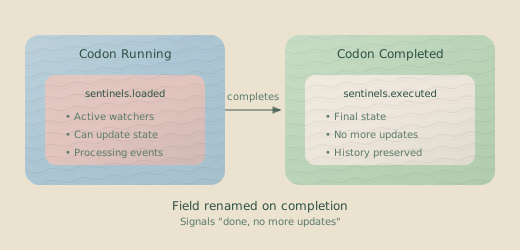
While a codon is running, sentinel states are stored in codon.sentinels.loaded. When the codon reaches a terminal state, this field is renamed to codon.sentinels.executed. This rename acts as a clear signal to any subscribers that all sentinel activity is final and no further updates will occur.
State Validation
When the state manager loads, it validates the state file for integrity to catch corruption, dangling references, and inconsistencies.
validate(state: unknown): StateValidation {
  const errors = [];
  const warnings = [];

  // Type structure validation
  if (!this.isValidStateStructure(state)) {
    errors.push({ type: "corrupted_data", message: "Invalid structure" });
  }

  // Referential integrity
  if (state.currentRunId && !state.runs.find(r => r.runId === state.currentRunId)) {
    errors.push({ type: "missing_run", message: "Current run not found" });
  }

  // Orphaned folders (warning, not error)
  // ...

  return { valid: errors.length === 0, errors, warnings };
}
Validation catches several categories of problems:
corrupted_data: The state file structure is invalid.missing_run:currentRunIdpoints to a run that doesn’t exist.missing_checkpoint: A state entry references a Git SHA that doesn’t exist.orphaned_folder(Warning): A run folder exists on disk without a corresponding state entry.
State Persistence
State is persisted to disk using an atomic write pattern to prevent corruption from partial writes. The process ensures that either the new state is written completely or the old state remains untouched:
- Backup: The current state file is copied to a backup location.
- Write to Temp: The new state is written to a temporary file (
.tmp). - Atomic Rename: The temporary file is atomically renamed to become the new state file.
async save(): Promise<void> {
  // 1. Backup current state
  if (fs.existsSync(this.statePath)) {
    await fs.copyFile(this.statePath, this.stateBackupPath);
  }

  // 2. Write to temp file
  const tempPath = `${this.statePath}.tmp`;
  await fs.writeFile(tempPath, JSON.stringify(this.state, null, 2));

  // 3. Atomic rename
  await fs.rename(tempPath, this.statePath);
}
This pattern provides two layers of safety: the backup file can be restored if the write fails, and the temporary file signals an incomplete write if the process crashes mid-operation.
Common State Machine Issues
The following errors are the most common state machine issues.
Invalid Transition Error
InvalidTransitionError: Invalid transition from completed to runningDeveloper Bug Indicator: InvalidTransitionError signals a bug in the runtime or in custom tooling, not a normal operational issue. This error should never occur in correctly functioning code. If you see it, check if you are trying to transition a codon that is already in a terminal state.
Missing Metadata
MetadataValidationError: Missing required metadata for transition to running: claudeSessionIdThis error means the transition event is missing required fields. Each target state requires specific metadata—check the guard functions in state-transition-guards.ts to see what’s required for each transition.
Orphaned Run Detection
On startup, Hankweave detects runs that were active when the server last shut down. If the process that owned a run no longer exists, that run is marked as crashed.
async detectCrashedRuns(): Promise<void> {
  for (const run of this.state.runs) {
    if (run.status === "running" && run.runId !== this.state.currentRunId) {
      try {
        process.kill(run.serverPid, 0); // Check if process exists
      } catch {
        // Process doesn't exist - mark as crashed
        this.transition({
          type: "RunCrashed",
          data: { runId: run.runId, detectedAt: new Date().toISOString(), ... }
        });
      }
    }
  }
}
TypeScript Types
The state machine types are designed to be self-documenting. TypeScript’s type system enforces the same invariants as the runtime, so if your code compiles, it is likely interacting with the state model correctly. The key types from state-types.ts are shown below.
// The 8 codon states
type CodonStatus =
  | "preparing" | "starting" | "initializing" | "running"
  | "completing-sentinels"
  | "completed" | "failed" | "skipped";

// Discriminated union for codon execution
type CodonExecution =
  | PreparingCodon | StartingCodon | InitializingCodon
  | RunningCodon | CompletingSentinelsCodon
  | CompletedCodon | FailedCodon | SkippedCodon;

// Check if terminal
function isTerminalCodonStatus(status: CodonStatus): boolean {
  return status === "completed" || status === "failed" || status === "skipped";
}

// Get cost regardless of state
function getCodonCost(codon: CodonExecution): number {
  switch (codon.status) {
    case "completed": return codon.finalCost;
    case "failed": return codon.partialCost;
    case "skipped": return 0;
    case "running":
    case "completing-sentinels": return codon.currentCost;
    default: return 0;
  }
}
The discriminated union is the key pattern. TypeScript knows exactly which fields are available in each state, preventing you from accessing a field that doesn’t exist in the current state.
function handleCodon(codon: CodonExecution) {
  if (codon.status === "running") {
    // TypeScript knows: claudeSessionId, currentCost, etc. exist
    console.log(codon.currentCost);
  } else if (codon.status === "completed") {
    // TypeScript knows: finalCost, completionCheckpoint, etc. exist
    console.log(codon.finalCost);
  }
}
Related Pages
- Execution Flow — High-level execution lifecycle
- Checkpoints — Git-based state persistence
- WebSocket Protocol — Event schemas and commands