Data Codebook Example
This guide breaks down a complete, production-quality hank that transforms raw CSV files into documented Zod schemas. It includes observations, validation loops, and documentation generation.
Every configuration option is explained inline. You can use this as a reference when building your own hanks.
Who is this for? This is for users who have completed the introductory guides and want to see a production-quality hank with every field explained. If you’re new to Hankweave, read Building a Hank first. That tutorial walks through this same example step-by-step; this page is a reference, not a tutorial.
What This Hank Does
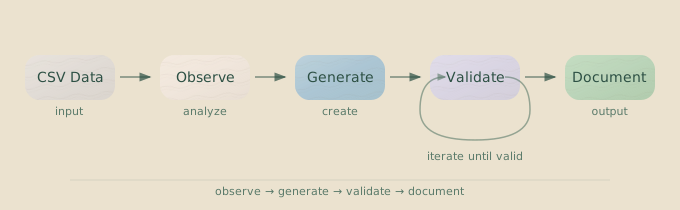
This hank takes CSV files as input and produces:
- Structured observations about the data (column types, patterns, relationships).
- Zod schemas with proper validations and TypeScript types.
- Validated code that passes type checking.
- Human-readable documentation explaining each field.
The pipeline has four stages, with Sentinels monitoring progress and cost in parallel:
Project Structure
Before you can run this hank, your project needs the following directory structure:
data-codebook/
├── hank.json                    # Main configuration (below)
├── prompts/
│   ├── observe.md               # Observation codon prompt
│   ├── generate.md              # Schema generation prompt
│   ├── validate.md              # Validation loop prompt
│   └── document.md              # Documentation prompt
├── sentinels/
│   ├── narrator.sentinel.json   # Progress narrator
│   └── cost-tracker.sentinel.json # Cost monitoring
├── templates/
│   └── typescript/              # TypeScript project template
│       ├── package.json
│       ├── tsconfig.json
│       └── src/
└── data/                        # Your CSV files
    ├── users.csv
    └── orders.csv
Complete Hank Configuration
{
  "meta": {
    "name": "Data Codebook Generator",
    "version": "1.0.0",
    "description": "Generate documented Zod schemas from CSV files"
  },
  "overrides": {
    "model": "sonnet",
    "dataHashTimeLimit": 10000
  },
  "hank": [
    {
      "id": "observe",
      "name": "Observe Data Structure",
      "model": "haiku",
      "continuationMode": "fresh",
      "promptFile": "./prompts/observe.md",
      "rigSetup": [
        {
          "type": "command",
          "command": {
            "run": "mkdir -p notes",
            "workingDirectory": "project"
          }
        }
      ],
      "checkpointedFiles": ["notes/**/*"]
    },
    {
      "id": "generate",
      "name": "Generate Zod Schemas",
      "model": "sonnet",
      "continuationMode": "fresh",
      "promptFile": "./prompts/generate.md",
      "rigSetup": [
        {
          "type": "copy",
          "copy": {
            "from": "./templates/typescript",
            "to": "src"
          }
        },
        {
          "type": "command",
          "command": {
            "run": "bun install",
            "workingDirectory": "lastCopied"
          }
        }
      ],
      "checkpointedFiles": ["src/schemas/**/*.ts", "src/package.json"],
      "sentinels": [
        { "sentinelConfig": "./sentinels/narrator.sentinel.json" },
        { "sentinelConfig": "./sentinels/cost-tracker.sentinel.json" }
      ]
    },
    {
      "type": "loop",
      "id": "validate",
      "name": "Schema Validation Loop",
      "description": "Iteratively fix schema issues until typecheck passes",
      "terminateOn": {
        "type": "iterationLimit",
        "limit": 3
      },
      "codons": [
        {
          "id": "fix-schemas",
          "name": "Validate and Fix Schemas",
          "model": "sonnet",
          "continuationMode": "continue-previous",
          "promptFile": "./prompts/validate.md",
          "checkpointedFiles": ["src/schemas/**/*.ts"],
          "rigSetup": [
            {
              "type": "command",
              "command": {
                "run": "bun run typecheck || true",
                "workingDirectory": "project"
              },
              "allowFailure": true
            }
          ],
          "sentinels": [
            { "sentinelConfig": "./sentinels/narrator.sentinel.json" }
          ]
        }
      ]
    },
    {
      "id": "document",
      "name": "Generate Documentation",
      "model": "sonnet",
      "continuationMode": "fresh",
      "promptFile": "./prompts/document.md",
      "rigSetup": [
        {
          "type": "command",
          "command": {
            "run": "mkdir -p docs",
            "workingDirectory": "project"
          }
        }
      ],
      "checkpointedFiles": ["docs/**/*"],
      "outputFiles": [
        {
          "copy": ["src/schemas/**/*.ts", "docs/**/*"],
          "beforeCopy": [
            {
              "type": "command",
              "command": {
                "run": "bun run typecheck",
                "workingDirectory": "project"
              }
            }
          ]
        }
      ],
      "sentinels": [
        { "sentinelConfig": "./sentinels/narrator.sentinel.json" },
        { "sentinelConfig": "./sentinels/cost-tracker.sentinel.json" }
      ]
    }
  ]
}
Configuration Breakdown
Let’s walk through each part of the configuration, from top to bottom.
Meta Section (optional)
"meta": {
  "name": "Data Codebook Generator",
  "version": "1.0.0",
  "description": "Generate documented Zod schemas from CSV files"
}
This section provides human-readable metadata for the hank.
| Field | Purpose | Why it matters |
|---|---|---|
name | Name shown in the TUI and logs. | When you’re debugging at 2am, readable names are a lifesaver. |
version | Semantic versioning for the hank. | Useful for tracking changes as your hank evolves. |
description | Brief explanation of what the hank accomplishes. | Helps others (and your future self) understand its purpose. |
Overrides Section
"overrides": {
  "model": "sonnet",
  "dataHashTimeLimit": 10000
}
Overrides provide default values for the entire hank. Individual codons can override these settings.
| Field | Purpose | Why it matters |
|---|---|---|
model | Default model for codons that don’t specify one. | Sets a sensible default, letting you specify exceptions only. |
dataHashTimeLimit | Maximum milliseconds to spend hashing the data source. | Prevents hangs on very large data directories. Increase if needed. |
The hank array defines the sequence of operations, called codons. This hank runs four codons in order.
Codon 1: Observe
{
  "id": "observe",
  "name": "Observe Data Structure",
  "model": "haiku",
  "continuationMode": "fresh",
  "promptFile": "./prompts/observe.md",
  "rigSetup": [
    {
      "type": "command",
      "command": {
        "run": "mkdir -p notes",
        "workingDirectory": "project"
      }
    }
  ],
  "checkpointedFiles": ["notes/**/*"]
}
Field-by-Field Explanation
| Field | Value | Why |
|---|---|---|
id | "observe" | Unique identifier used in checkpoints and logs. |
name | "Observe Data Structure" | Human-readable name for TUI display. |
model | "haiku" | Observation is simple—use a fast, cheap model. Haiku reads CSVs effectively. |
continuationMode | "fresh" | The first codon in a hank must always be fresh. |
promptFile | "./prompts/observe.md" | Path to the prompt file, relative to hank.json. |
rigSetup | [...] | A command to run before the agent starts. This one creates the notes/ directory. |
checkpointedFiles | ["notes/**/*"] | Tracks all files in notes/ for checkpoints and file change events. Glob supported. |
Why Haiku?
This is a straightforward task: read CSV files, note column types, and identify patterns. Haiku handles this well and costs significantly less than more powerful models. Save the expensive models for tasks that require more reasoning.
Rig Setup
The command mkdir -p notes creates the output directory. The -p flag ensures it doesn’t fail if the directory already exists, which is important for re-running the hank. workingDirectory: "project" means the command runs in the project root.
Codon 2: Generate
{
  "id": "generate",
  "name": "Generate Zod Schemas",
  "model": "sonnet",
  "continuationMode": "fresh",
  "promptFile": "./prompts/generate.md",
  "rigSetup": [
    {
      "type": "copy",
      "copy": { "from": "./templates/typescript", "to": "src" }
    },
    {
      "type": "command",
      "command": { "run": "bun install", "workingDirectory": "lastCopied" }
    }
  ],
  "checkpointedFiles": ["src/schemas/**/*.ts", "src/package.json"],
  "sentinels": [
    { "sentinelConfig": "./sentinels/narrator.sentinel.json" },
    { "sentinelConfig": "./sentinels/cost-tracker.sentinel.json" }
  ]
}
What are sentinels? Sentinels are parallel agents that observe a codon’s execution. This codon attaches two: a narrator that writes progress summaries, and a cost tracker that monitors token usage. Learn more in Sentinels.
Field-by-Field Explanation
| Field | Value | Why |
|---|---|---|
id | "generate" | Used in checkpoint names like generate-completed. |
model | "sonnet" | Schema generation requires reasoning. Sonnet offers a good balance of cost and quality. |
continuationMode | "fresh" | Reads files from the previous codon, so it doesn’t need conversation context. |
rigSetup | [copy, command] | Copies a project template, then installs dependencies into it. |
checkpointedFiles | Two patterns | Tracks generated schemas and package.json for dependency changes. |
sentinels | Two attached | Provides progress updates and cost monitoring during this step. |
Rig Setup Details
The rig runs two operations before the agent starts:
- Copy: Copies the
./templates/typescriptdirectory tosrc/. This gives the agent a pre-configured TypeScript project. - Command: Runs
bun install. TheworkingDirectory: "lastCopied"ensures this runs inside thesrc/directory that was just created.
Why copy templates? While agents can create projects from scratch,
providing a working template is more reliable and cheaper. It prevents
“creative” tsconfig.json settings and saves tokens on boilerplate.
Why fresh, Not continue-previous?
Even though this codon follows another, we use fresh for two reasons:
- Different models: We switched from Haiku to Sonnet. Different models cannot share conversation sessions.
- File-based handoff: The
observecodon writes its findings tonotes/. Reading from a file is more reliable and debuggable than depending on conversation history.
Loop: Validate
This is where things get interesting. The loop runs up to three times, attempting to fix type errors until the schemas compile cleanly.
{
  "type": "loop",
  "id": "validate",
  "name": "Schema Validation Loop",
  "terminateOn": {
    "type": "iterationLimit",
    "limit": 3
  },
  "codons": [
    {
      "id": "fix-schemas",
      "name": "Validate and Fix Schemas",
      "model": "sonnet",
      "continuationMode": "continue-previous",
      "promptFile": "./prompts/validate.md",
      "rigSetup": [
        {
          "type": "command",
          "command": {
            "run": "bun run typecheck || true",
            "workingDirectory": "project"
          },
          "allowFailure": true
        }
      ],
      "sentinels": [{ "sentinelConfig": "./sentinels/narrator.sentinel.json" }]
    }
  ]
}
Loop Configuration
| Field | Value | Why |
|---|---|---|
type | "loop" | Marks this block as a loop, not a regular codon. |
id | "validate" | Loop identifier used in the execution plan. |
terminateOn.type | "iterationLimit" | Stop after a fixed number of tries. |
terminateOn.limit | 3 | Gives the agent three attempts to fix issues (iterations 0, 1, 2). |
codons | [...] | Each iteration of the loop runs the codons in this array. |
Inner Codon Configuration
| Field | Value | Why |
|---|---|---|
id | "fix-schemas" | Runtime IDs become fix-schemas#0, fix-schemas#1, etc. |
continuationMode | "continue-previous" | Remembers previous fix attempts within the loop to avoid repeating mistakes. |
allowFailure | true | Critical. Allows the typecheck command to fail without halting the loop. |
Why iterationLimit?
Hankweave offers two main ways to terminate a loop: iterationLimit and contextExceeded. For validation, iterationLimit is usually the right choice:
- Cost Control: You know the maximum cost upfront.
- Predictability: The loop always runs a fixed number of times.
- Practicality: If the agent can’t fix the code in 3 attempts, there’s likely a deeper problem that needs manual intervention.
The allowFailure Pattern
The rig setup runs bun run typecheck || true, and the operation also includes "allowFailure": true. This combination provides robust error handling:
|| trueensures the shell command exits successfully even iftypecheckfinds errors.allowFailure: truetells Hankweave that the entire rig operation can fail without stopping the loop, giving the agent a chance to fix the underlying problem.
Always use allowFailure: true in loop rigs. Without it, a predictable
failure (like a type error) on the first iteration will stop the entire hank,
and the agent will never get a chance to fix it.
How continue-previous Works in Loops
Inside a loop, continue-previous chains the conversation from one iteration to the next:
fix-schemas#0: Starts fresh.fix-schemas#1: Continues the session from#0.fix-schemas#2: Continues the session from#1.
This accumulating context helps the agent learn from its mistakes and avoid trying the same failed fix repeatedly.
Codon 4: Document
The final codon generates human-readable documentation for the schemas.
{
  "id": "document",
  "name": "Generate Documentation",
  "model": "sonnet",
  "continuationMode": "fresh",
  "promptFile": "./prompts/document.md",
  "rigSetup": [
    {
      "type": "command",
      "command": { "run": "mkdir -p docs", "workingDirectory": "project" }
    }
  ],
  "checkpointedFiles": ["docs/**/*"],
  "outputFiles": [
    {
      "copy": ["src/schemas/**/*.ts", "docs/**/*"],
      "beforeCopy": [
        {
          "type": "command",
          "command": {
            "run": "bun run typecheck",
            "workingDirectory": "project"
          }
        }
      ]
    }
  ],
  "sentinels": [
    { "sentinelConfig": "./sentinels/narrator.sentinel.json" },
    { "sentinelConfig": "./sentinels/cost-tracker.sentinel.json" }
  ]
}
Field-by-Field Explanation
| Field | Value | Why |
|---|---|---|
id | "document" | Unique identifier. |
continuationMode | "fresh" | Documentation doesn’t need validation history. Start with a clean slate. |
outputFiles | [...] | Specifies which files to copy to the final results directory. |
beforeCopy | [...] | Runs a final typecheck. If it fails, the copy is aborted. |
The outputFiles Quality Gate
The beforeCopy command, bun run typecheck, acts as a quality gate. If the command fails (exits with a non-zero code), the copy operation is cancelled and the hank fails. This ensures that only valid, type-checked code makes it to the final output directory.
Why fresh After a Loop?
Starting a fresh session for the documentation step is cleaner. The agent doesn’t need the conversational history of failed validation attempts; it only needs to read the final, correct schema files from the project directory. This keeps the context lean and focused.
Sentinel Configurations
Two sentinels watch this hank. One writes progress updates; the other tracks costs.
Progress Narrator
{
  "id": "narrator",
  "name": "Progress Narrator",
  "model": "anthropic/claude-haiku-4-5",
  "trigger": {
    "type": "event",
    "on": ["assistant.action", "tool.result"]
  },
  "execution": { "strategy": "debounce", "milliseconds": 10000 },
  "systemPromptText": "You are a technical writer summarizing AI agent progress. Be concise and factual.",
  "userPromptText": "Based on these events, write a brief paragraph about what the agent just accomplished:\n\n<%= JSON.stringify(it.events, null, 2) %>",
  "joinString": "\n\n"
}| Field | Value | Purpose |
|---|---|---|
model | Full model ID | Sentinels accept both full IDs (anthropic/claude-haiku-4-5) and shortcuts (haiku). Full IDs are recommended for clarity. |
trigger.on | Two event types | Fires on agent actions and tool results for a complete picture. |
execution.strategy | "debounce" | Waits for 10 seconds of inactivity before summarizing events. |
joinString | "\n\n" | Separates summaries in the output file with blank lines. |
Cost Tracker
{
  "id": "cost-tracker",
  "name": "Cost Tracker",
  "model": "anthropic/claude-haiku-4-5",
  "trigger": { "type": "event", "on": ["token.usage"] },
  "execution": { "strategy": "timeWindow", "milliseconds": 30000 },
  "userPromptText": "Summarize the token usage so far. Calculate total input tokens, output tokens, and estimated cost. List the most expensive operations.\n\nEvents:\n<%= JSON.stringify(it.events, null, 2) %>",
  "joinString": "\n\n---\n\n"
}| Field | Value | Purpose |
|---|---|---|
trigger.on | ["token.usage"] | Fires only on token usage events, not every agent action. |
execution.strategy | "timeWindow" | Fires every 30 seconds, providing regular cost updates. |
Execution Strategy Comparison
| Strategy | Use Case |
|---|---|
immediate | Fire on every matching event. Best for rare, critical events. |
debounce | Fire once after a period of inactivity. Best for summarizing bursty events. |
count | Fire after N events. Best for when volume matters more than timing. |
timeWindow | Fire on a schedule. Best for regular summaries, like cost reports. |
Prompt Files
These are the complete prompt files for each codon. Specific prompts that clearly define the task and expected output format produce the most reliable results.
Observation Prompt
# Data Observation Task

Examine the CSV files in the `read_only_data_source/data/` directory.

For each CSV file:

1. List all columns with inferred data types.
2. Note any patterns (IDs, dates, enums, foreign keys).
3. Identify relationships between files (e.g., user_id references).
4. Record sample values and constraints.

Create a file called `notes/observations.md` with your findings.
Structure it clearly with headers for each CSV file.

Be thorough but concise. Focus on what a schema author would need to know.
Prompt design: Notice the prompt is specific about the output location
(notes/observations.md) and structure. Specific prompts produce consistent
results.
Schema Generation Prompt
# Schema Generation Task

Read the observations in `notes/observations.md`.

Based on those observations, create Zod schemas for each CSV file in `src/schemas/`.

Requirements:

- One schema file per CSV (e.g., `src/schemas/users.ts`, `src/schemas/orders.ts`).
- Include JSDoc comments explaining each field.
- Add appropriate validations (email format, date strings, enums).
- Create a barrel export in `src/schemas/index.ts`.

Example schema structure:

```typescript
import { z } from "zod";

/**
 * User record from users.csv
 */
export const UserSchema = z.object({
  id: z.number().int().positive(),
  name: z.string().min(1),
  email: z.string().email(),
  created_at: z.string().datetime(),
  status: z.enum(["active", "inactive"]),
});

export type User = z.infer<typeof UserSchema>;
```

Focus on accuracy. The schemas should validate real data from the CSVs.
Validation Prompt
# Schema Validation Task

Run the TypeScript type checker:

```bash
cd src && bun run typecheck
```

If there are type errors:

1. Read the error messages carefully.
2. Fix the schema files to resolve them.
3. Run typecheck again to verify.

Also test that the schemas can parse the actual data:

```bash
cd src && bun test
```

If tests fail, adjust the schemas to match the real data.

Continue until both typecheck and tests pass, or explain what's blocking you.
Documentation Prompt
# Documentation Generation Task

Create comprehensive documentation for the schemas in `src/schemas/`.

Generate `docs/CODEBOOK.md` with:

1. **Overview**: What datasets this codebook covers.
2. **Schemas**: For each schema:
   - Table name and purpose
   - Field-by-field documentation
   - Example valid/invalid values
   - Relationships to other tables
3. **Usage**: How to import and use the schemas.

Make it readable by non-developers. Explain what the data means, not just the types.

Also create `docs/CHANGELOG.md` documenting what was generated.
Template Files
The rig copies these files into the execution directory, giving the agent a working project structure from the start.
Package Configuration
{
  "name": "data-schemas",
  "version": "1.0.0",
  "type": "module",
  "scripts": {
    "typecheck": "tsc --noEmit",
    "test": "bun test"
  },
  "dependencies": {
    "zod": "^3.22.0"
  },
  "devDependencies": {
    "typescript": "^5.0.0",
    "@types/bun": "latest"
  }
}
TypeScript Configuration
{
  "compilerOptions": {
    "target": "ES2022",
    "module": "ESNext",
    "moduleResolution": "bundler",
    "strict": true,
    "esModuleInterop": true,
    "skipLibCheck": true,
    "outDir": "./dist"
  },
  "include": ["src/**/*"]
}
Running the Hank
Once you’ve set up the directory structure and files, you’re ready to run:
# Run with your data directory
hankweave --data ./data

# Validate configuration without running
hankweave --validate

# Force a new execution (ignore any checkpoints)
hankweave --data ./data --start-new
Expected Output
A successful run creates a hankweave-results/ directory with the final artifacts:
hankweave-results/
├── src/
│   └── schemas/
│       ├── users.ts
│       ├── orders.ts
│       └── index.ts
└── docs/
    ├── CODEBOOK.md
    └── CHANGELOG.md
Sentinel outputs appear in .hankweave/sentinels/outputs/:
.hankweave/sentinels/outputs/
├── narrator/
│   └── narrator-document-{timestamp}.md
└── cost-tracker/
    └── cost-tracker-document-{timestamp}.md
Typical Costs
| Codon | Model | Estimated Cost |
|---|---|---|
| observe | haiku | ~$0.001 |
| generate | sonnet | $0.02–0.05 |
| validate loop (3 iterations) | sonnet | $0.03–0.10 |
| document | sonnet | $0.02–0.04 |
| Total | $0.06–0.20 |
Sentinel costs (using Haiku) typically add another 10–20%. Actual costs vary with data complexity and the number of validation iterations required.
Adapting This Example
The observe-generate-validate-document pattern is a powerful template for many automated workflows.
| Use Case | Observe | Generate | Validate | Document |
|---|---|---|---|---|
| API client | Read OpenAPI spec | Generate TypeScript client | Test against a live API | Generate usage docs |
| Test suite | Analyze existing code | Generate test files | Run tests, fix failures | Create coverage report |
| Data migration | Analyze source DB schema | Generate migration scripts | Run dry-run, fix issues | Write migration runbook |
| Config generator | Read high-level requirements | Generate Terraform/YAML files | Validate syntax and semantics | Explain the configuration |
The core pattern—observe cheaply, generate capably, validate iteratively, and document cleanly—transfers to almost any multi-step AI workflow.
Common Variations
Here are a few ways to adapt this hank for different needs.
Using contextExceeded
For open-ended validation that runs until the context window is full:
"terminateOn": {
  "type": "contextExceeded"
}Note: You cannot use continue-previous in a codon that follows a loop terminated by contextExceeded.
Adding a Quality Assurance Sentinel
To get automated code review during generation, add a QA sentinel that triggers on file updates.
{
  "id": "qa-review",
  "name": "Quality Reviewer",
  "model": "anthropic/claude-haiku-4-5",
  "trigger": {
    "type": "event",
    "on": ["file.updated"],
    "conditions": [
      { "operator": "matches", "path": "path", "value": ".*\\.ts$" }
    ]
  },
  "execution": { "strategy": "debounce", "milliseconds": 5000 },
  "userPromptText": "Review this TypeScript file for quality issues (missing types, poor naming, security issues):\n\n<%= JSON.stringify(it.events, null, 2) %>"
}
Multi-Model Loop
For complex validation, you can alternate models within a loop—a cheap model for simple fixes and a powerful one for complex problems.
{
  "type": "loop",
  "id": "validate",
  "terminateOn": { "type": "iterationLimit", "limit": 5 },
  "codons": [
    {
      "id": "quick-fix",
      "model": "haiku",
      "continuationMode": "fresh",
      "promptText": "Run typecheck. If there are simple errors, fix them."
    },
    {
      "id": "deep-fix",
      "model": "sonnet",
      "continuationMode": "fresh",
      "promptText": "Run typecheck. If there are complex logical errors, analyze and fix them."
    }
  ]
}Note: Because the models are different, each codon in this loop must use continuationMode: "fresh".
Related Pages
- Building a Hank — Step-by-step tutorial building this example
- Codons — Complete field reference
- Loops — Termination modes and constraints
- Sentinels — Triggers, strategies, and output configuration
- Configuration — All configuration options