Advanced Patterns
You’ve built a few hanks. They work. Now you’re hitting the interesting problems: costs climbing faster than expected, context accumulating in ways that confuse your agents, and errors cascading through loops. This guide collects the patterns that solve these problems—patterns that emerged from real production use, not theory.
Who is this for? This guide is for developers who have already built working hanks and want to level up. You should be comfortable with Codons, Loops, Sentinels, and have worked through Building a Hank.
Multi-Model Orchestration
Here’s a truth that becomes obvious with your first bill: different models excel at different tasks, and using the wrong one is expensive. Fast models handle observation and formatting beautifully. Reasoning models tackle schema design and complex logic. The art is matching model capability to what the task actually requires.
Model Selection by Task
This mapping is based on what works in production:
| Task Type | Recommended Model | Why |
|---|---|---|
| Data observation, file reading | haiku | Fast, cheap, good at extraction |
| Code generation, schema design | sonnet | Balance of capability and cost |
| Complex reasoning, planning | opus or sonnet | When you need deep thinking |
| Formatting, simple transforms | haiku | No need for heavy reasoning |
| Review and validation | sonnet | Catches issues haiku might miss |
{
  "hank": [
    {
      "id": "observe",
      "name": "Quick Observation",
      "model": "anthropic/claude-3-haiku",
      "continuationMode": "fresh",
      "promptFile": "./prompts/observe.md"
    },
    {
      "id": "design",
      "name": "Architecture Design",
      "model": "anthropic/claude-3-sonnet",
      "continuationMode": "fresh",
      "promptFile": "./prompts/design.md"
    },
    {
      "id": "implement",
      "name": "Code Generation",
      "model": "anthropic/claude-3-sonnet",
      "continuationMode": "fresh",
      "promptFile": "./prompts/implement.md"
    },
    {
      "id": "format",
      "name": "Format Output",
      "model": "anthropic/claude-3-haiku",
      "continuationMode": "fresh",
      "promptFile": "./prompts/format.md"
    }
  ]
}
The pattern is: cheap for reading, expensive for thinking, cheap for writing.
Extensions: Single-Codon Unbounded Exploration
Sometimes you don’t need the structure of a loop—you just want a single codon to keep working until it runs out of context. Extensions enable this:
{
  "id": "deep-explore",
  "name": "Thorough Codebase Exploration",
  "model": "sonnet",
  "continuationMode": "fresh",
  "promptText": "Explore this codebase. Document every interesting pattern, antipattern, and architectural decision you find.",
  "exhaustWithPrompt": "Please continue exploring. Any more patterns, insights, or architectural decisions?"
}
The codon runs, completes, and then automatically continues with the exhaustWithPrompt prompt until context is exhausted. Each iteration creates a checkpoint, but the entire extended codon is treated as a single atomic unit—one codon.completed event, one set of output files, and rollback restores the entire unit.
Extensions vs Loops:
- Loops: Multiple codons executing in sequence, with explicit termination conditions.
- Extensions: A single codon that iterates internally until context is full.
Use extensions for open-ended exploration where structure isn’t needed. Use loops when you need multiple distinct steps per iteration.
Cost Warning: Extensions can consume significant API credits since they run until context is exhausted. Monitor usage carefully.
Cost-Effective Loop Design
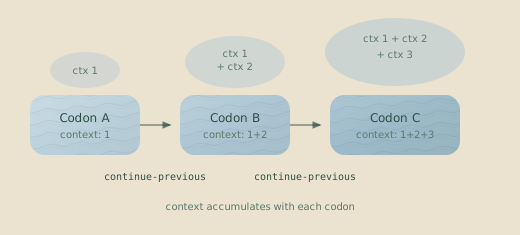
Loops are where costs sneak up on you. A continue-previous loop accumulates context with each iteration—every token you’ve generated comes back as input on the next round. By iteration five, you’re paying for iteration one’s output four more times.
Budgets provide declarative cost control. Instead of manually tuning
iteration limits, you can set a dollar or time budget on the loop and let the
runtime enforce it. A loop with "budget": { "maxDollars": 3.0 } runs as many
iterations as it can afford and stops automatically. See
Budgets for the full system.
Strategies for controlling loop costs:
1. Use iterationLimit for bounded work
When you know roughly how many iterations you need:
"terminateOn": {
  "type": "iterationLimit",
  "limit": 3
}
2. Use contextExceeded for open-ended exploration
When the task naturally fills context, like generating long-form content:
"terminateOn": {
  "type": "contextExceeded"
}
Context exhaustion is completion, not failure. A contextExceeded loop
that runs out of context is considered successful. The work it completed
before exhaustion is preserved.
3. Use budget-driven termination
When you don’t know how many iterations are needed but want cost predictability, use a loop budget as the real control and an iteration limit as a safety valve:
{
  "type": "loop",
  "id": "refine",
  "terminateOn": { "type": "iterationLimit", "limit": 20 },
  "budget": { "maxDollars": 3.0 },
  "codons": [
    {
      "id": "improve",
      "continuationMode": "continue-previous",
      "promptText": "..."
    }
  ]
}
The loop runs as many iterations as $3 buys. No manual tuning of iteration counts required.
4. Firewall context between heavy operations
If each iteration is self-contained, use the fresh continuation mode and pass data through files. This resets context each iteration, preventing cost growth.
{
  "id": "process-batch",
  "continuationMode": "fresh",
  "promptFile": "./prompts/process.md",
  "checkpointedFiles": ["output/**/*"]
}
Sentinel Compositions
A single sentinel watching your workflow is useful. Multiple sentinels working together—each focused on a different concern and sharing observations through their outputs—is where things get powerful. One sentinel can write a summary to a file that another sentinel, or a later codon, can use as input.
The Observer Pattern
Deploy sentinels that watch different aspects of the same workflow:
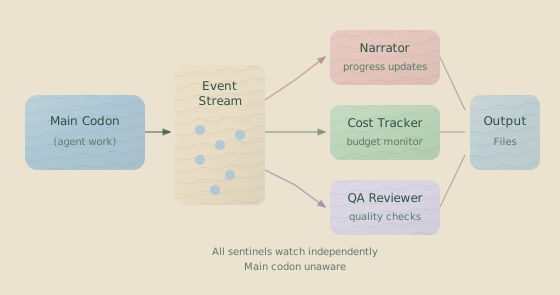
Each sentinel has a specific focus. A narrator summarizes progress:
{
  "id": "narrator",
  "name": "Progress Narrator",
  "trigger": {
    "type": "event",
    "on": ["assistant.action", "tool.result"]
  },
  "execution": {
    "strategy": "debounce",
    "milliseconds": 10000
  },
  "model": "anthropic/claude-3-haiku",
  "userPromptText": "Summarize what the agent just accomplished..."
}
An error detector watches for repeated failures, firing only when a problem seems systematic, not transient:
{
  "id": "error-detector",
  "name": "Error Pattern Detector",
  "trigger": {
    "type": "sequence",
    "interestFilter": { "on": ["tool.result"] },
    "pattern": [
      {
        "type": "tool.result",
        "conditions": [
          { "operator": "equals", "path": "isError", "value": true }
        ]
      },
      {
        "type": "tool.result",
        "conditions": [
          { "operator": "equals", "path": "isError", "value": true }
        ]
      },
      {
        "type": "tool.result",
        "conditions": [
          { "operator": "equals", "path": "isError", "value": true }
        ]
      }
    ],
    "options": { "consecutive": true }
  },
  "execution": { "strategy": "immediate" },
  "model": "anthropic/claude-3-haiku",
  "userPromptText": "Three consecutive errors detected. Analyze the pattern..."
}
Execution Strategy Selection
Different strategies serve different purposes:
| Strategy | When to Use | Example |
|---|---|---|
immediate | Critical alerts, must respond fast | Error detection, security checks |
debounce | Natural batching, quiet periods | Progress updates, summaries |
count | Fixed batch sizes | Processing every N events |
timeWindow | Regular intervals | Periodic reports, cost snapshots |
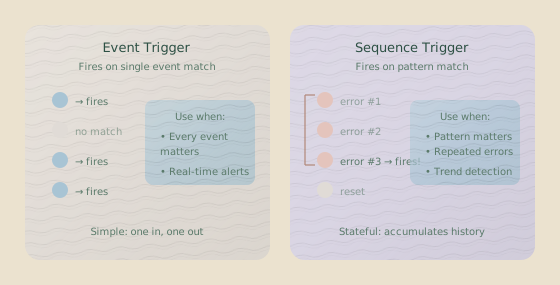
Debounce is useful when you want to batch events but don’t know when activity will stop. Set milliseconds to match natural pauses in your workflow:
"execution": {
  "strategy": "debounce",
  "milliseconds": 5000
}
TimeWindow is drift-resistant—it fires at regular intervals regardless of event timing, making it reliable for scheduled summaries:
"execution": {
  "strategy": "timeWindow",
  "milliseconds": 30000
}
Sentinel Cost Management
On long-running hanks, sentinel costs can rival codon costs. Sentinels use their own models and tokens, and a chatty observer can burn through your budget while your main agent does the real work.
Two principles keep sentinel costs under control. First, use a cheap model like haiku for most sentinels—unless you need deep analysis, it handles summarization and pattern detection well. Second, batch aggressively. A sentinel that fires on every event burns tokens fast.
// Instead of this (fires constantly):
{
  "execution": { "strategy": "immediate" }
}

// Do this (batches events):
{
  "execution": {
    "strategy": "debounce",
    "milliseconds": 10000
  }
}
Monitor sentinel costs separately. Check the cost tracker output or state file—sentinel costs appear under sentinels.totalCost in completed codons.
Context Management Strategies
Context is your most expensive resource. Every token the agent has seen costs you on every subsequent call. But context is also where the agent’s understanding lives—cut too much and it forgets what it learned. These patterns help you make that tradeoff deliberately.
When to Firewall (Fresh Mode)
Use fresh continuation when:
- Switching models: Different models can’t share sessions.
- Crossing task boundaries: The next codon doesn’t need conversation history.
- Passing data through files: Observations written to disk can be read fresh.
- Avoiding context pollution: Accumulated context might confuse the agent.
{
  "id": "generate-schema",
  "model": "anthropic/claude-3-sonnet",
  "continuationMode": "fresh",
  "promptFile": "./prompts/generate.md"
}
The agent reads what it needs from files. Clean slate, no baggage.
When to Accumulate (Continue-Previous Mode)
Use continue-previous when:
- Performing iterative refinement: The agent needs to remember what it already tried.
- Following multi-step reasoning: Intermediate results inform the next steps.
- Using the same model throughout: No model switch is required.
- Relying on conversation flow: E.g., “Now fix what you just wrote.”
{
  "type": "loop",
  "id": "refine",
  "terminateOn": { "type": "iterationLimit", "limit": 3 },
  "codons": [
    {
      "id": "fix",
      "model": "anthropic/claude-3-sonnet",
      "continuationMode": "continue-previous",
      "promptText": "Run tests. If they fail, fix the code and run again."
    }
  ]
}
The agent remembers its previous attempts and learns from failures.
Conversational Sentinels
Regular sentinels are stateless—each invocation starts fresh. That’s usually what you want. But sometimes a sentinel needs to track patterns over time, building understanding as it goes. Conversational sentinels maintain memory across triggers:
{
  "id": "issue-tracker",
  "name": "Issue Tracker",
  "model": "anthropic/claude-3-haiku",
  "trigger": {
    "type": "event",
    "on": ["tool.result"],
    "conditions": [{ "operator": "equals", "path": "isError", "value": true }]
  },
  "systemPromptText": "You track issues across a coding session. When you see an error, check if it's related to previous issues. Build a running list of problems and their status.",
  "conversational": {
    "trimmingStrategy": {
      "type": "maxTurns",
      "maxTurns": 10
    }
  },
  "userPromptText": "New error occurred:\n<%= JSON.stringify(it.events, null, 2) %>\n\nIs this related to previous issues? Update your issue list."
}
This sentinel builds understanding over time, connecting new errors to patterns it has seen before.
Trimming keeps context bounded. maxTurns: 10 keeps the last 10
conversation turns. Use maxTokens for finer control over context size.
Error Recovery Patterns
Things break. Files aren’t where you expected them, external APIs time out, and agents try clever things that don’t work. The question isn’t whether errors will happen—it’s whether your hank keeps running when they do.
Codon Failure Policies
The onFailure field on codons gives you granular control over how failures are handled:
{
  "id": "risky-operation",
  "name": "Attempt Risky Refactor",
  "model": "sonnet",
  "continuationMode": "fresh",
  "promptFile": "./prompts/risky-refactor.md",
  "onFailure": "retry",
  "retryConfig": {
    "maxAttempts": 3
  }
}| Value | Behavior |
|---|---|
"abort" | (Default) Stop the entire hank immediately. |
"retry" | Retry up to maxAttempts times before aborting. |
"ignore" | Log the failure and continue to the next codon. |
Use retry for flaky operations (network calls, rate-limited APIs). Use ignore for best-effort tasks that shouldn’t block the workflow.
{
  "id": "generate-docs",
  "name": "Generate API Docs (Optional)",
  "promptText": "Generate API documentation for any new endpoints",
  "onFailure": "ignore"
}
ignore requires independence. If a later codon depends on files the
failed codon was supposed to create, you’ll get a different failure
downstream. Use ignore only for truly optional work.
The allowFailure Pattern
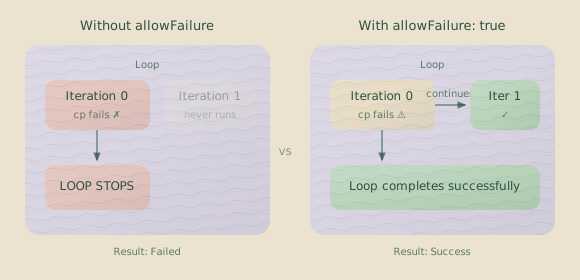
In a loop, some operations might fail on certain iterations. Without allowFailure, the first failure kills the entire loop.
{
  "type": "loop",
  "id": "process-files",
  "codons": [
    {
      "id": "process",
      "rigSetup": [
        {
          "type": "command",
          "command": {
            "run": "cp source.txt destination.txt",
            "workingDirectory": "project"
          },
          "allowFailure": true
        }
      ]
    }
  ]
}
With allowFailure: true, the rig operation can fail but the codon continues, allowing the agent to handle the missing file gracefully.
Sentinel Error Handling
Sentinels can fail, too. LLM calls time out, templates have bugs, or rate limits are hit. Usually, you want observer sentinels to fail silently, since they aren’t on the critical path. But a validation sentinel might be essential. You can configure how failures propagate:
{
  "id": "critical-validator",
  "maxConsecutiveFailures": 3,
  "unloadOnFatalError": true
}| Setting | Effect |
|---|---|
maxConsecutiveFailures | Unloads the sentinel after N consecutive failures. |
unloadOnFatalError | Unloads on template errors, corruption, or resource exhaustion. |
For non-critical sentinels like narrators or cost trackers, let them fail silently. For validators that must run, consider using failCodonIfNotLoaded:
"sentinels": [
  {
    "sentinelConfig": "./sentinels/validator.json",
    "settings": {
      "failCodonIfNotLoaded": true
    }
  }
]
This fails the codon if the sentinel can’t load, which is better than running without validation.
Graceful Degradation
Design hanks that produce useful output even when parts fail. Mark non-essential setup steps with allowFailure.
{
  "hank": [
    {
      "id": "required-setup",
      "description": "Must succeed"
    },
    {
      "id": "optional-enrichment",
      "description": "Nice to have",
      "rigSetup": [
        {
          "type": "command",
          "command": { "run": "fetch-external-data.sh" },
          "allowFailure": true
        }
      ]
    },
    {
      "id": "final-output",
      "description": "Works with or without enrichment"
    }
  ]
}
The final codon produces output regardless of whether enrichment succeeded. Its prompt can check if enrichment data exists and adjust accordingly.
Output File Strategies
When a codon completes, its output files are copied to your results directory. Without careful configuration, this directory becomes a mess of intermediate files, logs, and unneeded build artifacts. Strategic output configuration keeps results clean.
Selective Copying
Don’t copy everything. Copy what matters.
"outputFiles": [
  {
    "copy": [
      "src/schemas/**/*.ts",
      "docs/*.md"
    ]
  }
]
This avoids cluttering your results with intermediate files, logs, and build artifacts.
beforeCopy Validation
Run validation before copying to ensure only good output reaches the results directory.
"outputFiles": [
  {
    "copy": ["src/**/*.ts"],
    "beforeCopy": [
      {
        "type": "command",
        "command": {
          "run": "bun run typecheck",
          "workingDirectory": "project"
        }
      }
    ]
  }
]
If typecheck fails, nothing is copied. No broken code ends up in your output.
Sentinel Output Organization
By default, sentinels write to .hankweave/sentinels/outputs/{sentinelId}/. For important sentinel output that other parts of your system need to read, explicitly configure paths:
{
  "id": "validator",
  "output": {
    "format": "json",
    "file": "reports/validation.jsonl"
  }
}
A path containing a / is relative to the execution directory. This configuration places the output in {execution-dir}/reports/validation.jsonl, where subsequent codons or external tools can read it. This allows one sentinel to create a report that another process can consume, enabling complex, multi-stage analysis.
Rig Reuse Patterns
You’ll find yourself writing the same rig setups across different hanks, like copying a TypeScript template and running bun install. Instead of duplicating this logic, build reusable scaffolding.
Template Repositories
Create template directories that multiple hanks can share:
templates/
├── typescript/
│   ├── package.json
│   ├── tsconfig.json
│   └── src/
├── python/
│   ├── pyproject.toml
│   └── src/
└── docs/
    └── template.md
Reference these templates from any hank:
"rigSetup": [
  {
    "type": "copy",
    "copy": {
      "from": "../templates/typescript",
      "to": "project"
    }
  }
]
Install Once, Use Many
For loops that don’t modify dependencies, install them once before the loop begins:
{
  "hank": [
    {
      "id": "setup",
      "rigSetup": [
        {
          "type": "copy",
          "copy": { "from": "./templates/typescript", "to": "src" }
        },
        {
          "type": "command",
          "command": { "run": "bun install", "workingDirectory": "lastCopied" }
        }
      ]
    },
    {
      "type": "loop",
      "id": "iterations",
      "codons": [
        {
          "id": "work",
          "rigSetup": []
        }
      ]
    }
  ]
}
The loop codons have no rig setup because the dependencies were already installed by the setup codon.
Detecting Stuck Agents
Long-running agents can get stuck, trying the same failing operation repeatedly or spinning without making progress. A sentinel with a sequence trigger can detect this pattern and intervene.
{
  "id": "stuck-detection",
  "name": "Stuck Agent Detector",
  "trigger": {
    "type": "sequence",
    "interestFilter": { "on": ["assistant.action", "tool.result"] },
    "pattern": [
      {
        "type": "assistant.action",
        "conditions": [
          { "operator": "equals", "path": "action", "value": "tool_use" }
        ]
      },
      {
        "type": "tool.result",
        "conditions": [
          {
            "operator": "contains",
            "path": "result",
            "value": "does not match"
          }
        ]
      },
      {
        "type": "assistant.action",
        "conditions": [
          { "operator": "equals", "path": "action", "value": "tool_use" }
        ]
      },
      {
        "type": "tool.result",
        "conditions": [
          {
            "operator": "contains",
            "path": "result",
            "value": "does not match"
          }
        ]
      }
    ],
    "options": { "consecutive": true }
  },
  "execution": { "strategy": "immediate" },
  "model": "anthropic/claude-3-haiku",
  "userPromptText": "The agent appears stuck—multiple failed attempts with similar errors. Analyze and suggest intervention."
}
This pattern matches a specific failure cycle: tool use → error containing “does not match” → tool use → same error. Two consecutive failures trigger the sentinel.
Monitoring Costs with Alerts
For enforcement, use Budgets. The budget system provides automatic enforcement of cost limits — it kills the agent process when a limit is hit. Sentinel-based cost monitoring (below) is useful for observation and logging alongside budgets, not as a replacement.
You can use a sentinel to monitor costs and alert you when they cross a defined threshold.
{
  "id": "cost-alert",
  "name": "Cost Threshold Alert",
  "trigger": {
    "type": "event",
    "on": ["token.usage"],
    "conditions": [
      { "operator": "greaterThan", "path": "totalCost", "value": 0.5 }
    ]
  },
  "execution": { "strategy": "immediate" },
  "model": "anthropic/claude-3-haiku",
  "output": {
    "format": "json",
    "file": "cost-alerts.jsonl"
  },
  "userPromptText": "Cost threshold exceeded ($0.50). Current total: $<%= it.events[0].data.totalCost %>. Analyze whether this spending is justified for codon <%= it.events[0].data.codonId %>."
}
This sentinel fires only when the total cost crosses the threshold, producing a JSONL log of cost incidents for later review.
Automating Code Reviews
A sentinel can act as an automated QA reviewer, checking code for issues as the agent writes it.
{
  "id": "qa-reviewer",
  "name": "Code Review Bot",
  "trigger": {
    "type": "event",
    "on": ["file.updated"],
    "conditions": [{ "operator": "matches", "path": "path", "value": "\\.ts$" }]
  },
  "execution": {
    "strategy": "debounce",
    "milliseconds": 10000
  },
  "systemPromptText": "You are a senior TypeScript developer. Review code for correctness, style, and potential bugs. Be concise.",
  "model": "anthropic/claude-3-sonnet",
  "userPromptText": "Review these file changes:\n<% for (const event of it.events) { %>\n### <%= event.data.path %>\n```typescript\n<%= event.data.content %>\n```\n<% } %>"
}
The debounce strategy batches rapid file changes, so the sentinel reviews them together after a brief pause in activity, preventing it from firing on every single save.
Quick Test Runs with Model Override
Before committing to expensive Opus runs, test your workflow structure with a cheap model. The --model CLI flag overrides all codon models globally:
# Test the entire workflow with Haiku (~10-20x cheaper than Sonnet)
hankweave --model haiku

# Once the structure works, run with intended models
hankweave
This pattern catches configuration errors, missing files, and broken rig setups before you spend real money. Haiku won’t produce production-quality output, but it will tell you if your prompts parse correctly, your file paths resolve, and your workflow executes in the right order.
What to test with Haiku:
- Rig setup operations (copy, commands)
- File path resolution
- Workflow sequencing
- Prompt file loading
- Output file patterns
What requires the real model:
- Output quality
- Complex reasoning
- Nuanced code generation
Cost comparison: A 10-codon workflow that costs 0.10 with Haiku. Run 20 test iterations for the price of one real run.
Codon Decomposition for Debugging
Instead of one massive codon with a complex prompt, split work into multiple codons that share context via continue-previous. Each codon creates a checkpoint, giving you precise rollback points.
{
  "hank": [
    {
      "id": "analyze",
      "name": "Analyze Requirements",
      "model": "sonnet",
      "continuationMode": "fresh",
      "promptText": "Read the requirements in specs/. List the key components needed."
    },
    {
      "id": "design",
      "name": "Design Architecture",
      "model": "sonnet",
      "continuationMode": "continue-previous",
      "promptText": "Based on your analysis, design the architecture. Write to docs/architecture.md."
    },
    {
      "id": "implement",
      "name": "Implement Core",
      "model": "sonnet",
      "continuationMode": "continue-previous",
      "promptText": "Implement the core components from your design."
    },
    {
      "id": "test",
      "name": "Write Tests",
      "model": "sonnet",
      "continuationMode": "continue-previous",
      "promptText": "Write tests for your implementation."
    }
  ]
}
Benefits of decomposition:
| Benefit | Why it matters |
|---|---|
| Precise rollback | Roll back to “design” without losing “analyze” |
| Clearer logs | Each codon has its own log file |
| Easier debugging | Identify exactly which step failed |
| Incremental progress | Resume from last successful codon |
| Better checkpoints | Each step creates a named checkpoint |
When to decompose:
- Tasks with distinct phases (analyze → design → implement)
- Work you might want to roll back partially
- Complex workflows where debugging matters
When to keep it together:
- Tightly coupled operations that must succeed or fail together
- Simple tasks that don’t need intermediate checkpoints
Global System Prompts for Workspace Context
Every codon in your hank might need the same context: project structure, coding conventions, or domain knowledge. Instead of repeating this in every prompt, use global system prompts:
{
  "globalSystemPromptFile": [
    "./prompts/workspace-context.md",
    "./prompts/coding-standards.md"
  ],
  "hank": [
    {
      "id": "implement",
      "promptText": "Add user authentication to the app."
    }
  ]
}# Project Context
This is a TypeScript monorepo with the following structure:
- `packages/api/` - Express REST API
- `packages/web/` - React frontend
- `packages/shared/` - Shared types and utilities
All code uses strict TypeScript. Tests are in `__tests__/` directories.
Database is PostgreSQL accessed via Prisma ORM.# Coding Standards
- Use functional components with hooks (no class components)
- Prefer `const` over `let`
- All functions must have JSDoc comments
- Error handling with custom error classes
- No console.log in production code (use logger)Use cases for global prompts:
- Project structure and file layout
- Coding conventions and style guides
- Domain-specific terminology
- Security constraints
- Team preferences
Order matters: Global prompts are prepended before codon-specific
appendSystemPromptFile content. Put foundational context in global prompts,
codon-specific details in append prompts.
Archiving in Loops for Dynamic Programming
When a loop processes multiple items and each iteration needs a clean workspace, use archiveOnSuccess to preserve results while clearing the working area. This is like dynamic programming’s memoization—compute once, archive, continue.
{
  "type": "loop",
  "id": "process-projects",
  "terminateOn": { "type": "iterationLimit", "limit": 5 },
  "codons": [
    {
      "id": "setup-project",
      "rigSetup": [
        {
          "type": "copy",
          "copy": { "from": "./templates/project", "to": "current-project" }
        }
      ],
      "archiveOnSuccess": ["current-project/**/*"],
      "continuationMode": "continue-previous",
      "promptText": "Customize the project template based on the next spec in specs/."
    },
    {
      "id": "build-project",
      "continuationMode": "continue-previous",
      "promptText": "Build and test the project. Fix any issues."
    }
  ]
}
How archiving works:
- Iteration 0: Template copied to
agentRoot/current-project/ - Agent customizes and builds
- On success: Files moved to
rigArchive/process-projects-0/current-project/ - Iteration 1: Fresh template copied, previous work preserved in archive
- Repeat
Directory structure after 3 iterations:
execution-dir/
├── agentRoot/
│   └── current-project/     # Current iteration's workspace
├── rigArchive/
│   ├── process-projects-0/  # Iteration 0 results
│   │   └── current-project/
│   ├── process-projects-1/  # Iteration 1 results
│   │   └── current-project/
│   └── process-projects-2/  # Iteration 2 results
│       └── current-project/
└── .hankweave/
Use cases:
- Processing multiple independent items
- Building variants of a template
- Generating multiple reports
- Any loop where iterations shouldn’t see each other’s intermediate files
Rollback restores archives: If you roll back to iteration 1, the files
from iteration 1’s archive are restored to agentRoot/. The archive system is
fully integrated with checkpoints.
Validation-First Development
Always run --validate before expensive execution. It catches errors for $0.00:
# Validate before running
hankweave --validate ./my-hank.json ./data

# See the structure visualization
# Fix any errors
# Then run for real
hankweave ./my-hank.json ./data
What validation catches:
- Missing prompt files
- Invalid model names
- Malformed JSON configuration
- Broken continuation chains (model mismatches)
- Missing required environment variables
- Invalid rig paths
What validation shows:
┌─────────────────────────────────────┐
│ [1] setup-environment               │
│ prompts: 1 (45 lines)               │
│ model: claude-sonnet-4-20250514     │
└─────────────────────────────────────┘
                ↓
┌─────────────────────────────────────┐
│ [2] analyze-codebase (loop)         │
│ iteration limit: 3                  │
│ ┌─────────────────────────────────┐ │
│ │ [2.1] collect-files             │ │
│ └─────────────────────────────────┘ │
└─────────────────────────────────────┘
This ASCII visualization shows your hank’s structure at a glance—codon order, loop nesting, prompt sizes.
Declare required environment variables for fail-fast validation:
{
  "requirements": {
    "env": ["ANTHROPIC_API_KEY", "DATABASE_URL", "STRIPE_KEY"]
  },
  "hank": [...]
}
Missing variables are caught during --validate, not deep into execution.
Prompt Documentation with HTML Comments
Prompts—like code—need documentation. Use HTML comments to explain why instructions exist without sending the comments to the LLM:
# Refactoring Task

Refactor the authentication module to use JWT tokens.

<!-- CONTEXT: We're migrating from session-based auth to JWT for
     the mobile app release. Session cookies don't work well
     cross-platform. See ENG-234 for full requirements. -->

Requirements:

1. Replace session middleware with JWT verification
2. Add token refresh endpoint
3. Update all protected routes

<!-- NOTE: Don't touch the OAuth flows yet - that's a separate
     ticket (ENG-256) and has different requirements. -->

Preserve backward compatibility with the /api/v1/\* endpoints.

<!-- HISTORICAL: We added this constraint after breaking the
     Android app in the March 2025 release. Never again. -->
What gets sent to the LLM:
# Refactoring Task

Refactor the authentication module to use JWT tokens.

Requirements:

1. Replace session middleware with JWT verification
2. Add token refresh endpoint
3. Update all protected routes

Preserve backward compatibility with the /api/v1/\* endpoints.
Use comments for:
- Historical context (why this rule exists)
- Ticket references (ENG-234, JIRA-123)
- Warnings for future prompt editors
- Explanations of non-obvious constraints
- Temporary notes during development
Comments are stripped everywhere: System prompts, user prompts, and template variables all have HTML comments removed before sending to the API.
Context Bridges
When two codons do different tasks but the second benefits from knowing what the first learned, you need a context bridge—a way to pass understanding without passing raw conversation history.
The naive approach is continue-previous, but this carries baggage: all the exploration, failed attempts, and irrelevant details from the first codon. The better approach is explicit handoff through files.
{
  "hank": [
    {
      "id": "explore",
      "name": "Explore Codebase",
      "model": "sonnet",
      "continuationMode": "fresh",
      "promptText": "Explore this codebase. Write a summary to context/exploration-summary.md covering: architecture, key patterns, and gotchas.",
      "checkpointedFiles": ["context/**/*"]
    },
    {
      "id": "implement",
      "name": "Implement Feature",
      "model": "sonnet",
      "continuationMode": "fresh",
      "rigSetup": [
        {
          "type": "copy",
          "copy": {
            "from": "context/exploration-summary.md",
            "to": "context/exploration-summary.md"
          }
        }
      ],
      "promptText": "Read context/exploration-summary.md for codebase context. Then implement user authentication following the patterns described."
    }
  ]
}
What makes a good bridge:
| Good Bridge Content | Bad Bridge Content |
|---|---|
| Key architectural decisions | Raw exploration logs |
| Patterns and conventions discovered | Every file the agent looked at |
| Gotchas and constraints learned | Failed attempts and dead ends |
| Relevant code locations | Full conversation history |
Bridge formats:
- Summary markdown: Human-readable, good for broad context
- Structured JSON: Machine-parseable, good for specific data
- File lists: Paths to relevant code, good for directing attention
The exploration codon writes a focused summary. The implementation codon reads it. Clean context, no baggage.
Bridges work across model switches. Since the second codon uses fresh
mode, you can switch models freely. The bridge file carries the understanding,
not the conversation.
Stacking Reliability: The .8 + .8 + .8 = .9 Principle
Here’s an uncomfortable truth about AI systems: each step in your pipeline might only be 80% reliable. But three 80% reliable steps in sequence don’t give you 0.8³ = 51% reliability—they give you 90%+ if you design them right.
The key is independent verification and catch-and-correct patterns.
{
  "hank": [
    {
      "id": "generate",
      "name": "Generate Code",
      "model": "sonnet",
      "continuationMode": "fresh",
      "promptText": "Generate the authentication module based on the spec."
    },
    {
      "id": "verify",
      "name": "Verify Against Spec",
      "model": "sonnet",
      "continuationMode": "fresh",
      "promptText": "Read the spec and the generated code. List any discrepancies. If there are issues, fix them."
    },
    {
      "id": "test",
      "name": "Run Tests",
      "model": "sonnet",
      "continuationMode": "fresh",
      "promptText": "Write and run tests for the authentication module. Fix any failures."
    }
  ]
}
Why this works:
- Generate might produce code that’s 80% correct
- Verify catches half of the remaining issues → now 90% correct
- Test catches half of those remaining issues → now 95% correct
Each stage operates independently, looking at the artifact with fresh eyes. Errors that slip through one stage are more likely to be caught by the next because they’re looking for different things.
Anti-pattern: Sequential dependency without verification
{
  "hank": [
    { "id": "step1", "continuationMode": "fresh", "promptText": "Do part 1" },
    {
      "id": "step2",
      "continuationMode": "continue-previous",
      "promptText": "Now do part 2"
    },
    {
      "id": "step3",
      "continuationMode": "continue-previous",
      "promptText": "Now do part 3"
    }
  ]
}
This is 0.8³ = 51% reliability. Each step blindly trusts the previous one. Errors compound.
Pattern: Independent verification stages
{
  "hank": [
    {
      "id": "generate",
      "continuationMode": "fresh",
      "promptText": "Generate X"
    },
    {
      "id": "review",
      "continuationMode": "fresh",
      "promptText": "Review X, fix issues"
    },
    {
      "id": "validate",
      "continuationMode": "fresh",
      "promptText": "Validate X against spec, fix issues"
    }
  ]
}
Each stage independently examines the artifact. Errors get caught and fixed rather than amplified.
Verification requires fresh context. If the verifier sees the same conversation that led to the error, it often makes the same mistake. Fresh eyes catch more.
Handling Large Contexts
Some tasks require processing more content than fits in a single context window—large codebases, extensive document sets, or data that spans many files. Three patterns handle this.
Pattern 1: Chunked Processing with Aggregation
Process in pieces, aggregate results.
{
  "hank": [
    {
      "id": "inventory",
      "name": "Create File Inventory",
      "model": "haiku",
      "continuationMode": "fresh",
      "promptText": "List all TypeScript files in src/. Write the list to context/file-inventory.json as an array of paths."
    },
    {
      "type": "loop",
      "id": "analyze-chunks",
      "terminateOn": { "type": "contextExceeded" },
      "codons": [
        {
          "id": "analyze-batch",
          "model": "sonnet",
          "continuationMode": "fresh",
          "promptText": "Read context/file-inventory.json. Pick the next 10 unanalyzed files. Analyze them for security issues. Append findings to context/security-findings.md. Mark those files as analyzed in the inventory."
        }
      ]
    },
    {
      "id": "synthesize",
      "name": "Synthesize Findings",
      "model": "opus",
      "continuationMode": "fresh",
      "promptText": "Read context/security-findings.md. Produce a prioritized security report with recommendations."
    }
  ]
}
How it works:
- Inventory creates a list of all files to process
- Loop processes files in batches, accumulating findings
- Synthesize reads the aggregated findings (not the raw files) and produces the final report
The final synthesis codon never sees the full codebase—it sees a summary of findings. Much smaller context, much better reasoning.
Pattern 2: Map-Reduce Style
Process items independently, then reduce results.
{
  "hank": [
    {
      "type": "loop",
      "id": "map-phase",
      "terminateOn": { "type": "iterationLimit", "limit": 20 },
      "codons": [
        {
          "id": "analyze-doc",
          "model": "haiku",
          "continuationMode": "fresh",
          "rigSetup": [
            {
              "type": "copy",
              "copy": { "from": "./templates/analysis", "to": "workspace" }
            }
          ],
          "promptText": "Pick the next unprocessed document from docs/. Analyze it. Write a summary to workspace/summary.md.",
          "archiveOnSuccess": ["workspace/**/*"]
        }
      ]
    },
    {
      "id": "reduce",
      "name": "Combine Summaries",
      "model": "sonnet",
      "continuationMode": "fresh",
      "promptText": "Read all summaries from rigArchive/map-phase-*/workspace/summary.md. Combine into a unified analysis."
    }
  ]
}
Key insight: The reduce phase reads summaries, not original documents. Each summary is maybe 500 tokens; 20 documents = 10K tokens of summary vs potentially 500K tokens of raw content.
Pattern 3: Hierarchical Summarization
For very large contexts, summarize in layers.
Level 0: Raw files (too large)
    ↓ summarize
Level 1: File summaries (still large)
    ↓ summarize
Level 2: Section summaries (manageable)
    ↓ synthesize
Final: Executive summary{
"hank": [
{
"type": "loop",
"id": "file-summaries",
"terminateOn": { "type": "iterationLimit", "limit": 50 },
"codons": [
{
"id": "summarize-file",
"model": "haiku",
"continuationMode": "fresh",
"promptText": "Pick next unprocessed file. Write a 200-word summary to summaries/L1/{filename}.md."
}
]
},
{
"type": "loop",
"id": "section-summaries",
"terminateOn": { "type": "iterationLimit", "limit": 10 },
"codons": [
{
"id": "summarize-section",
"model": "sonnet",
"continuationMode": "fresh",
"promptText": "Read the next batch of L1 summaries. Write a combined summary to summaries/L2/section-{n}.md."
}
]
},
{
"id": "final",
"model": "opus",
"continuationMode": "fresh",
"promptText": "Read all L2 summaries. Produce the final executive summary."
}
]
}Each level compresses information. The final codon works with highly concentrated context—the essence of 50 files, not the raw content.
Theory of Mind for Prompts
When writing prompts, remember: you are not the audience. You have context the model doesn’t have. You know what you mean. The model only knows what you wrote.
The Information Gap
You know:
- Why this task matters
- What happened before
- What “good” looks like for your use case
- Edge cases you’ve hit before
- Conventions your team uses
The model knows:
- What’s in the prompt
- What’s in the context window
- General world knowledge from training
Every piece of information you assume is a potential failure point.
Making Implicit Knowledge Explicit
Clean up the API module.What does “clean up” mean? Remove dead code? Improve formatting? Refactor for performance? Add tests? The model will guess, and its guess might not match your intent.
Clean up the API module:

1. Remove any functions that aren't called anywhere in the codebase
2. Add JSDoc comments to all public functions
3. Extract repeated error handling into a shared utility
4. Keep all existing functionality—this is refactoring, not rewriting

The module currently handles: user authentication, session management, rate limiting.
Don't touch the rate limiting logic—it's complex for good reasons (see comments).
Preference Surfacing
80-90% of agent “mistakes” are actually preference mismatches. The agent made a reasonable choice; it just wasn’t your preferred choice.
Generate a React component for the user profile page.

Preferences:

- Functional components with hooks (not class components)
- Tailwind CSS for styling (not CSS modules)
- react-query for data fetching (not useEffect + fetch)
- TypeScript with strict types
- Split into smaller components if >100 lines

Non-preferences (your choice):

- File structure within the component folder
- Naming conventions for internal functions
- Test file organization
Explicitly stating what you care about and what you don’t prevents the agent from over-optimizing on the wrong dimensions.
The “Why” Context
Agents that understand why they’re doing something make better decisions at the margins.
Convert this Express API to use Fastify.

Context: We're migrating because our load testing showed Express can't handle
our projected scale. Fastify's performance is the primary driver.

This means:

- Preserve existing route structure (so clients don't break)
- Prioritize performance-oriented patterns where there's a choice
- Don't add features—this is a runtime swap, not a rewrite
- Validation can change if it improves performance
With this context, the agent knows that when facing a tradeoff between “cleaner code” and “faster code,” it should choose faster.
Related Pages
- Codons — Field reference and continuation modes
- Loops — Termination strategies and constraints
- Budgets — Declarative cost, time, and token limits
- Sentinels — Triggers, execution strategies, output
- Sentinel Configuration — Complete config reference
- Configuration — All hank configuration options
- Performance — Cost tracking and optimization
- Philosophy & When to Use — Mental models and decision framework
Next Steps
These patterns emerged from real production use—problems we hit and solutions we found. As you build more complex hanks, you’ll develop your own variations. The underlying principles, however, remain consistent:
- Match the model to the task.
- Compose focused sentinels rather than building one complex monolith.
- Manage context deliberately, choosing when to firewall and when to accumulate.
- Plan for failure with
allowFailure, error detection, and graceful degradation. - Control output with selective copying and validation gates.
Start with simple hanks. Add these patterns as you encounter the problems they solve. The best pattern is the one that fixes the problem you actually have.