Docker Deployment
Running Hankweave in Docker provides reproducible environments, clean dependency isolation, and straightforward CI/CD integration. This guide covers everything from building a basic image to running air-gapped deployments with local open-source models.
Who is this for? This guide is for users who want to run hanks in containers and for teams integrating Hankweave into automated pipelines.
Containers solve several common problems in AI workflows:
- Reproducibility: The environment that works today will work tomorrow. Eliminate “it works on my machine” issues.
- Isolation: Your hank runs with its own dependencies, free from conflicting libraries or polluted global state.
- CI/CD Integration: Spin up a container, run your hank, capture the results, and tear it down. Perfect for automation.
- Resource Control: Limit a container’s memory, CPU, and network access to prevent runaway processes from consuming all host resources.
Basic Dockerfile
This minimal Dockerfile provides a production-ready starting point. Place it in the root of your Hankweave project.
# Use a slim, efficient base image
FROM oven/bun:1-alpine

# Install git, which is required for creating checkpoints
RUN apk add --no-cache git

# Set the working directory
WORKDIR /app

# Copy dependency manifests and install dependencies first.
# This takes advantage of Docker's layer caching, so dependencies
# are only re-installed when package.json or bun.lockb changes.
COPY package.json bun.lockb ./
RUN bun install --frozen-lockfile

# Copy the rest of the application code
COPY . .

# Create the directory for execution state
RUN mkdir -p /executions

# Default command shows the help menu
CMD ["bun", "run", "server/index.ts", "--help"]
Build and tag the image:
docker build -t hankweave:latest .Running a Hank
To run a hank, you need to provide three things to the container: configuration, data, and API keys. This is done through volume mounts and environment variables.
Volume Mounts
Volume mounts connect directories on your host machine to directories inside the container, allowing Hankweave to access your files and persist its output.
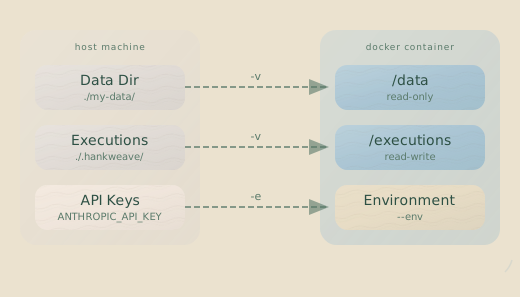
| Host Path | Container Path | Mode | Purpose |
|---|---|---|---|
./hanks/ | /config | Read-only | Your hank definition files (e.g., hank.json) |
./data/ | /data | Read-only | Input data for the hank |
./results/ | /output | Read-write | Where final outputs are written |
./executions/ | /executions | Read-write | Execution state: checkpoints, logs, and state.json |
The /executions volume is critical for resuming a stopped hank. It contains everything Hankweave needs to pick up where it left off. For a full breakdown, see the Execution Directory Structure reference.
Mount Data Read-Only: Always mount your data directory as read-only
(:ro). Hankweave creates a symlink or copy inside the execution directory,
ensuring your original data is never modified.
API Keys and Environment Variables
Pass API keys and other secrets to the container as environment variables. Never bake secrets into your Docker image.
# Pass variables directly on the command line
docker run -it \
  -e ANTHROPIC_API_KEY="${ANTHROPIC_API_KEY}" \
  -e OPENAI_API_KEY="${OPENAI_API_KEY}" \
  hankweave:latest

# Or, use an environment file for better organization
docker run -it --env-file .env hankweave:latestANTHROPIC_API_KEY=sk-ant-...
OPENAI_API_KEY=sk-...
GOOGLE_API_KEY=...Putting It All Together
Here is a complete docker run command that combines volume mounts and environment variables to execute a hank:
docker run -it --rm \
  -v $(pwd)/hanks:/config:ro \
  -v $(pwd)/data:/data:ro \
  -v $(pwd)/results:/output \
  -v $(pwd)/executions:/executions \
  -e ANTHROPIC_API_KEY="${ANTHROPIC_API_KEY}" \
  hankweave:latest \
  bun run server/index.ts \
    --config /config/my-hank.json \
    --data /data \
    --execution /executions/run-001 \
    --headless
Overriding Configuration at Runtime
You can override settings from your hank.json file using HANKWEAVE_RUNTIME_* environment variables. This is useful for adjusting behavior in different environments (like development vs. CI) without changing your configuration files.
docker run -it \
  -e HANKWEAVE_RUNTIME_PORT=8080 \
  -e HANKWEAVE_RUNTIME_AUTOSTART=true \
  -e HANKWEAVE_RUNTIME_MODEL=claude-3-sonnet-20240229 \
  hankweave:latest
Sentinel API Keys
Some hanks use sentinels—parallel agents that monitor execution. If a sentinel uses a different LLM provider than your main hank, configure its API key using the HANKWEAVE_SENTINEL_* prefix.
docker run -it \
  -e ANTHROPIC_API_KEY="${ANTHROPIC_API_KEY}" \
  -e HANKWEAVE_SENTINEL_OPENAI_API_KEY="${OPENAI_KEY_FOR_SENTINEL}" \
  hankweave:latest
Sentinels are an advanced feature. If your hank doesn’t define any, you can ignore this section. Learn more at Sentinels.
State Persistence
Containers are ephemeral, but hank state shouldn’t be. To resume hanks across container restarts, you must persist the /executions directory.
- Bind Mounts (e.g.,
-v $(pwd)/executions:/executions) are good for development, as they let you easily inspect state files on your host machine. - Named Volumes (e.g.,
-v hank-executions:/executions) are more robust for production. The volume is managed by Docker and survives even if you delete the container and the host directory.
# Using a named volume for robust state persistence
docker run -it \
  -v hank-executions:/executions \
  hankweave:latest \
  bun run server/index.ts \
    --execution /executions/my-project
The next time you run a container with this volume and execution path, Hankweave will automatically resume from the last checkpoint.
CI/CD Integration
For automated pipelines, run Hankweave in headless mode.
docker run --rm \
  -v $(pwd)/hanks:/config:ro \
  -v $(pwd)/data:/data:ro \
  -v $(pwd)/output:/output \
  -e ANTHROPIC_API_KEY="${ANTHROPIC_API_KEY}" \
  hankweave:latest \
  bun run server/index.ts \
    --config /config/my-hank.json \
    --data /data \
    --headless \
    --start-new
Key flags for CI/CD:
| Flag | Purpose |
|---|---|
--headless | Run without the interactive TUI; use standard I/O. |
--start-new | Force a fresh execution and ignore any previous state. |
-y | Automatically answer “yes” to confirmation prompts. |
--validate | Perform pre-flight checks (e.g., validate config and data) without executing the hank. |
GitHub Actions Example
This example workflow builds the Docker image, runs the hank, and uploads the results as an artifact.
name: Run Hank

on:
  push:
    branches: [main]
  workflow_dispatch:

jobs:
  run-hank:
    runs-on: ubuntu-latest
    permissions:
      contents: read
      packages: write # Required to push image to GHCR

    steps:
      - name: Checkout repository
        uses: actions/checkout@v4

      - name: Log in to the GitHub Container Registry
        uses: docker/login-action@v3
        with:
          registry: ghcr.io
          username: ${{ github.actor }}
          password: ${{ secrets.GITHUB_TOKEN }}

      - name: Build and push Docker image
        uses: docker/build-push-action@v5
        with:
          context: .
          push: true
          tags: ghcr.io/${{ github.repository }}:latest

      - name: Run hank
        run: |
          mkdir -p ./results ./executions # Create directories for output
          docker run --rm \
            -v $(pwd)/hanks:/config:ro \
            -v $(pwd)/data:/data:ro \
            -v $(pwd)/results:/output \
            -v $(pwd)/executions:/executions \
            -e ANTHROPIC_API_KEY=${{ secrets.ANTHROPIC_API_KEY }} \
            ghcr.io/${{ github.repository }}:latest \
            bun run server/index.ts \
              --config /config/my-hank.json \
              --data /data \
              --execution /executions/ci-run-${{ github.run_id }} \
              --headless -y

      - name: Upload results
        uses: actions/upload-artifact@v4
        with:
          name: hank-results
          path: ./results/
Docker Compose
For multi-service applications or to formalize your development setup, Docker Compose simplifies configuration.
version: "3.8"

services:
  hankweave:
    build: .
    volumes:
      - ./hanks:/config:ro
      - ./data:/data:ro
      - ./results:/output
      - hankweave-executions:/executions
    ports:
      - "7777:7777"
    env_file:
      - .env
    command: >
      bun run server/index.ts
        --config /config/my-hank.json
        --data /data
        --execution /executions/latest
        --port 7777

volumes:
  hankweave-executions:
    # This named volume persists execution state
Launch the application with:
docker compose upAir-Gapped Deployment
In environments without internet access, you must bundle all dependencies into the image and use locally-hosted models.
Building an Air-Gapped Image
A multi-stage Dockerfile is the best practice for this. The builder stage fetches dependencies, and the final stage copies only the necessary production artifacts, creating a smaller, more secure image.
# --- Builder Stage ---
FROM oven/bun:1-alpine AS builder
WORKDIR /app
RUN apk add --no-cache git
COPY package.json bun.lockb ./
# Install all dependencies, including devDependencies if needed for building
RUN bun install --frozen-lockfile
COPY . .
# Add any build steps here if necessary

# --- Final Stage ---
FROM oven/bun:1-alpine
WORKDIR /app
RUN apk add --no-cache git
# Copy dependencies from the builder stage
COPY --from=builder /app/node_modules ./node_modules
# Copy application code from the builder stage
COPY --from=builder /app .
RUN mkdir -p /executions

ENV NODE_ENV=production
CMD ["bun", "run", "server/index.ts", "--help"]
Using Local Open-Source Models
Point Hankweave to a local model server like Ollama or vLLM.
Docker Compose with Ollama: This example runs both Hankweave and Ollama, allowing Hankweave to use a local Llama 3.1 model.
version: "3.8"

services:
  ollama:
    image: ollama/ollama:latest
    volumes:
      - ollama-models:/root/.ollama
    ports:
      - "11434:11434"
    deploy:
      resources:
        reservations:
          devices:
            - driver: nvidia
              count: 1
              capabilities: [gpu]

  hankweave:
    build:
      context: .
      dockerfile: Dockerfile.airgap
    depends_on:
      - ollama
    volumes:
      - ./hanks:/config:ro
      - ./data:/data:ro
      - ./results:/output
    environment:
      - OLLAMA_HOST=http://ollama:11434
    command: >
      bun run server/index.ts
        --config /config/my-hank.json
        --data /data
        --model llama3.1:70b
        --headless

volumes:
  ollama-models:
Performance Note: Locally-hosted open-source models may be significantly slower than commercial API-based models. Plan for longer execution times and consider using smaller models during development.
Advanced Topics
Resource Limits
Agent processes can sometimes be resource-intensive. Prevent a hank from destabilizing your host by setting explicit resource limits.
# Limit the container to 4GB of memory and 2 CPU cores
docker run -it \
  --memory 4g \
  --cpus 2 \
  hankweave:latest
Or in Docker Compose:
services:
  hankweave:
    deploy:
      resources:
        limits:
          memory: 4G
          cpus: "2.0"
Memory Planning: The Hankweave runtime is lightweight, but model interactions and data processing can consume significant memory. Start with at least 2GB and monitor usage for your specific workload.
Healthchecks and Monitoring
In orchestrated environments like Kubernetes or Docker Swarm, healthchecks are essential for automated recovery.
Hankweave does not currently expose a standard HTTP /health endpoint.
Instead, use a file-based healthcheck to monitor the runtime lock file.
Add this instruction to your Dockerfile:
HEALTHCHECK --interval=30s --timeout=10s --start-period=5s --retries=3 \
  CMD test -f /app/.hankweave/runtime.lock || exit 1
This check passes if the lock file exists, indicating the server process is running.
For debugging and auditing, mount the logs directory to your host:
docker run -it \
  -v $(pwd)/logs:/app/.hankweave/logs \
  hankweave:latest
On-Demand Execution with Kubernetes Jobs
For workloads that run periodically, a Kubernetes Job is more efficient than a long-running Deployment. The job spins up a pod to run the hank, and the pod terminates upon completion.
apiVersion: batch/v1
kind: Job
metadata:
  name: hankweave-run
spec:
  template:
    spec:
      containers:
        - name: hankweave
          image: your-registry/hankweave:latest
          command: ["bun", "run", "server/index.ts"]
          args:
            - "--config=/config/hank.json"
            - "--data=/data"
            - "--headless"
            - "--start-new"
          env:
            - name: ANTHROPIC_API_KEY
              valueFrom:
                secretKeyRef:
                  name: api-keys
                  key: anthropic
          volumeMounts:
            - name: config-volume
              mountPath: /config
            - name: data-volume
              mountPath: /data
            - name: output-volume
              mountPath: /output
      restartPolicy: Never
      volumes:
        - name: config-volume
          configMap:
            name: hank-config
        - name: data-volume
          persistentVolumeClaim:
            claimName: hank-data-pvc
        - name: output-volume
          persistentVolumeClaim:
            claimName: hank-output-pvc
  backoffLimit: 2
Troubleshooting Common Issues
Container exits immediately with Error: Data source not found: /data
This means your volume mount is incorrect. Verify that the host path exists and your -v host:container syntax is correct.
Permission denied on volume mounts
This often happens when the user ID inside the container doesn’t have permission to write to the host directory mounted into it. The safest fix is to run the container with your current user’s ID and group ID.
docker run --user $(id -u):$(id -g) ...Cannot connect to WebSocket from outside the container
You need to map the container port to a host port.
docker run -it \
  -p 7777:7777 \
  hankweave:latest \
  bun run server/index.ts --port 7777
Git checkpoint errors: fatal: not a git repository
This means git is not installed in your container image, or the /executions directory is not writable. Ensure git is included in your Dockerfile and that the volume mount for executions is not read-only. Hankweave requires git to manage its checkpointing system.
Related Pages
Next Steps
Start with the basic Dockerfile and docker run command. Once that works, adapt the Docker Compose or GitHub Actions examples to fit your workflow. For production deployments, implement resource limits and healthchecks to ensure stability and automated recovery.