Testing Hanks
A hank that fails after 10,000 tokens is frustrating. A hank that fails after 100,000 tokens is expensive. And a hank that fails silently, producing subtly wrong output? That’s the worst kind.
Hankweave’s validation system catches problems before any API calls happen. Missing files, invalid models, misconfigured sentinels—all the things that would otherwise surface mid-run—get flagged immediately. Think of it as a pre-flight checklist for your AI workflows.
Who is this for? Track 2 readers—people writing hanks who want to validate their work before running. Also useful for Track 1 readers setting up CI/CD pipelines.
The Validation Flag
The --validate (or -v) flag is your first line of defense:
hankweave --validateThis runs comprehensive preflight checks without creating directories or making API calls. It simulates a real run to catch errors early and cheaply—before you spend a cent on tokens.
What Gets Checked
Validation systematically checks your configuration, from the data source down to the model provider’s API key. The process follows these steps:
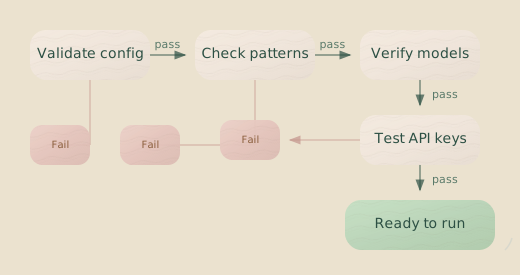
In short, hankweave --validate confirms your data exists, parses your hank.json, verifies every referenced file is present, and checks for path security issues. It then validates model names against the provider registry, runs a quick self-test for each model to check API access, and ensures your continuation logic is valid.
Running Validation
Running validation is straightforward. From your project directory:
hankweave --validateOr with explicit paths:
hankweave ./my-hank.json ./my-data --validateA successful validation produces a summary:
🔍 Validating configuration: /path/to/hank.json

📁 Data source: /path/to/my-data
🏃 Would execute in: ~/.hankweave-executions/validation-abc123

Running self-test for model: Claude Haiku (anthropic/claude-3-5-haiku-latest)
Self-test PASSED for Claude Haiku
Running self-test for model: Gemini Flash (google/gemini-2.5-flash)
Self-test PASSED for Gemini Flash

✅ Configuration is valid!

📋 Summary:
  - Codons: 3
  - Total prompt files: 3
  - Total system prompt files: 0
  - Rig setup operations: 2
  - Codons with file watching: 3
  - Codons with checkpoints: 3

🔧 Environment Variables:

  From System (HANKWEAVE_ prefixed):
    - DATABASE_URL: postgres://...
Errors vs. Warnings
Not all problems are created equal. Validation distinguishes between errors—which halt the process—and warnings, which are reported but don’t block you.
Errors stop validation cold. Missing prompt files, invalid JSON schemas, unresolvable models, failed self-tests, and broken continuation dependencies would all cause runtime failures.
Warnings are gentler. Duplicate codon names, empty prompt files, unusually large prompts (>1MB), missing checkpointed files from a previous codon, or copy targets that already exist—these might be intentional, or they might be bugs waiting to happen. Hankweave flags them and lets you decide.
Pay attention to warnings. While they don’t fail validation, they often indicate issues that will cause problems at runtime.
What Each Check Does
Let’s look at each validation step in detail. Understanding what’s being checked helps you write configurations that pass cleanly on the first try.
Schema Validation
Hankweave uses Zod schemas to validate your configuration. When something’s wrong, you get the specific field path and a helpful message:
Invalid hank file:
  - Codon "analyze" (codon-1) - continuationMode: continuationMode must be
    either 'fresh' or 'continue-previous'. Fix: Add continuationMode field
    with either 'fresh' (new conversation) or 'continue-previous' (maintain context).
Common schema errors include missing required fields (id, name, model), invalid values (like a misspelled continuationMode), or typos in field names (propmtFile instead of promptFile).
File Existence
Every file your configuration references must exist and be readable. This includes promptFile references (single file or array), appendSystemPromptFile paths, rig setup copy.from sources, and sentinel config files.
Codon 1 (analyze): promptFile "/path/to/missing.md" does not existPath Security
Rig setup operations copy files into your execution directory. Validation ensures those operations stay within bounds—you can’t accidentally write to /etc/passwd or escape the sandbox.
Codon 1 (setup), rig setup item 2: Target path "../../etc/passwd"
  would write outside execution directory
The to path must resolve to a location within the execution directory. Absolute paths and .. traversal that escapes the sandbox are rejected.
Model Validation
Every model reference in your configuration is validated against the LLM provider registry:
Invalid model 'claud-sonnet': Unknown model. Did you mean 'claude-sonnet'?Hankweave tries an exact match first, then provider-prefixed resolution (anthropic/claude-3-5-sonnet), and finally shorthand resolution (sonnet → claude-3-5-sonnet). If nothing matches, it uses fuzzy matching to suggest what you probably meant.
Shim Self-Tests
For each unique model in your hank, Hankweave runs a self-test to confirm it’s accessible via its API. This is a crucial check for API keys and network connectivity.
Running self-test for model: Claude Haiku (anthropic/claude-3-5-haiku-latest)
Self-test PASSED for Claude Haiku
The self-test makes a small, real API call to verify that your API key is valid, the provider is reachable, and the model responds correctly. It’s a quick handshake to confirm everything is wired up.
Self-tests make actual API calls but use minimal tokens. They are essential for catching authentication and connectivity issues before a long run.
Failed self-tests report detailed diagnostics:
Self-test failed for 1 model(s):
  - Claude Haiku (anthropic/claude-3-5-haiku-latest): API key not found.
    Set ANTHROPIC_API_KEY environment variable.

Please ensure all required API keys and dependencies are configured correctly.
Continuation Dependencies
Session continuation is powerful but has strict rules. Validation ensures your continuationMode settings are logical:
Codon 2 (generate): Cannot use continuationMode "continue-previous" when
  model differs from previous codon. Different models cannot share the
  same session ID. Change to "fresh" to start a new conversation.
The first codon in a sequence can’t use continue-previous—there’s nothing to continue from. When continuing, the model must match the previous codon, as different models can’t share session history. Finally, you can’t continue from a contextExceeded loop, because by definition there’s no context left.
Sentinel Validation
Sentinels add complexity, and validation catches configuration issues early:
Codon 1 (analyze), sentinel 2: Sentinel config file not found:
  ./sentinels/missing.json [WARNING]
The severity depends on your failCodonIfNotLoaded setting. If a sentinel is marked as required (failCodonIfNotLoaded: true), a missing config file is an error. Otherwise, it’s a warning, and the codon will run without that sentinel. Duplicate sentinel IDs within a codon are always errors.
Testing Strategies
Validation is just one tool. Here’s how to build confidence that your hank will do what you expect.
Start Small
Before running on your full dataset, test with a minimal sample:
# Create a sample
mkdir sample-data
cp my-data/first-file.csv sample-data/

# Validate against the sample
hankweave ./my-hank.json ./sample-data --validate

# Run against the sample
hankweave ./my-hank.json ./sample-data
Small samples let you iterate quickly. You’ll learn more from five fast runs than one long one.
Force Fresh Starts
During development, you often want a clean slate:
hankweave --start-newThis creates a fresh execution directory instead of resuming. If the directory already contains a .hankweave/ folder from a previous run, add --force:
hankweave --execution ./my-test-run --start-new --forceThe --force flag backs up the existing .hankweave/ directory to .hankweave.backup-{timestamp} before creating a new one. Your previous state is preserved, just moved aside.
Step-by-Step Mode
Sometimes you want to watch your hank execute one codon at a time. Disable autostart:
hankweave --no-autostartThe server starts but waits for your command. Press n in the TUI to run the next codon, or send codon.next via WebSocket. This gives you time to inspect state between codons, test specific parts in isolation, or debug transitions.
Headless Mode for CI/CD
For automated pipelines, skip the TUI entirely:
hankweave --headlessCombined with validation, this gives you a solid CI/CD pattern:
# CI/CD script
hankweave --validate || exit 1
hankweave --headless
Exit codes are straightforward: 0 for success, 1 for failure. Your CI system can take it from there.
Validation in Practice
Knowing the mechanics is one thing. Here’s how to weave validation into your actual workflow.
Pre-Commit Check
Make validation a habit before committing changes to your hank configuration:
# Before committing
hankweave --validate

# If valid, commit
git add hank.json prompts/
git commit -m "Update analysis prompt"
CI/CD Integration
Add Validation Step
Add a job to your CI pipeline that runs hankweave --validate on every push or pull request.
name: Validate Hank
on: [push, pull_request]

jobs:
  validate:
    runs-on: ubuntu-latest
    steps:
      - uses: actions/checkout@v4
      - uses: oven-sh/setup-bun@v1
      - name: Install Hankweave
        run: npm install -g hankweave
      - name: Validate Configuration
        run: hankweave --validate
        env:
          ANTHROPIC_API_KEY: ${{ secrets.ANTHROPIC_API_KEY }}
          GEMINI_API_KEY: ${{ secrets.GEMINI_API_KEY }}
Add Execution Step (Optional)
For a full end-to-end test, you can add a separate workflow that runs the hank in headless mode, typically triggered manually or on merge to a specific branch.
name: Run Hank
on:
  workflow_dispatch: # Manual trigger

jobs:
  execute:
    runs-on: ubuntu-latest
    steps:
      - uses: actions/checkout@v4
      - uses: oven-sh/setup-bun@v1
      - name: Install Hankweave
        run: npm install -g hankweave
      - name: Run Hank
        run: hankweave --headless
        env:
          ANTHROPIC_API_KEY: ${{ secrets.ANTHROPIC_API_KEY }}
Local Development Script
For local testing, a simple script can streamline your workflow.
#!/bin/bash
set -e

echo "🔍 Validating configuration..."
hankweave --validate

echo "🧪 Running with sample data..."
hankweave ./hank.json ./sample-data --start-new --headless

echo "✅ Tests passed!"
Common Validation Errors
Here are the errors you’ll see most often and how to fix them.
Missing API Key
Self-test failed for 1 model(s):
  - Claude Haiku (anthropic/claude-3-5-haiku-latest): API key not found
Fix: Set the appropriate environment variable for the provider.
export ANTHROPIC_API_KEY="sk-ant-..."
export GEMINI_API_KEY="..."
File Not Found
Codon 1 (analyze): promptFile "./prompts/analyze.md" does not existFix: Check the path. Paths in hank.json are resolved relative to the location of the hank.json file itself, not your current working directory. Running hankweave from a different directory is a common source of this error.
Model Mismatch on Continuation
Codon 2 (refine): Cannot use continuationMode "continue-previous" when
  model differs from previous codon.
Fix: You have two options: use the same model for both codons, or change to continuationMode: "fresh" if you intentionally need to switch models. The constraint exists because different models and providers cannot share conversation history.
Rig Setup Source Missing
Codon 1 (setup), rig setup item 1: source path "./templates/config.json"
  does not exist
Fix: The from path in a copy operation is relative to your hank.json file. Ensure the source file exists at that location.
Invalid Loop Configuration
Loop "iteration-loop": Loop with contextExceeded termination cannot
  contain codons with continuationMode "fresh"
Fix: In contextExceeded loops, all codons must use continue-previous. The purpose of this loop type is to let context accumulate until the model runs out of room. A fresh codon would reset the context each iteration, defeating the purpose.
Environment Variables in Validation
Validation reports which environment variables will be passed to your codons. This is helpful for debugging, as you can see exactly what the agent will receive:
🔧 Environment Variables:

  From System (HANKWEAVE_ prefixed):
    - DATABASE_URL: postgres://localhost/mydb
    - API_ENDPOINT: https://api.example.com

  From Codon Configurations:
    Codon "fetch-data" (fetch):
      - FETCH_TIMEOUT: 30000
The HANKWEAVE_ prefix is stripped before being passed to codons. HANKWEAVE_DATABASE_URL becomes DATABASE_URL in the codon’s environment.
Related Pages
- CLI Reference — Full command-line documentation
- Configuration — Complete configuration reference
- Debugging — When things go wrong after validation passes
Summary
The pattern is simple: validate first, test small, then scale up.
Run hankweave --validate before every execution. Test with minimal sample data when iterating on prompts. Use --no-autostart to inspect each step individually. Integrate validation into your CI pipeline so bad configurations never reach your main branch. And pay attention to warnings—they often flag future runtime problems.
Validation isn’t bureaucracy. It’s the cheapest way to find out your hank won’t work. Better to spend five seconds on a check than five dollars on a run that was doomed from the start.