Use Cases and Patterns
This isn’t theory. These are patterns we’ve learned from building hanks every day—the ones that work, the pipelines that hold up, and the approaches that save you from debugging at 2am. They are extracted from production hanks that process real data, generate real code, and run reliably across thousands of iterations.
Who is this for? This guide is for “Track 2” readers who want inspiration and concrete patterns. You should understand Codons and Hanks, and ideally have worked through the Building a Hank tutorial.
Polymorphic Connectors
A fascinating use case for Hankweave is building its own adapters. Instead of writing boilerplate code to connect to a new tool, you can generate it.
The Pattern
A polymorphic connector is adapter code generated on-demand from a specification and a test suite. When you need to connect to a new agent harness (like a new CLI tool or API), you don’t write the adapter manually. You write a spec, run a hank, and the hank generates a working connector.
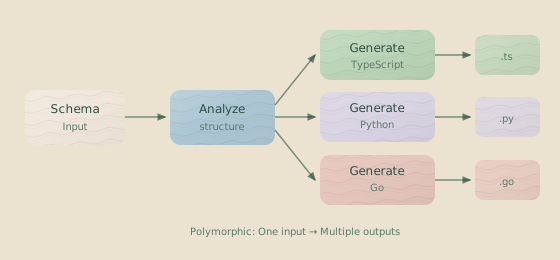
This pattern works in a sequence:
analyze-interface: A codon reads the target agent’s documentation and CLI interface to understand its structure.design-adapter: A codon designs the adapter’s code structure based on Hankweave’s internal requirements.generate: A codon in a loop generates the actual implementation code.test: Another codon in the loop runs the generated adapter’s self-test protocol.- Refinement Loop: The process iterates, refining the code until all tests pass.
Example Hank
{
  "hank": [
    {
      "id": "analyze-interface",
      "name": "Analyze Target Interface",
      "model": "haiku",
      "continuationMode": "fresh",
      "promptText": "Read the CLI documentation and extract the interface pattern...",
      "checkpointedFiles": ["analysis/*.md"]
    },
    {
      "id": "design-adapter",
      "name": "Design Adapter Structure",
      "model": "sonnet",
      "continuationMode": "fresh",
      "promptText": "Based on the analysis, design a shim that implements..."
    },
    {
      "type": "loop",
      "id": "implement-and-test",
      "terminateOn": { "type": "iterationLimit", "limit": 5 },
      "codons": [
        {
          "id": "generate",
          "name": "Generate Shim Code",
          "model": "sonnet",
          "continuationMode": "continue-previous"
        },
        {
          "id": "test",
          "name": "Run Self-Test",
          "model": "haiku",
          "continuationMode": "fresh",
          "rigSetup": [
            {
              "type": "command",
              "command": { "run": "node shim.mjs --self-test" }
            }
          ]
        }
      ]
    }
  ]
}
This is Hankweave’s most meta feature: using hanks to extend Hankweave itself.
Why it matters: You aren’t locked into the harnesses Hankweave ships with. New tools appear constantly; the polymorphic pattern lets you integrate them without waiting for official support.
Data Onboarding Pipelines
The “data codebook” pattern is our most battle-tested pipeline. It transforms raw, mixed-format datasets (CSVs, JSONs, etc.) into documented, typed, and annotated outputs.
The ‘Data Codebook’ Pattern
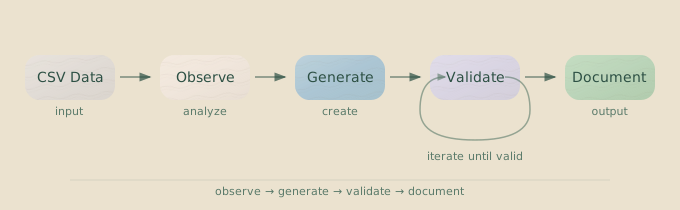
Why This Sequence Works
Each codon has a specific job, leveraging different models for their strengths:
| Stage | Model | Purpose |
|---|---|---|
| Observe | gemini | Read large files, extract patterns, note anomalies. |
| Schema | sonnet | Design strict Zod schemas from observations. |
| Enrich | gemini | Add context, relationships, and domain knowledge. |
| Annotate | sonnet | Add type annotations, validation rules, constraints. |
| Visualize | sonnet | Generate diagrams, charts, and type hierarchies. |
| Report | gemini | Compile everything into human-readable documentation. |
This sequence highlights a powerful strategy: use large-context models like Gemini for broad understanding (reading thousands of CSV rows) and precise models like Sonnet for tasks that require exactness (generating a flawless schema). The core pattern is: big context readers → precise reasoners → big context writers.
Using Sentinels for Observability
Sentinels make data pipelines observable. A “narrator” sentinel can provide a running commentary on the process, which is invaluable when processing datasets with hundreds of files.
{
  "id": "narrator",
  "model": "anthropic/claude-haiku-4-5",
  "trigger": {
    "type": "event",
    "on": ["tool.result"],
    "conditions": [{ "operator": "contains", "path": "name", "value": "file" }]
  },
  "execution": { "strategy": "debounce", "milliseconds": 5000 },
  "userPromptText": "Summarize what files were just processed: <%= JSON.stringify(it.events.map(e => e.data.name)) %>"
}
Code Generation Pipelines
The “research-design-implement” pattern handles complex code generation where a single prompt isn’t enough.
The ‘Research-Design-Implement’ Pattern
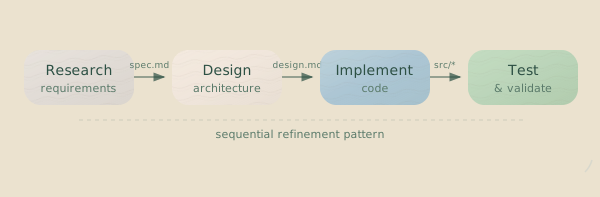
Multi-Model Orchestration
The key insight is to use expensive models for thinking and cheaper models for execution. Your bill will thank you.
- Use Opus for the design phase when you need genuine architectural reasoning.
- Use Sonnet for implementation, turning the design into code.
- Use Haiku for running tests and checking outputs.
{
  "hank": [
    {
      "id": "research",
      "model": "sonnet",
      "continuationMode": "fresh",
      "promptFile": "./prompts/research-codebase.md",
      "description": "Understand existing patterns"
    },
    {
      "id": "design",
      "model": "sonnet",
      "continuationMode": "fresh",
      "promptFile": "./prompts/design-architecture.md",
      "description": "Design the implementation"
    },
    {
      "type": "loop",
      "id": "implement-test-fix",
      "terminateOn": { "type": "iterationLimit", "limit": 3 },
      "codons": [
        {
          "id": "implement",
          "model": "sonnet",
          "continuationMode": "continue-previous"
        },
        {
          "id": "test",
          "model": "haiku",
          "continuationMode": "fresh",
          "rigSetup": [
            {
              "type": "command",
              "command": { "run": "npm test", "workingDirectory": "project" },
              "allowFailure": true
            }
          ]
        }
      ]
    }
  ]
}
Document Processing Pipelines
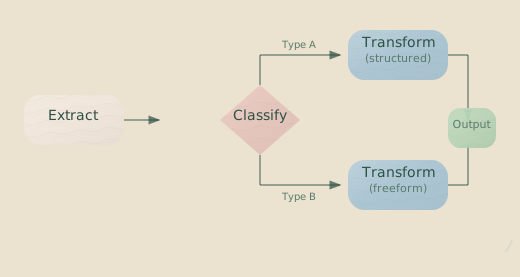
This pattern handles heterogeneous document inputs (e.g., PDFs, Word docs, images) where you don’t know the format in advance.
The ‘Extract-Classify-Transform’ Pattern
The sequence is: Extract → Classify → Transform → Validate → Format.
Handling Heterogeneous Inputs
The classification codon is crucial. It acts as a router, determining how to handle each document.
{
  "id": "classify",
  "model": "haiku",
  "continuationMode": "fresh",
  "promptText": "For each document in data/input/, determine its type (contract, invoice, report, unknown) and write a manifest to data/manifest.json mapping filenames to types."
}
Subsequent codons can then branch based on this manifest, applying different logic for invoices versus contracts.
Error Recovery
Documents fail. PDFs are corrupt, and CSVs have encoding issues. Build recovery into the pipeline to prevent a single bad file from halting the entire process.
{
  "type": "loop",
  "id": "process-documents",
  "terminateOn": { "type": "contextExceeded" },
  "codons": [
    {
      "id": "process-next",
      "model": "gemini",
      "continuationMode": "continue-previous",
      "promptText": "Process the next unprocessed document. If it fails, log the error to failed.txt and continue.",
      "checkpointedFiles": ["output/**/*", "failed.txt"]
    }
  ]
}
The contextExceeded termination condition allows the loop to process as many documents as the context window allows, then exit gracefully, saving all completed work.
Testing Harnesses
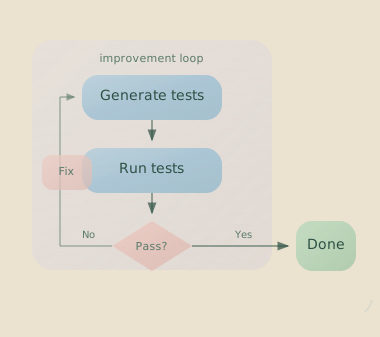
This pattern uses loops to generate tests, run them against existing code, and automatically fix failures until the entire suite passes.
The ‘Generate-Run-Fix’ Loop
Tracking Coverage with Sentinels
A sentinel can watch test runs and track coverage progress, giving you real-time visibility without requiring the main agent to parse test output.
{
  "id": "coverage-tracker",
  "model": "anthropic/claude-haiku-4-5",
  "trigger": {
    "type": "event",
    "on": ["tool.result"],
    "conditions": [
      { "operator": "equals", "path": "toolName", "value": "Bash" },
      { "operator": "contains", "path": "result", "value": "coverage" }
    ]
  },
  "execution": { "strategy": "immediate" },
  "output": {
    "file": "coverage-status.md"
  },
  "userPromptText": "Extract the coverage percentage from this test output and summarize: <%= it.events[0].data.result %>"
}
Defining a Stop Condition
Define clear termination criteria to prevent infinite loops. Five iterations is usually enough for test generation. If tests aren’t passing by the third iteration, the problem is likely in the prompt or rig setup, not the iteration count.
"terminateOn": {
  "type": "iterationLimit",
  "limit": 5
}
Design Pipelines
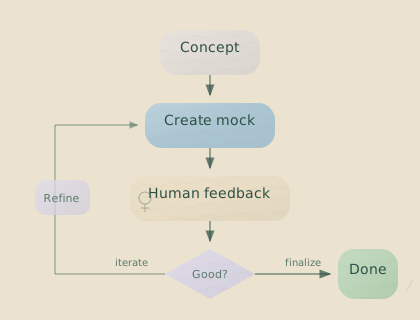
This pattern mixes models and tools to create unsupervised design workflows, turning a brief into finished assets.
The ‘Concept-Mock-Feedback’ Loop
Model Selection for Design
Different models bring different aesthetics and capabilities to a design task.
| Model | Strength | Use For |
|---|---|---|
| Claude Sonnet | Structured thinking | System design, component architecture |
| Gemini | High context, visual understanding | Analyzing references, feedback synthesis |
| Claude Opus | Deep reasoning | Complex layout decisions, design systems |
Core Techniques
These smaller patterns appear across nearly every production hank.
Schema-First Workflows
Define the output schema first, then generate content to match it. The schema becomes a contract that subsequent codons must fulfill, leading to reliable, structured outputs.
{
  "hank": [
    {
      "id": "define-schema",
      "name": "Define Output Schema",
      "model": "sonnet",
      "promptText": "Create a Zod schema in src/schema.ts that defines...",
      "checkpointedFiles": ["src/schema.ts"]
    },
    {
      "id": "generate-to-schema",
      "name": "Generate Matching Data",
      "model": "sonnet",
      "continuationMode": "fresh",
      "promptText": "Read src/schema.ts and generate data that validates against it..."
    }
  ]
}
Validation Loops
The “generate → validate → refine” loop is fundamental. The hank attempts to generate a valid output, a validation script checks it, and if it fails, the errors are fed back into the next generation attempt.
{
  "type": "loop",
  "id": "generate-validate",
  "terminateOn": { "type": "iterationLimit", "limit": 5 },
  "codons": [
    {
      "id": "generate",
      "model": "sonnet",
      "continuationMode": "continue-previous",
      "promptText": "Generate or refine the output based on previous validation errors..."
    },
    {
      "id": "validate",
      "model": "haiku",
      "continuationMode": "fresh",
      "rigSetup": [
        {
          "type": "command",
          "command": {
            "run": "npm run validate",
            "workingDirectory": "project"
          },
          "allowFailure": true
        }
      ]
    }
  ]
}Critical: Always set allowFailure: true on validation commands in loops.
Without it, a validation failure kills the loop instead of triggering the next
refinement iteration.
Multi-Model Composition
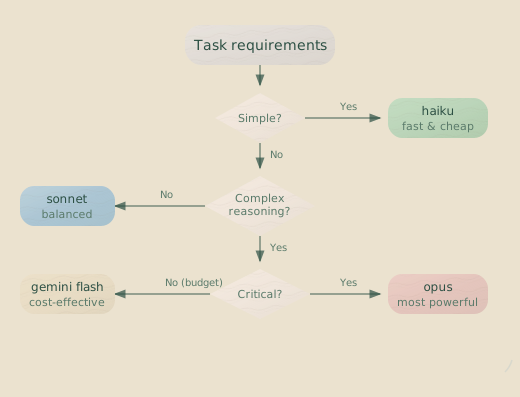
Choosing the right model for each task is key to building effective and cost-efficient hanks. This flowchart is a good starting point for deciding which model to use.
Sentinel Validation
You can validate a hank’s work in two ways: in real-time with sentinels or after the fact with a validation codon. The best approach depends on the task.
| Approach | Use When |
|---|---|
| Real-time sentinel | You need to catch issues as they happen (e.g., cost spikes, dangerous file operations). |
| Post-hoc validation | Final output quality is what matters; intermediate failures are acceptable. |
| Both | For mission-critical workflows where you cannot afford either type of failure. |
Bootstrapping with Templates
Don’t make the agent generate boilerplate from scratch. Pre-bake project structures like TypeScript configs, ESLint rules, and folder layouts into templates. Use the rig to copy the template, then let the agent fill in the unique parts.
{
  "rigSetup": [
    {
      "type": "copy",
      "copy": {
        "from": "./templates/typescript-project",
        "to": "project"
      }
    },
    {
      "type": "command",
      "command": {
        "run": "bun install",
        "workingDirectory": "lastCopied"
      }
    }
  ]
}
Anti-Patterns to Avoid
These patterns seem reasonable at first but cause problems in production.
Monolithic Codons
The Problem: A single codon tries to do everything. This makes debugging difficult and context management unreliable.
{
  "id": "do-everything",
  "promptText": "Read the data, design a schema, implement the validators, write tests, run them, fix any failures, then generate documentation."
}
The Solution: Split responsibilities. Each codon should have one job. Multiple small, focused codons are easier to debug and maintain than one large, complex one.
Excessive Continuation
The Problem: Using "continuationMode": "continue-previous" for every codon. Context accumulates until the model gets confused, paying attention to details from early steps that are no longer relevant.
The Solution: Use "continuationMode": "fresh" at natural breakpoints in the workflow. When one codon produces files that the next one needs to read, that’s a good time to start fresh.
Under-Specified Rigs
The Problem: Rigs that make too many assumptions about the environment (e.g., that npm is installed or a package.json exists).
{
  "rigSetup": [{ "type": "command", "command": { "run": "npm install" } }]
}
The Solution: Be explicit. Copy complete templates, use full paths, and set allowFailure: true on commands that might fail under normal conditions.
Flying Blind (No Sentinels)
The Problem: Running expensive, long-lived hanks without any visibility. You wait 20 minutes only to discover the process went off the rails in the first three.
The Solution: Add at least two sentinels to any non-trivial hank: a narrator to report on progress and a cost tracker to alert you to spending spikes. They cost almost nothing and save hours of debugging.
Ignoring Cost Signals
The Problem: Not monitoring token usage until the bill arrives.
The Solution: Use token.usage events and a cost-tracking sentinel to get real-time feedback on expenses.
{
  "id": "cost-alert",
  "model": "anthropic/claude-haiku-4-5",
  "trigger": { "type": "event", "on": ["token.usage"] },
  "execution": { "strategy": "count", "threshold": 10 },
  "userPromptText": "Check if total cost exceeds $5. If so, output WARNING.\n\n<%= JSON.stringify(it.events, null, 2) %>"
}
Putting It Together
The best hanks combine multiple patterns into a robust architecture.
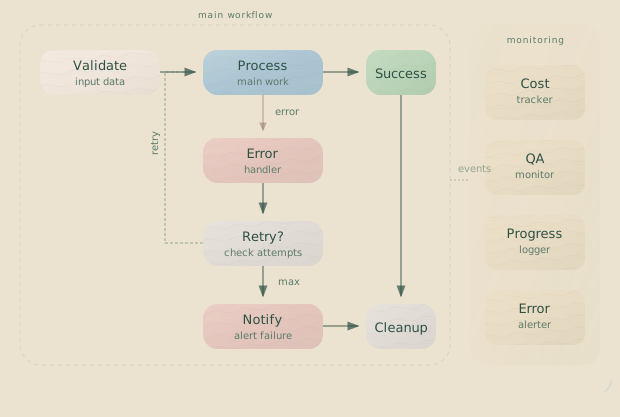
- Rigs provide consistent starting conditions using templates.
- Observation uses cheap models to understand the problem space.
- Design uses more capable models for architecture and planning.
- Implementation loops use tests and validation to converge on a working solution.
- Sentinels provide visibility and control without interrupting the main workflow.
This is the architecture that works. Start here, then customize it for your specific task.
Related Pages
- Building a Hank — A step-by-step tutorial.
- Advanced Patterns — Deep dives into specific techniques.
- Sentinels — Understanding the parallel observation system.
- Configuration Reference — The complete field reference.
Next Steps
Now that you’ve seen what’s possible, pick an approach that fits your work.
- If you’re processing data, start with the data codebook pattern.
- If you’re generating code, start with the code generation pipeline.
- If you’re building tool adapters, use the polymorphic connector pattern.
These patterns are effective because they’ve been refined through real-world use. Adapt them to your needs, but resist over-engineering your first attempt. Start simple and add complexity only when you need it. That’s how good hanks are built.