# Discover the workflow before you freeze a hank
A hank is a frozen workflow. Freezing one well means knowing what the workflow actually is: which prompts produced good output, what information the agent needed but lacked, and where one task should end and the next begin. None of that is visible from a blank `hank.json`. It becomes visible when you do the task with a coding agent and pay attention to what happens.
This page walks through that process in the order you will do it: run the task until it works, study what the session needed, sketch a structure, freeze the smallest working piece, and iterate until the run no longer needs you watching it. By the end you will have a validated hank built from evidence rather than guesses, plus a clear signal for when to stop adding to it.
## Start with the coding agent, not the hank file
Work with a coding agent until something works, observe what helped, freeze it into structure, and iterate. We discover the workflow before we decide how to preserve it.
Think of Hankweave as amber and the working workflow as the mosquito: what matters is the information we preserve. A useful sequence of operations, a prompt that gets good results, or a clarification that prevents a wrong turn can otherwise disappear with the conversation. A **hank** gives those discoveries a form we can share, run again, and improve together. Preserving the workflow does not make every future model response identical.
The loop looks like this, and it repeats as often as needed:
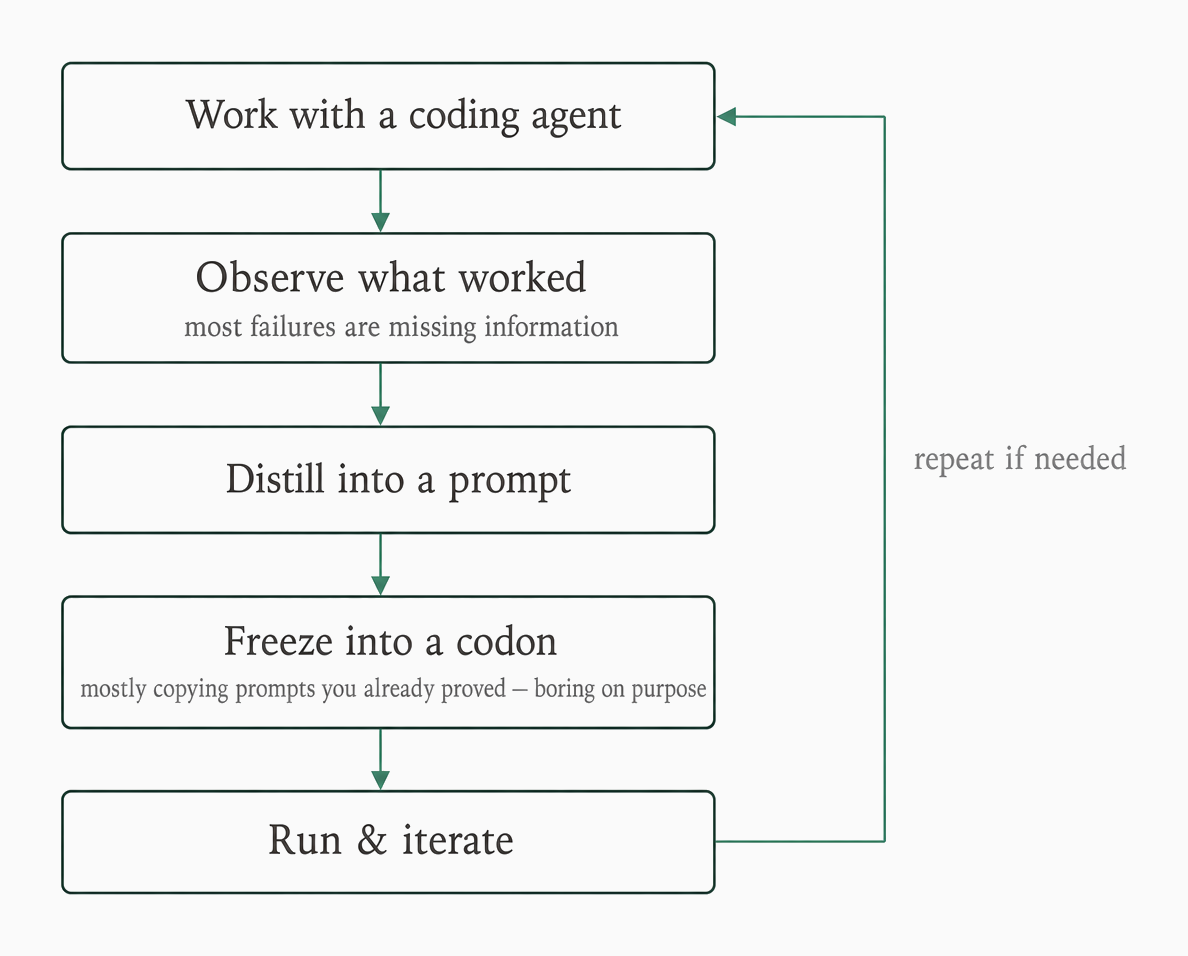
CCEPL loop
Diagram as text
```text
Work with a coding agent
|
v
Observe what worked
most failures are missing information
|
v
Distill into a prompt
|
v
Freeze into a codon
mostly copying prompts you already proved — boring on purpose
|
v
Run & iterate
|
+-------- repeat if needed -------->
Work with a coding agent
```
This practice has a name: **CCEPL**, the [Claude Code Eval Print Loop](https://www.southbridge.ai/blog/ccepl-driven-development). It works with any coding agent; the name stuck. The acronym names the practice, not an extra stage in the loop.
The original CCEPL practice starts with a folder containing `process.md` and `workspace/`. Load `process.md` into the agent. When the task fails, route missing documentation or fragile code to `workspace/`, and route direction or instruction problems to `process.md`. Restart the agent after the fix. When the work is done, write a `hank.json` that links those two artifacts.
Two terms carry the rest of this page. A **codon** is the smallest working piece you freeze: one sealed agent task in the sequence. A checkpoint **seals** the files a later codon needs to carry forward. Freezing a codon is mostly copying prompts you already proved in a session–boring on purpose; designing checkpoint boundaries is the thinking part.
If you are still deciding whether to write a hank or keep working interactively, start with [whether Hankweave is right for you](/0.10.0/files/start/is-it-right-for-you). The rest of this page assumes you have a workflow you want to use again.
## Do the task until it works
Do not start by writing a hank. Do the task yourself with a coding agent and ignore structure while you explore. You cannot freeze something that does not exist, and a hank encoding an undiscovered workflow is a guess.
For repeat work, do the task two or three times when possible. Each pass surfaces prompts that worked, information you had to supply, and where the agent went wrong. Those observations become the hank's structure in the later steps.
While you explore, track problems instead of TODOs. Ask, "Where does data come from?" and "What output does the user need?" A sequential TODO list linearizes interdependent tasks and becomes fragile when one task depends on another.
For a simpler task, use this named pattern; the fence is a label, not a command:
```text
Just Do It First
```
1. Do the task directly, as a coding agent normally would.
2. See the process, the decisions, and the outputs.
3. If it worked well, freeze it into a hank.
4. Base the hank on real experience, not speculation.
This catches one-off tasks that do not need hank complexity. If you are unsure whether the task is repeat work at all, decide that in [whether Hankweave is right for you](/0.10.0/files/start/is-it-right-for-you) before continuing here.
The anchor hank's first attempt shows why the direct pass matters. It was written against the corpus specification without first trying the real data. Rig paths, a richer corpus than the plan, budget sizing, and hazard rules all needed attention once it ran. A specification describes intent; a session reveals the work.
**Check-it:** Review your exploration notes and list the prompts that worked, information you supplied, wrong turns, and problems you saw. If the list contains assumptions you have not tested, do another direct pass before freezing them.
## Observe what the session needed
Once something works, stop and look at what happened before you freeze anything. Three questions turn a transcript into design decisions.
**What did the agent need to know?** Go through the conversation. Every time you provided information–context, constraints, preferences, clarifications–that is something the agent needed but did not have.
The most common failure class when an agent goes wrong is an information failure, not an intelligence failure: it did not know one of your preferences and made a judgment call in a different direction. It used Python instead of TypeScript, structured code differently, or chose a different library. These are failures of information, not intelligence, and they are the failures a hank can actually prevent.
**What did the agent do that you could have given it?** Did it write a setup script? You could provide one. Did it figure out an API? You could give it documentation. Anything the agent had to figure out is a source of variance.
At freeze time, decide whether to make deterministic work a rig–a script for setup that needs no judgment–or prompt content for work that needs judgment.
**Where are the natural breakpoints?** If you were handing this off to someone else, where would you draw the line? "I'll do research, you implement." "I'll set up, you code." These handoff points are where codon boundaries probably should be.
Use the [boundary checklist](/0.10.0/files/author/designing-codons-and-handoffs) to weigh model tier, failure policy, and whether a person needs to inspect the intermediate artifact.
Observation also catches failures that a successful-looking transcript hides. One observed attempt ended "success" after 15k tokens of thinking but wrote no file. The next attempt required the agent to create a skeleton first, write in increments, and verify the file before finishing. That protocol came from the failure; it would have been difficult to predict from a blank hank file.
**Check-it:** Find the first failed attempt in your session notes and state what information or verification was missing. Decide whether the fix belongs in a prompt, a rig, or a prerequisite check.
## Sketch the skeleton before any prompt
The observations from the last step need a shape before they become prompts. Sketch the overall structure in a planning document with four sections: **Input**, **Phases**, **Key Decisions**, and **Open Questions**. Mark every phase tight or loose to record how much freedom it gets, and record model-tier choices under Key Decisions.
A worked sketch can look like this:
```markdown
# Code Review Hank - Structure
## Input to collect
- Code to review
## Phases to run
1. **Analyze** (tight) - Categorize files and identify entry points
2. **Deep Review** (loose) - Explore and follow useful threads
3. **Synthesize** (tight) - Generate a structured report
4. **Refine Loop** (2-3 iterations) - Use fresh context each time
## Key Decisions to record
- Use a lower-cost model for structured analysis
- Reserve a stronger model for synthesis when the pilot shows it helps
## Open Questions to resolve
- What still needs an answer before the prompts are written?
```
Notice that the sketch names inputs and decisions without writing any prompt text. That is the point: with the skeleton on paper, we can check dependencies and decide where tight or loose constraints fit before writing the details. It also leaves our decisions available to the next person who changes the hank. For tight-versus-loose semantics and codon-weight estimation, see [designing codons and handoffs](/0.10.0/files/author/designing-codons-and-handoffs).
Then test the sketch against the work you actually observed. The anchor hank began with three supplier-normalization steps. A live pass found five more native exports and one unmatched Granite intake, so the plan gained `survey-and-extracts` instead of stretching an existing prompt to hide the extra work.
That new codon draws a useful boundary. Its `native-inputs.ts` rig parses the five recognized exports and creates an incomplete intake survey. The model reviews only the unmatched file and records the quarantine decision. `survey-notes.json` and the five generated envelopes make the handoff inspectable, and `bun pipeline/native-inputs.ts --check` verifies the generated envelopes and complete intake coverage before validation proceeds.
The result is the current seven-codon hank: five codons use Haiku, and two judgment codons use `pi/baseten/deepseek-ai/DeepSeek-V4-Pro`. Here is the added codon as shipped; note how the rig setup, retry policy, budget, and checkpointed files each correspond to a decision from the sketch:
```json
{
"id": "survey-and-extracts",
"name": "Prepare native exports and review raw intake",
"model": "haiku",
"continuationMode": "fresh",
"promptFile": "./prompts/survey-and-extracts.md",
"rigSetup": [
{
"type": "copy",
"copy": {
"from": "rigs/native-inputs.ts",
"to": "pipeline/native-inputs.ts"
}
},
{
"type": "command",
"command": {
"run": "bun pipeline/native-inputs.ts"
}
}
],
"onFailure": "retry",
"retryConfig": {
"maxAttempts": 3,
"delayMs": 20000,
"maxDelayMs": 120000
},
"budget": {
"maxDollars": 1.5,
"maxTimeSeconds": 1800,
"onExceeded": "complete"
},
"checkpointedFiles": [
"envelope-dover.json",
"envelope-embar.json",
"envelope-fjord.json",
"envelope-harbor.json",
"envelope-iris.json",
"survey-notes.json"
],
```
The word "mechanical" describes the decisions assigned to a normalization codon; it does not make model extraction infallible. A model can still misread a value, omit a field, or fail to write its file. The current three normalization codons therefore use `onFailure: "abort"` and `onExceeded: "fail"`. The survey codon uses `onExceeded: "complete"` only because interrupted output may be preserved for inspection and is checked before downstream use. A cap does not grant the model more time to finish; the runtime requests interruption first, then records the outcome selected by `onExceeded`.
The fixture's [historical design notes](/content-assets/cf45dff5691c48c0/fixtures/0.10.0/files/anchor-hank/design-notes.md) remain available if you want to see the earlier plan. Treat them as an iteration record, not as the current contract.
**Check-it:** For every phase in your planning document, name its input, output, tight-or-loose constraint, and verification step. Confirm that the document still has Input, Phases, Key Decisions, and Open Questions.
## Freeze the smallest working piece
With a tested sketch in hand, freeze the smallest thing that works: one codon, one prompt, and a basic rig. Do not anticipate every case; you do not know what will break until you run it.
A **rig** is a script for deterministic setup or other work that does not need judgment. Keep the rig and the checkpoint small at first.
Before spending tokens on a run, validate the hank:
```bash
bunx hankweave@0.10.0 ./hank.json ./task-data --validate
```
At 0.10.0, `--validate` hashes the input, resolves and validates the configuration, and performs harness setup, credential, and model-catalog checks. Its provider registry disables provider health checks for this command, and validation does not execute a codon or make a model-generation self-test. It may add `$schema` to the hank and writes a temporary validation log. It is not a universal offline or connectivity guarantee: Bedrock credential discovery can probe instance metadata. Runtime startup health checks are separate and can make provider calls.
A passing validation prints a `GOOD TO RUN!` box summarizing what the hank contains:
```text
╭─ GOOD TO RUN! ─────────────────────────────────────────────────────╮
│ 1 codons • 1 prompts • 0 system prompts • 0 rigs • 1 checkpoints │
╰────────────────────────────────────────────────────────────────────╯
```
The captured minimal run recorded actual service output and a tracked codon cost of `$0.01394590`; provider health checks and sentinel calls are separate. See [the quickstart](/0.10.0/files/start/quickstart#check-the-run-before-spending) for the full cost explanation.
When you write the prompt itself, prefer a single-shot prompt to freezing only the final turn of a multi-turn transcript. If you freeze a prompt-response-correction conversation as that final turn, you lose the correction turns, so the codon lacks part of the information it needed.
Place each discovered piece of knowledge in its natural home:
* **Global system prompt:** what every codon needs.
* **Codon system prompts:** conventions shared by some codons.
* **Codon prompts:** situation-specific steps and the growing guidelines block.
* **Rigs:** scripts born in the session.
* **Prerequisite checks:** environment expectations that should fail early.
Put deterministic work in rigs and judgment work in prompts. See [rigs](/0.10.0/files/concepts/rigs) for the setup contract.
Build incrementally from there. Make codon 1 work, then add codon 2 and run both. When the new codon needs outputs you have already verified, stage those files in a named execution's `agentRoot/` and start a fresh run against the same hank and data:
```bash
mkdir -p ./incremental-exec/agentRoot
cp envelope-aster.json ./incremental-exec/agentRoot/
bunx hankweave@0.10.0 ./hank.json ./task-data --execution ./incremental-exec --start-new --force --no-wipe
```
This example names the hank (`./hank.json`), prepared data (`./task-data`), and execution (`./incremental-exec`). `--no-wipe` is intentional: with an explicitly selected execution, `--start-new --force` backs up existing `.hankweave/` state, while `--no-wipe` retains the staged `agentRoot/` files. Without `--execution`, `--start-new` creates a new managed directory; it does not select or wipe the previous workspace. Otherwise, resume the recorded execution instead of expecting a new codon list to re-plan it automatically. Use the [minimal-valid first file](/0.10.0/files/tutorial/1-baseline) when you need the first valid `hank.json`.
> **VersionNote:** Changed in 0.10.0: frozen `promptFile` and rig `copy.from` references must be portable relative paths using `/` separators inside the hank directory. Absolute paths, `..` escapes, and symlinks are rejected during validation; a hank that passed on 0.9.x can fail now. See [the path/ref contract](/0.10.0/files/reference/hank-json#the-pathref-contract-r1--r2--r3).
**Check-it:** Run validation and confirm that the output includes `GOOD TO RUN!` and reports `1 codons • 1 prompts • 0 system prompts • 0 rigs • 1 checkpoints`.
## Iterate to the Control-C point, then stop
A frozen codon is a hypothesis. Running it tells you whether the hypothesis holds, and the first runs usually fail. When they do, diagnose the symptom rather than adding structure at random:
| Symptom | Likely cause | Fix |
| ----------------------- | ----------------------- | ----------------------------- |
| Rig errors | Setup did not work | Improve the rig |
| Agent confusion | Codon is doing too much | Split it into multiple codons |
| Wrong output | Prompt is unclear | Revise the prompt |
| Different from expected | Missing preferences | Add them explicitly |
Each fix moves the **Control-C point**: the moment when you watch a run and want to stop it. As you iterate, that point should move further out: the first run may reach it at 30 seconds, the second at 2 minutes, and the third at 5 minutes. When you can let the codon complete without intervention, it is frozen enough.
A codon is done when it completes reliably, finishes within context, leaves clean logs, and lets you walk away. It is not done when it works only sometimes, needs intervention, or does something you do not understand.
Add complexity only when evidence calls for it: a consistent failure or a clear missing step. Stop when the codon works reliably or when you are adding protection for a problem you have not seen. When in doubt, stop; more can be added later.
> **Pitfall:** The instinct to cover every possible case at freeze time creates an unmaintainable hank. Prefer the 3-codon version you would hand to a competent colleague over a 33-codon hank that handles every sub-task.
Iteration means running, and running has a few mechanics worth knowing before you start. Run from the directory containing the hank and pass the data directory as the positional argument. Hankweave mounts that directory under `read_only_data_source/` inside the execution directory, so prompts use `read_only_data_source/...` paths regardless of the corpus's real location. The `read_only` name is semantic; the runtime symlinks or copies the data and does not provide OS-level write protection.
Each run creates a managed execution directory under `~/.hankweave-executions/`. Its state is at `/.hankweave/state.json`, and its event journal is at `/.hankweave/events/events.jsonl`. For output-directory behavior, use the [runbook](/0.10.0/files/operate/runbook).
During a learning run, the headless console is quiet while codons run. Monitor files in `agentRoot/` and `events.jsonl`. Each completed codon emits a `codon.completed` event like this one from the captured journal:
```text
{"id": "", "timestamp": "", "type": "codon.completed", "data": {"codonId": "summarize-notes", "success": true, "cost":"", "duration":"", "exitStatus": {"type": "success"}}}
```
The run closes with a `RunCompleted` transition. The headless console prints nothing after `➜ Listening on`; `first-run.txt` ends at `exit=0`, while `[] [INFO] Shutdown: all codons completed (exit code: 0)` appears only in `.hankweave/logs/server.log`.
A hank can pass validation and still fail before its first codon when a required key is missing. The startup self-test reports `authentication: No authentication found (set ANTHROPIC_API_KEY)` before any codon runs. See the [quickstart failure step](/0.10.0/files/start/quickstart#break-it-on-purpose) for that expected capture.
Budget caps deserve the same evidence-based treatment as codon structure. Size freeze-time budget caps at least twice your estimate for expensive codons; an estimate-equal cap can interrupt work after you have already paid for model output. When any cap trips, the runtime requests interruption. `onExceeded: "complete"` then records the codon as completed, while `onExceeded: "fail"` records a failure. Neither policy gives the model extra reasoning time.
Choose `complete` only when partial output is useful and an explicit check protects downstream work. In the anchor, `survey-and-extracts` can preserve an interrupted survey, but `bun pipeline/native-inputs.ts --check` must verify complete coverage before `validate-and-repair` begins. `reconcile` uses `fail` because a truncated 40-row table must not pass as complete. See [what happens when a cap trips](/0.10.0/files/concepts/budgets#what-does-a-cap-do-after-work) for the full policy.
When every codon is past its Control-C point, the hank graduates to [testing and hardening](/0.10.0/files/author/testing-and-hardening), then to [maturing and versioning](/0.10.0/files/author/maturing-and-versioning).
**Check-it:** Let a full run complete without intervention. Confirm one `codon.completed` event per codon and a closing `RunCompleted` transition in `events.jsonl`. Use the captured journal line above for the completion observable; the headless console's shutdown wording is not part of that capture.