# Keep context useful across codons
Every codon in a run pays for its context twice: once in tokens, and again in the risk that a long, stale conversation steers the model wrong. This page is about controlling both. It covers how to hand results from one codon to the next without passing session history, when accumulating context is the right call instead, how to structure work that is bigger than one context window, and how to keep loop iterations from contaminating each other's workspaces.
The running example is the anchor hank, a seven-codon supplier-evaluation pipeline whose codons all start fresh and communicate entirely through files.
## When long contexts rot
As a conversation grows, we need to keep asking what the next task actually needs from it. **Worldline rot** is the slow erosion of meaning across a long context window: prompts bloat, tool output piles up uncollapsed, and the model that compacts the session carries the longest history without a useful anchor. For the full failure-mode framing, see [Why Hankweave](/0.10.0/files/start/why-hankweave).
Treat context as a run resource. A **[hank](/0.10.0/files/concepts/hanks)** is the configured sequence of **[codons](/0.10.0/files/concepts/codons)** a run executes; a codon is one sealed agent task in that sequence. Every token an agent has seen is paid for again on each later call, so cutting context is a correctness decision as well as a cost decision. No numeric cost estimate is implied.
The default response is the **goldfish doctrine**: make most codons `fresh`, so each task starts without its predecessor's session and runs from files instead. Keep a long horizon only for the reporting codon, and make it re-read settled files from disk. Files are ground truth; conversation history is a probabilistic summary of files already written down. "Worldline rot" and "goldfish doctrine" are names for these rules, not runtime objects.
The sections below apply the doctrine in order of increasing scope: a single handoff between two codons, the cases where accumulation beats freshness, work too large for any one window, and loops that must not leak state between iterations.
## Passing understanding without passing history
When the next codon needs the previous result, write a focused handoff file instead of passing the conversation. A **context bridge** states who reads it, what that reader will and will not see, decisions and their reasons, constraints, open questions, and confidence. Mark uncertainty as `[UNCERTAIN: reason]`; leave out exploration logs, failed attempts, and dead ends. The file carries the understanding; the session that produced it is discarded.
Building a bridge takes three steps:
1. Write the handoff from codon 1 into `agentRoot/`, the shared workspace.
2. List it in codon 1's `checkpointedFiles`. This causes the file to be watched, streamed to the client, tracked in the git-based checkpoint system (a saved rollback record), and sealed into the checkpoint for rollback.
3. Start codon 2 as `fresh` and read the file directly from `agentRoot/`. Execution setup creates `agentRoot/` once and uses it as the working directory for every agent process in the run. A `fresh` codon shares no session with codon 1, but the file remains at the same relative path.
One mechanism does not work here: do not add a copy rig for a prior codon's output. A **rig** is setup work that executes before a codon starts. Its `copy.from` path resolves inside the hank directory, not in `agentRoot/`, so it can reach a shipped hank file but not the previous codon's workspace output. Portable relative paths are accepted; absolute paths, `..` escapes, and symlinks are rejected. If the source is absent, the rig fails and the codon never starts unless `allowFailure: true`. See the [hank JSON path contract](/0.10.0/files/reference/hank-json#the-pathref-contract-r1--r2--r3).
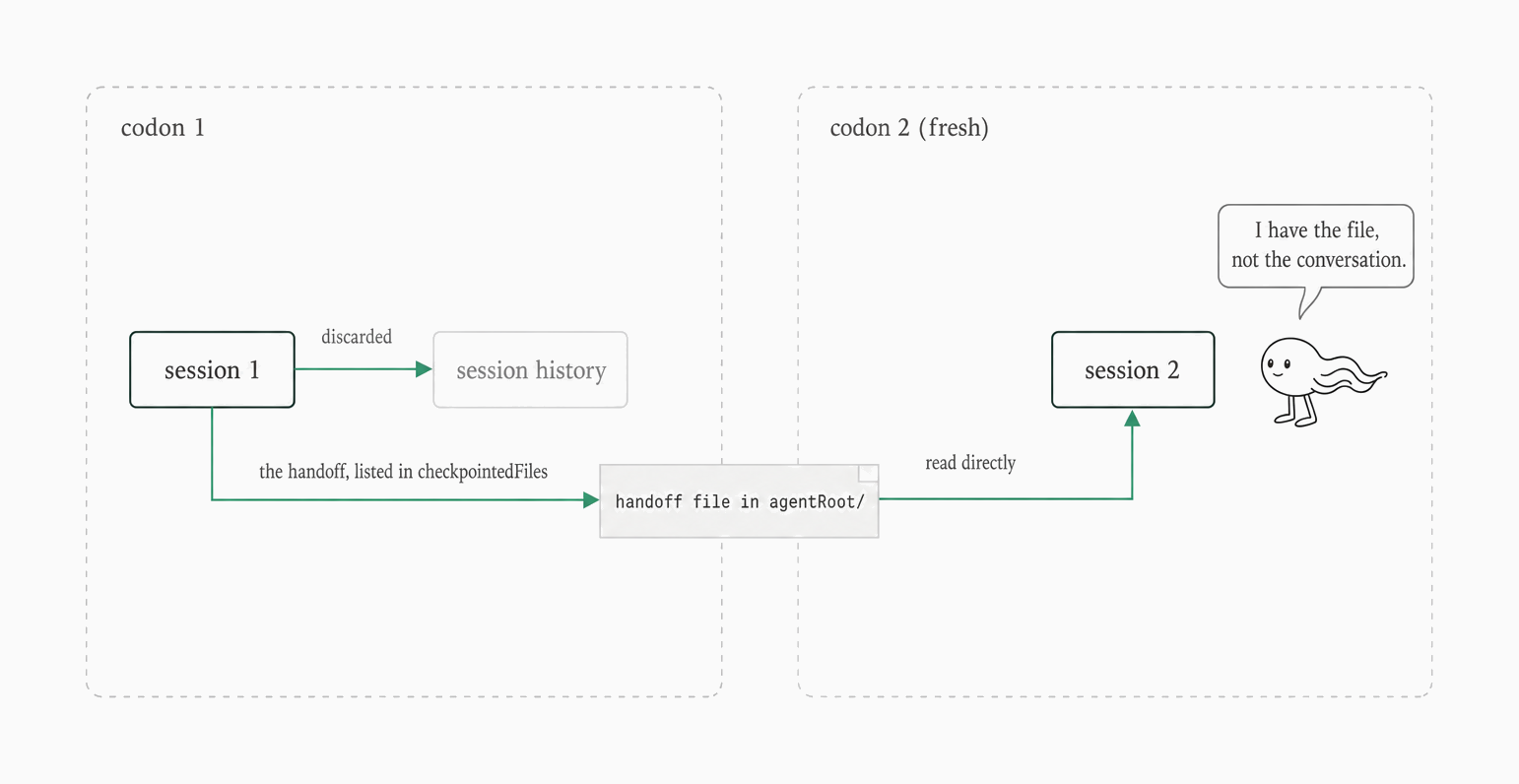
Context bridge handoff between fresh codons via shared workspace
Diagram as text
```text
+-- codon 1 ---------------------------------------+ +-- codon 2 (fresh) ------+
| | | |
| +-----------+ discarded +-----------------+ | | |
| | session 1 |-------------->| session history | | | |
| +-----+-----+ +-----------------+ | | |
| | the handoff, listed in checkpointedFiles | | |
| v | | |
| +---------------------------+ read directly | | +-----------+ |
| | handoff file in agentRoot/ |------------------+-------->| session 2 | |
| +---------------------------+ | | +-----------+ |
+--------------------------------------------------+ +-------------------------+
```
Because a `fresh` codon shares no session with its predecessor, the bridge also works across model switches. `continue-previous` with a different model is a hard load error; use the file bridge instead. For accumulation rules, see [codon concepts](/0.10.0/files/concepts/codons).
The anchor hank shows the pattern end to end. All seven codons use `fresh`, and no copy rig carries a prior codon's output. The hank fragment below shows two of them: each declares `continuationMode: "fresh"` and seals its handoff files with `checkpointedFiles`.
```json
"id": "normalize-aster",
"name": "Normalize Aster (Datalab dialect)",
"continuationMode": "fresh",
…
"checkpointedFiles": [
"envelope-aster.json"
],
…
"id": "validate-and-repair",
"name": "Validate & Repair Envelopes",
"continuationMode": "fresh",
…
"checkpointedFiles": [
"validated-records.json",
"exception-ledger.json"
],
```
The downstream side of the bridge is just an ordinary file read. The validation codon's prompt points it at the normalized files in the current directory, which is the workspace path used by the run:
```text
…
From the current directory (written by the three normalize codons and survey-and-extracts):
- `envelope-aster.json` — a JSON array of **two** envelope objects (Aster's original submission and its rev2 re-submission).
- `envelope-beacon.json` — a JSON array of **one** envelope object.
- `envelope-cedar.json` — a JSON array of **one** envelope object.
- `envelope-dover.json`, `envelope-embar.json`, `envelope-fjord.json`, `envelope-harbor.json`, `envelope-iris.json` — one envelope array each (native extracts, normalized).
- `survey-notes.json` — the raw-intake survey; carry every `quarantined` entry into the exception ledger as type `UNKNOWN_TEMPLATE` (quarantine is a success path — zero rows, onboarding note).
```
The same rule holds for a codon whose job is reporting: stay `fresh` and re-read settled files instead of carrying a long conversation. In the anchor, `award-brief` makes no new judgment calls and reads `unified-records.csv` and `exception-ledger.json` from the current directory:
```text
Complete only the qualitative assessment in the generated `award-brief.md`. Every claim must already be settled by `unified-records.csv` or `exception-ledger.json`; make no new judgment calls. Setup has rendered the financial section with `pipeline/render-award.ts` and rendered `exceptions.csv` losslessly from the ledger. Do not edit the generated financial section, CSV files, ledger, reconciled records, or rig scripts.
…
From the current directory:
- `unified-records.csv` — 40 data rows (8 suppliers × 5 BOM parts; 41 CSV rows including the header).
- `exception-ledger.json` — the full exception ledger from `validate-and-repair` and `reconcile`.
```
**Check-it:** After running the anchor hank, verify that `validate-and-repair` produces `validated-records.json` and `exception-ledger.json`. The captured expected outputs cover those two files; the check is about the files produced by the codon, not a sentinel completion-event log.
> **Pitfall:** Do not bridge with a copy rig. `copy.from` resolves inside the hank directory, so it copies a shipped file or fails the rig; the prior codon's file is already in `agentRoot/`.
## When to accumulate instead
Freshness is the default, not a rule. Choose `continue-previous` when the next codon refines the same artifact, needs intermediate attempts for multi-step reasoning, or answers a conversational follow-up such as "now fix what you wrote." Keep the same model as the previous codon.
Accumulation has its own load constraints–a successful predecessor, `contextExceeded` loops, and `exhaustWithPrompt`–covered in [codon concepts](/0.10.0/files/concepts/codons). A conversational **sentinel** is a configured observer, not a third way to carry codon context; see [sentinels](/0.10.0/files/concepts/sentinels) and [sentinel configuration](/0.10.0/files/reference/sentinel-config).
## When the work is bigger than the window
Some jobs do not fit in one context window no matter how the context is managed. Do not rely on silent compaction–the automatic shortening of a conversation–to rescue them. Since 0.8.0, compaction is off by default: a codon that overruns the context window fails with the provider's context-overflow error. Design the hank around the window.
> **VersionNote:** Since 0.8.0, compaction is off by default. A large-context hank that relied on automatic compaction fails at the window unless it is designed around that limit or opts into `autoCompact: true`; see [codon concepts](/0.10.0/files/concepts/codons).
Three patterns cover most of these jobs:
* **Chunked processing with aggregation:** Have an inventory codon list the work in a file. An `iterationLimit` loop processes the next batch on each iteration and appends findings to an accumulation file. A synthesis codon reads the aggregated findings, never the raw corpus. Use `iterationLimit`, not a `contextExceeded` loop with a `fresh` body codon: that pairing fails at load time; see [loop concepts](/0.10.0/files/concepts/loops).
* **Map-reduce:** Put each item in a `fresh` codon inside an `iterationLimit` loop. Have each codon write a small summary and archive it with `archiveOnSuccess`. A reduce codon reads those summaries from `rigArchive/` rather than the raw documents. Each item is isolated, unlike the accumulating chunked loop.
* **Hierarchical summarization:** For a very large corpus, summarize in layers: file summaries, section summaries, then an executive synthesis. Each layer compresses the material before the final codon reads it.
These patterns compose. A rig can pre-compile many files into one input before processing begins. Pointers plus agent search are a more thorough but costlier alternative to chunking. A research codon followed by a work codon has the map-then-reduce shape.
Model choice is part of the design too. Use cheaper model tiers for mechanical per-chunk work and a more capable tier for synthesis; see [hank concepts](/0.10.0/files/concepts/hanks). In the anchor, five `haiku` codons handle mechanical extraction or rendering, while `validate-and-repair` and `reconcile` use `pi/baseten/deepseek-ai/DeepSeek-V4-Pro` for judgment work.
When using the anchor's fixture counts as checks rather than as pattern requirements, distinguish the full run from the smaller ch4 checkpoint: the full anchor processes eight suppliers × five BOM parts, or 40 data rows, and its CSV has 41 lines including the header. The ch4 checkpoint intentionally emits 15 data rows. GRN is quarantined in the exception ledger, not counted as a ninth quoting supplier.
**Check-it:** Validate a loop pairing `terminateOn: contextExceeded` with a `fresh` codon. Validation fails at load with the captured diagnostic; the `continue-previous` variant validates as good to run. The two captures below show both outcomes.
```text
Validation failed: Loop 1 (bad-loop): Loop with contextExceeded termination cannot contain codons with continuationMode "fresh". Codon "step" (step) has continuationMode "fresh", which would prevent context from building up and cause an infinite loop. Change to "continue-previous" to allow context to accumulate.
```
```text
✓ Configuration is valid!
…
╭─ GOOD TO RUN! ─────────────────────────────────────────────────────╮
│ 1 codons • 0 prompts • 0 system prompts • 0 rigs • 0 checkpoints │
╰────────────────────────────────────────────────────────────────────╯
```
## Archiving loop workspaces between iterations
Loops raise a related problem: each iteration should start from a clean workspace, and its completed work should be put somewhere the next iteration will not trip over it. `archiveOnSuccess` is the mechanism. It is a codon-level list of file globs relative to `agentRoot/`; absolute paths and `..` spellings are rejected at load. On successful completion, matching files move to `rigArchive/` by being copied and then deleted from the workspace.
Before each iteration runs, use `rigSetup` to copy a template into the clean workspace. This is different from the bridge: it creates a clean loop workspace instead of importing a prior codon's output. Archive a completed iteration when its codon succeeds; a loop-level `archiveOnSuccess` takes effect once when the loop terminates. Compute once, archive, and continue so an iteration does not see another iteration's intermediate files.
The full three-variant archive path table–non-loop, loop-codon, and loop-level–is in [execution directory](/0.10.0/files/reference/execution-directory#how-rigarchive-is-organized). The shorthand is:
* a non-loop codon: `rigArchive//`;
* a codon inside a loop: `rigArchive/-/-/`; runtime IDs such as `edit#0` become `edit-0`;
* a loop-level archive: `rigArchive/-loop/`.
The archive is a sibling of `agentRoot`. From an `agentRoot` shell command, a copy-back source therefore starts with `../rigArchive/`; this shell path is not a `copy.from` rig path and is not subject to that rig-path validation. The hank fragment below puts the pieces together: the `edit` codon's setup restores the previous iteration's archive into a clean `current-project/` directory, and `archiveOnSuccess: ["current-project/**"]` moves the finished work out again. The result is `rigArchive/revise-0/edit-0/current-project/` and `rigArchive/revise-1/edit-1/current-project/`, with `agentRoot/current-project/` absent after each successful archive.
```json
"id": "edit",
"name": "Edit current-project",
"model": "deepseek-v4-flash",
"continuationMode": "fresh",
…
"run": "mkdir -p current-project && if [ -d ../rigArchive/revise-0/edit-0/current-project ]; then cp -R ../rigArchive/revise-0/edit-0/current-project/. current-project/; fi"
…
"archiveOnSuccess": [
"current-project/**"
]
```
A missing archive source is not an error. The runtime logs `Archive source not found (skipping): ` at info level and continues without an archive entry to restore, so a mistyped glob can silently produce an empty archive. Inspect `rigArchive/` or `.hankweave/archive-manifest.json` before treating success as proof.
The archive manifest records each entry's `sourcePath`, `archivePath`, `codonId`, optional `loopContext`, `checkpointSha`, and `timestamp`. Rolling back to a checkpoint restores archives created after it into the re-created iteration workspace. See [execution directory](/0.10.0/files/reference/execution-directory#how-rigarchive-is-organized) for the manifest and path mechanics.
**Check-it:** After the two-iteration loop, verify that `rigArchive/revise-0/edit-0/current-project/history.txt` and `rigArchive/revise-1/edit-1/current-project/history.txt` exist, while `agentRoot/current-project/` is gone. The expected archive tree:
```text
rigArchive/revise-0/edit-0/current-project/history.txt
rigArchive/revise-1/edit-1/current-project/history.txt
```