# Execution directory
Every hank run writes its work into a single execution directory: the agent workspace (`agentRoot/`), the archive of files moved out by `archiveOnSuccess` (`rigArchive/`), and the runtime's own bookkeeping (`.hankweave/`). Because all three live together, a completed execution is self-contained: you can inspect it, resume it, replay it, or pack it up as a debugging snapshot.
This page is the lookup reference for that directory. It covers where the directory is created and how Hankweave protects explicit paths, what each top-level entry contains, the state and log files under `.hankweave/`, the archive layout, replay behavior, checkpoint file watching, and the lifecycle rules that apply at cleanup time.
## Where the execution directory lives
By default, Hankweave creates execution directories under the managed root `~/.hankweave-executions/`. Set `HANKWEAVE_RUNTIME_EXECUTION_BASE_DIR` to move that root; `hankweave.json`'s `executionBaseDir` is informational only and does not move it. `getManagedExecutionsRoot()` reads this environment variable at call time when the managed root is requested.
When Hankweave auto-creates a directory under the managed root, the name follows this shape:
```text
{timestamp}-{random}-{dataHashFirst6}
```
Here, `timestamp` is `Date.now()`, `random` is the four-character result of `Math.random().toString(36).substring(2,6)`, and `dataHashFirst6` is the first six characters of the 12-character hex SHA-256 digest produced for the data source. For a directory, that digest covers a bounded manifest of entry names, types, sizes, and modification times; the scan reaches depth 3, considers at most 100 entries per directory, and can be truncated. For a single file, its metadata and contents are hashed. The hash in the name is what makes resume work: Hankweave chooses the most recent existing directory with the same `dataHash`, and creates a new one only when there is no match.
To choose the location yourself, pass `--execution` (or `-e`). Hankweave creates an absent path. What happens next depends on what is already there and on `--start-new`. Tier 1 of the safety checks below applies to every explicit path; the Tier 2 and Tier 3 checks run only when `--start-new` is also supplied. Without `--start-new`, an existing directory without `.hankweave/` is adopted after printing `Using existing directory as execution directory: `, with no prompt or counts; an existing execution with `.hankweave/execution-meta.json` is resumed after its data-hash check, and a changed `hank.json` prompts `Continue with modified config?` unless `-y` or `--force` is used.
The managed root and an explicitly selected execution are separate concepts: set the environment variable for the former, and use `--execution` for the latter. Either way, a hank run uses the selected execution directory for its workspace and state.
```sh
HANKWEAVE_RUNTIME_EXECUTION_BASE_DIR=/var/lib/hankweave-executions \
bunx hankweave@0.10.0 ./hank.json ./data
```
## Tiered safety for execution directories
Because an explicit path can point anywhere, Hankweave applies three protections to it. Tier 1 is unconditional; Tier 2 and Tier 3 are part of the `--start-new` branch:
1. **Managed-root protection.** A new `--execution` path inside `~/.hankweave-executions/` is rejected. An existing execution there may be resumed; manually creating a new one there through `--execution` is not allowed.
2. **Existing execution metadata.** With `--start-new`, a path that already contains `.hankweave/` refuses a fresh start unless `--force` is also supplied. That operation renames `.hankweave/` to `.hankweave.backup-{timestamp}` and wipes `agentRoot/`, unless `--no-wipe` preserves it.
3. **Non-empty path without metadata.** With `--start-new`, a non-empty directory without `.hankweave/` asks for confirmation and reports file and directory counts before agents receive read/write access. `--force` or `-y` skips that prompt.
`--start-new`/`-n` requests a fresh execution. Without `--execution`, the fresh directory is auto-created under the managed root; with an explicit path, the protections above still apply. One further guard applies on resume: if the data-source hash differs from the recorded one, the resume is blocked with the expected and current hashes. `--force` or `--ignore-data-mismatch` overrides that mismatch.
## The directories you see at the top level
Setup creates three principal entries:
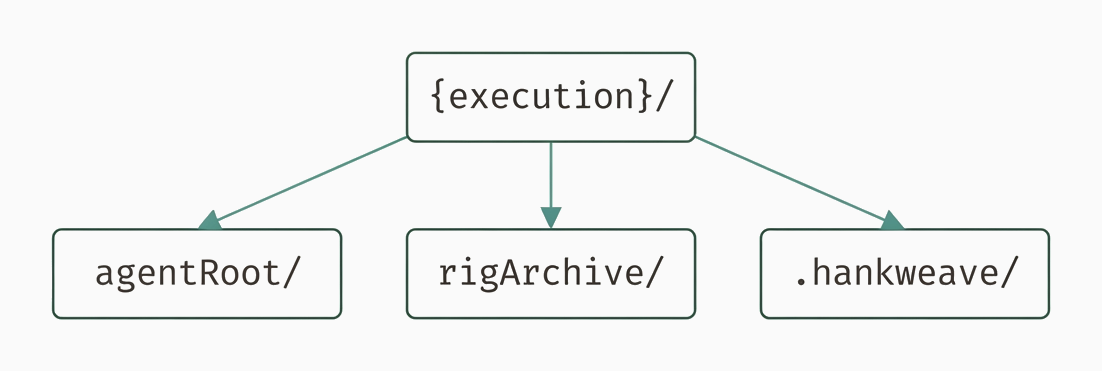
The directories you see at the top level
Diagram as text
```text
{execution}/
├── agentRoot/
├── rigArchive/
└── .hankweave/
```
`agentRoot/` is the workspace passed to agent processes. Agent file operations occur there, and files matching `checkpointedFiles` patterns are candidates for checkpoint (a Git snapshot) tracking. `rigArchive/` starts empty and stores files moved by `archiveOnSuccess`; its layout is described below. `.hankweave/` holds everything the runtime writes about the run, detailed in the next two sections. A completed root can also contain the checkpoint `.gitignore` and `model-validation.log`, which records model-catalog validation logging during startup.
To make that concrete, here is the observable layout of a completed one-codon run (one agent task):
```text
.
├── .gitignore
├── .hankweave
│ ├── archive-manifest.json
│ ├── checkpoints
│ │ ├── .gitconfig
│ │ └── .hankweavecheckpoints
│ │ ├── COMMIT_EDITMSG
│ │ ├── config
│ │ ├── description
│ │ ├── HEAD
│ │ ├── hooks
│ │ ├── index
│ │ ├── info
│ │ ├── logs
│ │ ├── objects
│ │ ├── ORIG_HEAD
│ │ └── refs
│ ├── events
│ │ └── events.jsonl
│ ├── execution-meta.json
│ ├── logs
│ │ └── server.log
│ ├── runs
│ │ └──
│ │ └── write-line-claude.log
│ ├── sentinels
│ │ └── history
│ ├── state.json
│ └── state.json.bak
├── agentRoot
│ ├── out.txt
│ └── read_only_data_source -> /fixtures/scenarios/execution-directory/data
├── model-validation.log
└── rigArchive
```
Note `read_only_data_source/` inside `agentRoot/`. By default it is a symlink to the original data source; `--copy` requests a copy instead. If the symlink system call fails, Hankweave falls back to a directory copy. For a single-file source, the file is placed at `read_only_data_source/{basename}`. This path is always excluded from checkpoint resolution.
The shipped `hankweave init` fixture also supplies these repository ignore rules:
```text
.hankweave/
*.log
node_modules/
```
Its README documents adding `rigSetup` to prepare an environment before a codon runs:
```text
…
- Add `rigSetup` to prepare your environment before a codon runs
…
```
## The files Hankweave writes to track execution
The entries under `.hankweave/` fall into two groups: small files that identify the execution and its owning process, and larger stores that persist history. This section covers the identity files and the two metadata files that sit beside them.
### `.hankweave/runtime.lock`
`runtime.lock` contains the process and run identity used for crash detection and attach-port discovery. Its fields are `pid`, `runId`, `startTime`, `lastHeartbeat`, and `port`; the heartbeat is refreshed every 30 seconds.
```typescript
interface LockFile {
pid: number;
runId: string;
startTime: string;
lastHeartbeat: string;
port?: number; // Optional for backward compatibility with old lock files
```
### `.hankweave/execution-meta.json`
`execution-meta.json` records the execution identity and environment. Its format version is `"1.1.0"`; it includes `hankweaveVersion`, an `environment` object with `invocationMethod`, `platform`, `arch`, `osRelease`, and `runtime`, and the identity/time fields `dataHash`, `hankHash`, `hankPath`, `linkType`, `createdAt`, and `lastUsed`. It also records `readOnlySourceDataPath` as supplied and `readOnlySourceResolvedDataPath` as the real path returned by `fs.promises.realpath`.
The following is the TypeScript construction that writes the metadata, not a captured JSON record:
```typescript
const meta = {
version: "1.1.0",
readOnlySourceDataPath,
readOnlySourceResolvedDataPath: await fs.promises.realpath(readOnlySourceDataPath),
dataHash,
hankHash,
hankPath,
linkType,
createdAt: isNewExecution
? new Date().toISOString()
: (existingMeta?.createdAt ?? new Date().toISOString()),
lastUsed: new Date().toISOString(),
hankweaveVersion: getMetadata().version,
environment: {
invocationMethod,
platform: process.platform,
arch: process.arch,
osRelease: os.release(),
runtime: getRuntimeVersion(),
},
};
```
> **VersionNote:** `execution-meta.json` format version `"1.1.0"` has been used since 0.5.0; it adds `hankweaveVersion` and the `environment.*` block.
### State and archive metadata
`.hankweave/state.json` is the primary persistence file for the complete execution history: runs, codons, checkpoints, and costs. `state.json.bak` is written before each save; if the primary file is corrupted, Hankweave falls back to the backup. The complete schema is in [State file reference](/0.10.0/files/reference/state-file).
`.hankweave/archive-manifest.json` tracks files archived by `archiveOnSuccess`. It is outside the checkpointed Git work tree, has version `"1.0.0"`, and starts as `{"version":"1.0.0","entries":[]}`. Rollback uses manifest entries after the target checkpoint SHA and updates the manifest with `removeEntriesAfterCheckpoint()`; the archive paths and entry fields are described in [How `rigArchive/` is organized](#how-rigarchive-is-organized).
## The subdirectories and their contents
Below the metadata files, `.hankweave/` grows subdirectories as the run proceeds: an event journal, logs, per-run agent transcripts, the checkpoint Git store, and sentinel state.
### Events and logs
`.hankweave/events/events.jsonl` is an append-only JSONL journal: each significant server event is one JSON object, and line order supplies the audit trail. See [Events](/0.10.0/files/reference/events) for its event schema. WebSocket traffic is recorded separately in the logs directory.
The `logs/` directory is created lazily on the first logger write. `logs/server.log` is timestamped plain text for startup, codon transitions, and debug output. `logs/websocket.log` is JSONL; each entry has `loggedAt`, `direction` (`in` or `out`), the full `ClientCommand` or `ServerEvent` in `message`, and `metadata.size`:
| WebSocket field | Meaning |
| --------------- | ----------------------------------------------------- |
| `loggedAt` | When the message was logged |
| `direction` | `in` for client-to-server; `out` for server-to-client |
| `message` | The complete `ClientCommand` or `ServerEvent` |
| `metadata.size` | Message size |
Configured sentinels also store output and conversational history below `.hankweave/sentinels/`.
### Run folders and agent logs
`.hankweave/runs/{runId}/` is created when a run starts. Agent logs there are JSONL with message types `system`, `assistant`, `user`, and `result`; `assistant` carries `usage`, and `result` carries `total_cost_usd`. State stores the agent-log path as `claudeLogPath`, relative to `executionPath`, for example `.hankweave/runs/{runId}/observe-0-claude.log`.
> **Pitfall:** Agent-log filename munging is owned by [Observe and debug](/0.10.0/files/operate/observe-and-debug). Use the recorded `claudeLogPath` rather than infer a filename.
### Checkpoint storage
`.hankweave/checkpoints/` contains `.hankweavecheckpoints/`, the Git repository that tracks selected files in `agentRoot/`, and `.gitconfig`, the isolated configuration with `user.name = Hankweave Runtime` and `gpgsign = false`. The store is named `.hankweavecheckpoints` rather than `.git` so an execution directory is not detected as a Git submodule. Git operations point `HOME` and `XDG_CONFIG_HOME` at this checkpoint directory instead of using the operator's global configuration. See [Checkpoints](/0.10.0/files/concepts/checkpoints) for store mechanics.
When inspecting from `agentRoot`, select the checkpoint repository and work tree explicitly:
```sh
git --git-dir=../.hankweave/checkpoints/.hankweavecheckpoints \
--work-tree=. log --oneline
```
### Sentinel outputs and history
Sentinel outputs are under `.hankweave/sentinels/outputs/{sentinelId}/` and use `{id}-{codonId}-{timestamp}.{ext}`. The extension is `md` for text, `ndjson` for structured output with `structuredOutput: true`, or `jsonl` when `output.format` is `"jsonl"`. Conversational state is under `.hankweave/sentinels/history/{sentinelId}-codon-{codonId}.json`; it stores turn history, token counts, and trim metadata between triggers. Output-path resolution belongs to [Sentinel configuration](/0.10.0/files/reference/sentinel-config). The public `WebSocketLogReader` surface belongs to [Client and exported types](/0.10.0/files/integrate/client-and-exported-types); this page does not provide a deep server import.
## How rigArchive/ is organized
`archiveOnSuccess` selects file-glob matches from `agentRoot/` for copying to `rigArchive/` when the owning codon completes; a loop-level archive runs once when its loop terminates. Its entries are file globs (file patterns), so a tree uses a pattern such as `current-project/**`, not a bare directory.
Where a file lands under `rigArchive/` depends on whether its codon ran inside a loop:
| Archive case | Path relative to `rigArchive/` | Timing and example |
| ----------------------------- | --------------------------------------------------------- | --------------------------------------------- |
| Non-loop codon | `{codonId}/{sourcePath}` | `edit/current-project/history.txt` |
| Codon inside a loop iteration | `{loopId}-{iteration}/{codonId}-{iteration}/{sourcePath}` | `revise-0/edit-0/current-project/history.txt` |
| Loop-level archive | `{loopId}-loop/{sourcePath}` | `revise-loop/current-project/history.txt` |
For a loop codon, the runtime ID includes the iteration suffix (`edit#0`), which becomes `edit-0` in the archive path. Loop IDs do not contain `#`. A loop-level archive runs once when the loop terminates. The source path is relative to `agentRoot/`; from an `agentRoot` command, the sibling archive begins at `../rigArchive/`.
The loop fixture uses the file glob explicitly:
```json
"archiveOnSuccess": ["current-project/**"]
```
Its observed first-iteration file is `../rigArchive/revise-0/edit-0/current-project/history.txt` when addressed from `agentRoot`, matching the loop-iteration row of the table above.
Archive operations copy the selected files and then remove them from `agentRoot/`. Each manifest entry records `sourcePath` relative to `agentRoot/`, `archivePath` relative to the execution root, `codonId`, optional `loopContext` (`loopId` and `iteration`), `checkpointSha`, and `timestamp`. [Rigs](/0.10.0/files/concepts/rigs), [Codons](/0.10.0/files/concepts/codons), and [Loops](/0.10.0/files/concepts/loops) link here for this path shape.
## When --replay copies the directory
Since 0.5.6, `--replay` copies the source execution to `$TMPDIR/hankweave-replay-{Date.now()}-{random}/` before starting. The original remains available as a read-only artifact. Hankweave removes `runtime.lock` from the temporary copy so a live source run does not block replay startup, then removes the temporary directory when the process exits.
Use `--replay` with the source execution as its argument. When no hank or data paths are supplied, the CLI discovers `hankPath` and `readOnlySourceDataPath` from `.hankweave/execution-meta.json`, making `--replay ` self-contained. Replay cannot be combined with `--execution`; supplying both flags exits with an error.
Replay starts a fresh run even when the source is complete and replays all codons from scratch. It reproduces the recorded codon LLM output from the existing JSONL logs rather than making those codon LLM calls. Replay intentionally skips rig setup and sentinels because the copied directory already contains the post-setup state; it therefore does not prove that changed rigs or external side effects work. In the pinned completed-execution capture, the listener initialized, the process exited 0 on its own, and the original state and event journal remained byte-identical. That is one capture, not a promise that every replay stays open or exits immediately, nor an absolute offline or zero-bill guarantee.
```sh
bunx hankweave@0.10.0 --replay ./my-execution
```
## How checkpoint file watching works
File-change detection is scan-on-demand. After a file tool call that could modify the filesystem, such as `Write` or `Edit`, the runtime scans for changes matching the configured patterns; it does not maintain a persistent filesystem watcher.
`checkpointedFiles` patterns accumulate across codons. After codon 1 declares `*.ts` and codon 2 declares `*.md`, later checkpoints continue to use both patterns. Before a checkpoint, the runtime re-adds the patterns from every codon through the current one into a `trackedPatterns` set, which is not cleared between codons.
`UnifiedFileResolver` combines `.gitignore` rules from the root and every subdirectory, rewriting subdirectory-relative rules to project-relative paths and caching the combined rules per project path. Before parsing those files, it always ignores `.git/`, `read_only_data_source/`, `.hankweavecheckpoints/`, `-quarantine-*`, and `.hankweave.backup-*`. Those hard-coded exclusions apply regardless of `checkpointedFiles`.
## Lifecycle of the execution directory
`--cleanup` removes execution artifacts; [CLI reference](/0.10.0/files/reference/cli) owns its exact scope. The directory is not automatically cleaned up after a run, so it remains available for inspection, resume, or replay.
For a debugging snapshot, archive `.hankweave/`, `agentRoot/`, and `rigArchive/` together. Those three parts reconstruct the execution state; `read_only_data_source/` remains a symlink by default or is copied when `--copy` was used.
Two execution paths are rejected: an explicit path containing both `/.hankweave-executions/` and `/data`, and an explicit path equal to the resolved read-only source data path. Keep the source and execution directory distinct, and choose another explicit execution path or omit `--execution` when one of these checks applies.