# Run your first hank in ten minutes
A hank is a JSON configuration plus a data directory. Hankweave runs the codons that configuration declares and writes the results to an execution directory you can return to later:
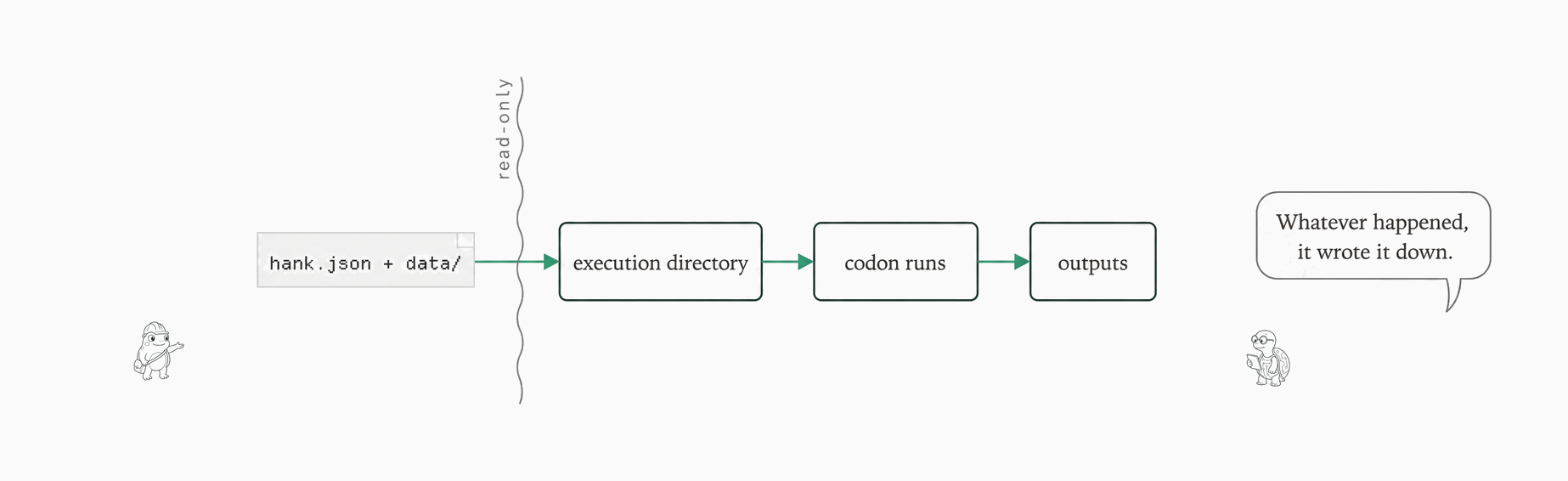
The run: hank + data in, execution dir, codon, outputs
Diagram as text
```text
hank.json + data/
│
▼
execution directory
│
▼
codon runs
│
▼
outputs
```
On this page we run the smallest useful hank: one codon, one provider key, one output file. We validate it, run it, inspect the summary it produces, watch it fail without a credential, and run it again with changed input. By the end you will have seen every stage of a normal run and will know where each artifact lives. Each step ends with a **Check-it** so you can confirm the expected result before moving on.
## What you need before you start
The hank's **codons** are sealed agent tasks that run in sequence; this fixture has exactly one. Prepare Node ≥ 22.19.0, [Git](/concepts/checkpoints), and the provider key used by this example. The `bunx` form requires Bun and uses Bun's package launcher without a permanent package install; it invokes the package's Node entrypoint. If you use Node/npm instead, substitute `npx hankweave@0.10.0` for `bunx hankweave@0.10.0` in each command below, keeping the remaining arguments unchanged.
This fixture uses the direct Anthropic route, so set `ANTHROPIC_API_KEY` before you validate or run it:
```bash
export ANTHROPIC_API_KEY='your-key'
```
A local Claude Code login does not replace that key under the default 0.10.0 authentication path: the normal startup self-test reports `No authentication found (set ANTHROPIC_API_KEY)`. Use the environment key for this quickstart, not an internal authentication workaround. If a different hank declares `requirements.env`, each named variable must be present in the environment; those checks do not use keychain logins.
This example needs only `ANTHROPIC_API_KEY`. Provider variables are independent, so other provider keys can coexist. The Gemini variant and its `GEMINI_API_KEY` setup are linked in [Where to go next](#choose-your-next-path).
## Get the example onto your machine
Use the versioned fixture bundle rather than retyping a tree or using `--init` for this quickstart. Download [`hankweave-fixtures-0.10.0.tar.gz`](/content-assets/cf45dff5691c48c0/fixtures/0.10.0/hankweave-fixtures-0.10.0.tar.gz), save it with that filename, then extract it into a named root and enter the fixture directory:
```bash
mkdir -p quickstart-fixture
tar -xzf hankweave-fixtures-0.10.0.tar.gz -C quickstart-fixture
cd quickstart-fixture/hankweave-fixtures-0.10.0/minimal-single-provider
```
The directory you entered contains `hank.json`, `prompts/`, and `data/`. Run the commands below from this fixture root: relative paths are resolved from it. The fixture's entry points are `hank.json` and `data/`.
`--init` scaffolds a different four-codon example (`analyze-haiku`, `analyze-gemini`, `analyze-pi`, and `analyze-gpt`); its anatomy belongs to [first run](/start/first-run).
## Check the run before spending
Before we spend on a codon, we validate the configuration:
```bash
bunx hankweave@0.10.0 hank.json data/ --validate
```
`-v` and `--validate` resolve and validate the configuration without executing a codon or performing the separate provider health check. Validation still runs a local test harness (SDK import and credential checks), so it is not a connectivity proof. It can add the `$schema` field (the configuration schema marker) to `hank.json` and write a temporary log.
A normal startup performs the local checks too, then separately performs provider health checks. Those checks can make a small, potentially billable `generateText("Hi", maxOutputTokens: 16)` call on available providers, outside the codon's own generation. Validation does not make that provider call.
The output ends with a summary box:
```text
...
╭─ GOOD TO RUN! ─────────────────────────────────────────────────────╮
│ 1 codons • 1 prompts • 0 system prompts • 0 rigs • 1 checkpoints │
╰────────────────────────────────────────────────────────────────────╯
...
```
The box counts what the hank declared: one codon, one prompt, one checkpoint, and no rigs or system prompts. For the complete sanitized validation capture, see [`validate-output.txt`](/content-assets/cf45dff5691c48c0/fixtures/0.10.0/files/minimal-single-provider/expected/validate-output.txt).
**Check-it 1:** the validation result should show the `GOOD TO RUN!` box.
## Run it and inspect the result
Running is the default operation; there is no `run` subcommand. We'll start a fresh execution in headless mode (without the terminal interface) and copy the configured output to `out/`:
```bash
bunx hankweave@0.10.0 hank.json data/ --headless --start-new -o out
```
The first positional `.json` is treated as the hank path and a non-`.json` positional as the data path; this command supplies both explicitly. The captured console includes the headless server's listening URL:
```text
...
Running in headless mode on port
➜ Listening on: http://localhost:/ (all interfaces)
...
```
The capture's trailing `exit=0` is an annotation added by the capture process, not a line to wait for in the terminal. Once the run completes, inspect the file the fixture copied:
```bash
cat out/summary.md
```
```markdown
# Meeting Summary
The team decided to proceed with the Calloway vendor quote for the packaging line refit based on lower total cost and included installation.
- **Decision:** Go with the Calloway quote for packaging line refit
- **Owner:** Devon
- **Deadline:** PO issued by Friday the 12th
```
**Check-it 2:** `out/summary.md` should contain the meeting summary with the Calloway decision, Devon as owner, and the Friday-the-12th deadline. The selected event excerpt records `codon.completed` before `RunCompleted`; [`final-events.txt`](/content-assets/cf45dff5691c48c0/fixtures/0.10.0/files/minimal-single-provider/expected/final-events.txt) is that selected excerpt, not an exhaustive journal. Its normalized costs are separate from the tracked codon cost of `$0.01394590`.
A few defaults are worth knowing before you adapt this command. By default, the terminal interface is used; `--headless` runs without it. Data is symlinked into `agentRoot/read_only_data_source` unless you pass `--copy`. Outputs otherwise remain under `~/.hankweave-executions/{id}/agentRoot`; there is no default results directory. `-o out` is what copies this fixture's `summary.md` into the directory you inspected. The [runbook](/operate/runbook) covers the selected execution path and layout.
> **Pitfall:** Do not look for `hankweave-results/`; pass `-o` when you want outputs copied outside the execution directory.
With no arguments and no flags, bare `hankweave` opens the welcome wizard and exits 0 without running the hank. The wizard's other entry paths belong to [first run](/start/first-run).
## Break it on purpose
Before trusting the happy path, it helps to know what a startup failure looks like. `env -u` removes the variable only from the child process, so the key in your current shell stays set, and `--start-new` ensures this test does not resume the completed execution:
```bash
env -u ANTHROPIC_API_KEY bunx hankweave@0.10.0 hank.json data/ --headless --start-new
```
```text
...
[] [ERROR] - authentication: ✗ No authentication found (set ANTHROPIC_API_KEY)
[ERROR] Server startup failed!
...
```
The error names the missing credential and the server refuses to start. The complete sanitized diagnostic is [`fail-no-key.txt`](/content-assets/cf45dff5691c48c0/fixtures/0.10.0/files/minimal-single-provider/expected/fail-no-key.txt). The capture's trailing `exit=1` is a status annotation, not a line to wait for.
**Check-it 3:** the failure should name the missing credential: `No authentication found (set ANTHROPIC_API_KEY)`. The child process leaves the key in your shell unchanged.
## Change something and run it again
A checkpoint is sealed run state. When state exists, running the same command again resumes the previous execution. A plain run uses the auto-managed pool under `~/.hankweave-executions/{id}`; a new execution gets a fresh generated id. The startup `Exec →` line and a listing of `~/.hankweave-executions/` show which directory was selected.
Two flags control that behavior. Use `-e`/`--execution ` to choose an execution directory: Hankweave creates it when absent and resumes it when it has state. Use `--start-new` (or `-n`) to start fresh and never resume; add `-f` when a fresh start must overwrite existing state.
The earlier `env -u` command changed only its child process, so the key in your shell is still set. For a fresh comparison, change the deadline fact in the local notes and use a separate output directory:
```bash
node -e 'const fs=require("node:fs"); const p="data/notes.txt"; const s=fs.readFileSync(p,"utf8"); fs.writeFileSync(p,s.replace("Friday the 12th","Monday the 15th"));'
bunx hankweave@0.10.0 hank.json data/ --headless --start-new -o out-second
cat out-second/summary.md
```
The new `out-second/summary.md` is the result of that fresh run. To resume instead, omit `--start-new` from the run command. If you reuse `out/`, an existing `summary.md` remains and the incoming file receives a numbered timestamp suffix unless `--overwrite-output` is requested. The exact rule for which edits change automatic resume selection belongs to the [runbook](/operate/runbook), so check the selected `Exec →` path rather than assuming a particular reuse decision.
**Check-it 4:** inspect `out-second/summary.md` and confirm that it says `PO issued by Monday the 15th` while retaining the Calloway decision and Devon as owner; also confirm that the fresh run has a distinct output directory. For a resume, compare the selected execution path with the prior run.
## Recap: your hank.json, one useful view
Everything above traces back to one file. Here is the fixture's `hank.json`, which names the hank `Minimal single provider`, uses `haiku`, reads `./prompts/summarize.md`, checkpoints `summary.md`, and copies that file when `-o` configures an output path:
```json
{
"$schema": "https://unpkg.com/hankweave@0.10.0/schemas/hank.schema.json",
"meta": {
"name": "Minimal single provider",
"version": "1.0.0",
"description": "The smallest useful hank: one codon, one provider key, one output file. The quickstart's fixture."
},
"hank": [
{
"id": "summarize-notes",
"name": "Summarize the notes",
"model": "haiku",
"continuationMode": "fresh",
"promptFile": "./prompts/summarize.md",
"checkpointedFiles": ["summary.md"],
"outputFiles": [ { "copy": ["summary.md"] } ]
}
]
}
```
The fixture has no `budget` field. For a codon, `budget` can set `maxDollars`, `maxTimeSeconds`, `maxOutputTokens`, `maxContextTokens`, and `onExceeded`. `outputFiles.copy` destinations materialize only when an output path is configured, which is why the run above used `-o out`.
Run-level `--max-cost` and `--max-time` caps are available when you need a ceiling. When a ceiling is exceeded, Hankweave interrupts the running model. The default `complete` policy then marks the codon completed, so partial output can be checkpointed and copied; it does not wait for the model to finish its response. `fail` marks the codon failed and applies its `onFailure` policy. The execution directory and sealed checkpoints remain in place for a later rerun when possible.
## Where to go next
You have a working one-key path and a result to inspect. Continue with the part you need:
* [Take the tour](/tutorial/0-tour) – build a quote-unification workflow with the supplied fixtures.
* [Understand how a run works](/start/how-a-run-works) – the execution-directory and checkpoint mental model.
* [Operate a run](/operate/runbook) – resume, fresh starts, and output-directory mechanics.
* [Use another provider](/operate/authentication-and-models) – the same fixture with its codon `model` changed to `pi/google/gemini-2.5-flash`, authenticated with `GEMINI_API_KEY`, and using the same output destinations; do not hand-fork it.
* [Read the CLI reference](/reference/cli) – the supported flags.
* [Inspect `--init` and the wizard](/start/first-run) – the alternate four-codon scaffold and bare-invocation paths.
You do not need the tour, mental model, or runbook to complete this first pass. Keep them nearby for the next thing you want to try.