API Keys and Models
Before your hanks can use Claude, GPT-4, Gemini, or any other model, you’ll need to set up API keys. This page covers how to configure providers and how Hankweave’s model resolution system turns shorthand like sonnet into specific API calls.
Who is this for? Anyone running hanks (Track 1) or writing hanks (Track 2). You’ll need this to configure your environment and understand how to specify models in your codon configurations.
Supported Providers
Hankweave connects to multiple LLM providers through a unified registry. Each provider needs an API key set as an environment variable.
| Provider | Environment Variable | Example Models |
|---|---|---|
| Anthropic | ANTHROPIC_API_KEY | claude-sonnet-4-20250514, claude-opus-4-20250514 |
| OpenAI | OPENAI_API_KEY or Codex CLI | gpt-4.1, gpt-5.2, gpt-5.2-codex-high, o1, o3-mini |
GOOGLE_API_KEY | gemini-2.0-flash, gemini-2.5-pro | |
| Groq | GROQ_API_KEY | llama-3.1-70b-versatile, mixtral-8x7b-32768 |
Hankweave validates API keys before each run. If your hank uses a model from a provider without a configured key, you’ll see a clear error during validation—not a cryptic failure mid-run.
Setting Up API Keys
Basic Setup
The simplest method is to export API keys in your shell.
export ANTHROPIC_API_KEY="sk-ant-..."
export OPENAI_API_KEY="sk-..."
export GOOGLE_API_KEY="AIza..."
For a permanent configuration, add these lines to your shell profile (~/.bashrc, ~/.zshrc, etc.) so they’re set every time you open a terminal.
Claude Code Authentication
Hankweave offers two ways to authenticate with Anthropic’s API for Claude models:
-
API Key (recommended for most users):
Textexport ANTHROPIC_API_KEY="sk-ant-..." -
OAuth Token (for users of Anthropic’s developer console and related tooling):
Textexport CLAUDE_CODE_OAUTH_TOKEN="..."
If both are set, the OAuth token takes precedence. This is useful for reusing an existing Claude Code authentication.
OpenAI Codex Integration
If you have a ChatGPT Plus or Pro subscription, you can use the Codex CLI to run OpenAI models (GPT-4.1, GPT-5.2 variants, o1, o3, etc.) without a separate API key. This uses your subscription credits.
Setup:
There are multiple ways to authenticate:
-
Codex CLI login (recommended):
Textnpm install -g @openai/codex codex loginHankweave automatically detects the session from
~/.codex/auth.json. -
Environment variables:
Textexport CODEX_API_KEY="..." # or export OPENAI_API_KEY="sk-..."
Codex Binary Management: Hankweave handles Codex binary extraction and management automatically, including platform-specific builds for Windows, macOS, and Linux.
Available Codex Models:
When authenticated via Codex, you can use models like:
gpt-4.1— GPT-4 seriesgpt-5.2— GPT-5 base modelgpt-5.2-high/gpt-5.2-xhigh— GPT-5 with higher quality tiersgpt-5.2-codex-high/gpt-5.2-codex-xhigh— Codex-optimized GPT-5 variantso1/o1-pro— Reasoning modelso3/o3-mini— Latest reasoning models
These models support the same features as API-authenticated OpenAI models, including tool calling and structured outputs. The -high and -xhigh suffixes select quality tiers, trading latency for better output.
Environment Variable Prefixes
Hankweave uses prefixes to route environment variables to the correct component.
| Prefix | Purpose |
|---|---|
HANKWEAVE_ | Passed to the AI agent with the prefix stripped (e.g., HANKWEAVE_MY_TOKEN becomes MY_TOKEN). |
HANKWEAVE_RUNTIME_ | Server configuration; not passed to the agent. |
HANKWEAVE_SENTINEL_ | Sentinel-specific API keys; not passed to the main agent. |
This separation allows for granular control. For example, you can run your main agent on Claude Opus while cost-tracking sentinels run on the cheaper GPT-4o-mini.
# Main agent uses Anthropic
export ANTHROPIC_API_KEY="sk-ant-..."

# Sentinel uses OpenAI for cost efficiency
export HANKWEAVE_SENTINEL_OPENAI_API_KEY="sk-..."
Custom Base URLs
If you’re behind a corporate proxy or using a custom API gateway, you can override a provider’s base URL.
Set it as an environment variable:
export ANTHROPIC_BASE_URL="https://your-proxy.example.com/v1"Or define it in your hankweave.json configuration file:
{
  "anthropicBaseUrl": "https://your-proxy.example.com/v1"
}
Model Resolution
You don’t need to memorize long model IDs like claude-sonnet-4-20250514. Hankweave’s resolution system lets you use simple shortcuts like sonnet while still allowing for precise version control when needed.
Model Shortcuts
For common Anthropic models, shortcuts keep your configuration clean and automatically point to the latest version.
| Shortcut | Resolves To |
|---|---|
sonnet | Latest Claude Sonnet |
opus | Latest Claude Opus |
haiku | Latest Claude Haiku |
{
  "hank": [
    {
      "id": "my-codon",
      "name": "My Codon",
      "model": "sonnet",
      "promptText": "Hello, world!"
    }
  ]
}
Full Model Names
To pin to a specific model version, use its full identifier.
{
  "model": "claude-sonnet-4-20250514"
}
You can also include the provider prefix for clarity, though it’s usually inferred automatically.
{
  "model": "anthropic/claude-sonnet-4-20250514"
}
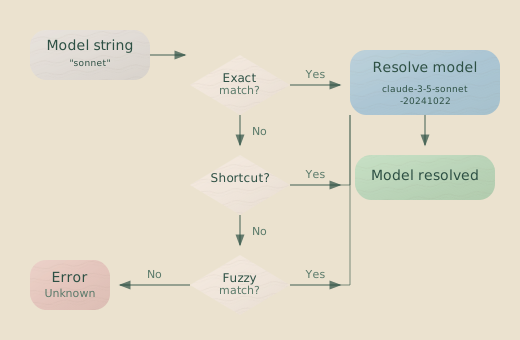
Fuzzy Matching
If an exact match isn’t found, Hankweave attempts an intelligent fuzzy match. This can catch typos (claued-sonnet), resolve partial names (claude-sonnet), and infer providers from model names (gemini-flash).
The resolution order is:
- Exact match with explicit provider:
anthropic/claude-sonnet-4-20250514 - Exact match with inferred provider:
claude-sonnet-4-20250514 - Fuzzy match: Finds the closest model name above a similarity threshold.
When multiple models have similar fuzzy match scores, Hankweave prioritizes based on the inferred provider, then the most recently updated model, and finally the highest similarity score.
Key Insight: Model resolution is case-insensitive. CLAUDE-SONNET-4 and
claude-sonnet-4 resolve to the same model.
Model Override Behavior
You can override the model specified in a hank file, which is useful for testing with a cheaper model or forcing a specific version. Model configuration follows a clear precedence system:
- CLI argument (
--model, highest priority) - Environment variable (
HANKWEAVE_RUNTIME_MODEL) - Hank recommendation (a top-level
modelkey inhank.json) - Runtime config (a
modelkey inhankweave.json) - Codon-level model (the
modelkey inside a specific codon’s definition) - Default (lowest priority)
When you specify a model at a higher layer (CLI, environment variable, or runtime config), it overrides all codon models globally.
# Run all codons with Claude Haiku to save costs during a test
hankweave run --model haiku ./my-hank.json
When the model comes from a Hank recommendation or a default, it only acts as a fallback for codons that don’t specify their own model.
Codon-Specific Environment Variables
Beyond provider API keys, you can pass custom environment variables to specific codons. These variables become available to any tools the agent uses during execution.
{
  "hank": [
    {
      "id": "database-migration",
      "name": "Database Migration",
      "model": "sonnet",
      "promptFile": "./prompts/migrate.md",
      "env": {
        "DATABASE_URL": "postgres://localhost:5432/mydb",
        "MIGRATION_DRY_RUN": "true"
      }
    }
  ]
}
Validating Your Configuration
Before running a hank and spending tokens, validate your setup.
hankweave --validate ./my-hank.jsonThis command runs a self-test for each unique model in your hank, checking that API keys are present and that providers are reachable.
Example output:
✓ Self-test passed for Claude Sonnet 4 (anthropic/claude-sonnet-4-20250514)
✓ Self-test passed for GPT-5.2 Codex High (openai/gpt-5.2-codex-high)
✗ Self-test failed for Gemini Flash (google/gemini-2.0-flash): No API key found

Validation failed: 1 model(s) have configuration issues.
Model Information
Hankweave’s internal registry stores detailed metadata for each model, which it uses for cost calculation, parameter validation, and health checks. This includes properties like:
| Property | Description |
|---|---|
modelId | Unique identifier (e.g., claude-sonnet-4-20250514) |
providerId | Provider name (e.g., anthropic, openai) |
name | Human-readable name |
cost | Pricing per million tokens (input, output, cache) |
limit.context | Maximum context window in tokens |
limit.output | Maximum output tokens per request |
modalities.input | Supported input types (text, image) |
modalities.output | Supported output types |
tool_call | Whether the model supports tool calling |
reasoning | Whether the model supports chain-of-thought prompting |
temperature | Whether temperature control is supported |
For example, Hankweave uses this data to automatically trim a maxOutputTokens parameter if it exceeds the model’s limit, preventing an API error.
Troubleshooting
”No API key found”
Error: Provider anthropic: No API key found (checked: HANKWEAVE_SENTINEL_ANTHROPIC_API_KEY, ANTHROPIC_API_KEY)The error message shows exactly which environment variables Hankweave checked. Make sure one of them is set correctly.
export ANTHROPIC_API_KEY="your-key-here"”Model not found”
Error: Invalid model 'claude-4-opus': model-not-foundThis typically means there’s a typo or the model doesn’t exist in the registry. Use hankweave models list to see available models, or use a reliable shortcut like sonnet or opus.
”Provider unhealthy”
Warning: Provider openai: Health check failedThis can be caused by network issues, an invalid or expired API key, or rate limiting. Check that your key is valid and that you have network access to the provider’s API endpoint.
Session continuation with different models
Error: Cannot use continuationMode "continue-previous" when model differs from previous codonSession state is tied to a specific model’s context format. To continue a session, subsequent codons must use the same model. To resolve this, either use matching models or set continuationMode to fresh to start a new, independent session. (See Continuation Modes to learn more.)
Related Pages
- Configuration Reference - Full configuration options
- CLI Reference - Command-line options, including model override
- Harnesses and Shims - How different providers are integrated
Next Steps
With your API keys configured, run hankweave --validate on a simple hank to confirm your setup, then head to the Getting Started guide to run your first hank.