CLI Reference
The Hankweave CLI is your primary interface for running hanks, validating configurations, and managing execution directories. This page covers every command, flag, and option.
Who is this for? This guide is for users who are familiar with Hankweave’s core concepts and want a comprehensive reference for all available CLI commands, flags, and options.
Basic Usage
A Hankweave command follows this pattern:
hankweave [hank-path] [data-path] [options]Positional Arguments:
| Argument | Description |
|---|---|
hank-path | Path to a hank configuration file (default: hank.json). Can also be a remote Git URL. |
data-path | Path to a data file or directory. Use - to read from stdin (default: current directory). |
Both positional arguments are optional. If you don’t specify a hank-path, Hankweave looks for hank.json in the current directory. If you don’t specify a data-path, it uses the current directory.
If you provide a single positional argument, Hankweave infers its type:
- A path ending in
.jsonis treated as ahank-path. - Any other path is treated as a
data-path.
Quick Examples
# Run with defaults: hank.json in the current directory
hankweave

# Run a specific hank with data from the current directory
hankweave ./my-workflow.json

# Run a specific hank with a specific data directory
hankweave ./workflow.json ./my-data

# Run a hank from a public GitHub repository
hankweave https://github.com/user/repo ./data
Core Operations
By default, hankweave runs a hank. You can select a different operation by providing one of the following flags. These operations—run, init, validate, and cleanup—are mutually exclusive.
run (Default Operation)
Without an operation flag, hankweave runs a hank using the specified or default paths.
hankweave [hank-path] [data-path]This is the primary mode for executing a workflow. It either starts a new execution or resumes an existing one based on the state found in the execution directory.
hankweave --init
Creates a new hank in the current directory with a set of starter files. This is a quick way to scaffold a new project and see what a complete hank looks like.
hankweave --initThis command creates:
hank.json: A starter workflow with two example codons (using Claude Haiku and Google Gemini).prompts/analyze-haiku.md: A prompt template for the Claude Haiku codon.prompts/analyze-gemini.md: A prompt template for the Google Gemini codon.data/sample1.txt,data/sample2.txt,data/notes.txt: Sample data files.README.md: Basic documentation for your new hank.
The --init command requires an empty directory. It will fail if any files
are present.
hankweave --validate
Runs comprehensive preflight checks on a hank and its data without creating any directories or writing files. Use this to catch errors before committing a hank or running it in a CI environment.
hankweave --validate ./workflow.json ./data
# or with the short flag
hankweave -v ./workflow.json ./data
Validation catches common problems early: malformed configuration, missing prompt files, invalid rig paths, unavailable models, broken continuation dependencies, and missing environment variables. The output includes an ASCII tree visualization of the hank’s structure—showing codons, loops, and their nesting—along with summaries of prompt files, rig operations, and file tracking settings.
┌─ Hank Structure ─────────────────────────────────────────┐
│  1. setup-environment                                    │
│  2. [loop: data-processing] (3 iterations)               │
│     ├─ extract-data                                      │
│     ├─ transform-data                                    │
│     └─ validate-output                                   │
│  3. generate-report                                      │
└──────────────────────────────────────────────────────────┘
hankweave --cleanup
Removes execution directories associated with a data source. As you iterate on a hank, you may accumulate multiple execution directories; this command helps you clean them up.
# Interactively clean up the latest execution for ./data
hankweave --cleanup ./data

# Clean up without a confirmation prompt
hankweave --cleanup -y ./data
By default, cleanup removes only the most recently created execution directory for the specified data source. Before deleting, it shows the directory’s creation time, size, and data link. If a server is still running in that directory, cleanup will refuse to proceed. It also lists any other execution directories associated with the data source for your reference but does not remove them.
Cleanup is irreversible. The -y flag skips the confirmation prompt and
should be used with caution, especially in scripts.
hankweave --replay <execution-dir>
Replays a completed execution from its JSONL logs without making real LLM API calls. This is useful for debugging, demos, and testing TUI or client integrations without spending money.
# Replay a completed execution
hankweave --replay ~/.hankweave-executions/my-run

# Replay with a specific execution directory
hankweave --replay /path/to/execution-dir
Replay mode:
- Copies the original execution directory to a temporary location, preserving the source as read-only.
- Auto-discovers the hank config and data paths from
execution-meta.json— you don’t need to specify them. - Skips rig setup and sentinels, since the copied directory already has post-setup state.
- Uses realistic pacing: Inter-message timing is derived from timestamps in the original JSONL logs, capped at 5 seconds per gap.
Replay is particularly valuable during hank development. You can replay a completed run to test TUI changes, debug event handling, or demonstrate a workflow to others — all without any API spend.
Options and Flags
These flags modify the behavior of the run operation.
Path and Input Options
| Flag | Description |
|---|---|
--config <path> | Path to hank configuration file (alternative to hank-path argument). |
--data <path> | Path to data file/directory, or - for stdin (alternative to data-path argument). |
--input <text> | Use inline text as the data input (overrides --data and data-path). |
--execution <path> | Resume a specific execution directory, rather than letting Hankweave choose. |
When multiple input sources are provided, Hankweave uses this priority order:
--inputflagstdin(whendata-pathis-)data-pathfile or directory
# Use inline text as input
hankweave hank.json --input "Analyze this text for sentiment."

# Pipe from stdin
echo "Design a REST API" | hankweave hank.json -

# Pipe file contents using cat
cat spec.md | hankweave hank.json --data -
Execution Control
These flags control how Hankweave manages execution directories and codon behavior.
| Flag | Description |
|---|---|
--start-new | Forces a new execution, ignoring any existing resumable states. Requires --force if the target directory has a .hankweave/ state directory. |
--force | Force an operation in a directory with an existing .hankweave/ state. Backs up the old state to .hankweave.backup-{timestamp}. |
--copy | Copy data into the execution directory instead of symlinking. Useful for environments that don’t support symlinks, such as some Docker configurations. |
--no-autostart | Prevents codons from starting automatically when the server launches. |
--ignore-rig-failures | Treat all rig setup operations as allowFailure: true. Useful when resuming after rig setup has already partially completed. |
--ignore-data-mismatch | Allow resuming executions when the data source has intentionally changed. Bypasses the data integrity check. |
# Force a fresh start, even if a resumable execution exists
hankweave --start-new --force

# Copy data instead of symlinking (e.g., for Docker volumes)
hankweave --copy ./data
Server Configuration
Hankweave runs a WebSocket server to stream events and accept commands. These flags configure it.
| Flag | Description | Default |
|---|---|---|
--port <port> | WebSocket server port. | 0 (OS-assigned) |
--headless | Run without the Terminal UI (TUI). Ideal for CI/CD and scripts. | false |
--autostart | Start execution immediately without waiting (use with --headless). | false |
--attach <url> | Connect the TUI to a running server in read-only mode. | — |
--proxy | Enable the LLM proxy server, which runs on <port> + 1. | disabled |
--idle-timeout <seconds> | Idle timeout in seconds for WebSocket and proxy servers (0-255). | 0 (no timeout) |
# Run on a specific port
hankweave --port 8080

# Run in headless mode for a CI/CD pipeline
hankweave --headless --autostart

# Attach to a running server (read-only)
hankweave --attach ws://localhost:8080

# Enable the LLM proxy (runs on port 8081 if main is 8080)
hankweave --proxy --port 8080
Dynamic Port Allocation: By default, Hankweave uses port 0, which tells
the OS to assign an available ephemeral port. The actual port is displayed
when the server starts. This avoids conflicts when running multiple Hankweave
instances.
Model Configuration
Override model selection from the command line. This is useful for quick tests or for running a hank with a different model than specified in its configuration.
| Flag | Description |
|---|---|
--model <model> | Override the model for all codons, ignoring per-codon settings in hank.json. |
--anthropic-base-url <url> | Use a custom Anthropic API base URL, for proxies or enterprise endpoints. |
# Test workflow structure cheaply with Haiku (~10-20x cheaper)
hankweave --model haiku

# Once structure works, run with production model
hankweave --model opus

# Use a custom API endpoint for Anthropic models
hankweave --anthropic-base-url https://api.example.com/v1
Development Pattern: Use --model haiku to test workflow structure, rig
setups, and file paths before committing to expensive models. Haiku won’t
produce production-quality output, but it catches configuration errors for
~0.20 per run.
Model shortcuts are available: opus, sonnet, haiku. For complete model configuration and authentication, see the Configuration Reference.
Budget Controls
Set cost and time ceilings for a run, overriding any budgets declared in hank.json. These are the highest-priority budget source — they cap but never raise hank-declared limits.
| Flag | Description | Default |
|---|---|---|
--max-cost <dollars> | Global cost ceiling in USD. Caps the entire run regardless of hank or runtime config budgets. | No limit |
--max-time <seconds> | Global time ceiling in seconds. Caps wall-clock execution time for the entire run. | No limit |
# Cap this run at $5, regardless of what hank.json says
hankweave hank.json data/ --max-cost 5.00

# Cap at 30 minutes
hankweave hank.json data/ --max-time 1800

# Cheap pilot run: tight budget + fast model
hankweave hank.json data/ --max-cost 0.50 -m haiku
The effective ceiling is always the tightest constraint across CLI flags, runtime config (hankweave.json), and hank overrides. During --validate and at startup, a budget resolution table shows what limits will be enforced and where each came from.
See Budgets for the full budget system documentation, including allocation modes and per-codon limits.
Shim Configuration
| Flag | Description | Default |
|---|---|---|
--shim-idle-timeout <seconds> | Idle timeout for shim-based agent harnesses (Gemini, Codex, etc.). Aborts if no events received. | 120 (seconds) |
# Increase shim timeout for slow-starting agents
hankweave --shim-idle-timeout 300
The shim idle timeout prevents runs from hanging indefinitely when an agent stalls. It can also be configured per-codon (shimIdleTimeout in hank.json) or per-hank (in overrides).
Output
| Flag | Description |
|---|---|
--output <path> | Override the output directory where results are saved (alternative to configuring outputDirectory in hankweave.json). |
--overwrite-output | Overwrite existing files in the output directory instead of renaming them with _N_timestamp suffixes. |
# Save results to a specific directory
hankweave --output ./results ./workflow.json ./data

# Always keep the latest version of output files (no rename history)
hankweave --output ./results --overwrite-output ./workflow.json ./data
Help and Information
| Flag | Description |
|---|---|
--help, -h | Show help message. |
--version | Print the Hankweave version and exit. |
Remote Hanks
You can run a hank directly from a public Git repository without cloning it first.
# Run from the main branch of a GitHub repository
hankweave https://github.com/user/repo ./my-data

# Run from a specific branch or tag
hankweave https://github.com/user/repo#v1.0.0 ./data
hankweave https://github.com/user/repo/tree/feature-branch ./data
Hankweave caches remote hanks locally. Before each run, it shows when the hank was last fetched and displays a summary of its configuration, so you always know what code you’re about to execute.
Execution Safety
Hankweave includes a three-tier safety system to prevent accidental data loss or corruption of existing executions.
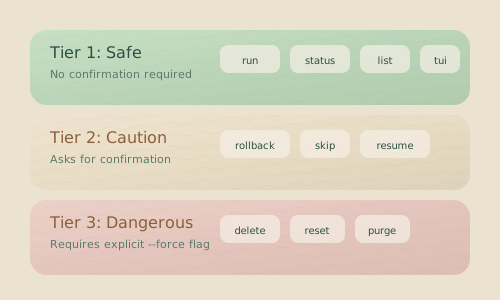
- Tier 1: The
~/.hankweave-executions/directory is reserved for automatically managed executions. You cannot specify it as a custom execution path. - Tier 2: A directory with an existing
.hankweave/state folder requires the--forceflag to proceed. This ensures you don’t accidentally overwrite an in-progress execution. - Tier 3: Running in a non-empty directory that doesn’t meet Tier 2 conditions triggers a warning and requires confirmation before proceeding.
Execution Isolation
Hankweave never runs directly in your data directory. It creates an isolated execution directory and links to your data as read-only. This separation keeps your original data pristine, allows you to run multiple independent executions against the same data source, and preserves a complete checkpoint history for each run.
Your data is accessible inside the execution environment via a symlink (or copy, with --copy):
<execution-dir>/read_only_data_source/Template Variables
Your prompts and hank.json configuration can reference execution paths using these template variables:
| Variable | Description |
|---|---|
<%EXECUTION_DIR%> | The absolute path to the current execution directory. |
<%DATA_DIR%> | The absolute path to the data source within the execution directory (<execution-dir>/read_only_data_source). |
Exit Codes
Hankweave uses exit codes to communicate outcomes for scripting and automation:
| Code | Meaning |
|---|---|
0 | All codons completed successfully, or user-initiated shutdown. |
1 | Codon failure, configuration error, or runtime error. |
In headless mode, the exit code reflects the run outcome: 0 when all codons succeed, 1 when any codon fails. This makes it straightforward to use Hankweave in CI/CD pipelines where the exit code drives the build status.
Infrastructure-level crashes (uncaught exceptions, unhandled promise rejections) also exit with a non-zero code to ensure the failure is visible to the calling process.
Environment Variables
Hankweave respects several environment variables for configuration. See the Configuration Reference for a complete list. Key variables include:
| Prefix/Variable | Purpose |
|---|---|
ANTHROPIC_API_KEY | API key for Anthropic models. |
GOOGLE_API_KEY | API key for Google/Gemini models. |
HANKWEAVE_RUNTIME_* | Overrides for runtime configuration settings. |
HANKWEAVE_SENTINEL_* | API keys specific to Sentinel integrations. |
HANKWEAVE_* | Variables passed into codon environments (with the prefix stripped). |
Common Workflows
These patterns are common when working with the Hankweave CLI.
Development Iteration
# Start an initial run
hankweave

# After editing prompts or config, resume the last execution
hankweave --execution ~/.hankweave-executions/<dir-name>

# Force a completely new run after major changes
hankweave --start-new --force
CI/CD Pipeline
# First, validate the configuration to catch errors early
hankweave --validate ./workflow.json ./data

# Then, run in headless mode for automation (with autostart)
hankweave --headless --autostart ./workflow.json ./data
Testing with Different Models
# Test the workflow with a fast, cheap model
hankweave --model haiku

# Once validated, run with a more powerful model for final results
hankweave --model opus
Cleaning Up After Experiments
# Interactively review and remove the last execution for a data source
hankweave --cleanup ./data

# Non-interactively remove the last execution (e.g., in a script)
hankweave --cleanup -y ./data
Related Pages
- Getting Started — A tutorial for first-time users.
- Configuration Reference — A detailed guide to all options in
hank.json. - Debugging Guide — Strategies for troubleshooting when things go wrong.