Configuration Reference
This is a comprehensive reference for all configuration options in Hankweave. It covers the hank.json and hankweave.json files, runtime settings, and environment variables.
Who is this for?
This guide is for:
- Hank authors (Track 2) who need detailed documentation for every configuration field.
- Developers building on Hankweave (Track 3) who need to understand the complete configuration schema.
Configuration Files Overview
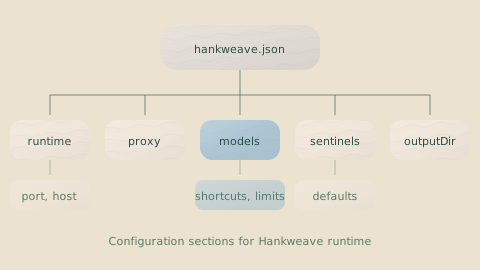
Hankweave’s configuration lives in two JSON files.
| File | Purpose | Required |
|---|---|---|
hank.json (or strand.json) | Defines the hank itself—codons, loops, and sentinel attachments. | Yes |
hankweave.json | Defines runtime settings like the server port, model defaults, and sentinel behavior. | No |
Hank File Structure
A hank file is a JSON object with up to three top-level keys. Only hank is required.
{
  "meta": {
    "name": "Data Codebook Generator",
    "version": "1.0.0",
    "description": "Generates documented schemas from raw CSV files",
    "author": "Your Name"
  },
  "overrides": {
    "model": "sonnet",
    "dataHashTimeLimit": 10000,
    "sentinel": {
      "enablePersistence": true
    }
  },
  "hank": [
    {
      /* codon or loop */
    }
  ]
}
Meta Section
Metadata for humans. Add it when you’re sharing hanks or want to remember what you built six months from now.
| Field | Type | Description |
|---|---|---|
name | string | Human-readable name for the hank |
version | string | Semantic version (e.g., "1.0.0") |
description | string | What this hank does |
author | string | Creator information |
Overrides Section
The hank author’s overrides for runtime settings. These values take precedence over the hankweave.json config file but can still be overridden by environment variables and CLI arguments.
| Field | Type | Default | Description |
|---|---|---|---|
model | string | — | Preferred model for this hank |
dataHashTimeLimit | number | 5000 | Time limit for hashing data directories (ms) |
sentinel | object | — | Sentinel system settings (see below) |
budget | object | — | Budget settings: cost/time ceilings and allocation. See Budgets. |
The budget object in overrides accepts these fields:
| Field | Type | Default | Description |
|---|---|---|---|
maxDollars | number | — | Total cost budget in USD for the hank. |
maxTimeSeconds | number | — | Wall-clock time limit in seconds for the entire hank. |
allocation | "shared" | "proportional" | "proportional-strict" | "shared" | How the dollar budget is distributed among children. |
shares | Record<string, number> | — | Map of child codon/loop IDs to fractions (0–1). Requires proportional. |
onExceeded | "complete" | "fail" | "complete" | Default policy when a budget limit is hit. |
Configuration Layer Precedence: Overrides are layer 3 of 5. They override built-in defaults and the runtime config file, but are themselves overridden by environment variables and CLI arguments. See Configuration Layers for the full hierarchy.
Requirements Section
Declare required environment variables for fail-fast validation at startup.
| Field | Type | Description |
|---|---|---|
env | string[] | Environment variable names required for this hank. |
{
  "requirements": {
    "env": ["ANTHROPIC_API_KEY", "DATABASE_URL"]
  }
}
Validation runs during both --validate and normal startup. The HANKWEAVE_ prefix is automatically supported: HANKWEAVE_API_KEY satisfies a requirement for API_KEY.
Global System Prompts
Apply a system prompt to ALL codons in the hank, useful for enforcing conventions across the entire workflow.
| Field | Type | Description |
|---|---|---|
globalSystemPromptFile | string | string[] | Path(s) to system prompt file(s) applied to all codons. |
globalSystemPromptText | string | Inline system prompt text applied to all codons. |
{
  "globalSystemPromptFile": ["./prompts/workspace-context.md", "./prompts/coding-standards.md"],
  "hank": [...]
}
Or with inline text:
{
  "globalSystemPromptText": "Always explain your reasoning. Never use TODO comments.",
  "hank": [...]
}
The global system prompt is prepended before any codon-specific appendSystemPromptFile or appendSystemPromptText content.
Common use cases for global prompts:
| Use Case | Example Content |
|---|---|
| Workspace layout | ”The codebase is a TypeScript monorepo with packages/ for libraries and apps/ for applications.” |
| Coding standards | ”Use functional components. All functions need JSDoc. No console.log in production.” |
| Domain context | ”This is a fintech app. PII must never be logged. All amounts are in cents.” |
| Project constraints | ”We support Node 18+. Don’t use features from Node 20.” |
Using global prompts avoids repetition and ensures consistency—change the rules in one place, every codon sees the update.
Hank Array
The hank array is the actual program—your codons and loops in execution order. Everything else is metadata and settings; this is where the work happens.
{
  "hank": [
    {
      /* codon 1 */
    },
    {
      /* codon 2 */
    },
    { "type": "loop" /* loop definition */ },
    {
      /* codon 3 */
    }
  ]
}
Items execute sequentially. See Codon Configuration and Loop Configuration for field details.
Codon Configuration
A codon is the atomic unit of work—a single agent task with its own prompt, model, and settings. If hanks are programs, codons are the statements.
Required Fields
Every codon must have these fields:
| Field | Type | Description |
|---|---|---|
id | string | Unique identifier (e.g., "schema-gen", "validate-output") |
name | string | Human-readable name shown in UI and logs |
model | string | Model identifier for the LLM. See Model Specification. |
continuationMode | "fresh" | "continue-previous" | Specifies how to handle context. "fresh" starts a new conversation; "continue-previous" adds to the existing one. |
Plus one of:
promptFile: Path(s) to prompt file(s)promptText: Inline prompt string
Complete Field Reference
Here’s a codon with every possible field. You’ll rarely need all of these—most codons are much simpler.
{
  "type": "codon",
  "id": "generate-schema",
  "name": "Schema Generation",
  "description": "Generates Zod schemas from CSV observations",

  "model": "sonnet",
  "continuationMode": "continue-previous",

  "promptFile": ["./prompts/schema-gen.md"],
  "promptText": "Alternative: inline prompt text",

  "appendSystemPromptFile": ["./system/rules.md"],
  "appendSystemPromptText": "Alternative: inline system prompt",

  "rigSetup": [
    {
      "type": "copy",
      "copy": { "from": "./templates", "to": "src" }
    },
    {
      "type": "command",
      "command": { "run": "npm install", "workingDirectory": "lastCopied" },
      "allowFailure": true
    }
  ],

  "checkpointedFiles": ["src/**/*.ts", "schemas/*.json"],

  "env": {
    "NODE_ENV": "development",
    "DEBUG": "true"
  },

  "outputFiles": [
    {
      "copy": ["dist/**/*"],
      "beforeCopy": [
        { "type": "command", "command": { "run": "npm run build" } }
      ]
    }
  ],

  "sentinels": [
    { "sentinelConfig": "./sentinels/narrator.json" },
    {
      "sentinelConfig": "./sentinels/cost-tracker.json",
      "settings": { "failCodonIfNotLoaded": true }
    }
  ]
}
Field Descriptions
Let’s break down each group of fields.
Identity and Display
| Field | Type | Required | Description |
|---|---|---|---|
type | "codon" | No | Type discriminator. Defaults to "codon" if omitted. |
id | string | Yes | Unique identifier. Used in runtime IDs and rollback commands. |
name | string | Yes | Human-readable name displayed in UI and logs. |
description | string | No | Optional description of what this codon does. |
Model and Continuation
| Field | Type | Required | Description |
|---|---|---|---|
model | string | Yes | Model identifier. See Model Specification. |
continuationMode | enum | Yes | "fresh" starts a new conversation. "continue-previous" continues from the last codon’s conversation. |
Warning: Model Matching Constraint
When using
continue-previous, themodelmust match the previous codon’s model. Different models cannot continue the same conversation.
Prompts
| Field | Type | Required | Description |
|---|---|---|---|
promptFile | string | string[] | One of these | Path(s) to prompt file(s), relative to the hank file. |
promptText | string | One of these | Inline prompt text. |
appendSystemPromptFile | string | string[] | No | Additional system prompt file(s) to append. |
appendSystemPromptText | string | No | Inline system prompt to append. |
Info: Prompt Assembly
If you provide multiple files in
promptFileorappendSystemPromptFile, they are concatenated in order. However, the*Fileand*Textvariants for a given prompt type are mutually exclusive (e.g., you must usepromptFileorpromptText, but not both).HTML comments (
<!-- ... -->) are automatically stripped from all prompts before sending to the LLM. This lets you add internal notes, TODOs, or documentation directly in your prompt files without them reaching the model. Trailing newlines after stripped comments are consumed to prevent blank line accumulation.
Rig Setup
| Field | Type | Required | Description |
|---|---|---|---|
rigSetup | array | No | Operations to run before the codon starts. |
Rigs handle deterministic setup tasks: copying templates, installing dependencies, or running build commands. Each rig setup item is either a copy operation or a command operation.
Copy Operation:
{
  "type": "copy",
  "copy": {
    "from": "./templates/typescript",
    "to": "src/generated"
  },
  "allowFailure": false
}| Field | Type | Description |
|---|---|---|
copy.from | string | Source path (relative to hank file or absolute). |
copy.to | string | Destination path within the execution directory. This is the full path, including the final directory name. |
allowFailure | boolean | If true, failure won’t stop the codon. Default: false. |
Command Operation:
{
  "type": "command",
  "command": {
    "run": "npm install",
    "workingDirectory": "lastCopied"
  },
  "allowFailure": false
}| Field | Type | Description |
|---|---|---|
command.run | string | Shell command to execute. |
command.workingDirectory | "project" | "lastCopied" | Where to run the command. "project" is the execution directory; "lastCopied" is the last copy operation’s target. Default: "project". |
allowFailure | boolean | If true, failure won’t stop the codon. Default: false. |
Warning: Loop Rig Setup
Always use
allowFailure: truefor rig setup in loop codons. Operations that succeed on the first iteration might fail on the next (e.g., copying to a path that already exists).
File Tracking
| Field | Type | Required | Description |
|---|---|---|---|
checkpointedFiles | string[] | No | Glob patterns for files to track and checkpoint. |
Tell Hankweave which files matter. Files matching these patterns are watched for changes, streamed to connected clients, and versioned in the git-based checkpoint system.
"checkpointedFiles": [
  "src/**/*.ts",
  "schemas/**/*.json",
  "!src/**/*.test.ts"
]
Environment Variables
| Field | Type | Required | Description |
|---|---|---|---|
env | object | No | Environment variables passed to the agent process. |
"env": {
  "NODE_ENV": "production",
  "API_ENDPOINT": "https://api.example.com"
}
These are merged with system environment variables, with codon-level variables taking precedence. They are available both during rig setup commands and to the agent process itself.
Output Files
| Field | Type | Required | Description |
|---|---|---|---|
outputFiles | array | No | Files to copy out of the execution directory when the codon completes. |
"outputFiles": [
  {
    "copy": ["dist/**/*", "schemas/*.json"],
    "beforeCopy": [
      {
        "type": "command",
        "command": { "run": "npm run build" }
      }
    ]
  }
]| Field | Type | Description |
|---|---|---|
copy | string[] | Glob patterns for files to copy to the output directory. |
beforeCopy | array | Commands to run before copying (e.g., build steps). Only runs when outputDirectory is configured. |
When copying files to the output directory, Hankweave automatically handles filename collisions. If a file already exists in the output directory, it is renamed using the format file_<counter>_<timestamp>.ext (e.g., report_1_1738678800.pdf). Use --overwrite-output to replace existing files instead of renaming. Preflight warnings are shown when the output directory is non-empty. A safety limit of 100 conflicts per file prevents runaway renaming.
Sentinels
| Field | Type | Required | Description |
|---|---|---|---|
sentinels | array | No | Sentinel observers to run during this codon. |
Sentinels watch the event stream and execute their own logic when patterns match—useful for real-time monitoring, documentation, and guardrails. Each sentinel entry wraps a config file with optional per-codon settings.
Failure Handling
| Field | Type | Required | Description |
|---|---|---|---|
onFailure | object | No | Failure handling policy for this codon. |
Configure what happens when a codon fails:
{
  "onFailure": "retry",
  "retryConfig": {
    "maxAttempts": 3
  }
}| Field | Type | Description |
|---|---|---|
onFailure | "abort" | "retry" | "ignore" | abort (default) stops the hank; retry attempts again; ignore continues to the next codon. |
retryConfig | object | Optional. Configuration for retry behavior (only used when onFailure is "retry"). |
retryConfig fields:
| Field | Type | Description |
|---|---|---|
maxAttempts | number | Maximum retry attempts (1-10). Default: 3. |
delayMs | number | Delay between retries in milliseconds (0-60000). Default: 1000. |
Extensions
| Field | Type | Required | Description |
|---|---|---|---|
exhaustWithPrompt | string | No | Continue the codon until context is exhausted, using this prompt. |
Extensions enable unbounded exploration by letting a codon iterate until the model’s context window is full. The exhaustWithPrompt string is automatically sent as a follow-up prompt after each completion:
{
  "exhaustWithPrompt": "Please continue. Any more insights or patterns to explore?"
}
See Codons: Extensions for detailed usage.
Budget
| Field | Type | Required | Description |
|---|---|---|---|
budget | object | No | Cost, time, and token limits for this codon. See Budgets. |
"budget": {
  "maxDollars": 3.0,
  "maxTimeSeconds": 300,
  "maxOutputTokens": 50000,
  "maxContextTokens": 200000,
  "onExceeded": "fail"
}| Field | Type | Default | Description |
|---|---|---|---|
maxDollars | number | — | Max cost in USD for this codon execution. |
maxTimeSeconds | number | — | Max wall-clock time in seconds. |
maxOutputTokens | number | — | Max output tokens (generated by the model). |
maxContextTokens | number | — | Max context window tokens (high-water mark of input+output per turn). |
onExceeded | "complete" | "fail" | inherited | Override the container-level default. |
Codon caps inside loops are per-iteration, not cumulative. See Budgets for full documentation on allocation modes, loop budgets, and how limits are resolved.
{
  "sentinelConfig": "./sentinels/narrator.json",
  "settings": {
    "failCodonIfNotLoaded": false,
    "outputPaths": {
      "logFile": "custom-log.md",
      "lastValueFile": "custom-value.json"
    },
    "reportToWebsocket": {
      "lifecycle": true,
      "errors": true,
      "outputs": true,
      "triggers": false
    }
  }
}| Field | Type | Description |
|---|---|---|
sentinelConfig | string | object | Path to a sentinel config file, or an inline config object. |
settings.failCodonIfNotLoaded | boolean | Fail the codon if the sentinel can’t load. Default: false. |
settings.outputPaths.logFile | string | Override the auto-generated log file path. |
settings.outputPaths.lastValueFile | string | Override the auto-generated last-value file path. |
settings.reportToWebsocket | object | Control which events are emitted to WebSocket clients. |
Info: Reusable Sentinel Configs
Keeping sentinel configurations in separate files makes them reusable across codons. The
settingsobject lets you customize their behavior for each specific codon.
Loop Configuration
Sometimes, one pass isn’t enough. Loops repeat a sequence of codons until a termination condition is met.
{
  "type": "loop",
  "id": "validation-loop",
  "name": "Iterative Validation",
  "description": "Run validation until passing or limit reached",
  "terminateOn": {
    "type": "iterationLimit",
    "limit": 3
  },
  "codons": [
    {
      /* codon 1 */
    },
    {
      /* codon 2 */
    }
  ]
}
Loop Fields
| Field | Type | Required | Description |
|---|---|---|---|
type | "loop" | Yes | Type discriminator (required for loops). |
id | string | Yes | Unique identifier for the loop. |
name | string | Yes | Human-readable name. |
description | string | No | Optional description of what this loop does. |
terminateOn | object | Yes | The condition that ends the loop. |
codons | array | Yes | An array of codons to execute in each iteration. |
budget | object | No | Loop-level budget: maxDollars, maxTimeSeconds, allocation, shares, onExceeded. Scopes a sub-budget shared across all iterations. See Budgets. |
Termination Modes
There are two fundamentally different ways to end a loop.
Iteration Limit: Stops the loop after a fixed number of iterations. This is the safe, predictable choice.
{
  "terminateOn": {
    "type": "iterationLimit",
    "limit": 5
  }
}
Iterations are 0-indexed, so a limit of 5 runs iterations 0, 1, 2, 3, and 4.
Context Exceeded: Stops when the model’s context window is full. This is for long-running tasks where you want the agent to work until it genuinely can’t continue.
{
  "terminateOn": {
    "type": "contextExceeded"
  }
}
Warning:
contextExceededConstraintLoops with
contextExceededtermination cannot contain codons withcontinuationMode: "fresh". A fresh codon would reset the context, preventing it from ever filling up and creating an infinite loop.
Loop Constraints
A few rules keep loops predictable and safe:
- No nested loops: The
codonsarray can only contain codons, not other loops. - Model matching: Within a loop, any codon with
continue-previousmust use the same model as the preceding codon. - Post-loop continuation: Any codon immediately following a loop with
terminateOn: { "type": "contextExceeded" }must usecontinuationMode: "fresh", as there is no meaningful context left to continue.
See Loops for detailed behavior documentation.
Runtime Configuration (hankweave.json)
The hankweave.json file controls the Hankweave server’s behavior—ports, timeouts, model defaults, and sentinel system settings. This file is optional; sensible defaults are used if it’s not present.
{
  "port": 7777,
  "autostart": true,
  "model": "sonnet",
  "outputDirectory": "hankweave-results",
  "sentinel": {
    "enablePersistence": true,
    "healthCheckGracePeriodMs": 2000
  }
}
Server Behavior
| Field | Type | Default | Description |
|---|---|---|---|
port | number | 0 | WebSocket server port. 0 means the OS assigns an available port dynamically. Default is dynamic assignment. |
autostart | boolean | true | Run the hank immediately when a client connects. |
withoutProxy | boolean | true | If true, disables the internal LLM proxy used for caching and logging. |
idleTimeout | number | 0 | Connection idle timeout in seconds (0-255). 0 disables it. |
Model & API
| Field | Type | Default | Description |
|---|---|---|---|
model | string | — | Default model override for all codons. |
anthropicBaseUrl | string | — | Custom Anthropic API endpoint (for corporate proxies). |
Info: Model Override Behavior
When
modelis set via CLI, environment variable, orhankweave.json, it overrides all codon models globally. When set inhank.jsonoverrides, it only serves as a fallback for codons that don’t specify their own model.
Resources & Limits
| Field | Type | Default | Description |
|---|---|---|---|
outputDirectory | string | "hankweave-results" | Where results are saved (relative to CWD). |
executionBaseDir | string | ~/.hankweave-executions | Where temporary execution environments are created. |
logParsingInterval | number | 1000 | Log parsing interval in milliseconds. |
dataHashTimeLimit | number | 5000 | Time limit for hashing data directories (ms). |
Budget (Runtime-Level)
Persistent budget ceilings that apply to all hanks run with this config. These serve as “never exceed” guards — the operator doesn’t need to know the hank’s internal structure.
| Field | Type | Default | Description |
|---|---|---|---|
budget.maxDollars | number | — | Global cost ceiling in USD. Overridden by --max-cost. |
budget.maxTimeSeconds | number | — | Global time ceiling in seconds. Overridden by --max-time. |
{
  "budget": {
    "maxDollars": 20.0,
    "maxTimeSeconds": 7200
  }
}
The effective ceiling is always the tightest constraint: min(CLI flag, runtime config, hank overrides).
Sentinel System
| Field | Type | Default | Description |
|---|---|---|---|
sentinel.enablePersistence | boolean | true | Save sentinel outputs to disk. |
sentinel.healthCheckGracePeriodMs | number | 2000 | Grace period for sentinel health checks (ms). |
sentinel.waitForAllHealthChecks | boolean | false | Block execution until all health checks are complete. |
Telemetry
| Field | Type | Default | Description |
|---|---|---|---|
telemetry.enabled | boolean | true | Enable or disable anonymous usage telemetry. |
telemetry.debug | boolean | false | Print telemetry payloads to console and write to ~/.hankweave/telemetry-debug.jsonl. |
Telemetry can also be controlled via environment variables (DO_NOT_TRACK=1, HANKWEAVE_TELEMETRY=0) and is automatically disabled in CI environments. See Telemetry for full details.
Environment Variables
Environment variables provide another way to configure Hankweave, which is useful for CI/CD, containers, and keeping secrets out of config files. Hankweave reads variables with three different prefixes.
Runtime Configuration: HANKWEAVE_RUNTIME_*
Override hankweave.json settings. The prefix is stripped and names are converted from SNAKE_CASE to camelCase.
| Environment Variable | Config Field | Type |
|---|---|---|
HANKWEAVE_RUNTIME_PORT | port | number |
HANKWEAVE_RUNTIME_MODEL | model | string |
HANKWEAVE_RUNTIME_AUTOSTART | autostart | boolean |
HANKWEAVE_RUNTIME_WITHOUT_PROXY | withoutProxy | boolean |
HANKWEAVE_RUNTIME_OUTPUT_DIRECTORY | outputDirectory | string |
HANKWEAVE_RUNTIME_EXECUTION_BASE_DIR | executionBaseDir | string |
HANKWEAVE_RUNTIME_LOG_PARSING_INTERVAL | logParsingInterval | number |
HANKWEAVE_RUNTIME_DATA_HASH_TIME_LIMIT | dataHashTimeLimit | number |
HANKWEAVE_RUNTIME_IDLE_TIMEOUT | idleTimeout | number |
HANKWEAVE_RUNTIME_SHOW_COSTS | — | boolean |
HANKWEAVE_RUNTIME_SHOW_COSTS controls whether dollar amounts and token totals are displayed in the TUI. Cost data is hidden by default. Set to 1 or true to show costs.
Nested sentinel settings:
| Environment Variable | Config Field |
|---|---|
HANKWEAVE_RUNTIME_SENTINEL_ENABLE_PERSISTENCE | sentinel.enablePersistence |
HANKWEAVE_RUNTIME_SENTINEL_HEALTH_CHECK_GRACE_PERIOD_MS | sentinel.healthCheckGracePeriodMs |
HANKWEAVE_RUNTIME_SENTINEL_WAIT_FOR_ALL_HEALTH_CHECKS | sentinel.waitForAllHealthChecks |
Type conversion:
- Booleans:
"true"or"1"becometrue;"false"or"0"becomefalse. - Numbers are parsed from strings.
Sentinel API Keys: HANKWEAVE_SENTINEL_*
Provide sentinels with their own API keys, which is useful for separate billing or using a different provider than your main codons.
| Environment Variable | Provider |
|---|---|
HANKWEAVE_SENTINEL_ANTHROPIC_API_KEY | Anthropic |
HANKWEAVE_SENTINEL_OPENAI_API_KEY | OpenAI |
HANKWEAVE_SENTINEL_GOOGLE_API_KEY | Google/Gemini |
Sentinel-specific keys are checked first. If they aren’t found, Hankweave falls back to the standard API key variables.
Codon Environment: HANKWEAVE_*
Variables with the HANKWEAVE_ prefix (excluding RUNTIME_ and SENTINEL_) are passed to codon processes with the prefix stripped.
export HANKWEAVE_DATABASE_URL="postgres://localhost/mydb"
# The codon process sees DATABASE_URL="postgres://localhost/mydb"
Use the special value "unset" to remove a variable from both the server process and child environments:
export HANKWEAVE_ANTHROPIC_BASE_URL="unset"
# Codon agents and sentinels will NOT have ANTHROPIC_BASE_URL set
This is useful when a parent process (such as a proxy or wrapper tool) sets environment variables like ANTHROPIC_BASE_URL or OPENAI_BASE_URL that should not propagate into Hankweave’s codon agents or sentinel LLM calls. The =unset value is applied to process.env before sentinel providers are initialized and is also stripped from child process environments independently.
Standard API Keys
For primary LLM calls in codons, use the standard environment variables for your provider.
| Provider | Environment Variable |
|---|---|
| Anthropic | ANTHROPIC_API_KEY |
| Google/Gemini | GOOGLE_API_KEY or GEMINI_API_KEY |
| OpenAI | OPENAI_API_KEY |
| Groq | GROQ_API_KEY |
Configuration Layers
Configuration is merged from five sources in a predictable order. Higher layers override lower ones.
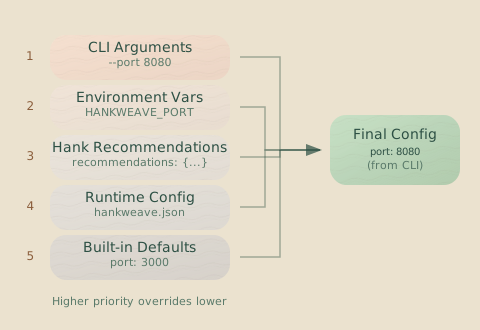
| Layer | Source | Priority |
|---|---|---|
| 5 | CLI arguments (--port, --model, etc.) | Highest |
| 4 | Environment variables (HANKWEAVE_RUNTIME_*) | |
| 3 | Hank overrides (hank.json) | |
| 2 | Runtime config file (hankweave.json) | |
| 1 | Built-in defaults | Lowest |
Deep merge behavior: Nested objects are merged, not replaced. If layer 2 sets sentinel.enablePersistence and layer 4 sets sentinel.healthCheckGracePeriodMs, the final config will include both settings.
Model Specification
You can specify models in several formats. Start with short names for convenience; use full IDs when you need specific versions.
Short Names
Common Claude models have short aliases:
| Short Name | Resolves To |
|---|---|
sonnet | Latest Claude Sonnet |
opus | Latest Claude Opus |
haiku | Latest Claude Haiku |
Full Model IDs
Specify the exact model ID from the provider:
"model": "claude-sonnet-4-20250514"Provider-Prefixed
For non-Anthropic models, use the provider’s standard model name:
"model": "gemini-1.5-pro-latest"
"model": "gpt-4o"
Validation
Models are validated at load time against the LLM Provider Registry. Invalid model names will cause a validation error with suggestions for valid alternatives.
Template Variables
When you need an agent to write to specific paths, template variables provide runtime-resolved locations.
| Variable | Replaced With |
|---|---|
<%EXECUTION_DIR%> | Full path to the temporary execution directory. |
<%DATA_DIR%> | Full path to the read-only source data directory. |
<%PROJECT_DIR%> | Alias for <%EXECUTION_DIR%>. |
{
  "promptText": "Save the output to <%PROJECT_DIR%>/results/output.json"
}
Info: When to use template variables
Use template variables in your prompts when the agent needs to know the absolute path to a file or directory within its sandboxed environment. The agent sees the fully resolved path.
JSON Schemas
Hankweave provides JSON schemas for configuration files, enabling autocomplete and validation in your editor. Hankweave also auto-adds a $schema field to your hank.json if one isn’t present, so editors with JSON Schema support get autocomplete automatically.
Schema URLs
Schemas are hosted on the unpkg CDN and included in the npm package:
| Schema | URL |
|---|---|
hank.json | https://unpkg.com/hankweave@latest/schemas/hank.schema.json |
hankweave.json | https://unpkg.com/hankweave@latest/schemas/hankweave.schema.json |
*.sentinel.json | https://unpkg.com/hankweave@latest/schemas/sentinel.schema.json |
You can also reference them locally from node_modules/hankweave/schemas/ if you have Hankweave installed as a dependency.
Editor Integration
VS Code: Add this to your workspace settings (.vscode/settings.json):
{
  "json.schemas": [
    {
      "fileMatch": ["**/hank.json", "**/strand.json"],
      "url": "https://unpkg.com/hankweave@latest/schemas/hank.schema.json"
    },
    {
      "fileMatch": ["**/hankweave.json"],
      "url": "https://unpkg.com/hankweave@latest/schemas/hankweave.schema.json"
    },
    {
      "fileMatch": ["**/*.sentinel.json"],
      "url": "https://unpkg.com/hankweave@latest/schemas/sentinel.schema.json"
    }
  ]
}
This gives you:
- Autocomplete for all configuration fields
- Inline documentation on hover
- Validation errors as you type
Validation
Hankweave catches mistakes early. Validation occurs at multiple stages to find different kinds of problems.
Schema Validation
Zod schemas enforce the structure and types of your config files. Invalid fields produce detailed error messages pinpointing the problem.
Invalid hank file:
  - Codon "schema-gen" (codon-2) - continuationMode: Required
  - Codon "validate" (codon-3) - model: Invalid model 'claude-999': Model not found
File Validation
The loader verifies that all referenced files exist before any tokens are spent:
- Prompt files (
promptFile,appendSystemPromptFile) - Rig setup sources (
copy.from) - Sentinel config files (
sentinelConfig)
Constraint Validation
Beyond the schema, semantic rules catch configurations that are technically valid but logically broken:
- Codon and loop IDs must be unique.
continue-previousmode requires matching models between codons.contextExceededloops cannot contain codons withfreshcontinuation.- Continuation chains must be valid (e.g., no continuing from a
contextExceededloop).
Pre-flight Validation
Run hankweave --validate before committing tokens to a run. It combines all the above with additional runtime checks:
- All schema, file, and constraint validation.
- Rig setup path security (no
..escapes). - Model self-tests to verify API connectivity.
- Warnings for risky configurations, like rig setup in a loop without
allowFailure: true.
Common Mistakes
These trip up most people at least once. Save yourself the debugging time.
Warning: Missing
allowFailurein loopsRig setup operations in loop codons should almost always have
allowFailure: true. Without it, acopythat succeeds on iteration 0 but fails on iteration 1 (because the target already exists) will kill the entire loop.
Warning: Model mismatch with
continue-previousDifferent models cannot share a conversation. If codon A uses
sonnetand codon B usesopuswithcontinue-previous, validation will fail.
Warning: Wrong
copy.topathThe
tofield is the full target path, including the final name, not just the parent directory.from: "./templates/config", to: "src"copies theconfigdirectory assrc, not intosrc.
Warning: Fresh codons in
contextExceededloopsThis creates an infinite loop because the context never accumulates. All codons in a
contextExceededloop should usecontinue-previous.