Harnesses and Shims
Hankweave doesn’t implement its own AI agent. It orchestrates existing ones—Claude Code, Gemini CLI, and potentially others—through a unified interface. When Claude Code gets new tools or Gemini improves its reasoning, you get those benefits automatically. No waiting for Hankweave to catch up.
Who is this for? This page is for developers building on Hankweave (Track 3) and contributors working on the runtime (Track 4). If you’re writing hanks, you don’t need to understand this layer—just specify your model and Hankweave handles the rest.
The Philosophy
Why orchestrate existing agents rather than building one from scratch?
Orchestration gives you immediate access to whatever your agent can do. When Claude Code adds a new tool, it’s available in your hanks. When Gemini improves its context window, your Gemini codons benefit. Hankweave doesn’t need to reimplement file operations, shell access, or tool use—it inherits battle-tested implementations from the agents themselves.
The trade-off is that Hankweave is bound by the underlying agent’s capabilities:
- Feature support: Hankweave can only use features the agent exposes.
- Complexity: Log formats must be translated between the agent and the runtime.
- Continuation: Cross-codon session continuity depends on agent-specific features.
Hankweave makes this trade-off deliberately. Agent development moves fast—building a custom agent would mean perpetually chasing feature parity. Orchestration lets Hankweave focus on what makes it valuable: checkpoints, execution isolation, and debugging capabilities.
Architecture Overview
Here’s how the pieces fit together:
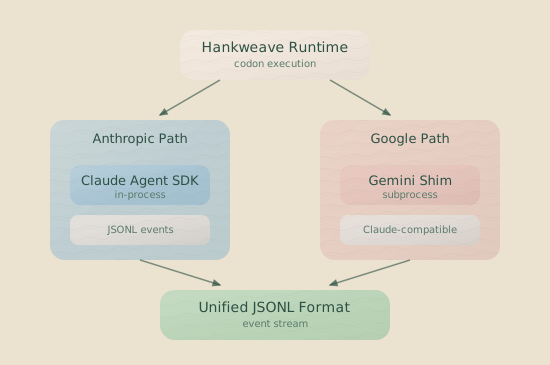
Two paths, one destination. Regardless of which model you use, Hankweave sees the same log format. That’s the key insight—shims translate foreign agents into a lingua franca the runtime understands.
Claude Agent SDK Integration
For Anthropic models—Claude Opus, Sonnet, and Haiku—Hankweave uses the official Claude Agent SDK. Unlike shims, the SDK runs in-process rather than as a subprocess.
How Detection Works
The CodonRunner decides which path to take by checking the model’s provider ID:
static canRun(model: ModelInfo): boolean {
  const supportedProviders = ["anthropic", "google", "openai"];
  return supportedProviders.includes(model.providerId.toLowerCase());
}
When the provider is “anthropic”, Hankweave routes to ClaudeAgentSDKManager. All other providers (Google, OpenAI) go through their respective shims.
What the SDK Manager Does
The ClaudeAgentSDKManager sits between Hankweave and the Claude Agent SDK, handling the details that make orchestration work:
- Session management creates and resumes sessions using the SDK’s session continuation features.
- System prompt appending injects additional instructions via the
systemPrompt.appendoption. - Environment variable passing forwards
HANKWEAVE_*variables (with prefix stripped) along with essential system variables. - Template variable replacement substitutes
<%EXECUTION_DIR%>,<%DATA_DIR%>, and the legacy<%PROJECT_DIR%>. - Log output writes SDK messages to Claude-compatible JSONL format.
- Synthetic PIDs generate process IDs in the 900000+ range for compatibility with process management APIs.
Session Continuation
When a codon uses continuationMode: "continue-previous", the SDK manager passes the previous session ID:
if (codon.continuationMode === "continue-previous" && previousSessionId) {
  options.continue = true;
  options.resume = previousSessionId;
}
This maintains conversation context across codons. The new codon doesn’t start fresh—it continues exactly where the previous one left off, with full memory of what came before.
Environment Variables
Not all environment variables reach the agent. The SDK manager filters and transforms them:
| Category | Pattern | Behavior |
|---|---|---|
| Essential system | PATH, HOME, USER, etc. | Passed directly |
| Claude Code | CLAUDE_CODE_* | Passed directly (for OAuth) |
| Anthropic | ANTHROPIC_* (except ANTHROPIC_API_KEY) | Passed directly |
| Hankweave | HANKWEAVE_* (except RUNTIME_ and SENTINEL_) | Prefix stripped, then passed (see configuration reference) |
| Codon-specific | codon.env | Override any existing vars |
Codon-level env variables are also injected into rig setup command execution, so setup scripts can depend on the same environment as the agent process.
ANTHROPIC_API_KEY is excluded when OAuth tokens are present to avoid
authentication conflicts. The SDK will prefer CLAUDE_CODE_OAUTH_TOKEN if
it’s set.
Self-Test
Before running anything expensive, you can verify the SDK is properly configured. A self-test runs diagnostics to check that the SDK is installed, accessible, and authenticated.
const result = await manager.runSelfTest();
// Returns: { shim, agent, checks, overall }
The self-test runs several diagnostics:
- Installation: Checks if the SDK is installed and importable.
- Executable: Verifies the Claude CLI executable can be found (or resolved internally by the SDK).
- Authentication: Confirms an API key or OAuth token is configured.
- Endpoint: Validates any custom base URL.
The Shim System
For non-Anthropic models, Hankweave uses shims—command-line adapters that translate between agent-specific formats and Claude-compatible JSONL.
Why Shims Exist
Every AI CLI tool does things differently. Output formats vary—streaming JSON, NDJSON, custom protocols. Session continuation mechanisms differ. Tool names aren’t consistent (one agent’s read_file is another’s ReadFile). Error reporting styles range from structured JSON to plain text stack traces.
Shims normalize all of this. From Hankweave’s perspective, every agent speaks the same language.
The Standardized Interface
Every shim implements the same command-line interface, accepting these arguments:
--model {modelId}(required): Specifies which model to use.-p(required): Reads prompt content from stdin.--resume {sessionId}(optional): Continues from a previous session.--append-system-prompt {text}(optional): Injects additional system instructions.--self-test(optional): Runs environment diagnostics and exits.
Log Output Format
Shims write Claude-compatible JSONL to stdout—one JSON object per line. Four message types make up the format:
System messages:
{
  "type": "system",
  "subtype": "init",
  "cwd": "/path/to/execution",
  "session_id": "session-abc123",
  "tools": ["Read", "Write", "Edit", "Bash", "Glob", "Grep"],
  "model": "google/gemini-2.0-flash",
  "permissionMode": "bypassPermissions"
}
Assistant messages:
{
  "type": "assistant",
  "message": {
    "id": "msg_abc123",
    "type": "message",
    "role": "assistant",
    "model": "google/gemini-2.0-flash",
    "content": [
      { "type": "text", "text": "I'll read that file..." },
      {
        "type": "tool_use",
        "id": "toolu_xyz",
        "name": "Read",
        "input": { "file_path": "..." }
      }
    ],
    "stop_reason": "tool_use"
  }
}
User messages (tool results):
{
  "type": "user",
  "message": {
    "role": "user",
    "content": [
      {
        "type": "tool_result",
        "tool_use_id": "toolu_xyz",
        "content": "file contents..."
      }
    ]
  }
}
Result messages:
{
  "type": "result",
  "subtype": "success",
  "is_error": false,
  "duration_ms": 12345,
  "num_turns": 5,
  "result": "Request completed successfully",
  "session_id": "session-abc123",
  "usage": { "input_tokens": 1000, "output_tokens": 500 }
}
Tool Name Normalization
Different agents name their tools differently. Shims translate them all to a standard set:
| Native Name | Normalized |
|---|---|
read_file, readFile, file_read | Read |
write_file, writeFile | Write |
edit_file, editFile, str_replace_editor | Edit |
run_shell_command, bash, shell | Bash |
list_directory, ls, list | LS |
glob, find_files | Glob |
grep, search_files, search | Grep |
Self-Test Protocol
When you invoke a shim with --self-test, it checks its dependencies—CLI tools, API keys, anything else it needs. Then it outputs a JSON result to stdout and exits with code 0 if everything passed, or 1 if something failed.
Here’s what the output looks like:
{
  "shim": {
    "name": "gemini-cli-shim",
    "version": "1.0.0"
  },
  "agent": {
    "name": "gemini-cli",
    "version": "0.1.2",
    "found": true
  },
  "checks": [
    {
      "name": "gemini_cli_found",
      "passed": true,
      "message": "Gemini CLI found at /usr/local/bin/gemini"
    },
    {
      "name": "api_key",
      "passed": true,
      "message": "API key found in environment"
    }
  ],
  "overall": {
    "passed": true,
    "message": "All checks passed"
  }
}
Built-in Shims
Hankweave ships with four shims. All shims share a common infrastructure package (@shims/common) that provides argument parsing, message protocol types, session management, idle timeout logic, and tool definitions.
The Gemini Shim (Reference Implementation)
Hankweave ships with a reference shim for Google’s Gemini models. It wraps the gemini CLI and translates its output to the standard format. If you’re building your own shim, this is a good place to start.
How It Works
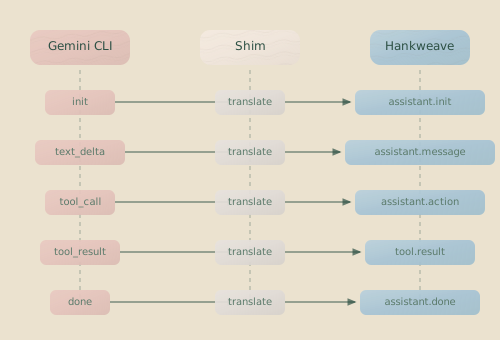
Event Translation
The shim maps Gemini CLI events to their Claude equivalents:
| Gemini Event | Claude Output |
|---|---|
init | system message with session ID |
message (role: assistant) | Accumulated into assistant message |
tool_use | tool_use block in assistant message |
tool_result | user message with tool_result |
result | result message with final stats |
The shim recognizes shortcuts for Gemini models, such as flash and pro. The LlmProviderRegistry (covered next) is the single source of truth for resolving all model shortcuts to their full IDs.
The Codex Shim
For OpenAI models, Hankweave ships a Codex shim that wraps the @openai/codex CLI. It supports the full GPT-4.1 and GPT-5.2 series, including quality-tier variants (-high, -xhigh) and Codex-optimized variants (-codex-high, -codex-xhigh), as well as reasoning models (o1, o3).
Hankweave handles Codex binary management automatically. In development, it uses the binary from node_modules; for compiled executables, it extracts the platform-specific Codex binary to ~/.hankweave/codex-sdk/<version>/ and caches it across runs.
Authentication is detected in this order: ~/.codex/auth.json (from codex login), then CODEX_API_KEY, then OPENAI_API_KEY. The self-test verifies both the binary and authentication.
The Pi Shim
For the Pi coding agent , Hankweave includes a shim that uses Pi as an embedded library rather than wrapping an external CLI. The shim imports @mariozechner/pi-coding-agent directly, creating agent sessions, tools (Bash, Read, Write, Edit, Grep, Find, Ls), and model registry entries in-process. This means Pi doesn’t require a separate CLI installation — everything needed to run Pi codons is bundled with Hankweave.
The shim translates Pi’s event-based output into Claude-compatible JSONL, manages provider authentication across Pi’s supported LLM providers, and includes an adaptive idle watchdog and debug recording for diagnostics.
Why Pi is different: The Gemini and Codex shims wrap external CLI tools that must be installed separately. The Pi shim embeds the agent library directly, making it available out of the box with no additional setup beyond an API key. This makes Pi a good choice when you need a lightweight multi-provider agent without external dependencies.
The OpenCode Shim
For OpenCode , Hankweave includes a shim that wraps the opencode CLI. The shim handles model resolution (including Gemini models through OpenCode), session management via OpenCode’s title-based session lookup, and tool name normalization.
OpenCode authentication is detected from the provider’s standard API key environment variables (e.g., GOOGLE_API_KEY for Gemini models routed through OpenCode).
Model Detection and Routing
When a codon specifies a model, the CodonRunner figures out which path to take:
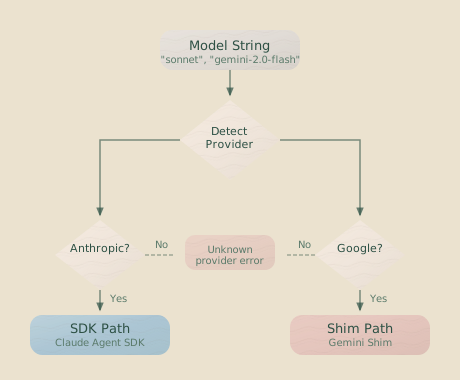
Five providers are currently supported: Anthropic models run through the Claude Agent SDK in-process, Google models go through the Gemini shim as a subprocess, OpenAI models run through the Codex shim, Pi models run through the Pi shim (embedded library, no external CLI), and OpenCode models run through the OpenCode shim.
Choosing between providers: Anthropic models execute via the Claude Agent SDK in-process. Gemini, Codex, and OpenCode shims wrap external CLI tools as subprocesses (requiring those tools to be installed). The Pi shim embeds its agent library directly — no external CLI needed. You can mix providers in the same hank; each codon routes to its appropriate harness.
LlmProviderRegistry
Behind model detection sits the LlmProviderRegistry—a singleton that manages model resolution, provider health checks, and cost calculation. It’s the source of truth for what models exist and how to reach them.
Model Resolution
The registry is forgiving about model names. It resolves them through three phases:
First, it tries an exact match—anthropic/claude-sonnet-4-20250514 matches directly. If that fails, it attempts inferred provider resolution—claude-sonnet infers Anthropic from the name. As a last resort, fuzzy matching kicks in—claude-sonet (typo) finds the closest model name match. Fuzzy matching is helpful for development but unreliable for production—always use full model IDs in critical hanks.
const result = registry.resolveModel({
  providerId: "anthropic", // Optional: narrow to provider
  model: "sonnet", // Accepts shortcuts, full IDs, fuzzy names
  ignoreBlockList: true, // Skip blocklist checks (default: true)
});

// result.matchType: "exact" | "exact-with-inferred-provider" | "fuzzy"
Model Shortcuts
The registry has built-in shortcuts for convenience:
| Shortcut | Resolves To | Provider |
|---|---|---|
opus | claude-opus (latest) | Anthropic |
sonnet | claude-sonnet (latest) | Anthropic |
haiku | claude-haiku (latest) | Anthropic |
pro | gemini-2.0-pro (latest) | |
flash | gemini-2.0-flash (latest) |
OpenAI models use their full IDs (e.g., gpt-5.2-codex-high, o3-mini) since there is no single “default” OpenAI model.
Provider Health Checks
Before running an expensive hank, you can verify that your providers are reachable:
await registry.performHealthChecks();
const status = registry.getProviderStatus();
// Map<string, { status: "available" | "not-configured" | "failed", healthy: boolean, ... }>
Health checks use the cheapest available model for each provider to minimize cost. If something’s misconfigured, you’ll find out before burning tokens.
Cost Calculation
The registry also tracks pricing, so you can calculate costs programmatically:
const cost = registry.calculateCost("anthropic/claude-sonnet-4-20250514", {
  inputTokens: 10000,
  outputTokens: 5000,
  cacheReadTokens: 2000,
  cacheCreationTokens: 1000,
});
// Returns cost in USD, or null if pricing unavailable
Building Your Own Shim
Want to add support for a new AI provider? Here’s what it takes.
1. Implement the CLI Interface
Your shim needs to accept --model {modelId} to specify the model, -p to read the prompt from stdin, --resume {sessionId} for optional session continuation, --append-system-prompt {text} for optional system prompt injection, and --self-test for diagnostic mode.
2. Output Claude-Compatible JSONL
Write one JSON object per line to stdout. Start with a system message containing the session ID. Follow with assistant messages (including tool use blocks) and user messages (containing tool results). End with a result message that includes usage stats.
3. Normalize Tool Names
Map your agent’s tool names to the standard set: Read, Write, Edit, Bash, Glob, Grep, LS. This is what lets Hankweave understand tool usage regardless of which agent is running.
4. Handle Errors Gracefully
Even when things go wrong, your shim should emit a complete message sequence: a system message (even with placeholder data), a synthetic assistant message explaining the error, and a result message with subtype: "error". This keeps downstream processing consistent.
5. Implement Self-Test
Return a JSON object that describes your shim name and version, the underlying agent name, version, and whether it was found, individual checks with pass/fail status, and an overall result. See the Gemini shim’s self-test output for the expected format.
Polymorphic Connector Pattern
A notable application of this architecture is the polymorphic connector pattern: using AI to build adapters for other AI. Hankweave’s own Gemini shim was built this way.
The process works like this: start with the Claude JSONL schema as your target format. Give an agent the documentation for whatever CLI you’re wrapping. Have it generate a shim that translates between formats. Iterate until the translation is accurate.
This pattern works for any agent with documented output format, session continuation support, and tool use capabilities. If an agent meets those criteria, you can have an AI write most of the adapter for you.
The polymorphic connector concept is one of Hankweave’s use cases—you can build hanks that generate adapters, parsers, or translators based on documentation.
Debugging Agent Integration
When things go wrong at the harness layer, here’s where to look.
Check Logs
Agent logs live in .hankweave/runs/{runId}/{codonId}-claude.log. These are raw JSONL from the agent or shim—exactly what Hankweave received. If something’s being mistranslated, you’ll see it here.
Verify Self-Test
Before digging deeper, verify that the agent is even available:
hankweave --validateThis runs self-tests for all models used in your hank. If something’s misconfigured, the self-test will tell you.
Common Issues
| Symptom | Likely Cause | Fix |
|---|---|---|
| ”Claude CLI not found” | Claude Code not installed | Install from anthropic.com |
| ”Gemini CLI not found” | Gemini CLI not in PATH | Install from geminicli.com |
| ”Codex CLI not found” | Codex not installed | npm install -g @openai/codex then codex login |
| ”OpenCode CLI not found” | OpenCode not installed | npm install -g opencode-ai |
| ”No API key found” | Missing environment variable | Set ANTHROPIC_API_KEY, GOOGLE_API_KEY, or OPENAI_API_KEY |
| ”Invalid session ID” | Session expired or invalid | Session continuation failed—remove --resume |
| Model resolution failed | Unknown model name | Check spelling, use full ID like anthropic/claude-sonnet-4-20250514 |
Pi doesn’t appear in this table because the Pi agent library is embedded
in the shim — there’s no external CLI to install. If a Pi codon fails to
start, check your API key for the model’s provider (e.g., ANTHROPIC_API_KEY
for pi/anthropic/claude-haiku-4-5).
Related Pages
- Configuration Reference - Model specification in hank config
- Execution Flow - How codon execution works end-to-end
- Debugging Guide - Troubleshooting execution and debugging agent integration
Summary
Hankweave’s harness architecture is a bet on orchestration over implementation.
The Claude Agent SDK handles Anthropic models in-process. Shims (Gemini, Codex, Pi, OpenCode) translate other agents to a common format. The registry resolves models and tracks provider health. And the polymorphic pattern shows how AI can build its own adapters—Hankweave eating its own dog food.
You don’t need to understand this layer to use Hankweave. But if you want to extend it to new providers, this is where you start.