LLM Proxy
The LLM proxy is an optional layer that intercepts HTTP requests between Hankweave and LLM APIs. When enabled, it runs on port+1 (e.g., port 7778 if the main server is on 7777) and provides a middleware pipeline to inspect, log, and transform API requests and responses.
Who is this for? Developers building on Hankweave (Track 3) who want to intercept, log, or modify LLM API calls. Also useful for contributors implementing custom middleware (Track 4).
Why Use the Proxy?
Sometimes you need to see or change what’s going over the wire. The proxy provides a clean interception point without modifying your agent code.
Common use cases:
- Logging: Record all requests and responses for auditing or debugging.
- Cost Controls: Enforce token limits or spending caps before the request hits the LLM.
- Rate Limiting: Throttle requests to stay within API quotas.
- Request Modification: Adjust parameters like
max_tokenson the fly. - Response Transformation: Post-process API responses before your agent sees them.
- Corporate Proxies: Route all outgoing LLM traffic through required internal infrastructure.
Getting Started
Enabling the Proxy
The proxy is disabled by default. To enable it, use the --proxy flag:
# Enable the proxy
hankweave --proxy

# The proxy will run on the main server's port + 1
You can also enable it with an environment variable or in your configuration file.
Environment variable:
HANKWEAVE_RUNTIME_WITHOUT_PROXY=false hankweaveConfiguration file:
{
  "withoutProxy": false
}
When enabled, the proxy starts and stops automatically with the main Hankweave server.
Configuration
By default, the proxy listens on the main server’s port + 1 and forwards requests to https://api.anthropic.com. You can customize the target URL for use with corporate proxies or custom deployments.
Command-line flag:
hankweave --proxy --anthropic-base-url=https://llm-proxy.corp.example.comEnvironment variable:
HANKWEAVE_RUNTIME_ANTHROPIC_BASE_URL=https://llm-proxy.corp.example.comConfiguration file:
{
  "withoutProxy": false,
  "anthropicBaseUrl": "https://llm-proxy.corp.example.com"
}
Verifying the Proxy is Running
The proxy exposes a health check endpoint. You can ping it to confirm it’s running:
curl http://localhost:7778/health
# Response: "Hankweave Proxy OK"
The root path (/) returns the same response. All other paths are forwarded through the middleware pipeline.
Developing Custom Middleware
To intercept and modify traffic, you write and register custom middleware classes.
The Middleware Pipeline
The proxy processes requests and responses through a chain of middleware.
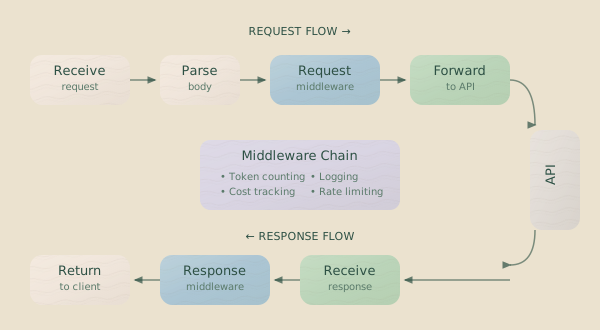
The process is:
- Receive request from the agent.
- Parse Claude API format (if applicable) into a structured object.
- Apply request middleware in the order they are registered.
- Forward request to the target LLM API.
- Receive response from the LLM API.
- Apply response middleware in order.
- Return response to the agent.
Creating a Middleware Class
To create middleware, extend the LLMProxyMiddleware class and override the handleRequest or handleResponse methods.
Here is an example that caps the max_tokens parameter in Claude API requests:
import {
  LLMProxyMiddleware,
  type LLMProxyRequest,
  type LLMProxyResponse,
} from "./llm-proxy.js";

class TokenLimitMiddleware extends LLMProxyMiddleware {
  constructor(private maxTokens: number) {
    super();
  }

  override async handleRequest(req: LLMProxyRequest): Promise<LLMProxyRequest> {
    // Check for parsed Claude request data
    if (req.claudeRequestData) {
      if (req.claudeRequestData.max_tokens > this.maxTokens) {
        req.claudeRequestData.max_tokens = this.maxTokens;
        console.log(`[TokenLimit] Capped max_tokens to ${this.maxTokens}`);
      }
    }
    return req;
  }

  override async handleResponse(
    res: LLMProxyResponse,
  ): Promise<LLMProxyResponse> {
    // This middleware doesn't modify the response, but it could.
    // Here, we just log the status.
    console.log(`[TokenLimit] Response status: ${res.status}`);
    return res;
  }
}
The Request Object
The handleRequest method receives an LLMProxyRequest object with the following fields:
| Field | Type | Description |
|---|---|---|
method | string | HTTP method (GET, POST, etc.) |
url | string | Request path and query parameters |
headers | Record<string, string> | HTTP headers |
body | string | undefined | Raw request body |
claudeRequestData | ClaudeApiRequest | undefined | Parsed Claude API request data (if format matches) |
Modifying Claude Requests: When claudeRequestData is present, modify its
properties directly. The proxy automatically rebuilds the raw body from this
structured object, preventing synchronization issues.
The Response Object
The handleResponse method receives an LLMProxyResponse object:
| Field | Type | Description |
|---|---|---|
status | number | HTTP status code |
headers | Record<string, string> | Response headers |
body | string | ReadableStream | undefined | Response body (may be streaming) |
Streaming Responses: If the response body is a ReadableStream, be
careful. Once a stream is read, it cannot be read again. To inspect and
forward a streaming response, you must implement logic to buffer or tee the
stream.
Built-in Middleware (Examples)
Hankweave includes two middleware implementations that serve as useful examples.
LoggingMiddleware
Enabled by default when the proxy is running, this logs request and response details to the server log. For Claude API requests, it logs key parameters:
[LOGGING-MIDDLEWARE] Received request POST /v1/messages
[LOGGING-MIDDLEWARE] Claude request - model=claude-sonnet-4-20250514, messages=5, max_tokens=8192, stream=true
---
[LOGGING-MIDDLEWARE] Response status: 200
---
For non-Claude requests, it logs the HTTP method, URL, and a truncated body.
DoubleMaxTokens (Demonstration)
This example middleware demonstrates modifying a request parameter. It doubles the max_tokens value for any Claude API call that includes it.
export class DoubleMaxTokens extends LLMProxyMiddleware {
  override async handleRequest(req: LLMProxyRequest): Promise<LLMProxyRequest> {
    if (req.claudeRequestData?.max_tokens) {
      const originalMaxTokens = req.claudeRequestData.max_tokens;
      req.claudeRequestData.max_tokens = originalMaxTokens * 2;
    }
    return req;
  }
}
This middleware is not enabled by default; it exists as a reference for your own implementations.
Troubleshooting and Limitations
Debugging
Proxy activity is logged to the main server log. You can monitor it for middleware output and errors:
tail -f .hankweave/logs/server.log | grep -E "\[PROXY|LOGGING-MIDDLEWARE\]"The built-in LoggingMiddleware provides the clearest view into the request/response lifecycle.
Known Limitations
- Anthropic-aware Parsing: The structured
claudeRequestDataobject is only populated for requests that match the Anthropic API format. Other requests are passed through, but you must work with the rawbody. - Limited Body Modification: Middleware can only modify the structured
claudeRequestDataobject. For non-Claude requests, the raw requestbodyis passed through unmodified. You can inspect it, but you cannot currently change it. - Passthrough Only: The only supported proxy mode is “passthrough.” Features like caching or load balancing are not implemented.
Internals (For Contributors)
This section describes the underlying components that manage the proxy. You don’t need to understand these to write middleware, but they are useful for contributors to Hankweave.
HTTP Transport
The HttpTransport class is responsible for forwarding the final, modified request to the target LLM service.
class HttpTransport implements LLMTransport {
  constructor(
    private baseUrl: string, // e.g., "https://api.anthropic.com"
    public logger: Logger,
  ) {}

  async forward(req: LLMProxyRequest): Promise<LLMProxyResponse> {
    // Forwards to baseUrl + req.url
  }
}
The transport automatically updates the Host header, recalculates Content-Length after middleware modifications, handles streaming responses, and logs errors.
Proxy Runner
The ProxyRunner class manages the proxy server’s lifecycle.
const runner = new ProxyRunner(
  "passthrough", // Proxy type
  7778, // Port
  "https://api.anthropic.com", // Target URL
  logger,
  0, // Idle timeout (0 = no timeout)
);

// Start the proxy
const proxyUrl = runner.start();
console.log(proxyUrl); // "http://localhost:7778"

// Stop the proxy
runner.stop();
When you start Hankweave with --proxy, it creates and manages a ProxyRunner instance for you.
When to Use the Proxy
The proxy is most valuable for debugging API communication, implementing organization-wide policies (like token limits or cost caps), routing traffic through corporate infrastructure, or logging API usage for compliance.
For most development, the proxy is unnecessary and adds minor latency. Enable it when you have a specific problem to solve.
Related Pages
- Configuration - Runtime configuration options.
- Harnesses and Shims - How Hankweave communicates with LLM providers.
- API Keys and Models - Provider configuration and model resolution.