Performance and Cost Tracking
Hankweave automatically tracks costs and token usage. Every LLM call from a codon or sentinel is metered and recorded, available for inspection both in real time and after a run completes.
Who is this for? Users optimizing hank costs (Track 2: Writing Hanks) and developers building monitoring tools (Track 3: Building on Hankweave).
How Cost Tracking Works
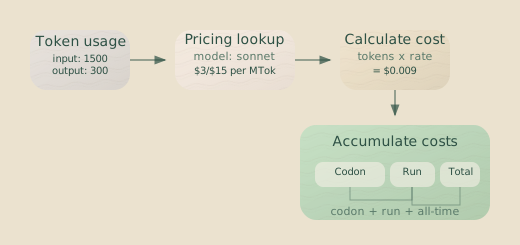
Hankweave calculates costs using per-model pricing data from its LLM Provider Registry. When an agent makes an LLM call, the runtime extracts token usage from the response and computes costs based on input tokens, output tokens, and cache operations.
Token Categories
Every LLM call tracks four token categories:
| Category | Description | Typical Impact |
|---|---|---|
| Input Tokens | Tokens sent to the model (prompt, context, files) | Usually the largest cost component |
| Output Tokens | Tokens generated by the model | Higher per-token cost than input |
| Cache Read Tokens | Tokens read from prompt caching | Significantly cheaper than input |
| Cache Write Tokens | Tokens written to prompt cache | One-time cost, enables future savings |
Cost Calculation
The registry calculates costs per million tokens using model-specific pricing:
const inputCost = (usage.inputTokens / 1_000_000) * modelCost.input;
const outputCost = (usage.outputTokens / 1_000_000) * modelCost.output;
const cacheReadCost =
  (usage.cacheReadTokens / 1_000_000) * modelCost.cache_read;
const cacheWriteCost =
  (usage.cacheWriteTokens / 1_000_000) * modelCost.cache_write;

const totalCost = inputCost + outputCost + cacheReadCost + cacheWriteCost;
Prompt caching can substantially reduce costs. When a codon uses the
continue-previous continuation mode, prompts
that overlap with previous turns can be served from the cache at a reduced
cost.
Where Costs Appear
Hankweave reports costs in multiple places, each serving a different purpose.
State File
The state file tracks cumulative costs per codon. Running codons show currentCost and currentTokens, while completed codons have finalCost and finalTokens:
{
  "codons": [
    {
      "codonId": "generate-schema",
      "status": "completed",
      "finalCost": 0.0234,
      "finalTokens": {
        "inputTokens": 15420,
        "outputTokens": 3210,
        "cacheWriteTokens": 0,
        "cacheReadTokens": 12500
      }
    }
  ]
}
See State File for the complete schema.
Events
Cost updates are emitted as events during execution:
| Event | When | Data |
|---|---|---|
token.usage | During codon execution | Current tokens and cost for the codon |
codon.completed | After codon finishes | Final cost, tokens, and sentinel costs |
sentinel.output | After sentinel LLM call | Per-call cost and tokens |
State Snapshots
The state.snapshot event includes aggregated costs:
{
  "type": "state.snapshot",
  "data": {
    "currentCost": 0.0234,
    "totalTokens": {
      "inputTokens": 15420,
      "outputTokens": 3210,
      "cacheWriteTokens": 0,
      "cacheReadTokens": 12500
    }
  }
}
Codon vs. Sentinel Costs
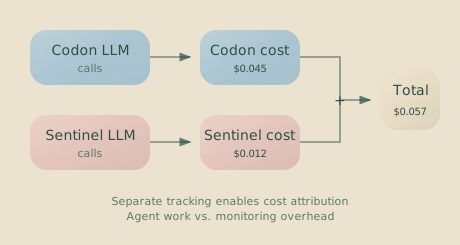
Hankweave tracks codon and sentinel costs separately because they serve different purposes and often use different models.
Codon Costs
Codon costs come from the main agent—such as Claude Code or a shim-based agent—executing the codon’s work. These are typically the majority of a run’s costs.
Codon costs appear in:
currentCost/finalCoston codon execution objectstoken.usageevents during executioncodon.completedevents when finished
Sentinel Costs
Sentinel costs come from parallel LLM calls for observation. Each sentinel tracks its cumulative cost independently.
Sentinel costs appear in:
- The
totalCostfield within thesentinelsobject on a codon execution sentinel.outputevents with per-call costs- Individual sentinel state with the
totalCostfield
{
  "sentinels": {
    "executed": [
      {
        "id": "cost-tracker",
        "model": "anthropic/claude-haiku",
        "totalCost": 0.0012,
        "llmCallCount": 8
      }
    ],
    "totalCost": 0.0012
  }
}
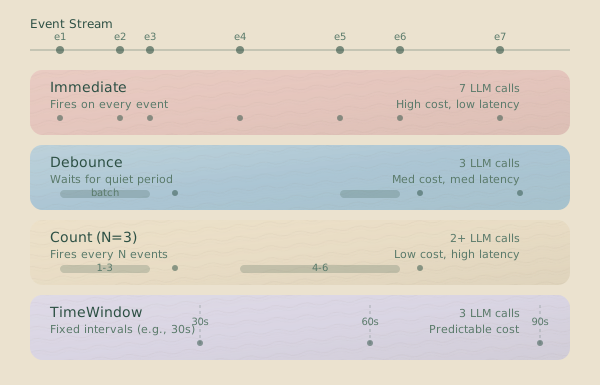
Sentinel costs add up. A sentinel using the immediate execution strategy
triggers on every matching event. In a long run, frequent sentinel calls can
become significant. Use debounce, count, or timeWindow strategies to
batch events and reduce LLM calls.
The Cost Cache
The state manager maintains a cost cache for fast queries without recalculating from the full state history:
// Fast queries via cache
const currentRunCost = stateManager.getCurrentRunCost();
const totalCost = stateManager.getTotalCost();
The cache rebuilds automatically after any cost-related state transition. This means queries are O(1) rather than O(codons).
When the Cache Rebuilds
| Event | Cache Behavior |
|---|---|
CostsUpdated | Full rebuild |
CostsIncremented | Full rebuild |
CodonFinalCostSet | Full rebuild |
RunStarted | Reset current run cost |
RunCompleted / RunFailed | Reset current run cost |
Performance Considerations
Beyond direct LLM costs, several factors influence Hankweave’s performance and resource usage.
Event Journal Growth
The event journal (.hankweave/events/events.jsonl) grows with every journaled event. For long-running hanks or hanks with verbose sentinels, this file can become large.
What’s normal:
- Short runs (< 10 codons): A few hundred KB
- Medium runs (10-50 codons): 1-10 MB
- Long runs or loops: 10-100+ MB
When to be concerned:
- Journal file over 500 MB
- Noticeable latency in event queries
Mitigation:
- Archive old runs. The journal is append-only, so you can safely truncate the file after backing it up.
- Use
reportToWebsocket.triggers: falseon verbose sentinels to reduce events. - For extremely long runs, consider splitting them into multiple hanks.
Sentinel Queue Sizing
Sentinels use fixed queue limits to prevent unbounded memory growth:
| Queue | Limit | Behavior When Full |
|---|---|---|
| Trigger queue | 100 triggers | Drops oldest trigger |
| Event buffer | 10,000 events | Drops oldest trigger’s events |
These limits exist to prevent memory exhaustion during high-throughput scenarios. If you see “Queue full” or “Event buffer exceeded” log messages, your sentinel is receiving events faster than it can process them.
Solutions:
- Switch from
immediateto adebounceortimeWindowstrategy. - Increase trigger selectivity with more specific conditions.
- Use a faster model for the sentinel.
Loop Efficiency
Hankweave uses lazy loop expansion—only one iteration exists in the execution plan at a time. This design has several performance implications:
Benefits:
- Memory-efficient: The plan doesn’t grow until an iteration starts.
- Supports unbounded loops:
contextExceededloops can run indefinitely. - Enables mid-iteration termination: A hank can be stopped cleanly within a loop.
Considerations:
- Each iteration requires a cheap plan expansion operation.
- Debugging tools show only the currently expanded iterations.
- The runtime cannot “see ahead” to future iterations in the plan.
Checkpoint Overhead
Every checkpoint creates a git commit in the shadow repository. Git operations are fast but not free:
| Operation | Typical Time | When |
|---|---|---|
git add | 10-50ms | After each checkpoint |
git commit | 50-100ms | After each checkpoint |
git checkout | 100-500ms | During rollback |
git log | 10-50ms | Listing checkpoints |
For hanks with many small codons, checkpoint overhead can become noticeable. The overhead scales with the number of tracked files, not their size, as git uses content-addressed storage efficiently.
Memory vs. File Storage
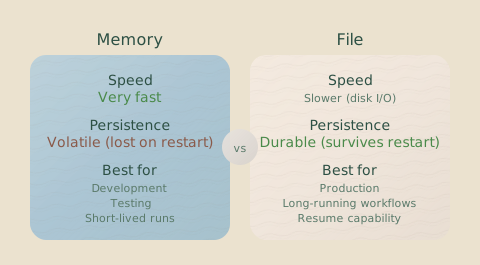
Hankweave offers two event storage backends:
| Backend | Use Case | Memory | Persistence |
|---|---|---|---|
FileEventStorage | Production | Low | Yes |
MemoryEventStorage | Testing | 100 events max | No |
FileEventStorage uses chunked reads (10,000 events per chunk) and streaming to handle large journals without loading everything into memory.
MemoryEventStorage auto-trims to a maximum of 100 events (dropping the oldest 10% when the limit is reached), making it suitable only for tests.
Budget Enforcement
Beyond passive cost tracking, Hankweave provides an active budget system that enforces cost, time, and token limits. Budgets let you declare, in advance, how much a codon, loop, or hank is allowed to consume — and what happens when it hits that limit.
Budget limits are resolved at runtime from three sources (tightest wins): CLI flags (--max-cost, --max-time), runtime config (hankweave.json), and hank overrides. The runtime kills the agent process when any limit is hit.
At the end of a run, a budget.summary event is emitted with a per-codon summary table showing budget vs. actual usage. The TUI renders this table inline. During --validate, a budget resolution table shows what limits will be enforced before any tokens are spent.
See Budgets for the full documentation on allocation modes, per-codon limits, and loop budget interaction.
TUI cost display is hidden by default. Set
HANKWEAVE_RUNTIME_SHOW_COSTS=1 to display dollar amounts and token totals in
the TUI output.
Optimizing Costs
Model Selection by Task
Different tasks have different model requirements. Hankweave lets you specify models per codon, so use them strategically:
| Task Type | Suggested Model Class | Why |
|---|---|---|
| Planning, architecture | High reasoning (opus, o1) | Complex decision-making |
| Code generation | Medium reasoning (sonnet) | Balance of capability and cost |
| Simple transformations | Fast (haiku, gemini-flash) | Speed over sophistication |
| Validation, formatting | Fast (haiku, gemini-flash) | Quick feedback loops |
Sentinel Model Selection
Sentinels often don’t need top-tier models. A narrator or cost tracker works well with a faster, cheaper model like Haiku:
{
  "id": "narrator",
  "model": "anthropic/claude-haiku-4-5",
  "trigger": { "type": "event", "on": ["*"] },
  "execution": { "strategy": "debounce", "milliseconds": 5000 }
}
Sentinel-specific API keys let you use different billing for sentinel
calls. Set the HANKWEAVE_SENTINEL_ANTHROPIC_API_KEY environment variable to
separate sentinel costs from codon costs.
Prompt Caching
Claude models support prompt caching, which can significantly reduce costs for codons that share context. To maximize cache hits:
- Use
continue-previousmode when codons build on previous work. - Place stable content early in prompts (e.g., system prompts, reference documentation).
- Keep changing content late in prompts (e.g., the current task, recently modified files).
Batching with Execution Strategies
For sentinels that don’t need real-time responses, batching reduces LLM calls:
| Strategy | Best For | Configuration |
|---|---|---|
immediate | Critical alerts | N/A |
debounce | Activity summaries | 5-30 seconds typical |
count | Periodic digests | 5-20 events typical |
timeWindow | Regular reports | 30-300 seconds typical |
A sentinel that fires once per minute instead of on every event can use over 60x fewer LLM calls.
Monitoring During Execution
Real-Time Cost Tracking
Connect a WebSocket client to receive cost updates as they happen:
client.on("token.usage", (event) => {
  console.log(`Codon ${event.data.codonId}: $${event.data.cost.toFixed(4)}`);
});

client.on("sentinel.output", (event) => {
  console.log(
    `Sentinel ${event.data.sentinelId}: $${event.data.cost.toFixed(4)}`,
  );
});
Cost-Tracking Sentinel
Build a sentinel that monitors costs in real time:
{
  "id": "cost-tracker",
  "model": "anthropic/claude-haiku-4-5",
  "trigger": {
    "type": "event",
    "on": ["token.usage", "codon.completed"]
  },
  "execution": {
    "strategy": "debounce",
    "milliseconds": 10000
  },
  "userPromptText": "Summarize spending: <%= JSON.stringify(it.events) %>"
}
What’s Normal, What’s Concerning
Typical Cost Patterns
| Scenario | Expected Cost Range | Notes |
|---|---|---|
| Simple 3-codon hank | 0.50 | Depends on model choices |
| Data processing pipeline | 5.00 | More for complex schemas |
| Long validation loop | 20.00 | Depends on iterations |
| With active sentinels | Add 10-30% | Model-dependent |
Warning Signs
Runaway costs:
- Cost growing rapidly without visible progress.
- A
contextExceededloop that should have terminated. - A sentinel with an
immediatestrategy on high-frequency events.
Performance issues:
- State file writes taking > 1 second.
- Event queries timing out.
- Log parsing interval warnings.
Resource exhaustion:
- “Queue full” messages from sentinels.
- Git operations failing.
- Lock file heartbeat warnings.
Related Pages
- Budgets - Active cost, time, and token limit enforcement
- Configuration Reference - Runtime config options
- Sentinels - Understanding sentinel execution
- State File - Where costs are persisted
- Debugging - Investigating performance issues
Next Steps
To optimize your hank’s costs:
- Review the state file after a run to see where costs accumulated.
- Consider sentinel execution strategies for batching.
- Use appropriate model selection for each codon.