WebSocket Protocol
Hankweave exposes a WebSocket API for building custom tools, UIs, and integrations. The built-in TUI uses this same API—anything it can do, you can do.
Who needs this page? Developers building tools that integrate with Hankweave: custom dashboards, CI/CD integrations, monitoring tools, alternative interfaces, or programmatic control. If you’re just running or writing hanks, you don’t need this—use the CLI instead.
Connection Overview
The Hankweave server runs a WebSocket endpoint that accepts multiple simultaneous clients. By default, the port is dynamically assigned; use --port to specify one explicitly. Each client completes a handshake to establish its access level, then sends commands and receives events.
The server only accepts WebSocket connections. HTTP requests (from browsers, curl, health checks, etc.) receive a 400 Bad Request JSON response with CORS headers, directing the caller to the WebSocket endpoint. This prevents stray HTTP probes from disrupting execution—particularly important in CI/CD environments.
The protocol defines 13 client commands and 27 server events organized into four categories.
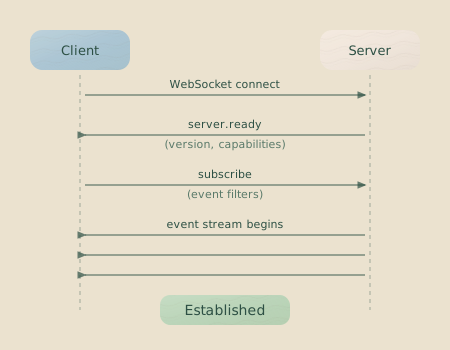
Handshake Protocol
Before sending any commands, a client must complete a handshake. This establishes its access level and optionally retrieves event history from the current run.
Handshake Request
interface HandshakeRequest {
  type: "handshake";
  data: {
    mode: "readonly" | "readandwrite";
    sendPreviousEvents?: boolean; // Request event history (default: false)
  };
}
Handshake Response
interface HandshakeResponse {
  type: "handshake.response";
  data: {
    clientId: string; // Server-assigned unique ID
    mode: "readonly" | "readandwrite"; // Granted mode
    eventHistory: ServerEvent[]; // Recent events (if requested)
    totalEvents: number; // Total events in journal
  };
}
Access Modes and Permissions
The mode you request in the handshake determines which commands the server will accept from your client. The server confirms the granted mode in the HandshakeResponse.
| Mode | Can Send Commands | Can Receive Events | Use Case |
|---|---|---|---|
readonly | Query/System commands only | Yes | Monitoring, dashboards |
readandwrite | All commands | Yes | Full control, TUI |
Read-Only Commands
Clients in readonly mode can send commands that query state but do not modify it. The following commands are always permitted:
checkpoint.listhistory.syncpingping.broadcastserver.shutdown
State-Modifying Commands
All other commands, such as codon.start or rollback.toCheckpoint, modify the execution state and require readandwrite mode. Sending a state-modifying command from a readonly client will result in an error event with the code INSUFFICIENT_PERMISSIONS.
Connecting in TypeScript
const ws = new WebSocket("ws://localhost:7777");

ws.onopen = () => {
  // Send handshake
  ws.send(
    JSON.stringify({
      type: "handshake",
      data: {
        mode: "readandwrite",
        sendPreviousEvents: true,
      },
    }),
  );
};

ws.onmessage = (event) => {
  const data = JSON.parse(event.data);

  if (data.type === "handshake.response") {
    console.log(`Connected as ${data.data.clientId}`);
    console.log(`Received ${data.data.eventHistory.length} historical events`);
    // Ready to send commands
  } else {
    // Handle server events
    handleEvent(data);
  }
};
Client Commands
Commands are JSON messages with a type field and an id for correlation. All commands require a completed handshake—the server rejects any command sent before the handshake response arrives.
Command Structure
interface ClientCommand {
  id: string; // Unique command ID (for your tracking)
  type: string; // Command type
  data?: object; // Command-specific data
}
Codon Control Commands
codon.start
Start a specific codon by its ID.
{
  "id": "cmd-1",
  "type": "codon.start",
  "data": {
    "codonId": "generate-schema",
    "skipPreCommands": false
  }
}| Field | Type | Description |
|---|---|---|
codonId | string | The codon ID to start |
skipPreCommands | boolean? | Skip rig setup (default: false) |
codon.next
Start the next codon in the execution plan.
{
  "id": "cmd-2",
  "type": "codon.next"
}
codon.skip
Skip the currently running codon. Creates a skipped checkpoint and moves to the next codon.
{
  "id": "cmd-3",
  "type": "codon.skip"
}
codon.redo
Retry the last completed or failed codon.
{
  "id": "cmd-4",
  "type": "codon.redo"
}
codon.forceStop
Immediately terminate the current codon. Use this when an agent is stuck in a loop or burning tokens on a dead end.
{
  "id": "cmd-5",
  "type": "codon.forceStop",
  "data": {
    "reason": "Agent stuck in loop"
  }
}
Rollback Commands
Rollback commands let you restore the execution directory to a previous checkpoint. This is central to Hankweave’s debugging workflow—try something, roll back, try something else.
checkpoint.list
Query available checkpoints for rollback. The server responds with a checkpoint.list event containing the requested information.
{
  "id": "cmd-6",
  "type": "checkpoint.list",
  "data": {
    "runId": "run-abc123"
  }
}
rollback.toCheckpoint
Rollback to a specific git checkpoint SHA.
{
  "id": "cmd-7",
  "type": "rollback.toCheckpoint",
  "data": {
    "checkpointSha": "a1b2c3d4e5f6",
    "autoRestart": true
  }
}| Field | Type | Description |
|---|---|---|
checkpointSha | string | Git commit SHA to restore |
autoRestart | boolean? | Auto-start next codon after rollback (default: false) |
rollback.toCodon
Rollback to a specific codon’s checkpoint.
{
  "id": "cmd-8",
  "type": "rollback.toCodon",
  "data": {
    "codonId": "validate-schema",
    "checkpointType": "rig-setup",
    "autoRestart": true
  }
}| Field | Type | Description |
|---|---|---|
codonId | string | The codon to rollback to |
checkpointType | string | One of: "rig-setup", "completed", "error", "skipped", or convenience aliases "start" / "end" |
autoRestart | boolean? | Auto-start after rollback (default: false) |
Convenience aliases: "start" resolves to "rig-setup" if available,
otherwise "completed" from the previous codon. "end" resolves to
"completed", "error", or "skipped" depending on the codon’s final state.
Use aliases when you don’t know the exact checkpoint type—Hankweave will pick
the right one.
rollback.toLastSuccess
Rollback to the last successfully completed codon.
{
  "id": "cmd-9",
  "type": "rollback.toLastSuccess",
  "data": {
    "autoRestart": false
  }
}
System Commands
server.shutdown
Gracefully shut down the server.
{
  "id": "cmd-10",
  "type": "server.shutdown",
  "data": {
    "reason": "User requested"
  }
}
ping
Test connection. The server sends a pong event only to the sender.
{
  "id": "cmd-11",
  "type": "ping"
}
ping.broadcast
Test connection with broadcast. All connected clients receive the pong event.
{
  "id": "cmd-12",
  "type": "ping.broadcast"
}
history.sync
Stream the full event history from the journal. Events arrive as history.batch events.
{
  "id": "cmd-13",
  "type": "history.sync"
}
Server Events
Events are JSON messages the server pushes to clients. They form the real-time stream you’ll use to build UIs and monitoring tools. Every event has this base structure:
interface ServerEvent {
  id: string; // Unique event ID
  timestamp: string; // ISO 8601 timestamp
  type: string; // Event type
  data: object; // Event-specific payload
}
Event Categories
Hankweave classifies events into four categories, which determines how they’re persisted and routed:
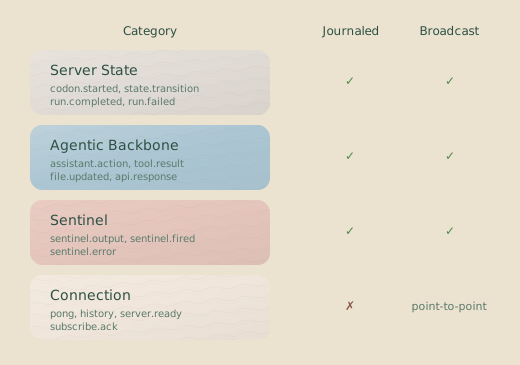
| Category | Journaled? | Routing | Events |
|---|---|---|---|
| Server State | Yes | Broadcast to all | Execution lifecycle, state changes |
| Agentic Backbone | Yes | Broadcast to all | Agent actions, tool results, file changes |
| Sentinel | Yes | Broadcast to all | Sentinel lifecycle and outputs |
| Connection State | No | Unicast to sender | Client-specific responses |
Server State Events
These track the execution lifecycle and are persisted to the event journal.
server.idle
Server is waiting for commands.
{
  type: "server.idle",
  data: {
    reason: "startup" | "codon-completed" | "all-codons-completed",
    message: string
  }
}
codon.started
A codon has begun execution.
{
  type: "codon.started",
  data: {
    codonId: string,
    codonName: string,
    codonDescription?: string,
    sessionId: string,
    previousSessionId?: string,
    startTime: string,  // ISO 8601
    promptMetadata?: {
      name?: string,
      description?: string,
      tags?: string[],
      version?: string,
      author?: string
    }
  }
}
codon.completed
A codon has finished (success or failure).
{
  type: "codon.completed",
  data: {
    codonId: string,
    success: boolean,
    cost: number,         // USD
    duration: number,     // milliseconds
    exitStatus: ProcessExit,
    failureReason?: FailureReason
  }
}
ProcessExit types:
type ProcessExit =
  | { type: "success" }
  | { type: "error"; code: number }
  | { type: "killed"; signal: string };
FailureReason structure:
interface FailureReason {
  type:
    | "timeout"
    | "rate-limit"
    | "api-error"
    | "sentinel-load-failure"
    | "unknown";
  retriable: boolean;
  message?: string;
  sentinelRefs?: string[]; // For sentinel-load-failure
}
state.snapshot
Current execution state (sent periodically during execution).
{
  type: "state.snapshot",
  data: {
    currentCodon?: CodonExecution,
    completedCodons: CodonExecution[],
    fileTree: FileNode[],
    totalCost: number,
    totalTime: number,
    isRollingBack: boolean
  }
}
token.usage
Token consumption update for a codon.
{
  type: "token.usage",
  data: {
    codonId: string,
    inputTokens: number,
    outputTokens: number,
    cacheCreationTokens: number,
    cacheReadTokens: number,
    totalCost: number,
    modelId?: string,
    modelUsage?: Record<string, {
      inputTokens: number,
      outputTokens: number,
      cacheReadInputTokens?: number,
      cacheCreationInputTokens?: number,
      costUSD: number
    }>
  }
}
info
Informational message.
{
  type: "info",
  data: {
    message: string
  }
}
error
Error occurred during execution.
{
  type: "error",
  data: {
    message: string,
    codon?: string,
    fatal: boolean,
    severity?: "fatal" | "codon" | "operation" | "warning",
    context?: string,
    code?: string
  }
}
checkpoint.list
Response to checkpoint.list command.
{
  type: "checkpoint.list",
  data: {
    runId: string,
    checkpoints: CheckpointInfo[],
    currentBranch: string
  }
}
CheckpointInfo structure:
interface CheckpointInfo {
  codonId: string;
  codonName: string;
  checkpointType: "rig-setup" | "completed" | "error" | "skipped";
  sha: string;
  status: CodonStatus;
  timestamp: string;
}
Rollback Events
These events track the progress of a rollback operation.
rollback.started
Fired when a rollback process begins.
{
  type: "rollback.started",
  data: {
    fromRun: string,
    fromCodon: string,
    toCodon: string,
    toCheckpoint: string,
    checkpointType: string,
    codonsToProcess: string[]
  }
}
rollback.progress
Provides a progress update during a long rollback.
{
  type: "rollback.progress",
  data: {
    currentStep: number,
    totalSteps: number,
    message: string
  }
}
rollback.codonCheckpoint
Fired when a specific codon’s checkpoint has been successfully applied.
{
  type: "rollback.codonCheckpoint",
  data: {
    codonId: string,
    codonName: string,
    checkpoint: string,
    checkpointType: string,
    message: string
  }
}
rollback.rigCleanup
Reports on the cleanup of rig directories associated with rolled-back codons.
{
  type: "rollback.rigCleanup",
  data: {
    codonId: string,
    codonName: string,
    directories: string[],
    status: "started" | "completed" | "failed" | "partial",
    successfulCleanups?: string[],
    failedCleanups?: { directory: string, error: string }[]
  }
}
rollback.completed
Fired when the entire rollback operation is complete.
{
  type: "rollback.completed",
  data: {
    fromRun: string,
    toRun: string,
    checkpoint: string,
    codonId: string,
    codonName: string,
    checkpointType: string,
    autoRestart: boolean
  }
}
rollback.archiveRestore
When rolling back a codon that had archiveOnSuccess, archived files are automatically restored from rigArchive/ back to agentRoot/.
{
  type: "rollback.archiveRestore",
  data: {
    codonId: string,
    restoredFiles: string[],
    sourceDir: string
  }
}
Archive Events
These events track the archiving of files after successful codon or loop iteration completion (when archiveOnSuccess is configured).
archive.completed
Fired when all files matching archiveOnSuccess patterns have been moved to rigArchive/.
{
  type: "archive.completed",
  data: {
    codonId: string,
    archivedFiles: string[],
    archiveDir: string
  }
}
archive.partial
Fired when some files were archived successfully but others failed.
{
  type: "archive.partial",
  data: {
    codonId: string,
    archivedFiles: string[],
    failedFiles: string[],
    archiveDir: string
  }
}
state.transition
Internal state machine transition (useful for debugging).
{
  type: "state.transition",
  data: {
    transitionType: StateTransitionType,
    runId?: string,
    codonId?: string,
    transition: {
      type: string,
      data: Record<string, unknown>
    },
    resultingState: {
      currentRunId: string | null,
      runCount: number,
      totalCost: number,
      currentRunCost: number
    }
  }
}
StateTransitionType values:
RunStarted,RunCompleted,RunFailed,RunCrashedCodonStarted,CodonTransitionedCostsUpdated,CostsIncremented,CodonFinalCostSetAssistantMessageCountUpdatedCheckpointCreated,InitialCheckpointSetSentinelStatesUpdated
Agentic Backbone Events
These capture what the agent is actually doing—tool calls, file changes, and outputs. If you’re building a live view of agent activity, these are the events you’ll consume most.
assistant.action
Agent is thinking, sending a message, or using a tool.
{
  type: "assistant.action",
  data: {
    codonId: string,
    action: "thinking" | "message" | "tool_use",
    content: string,
    toolName?: string,
    toolInput?: Record<string, unknown>
  }
}
tool.result
Tool execution completed.
{
  type: "tool.result",
  data: {
    codonId: string,
    toolUseId: string,
    toolName: string,
    result: string,
    truncated: boolean,
    originalLength: number,
    executionTimeMs: number,
    isError: boolean
  }
}
file.updated
File was created, modified, or deleted.
{
  type: "file.updated",
  data: {
    path: string,
    filename: string,
    content: string,
    action: "created" | "modified" | "deleted"
  }
}
filetree.updated
File tree structure changed.
{
  type: "filetree.updated",
  data: {
    tree: FileNode[]
  }
}
FileNode structure:
interface FileNode {
  name: string;
  path: string;
  isDirectory: boolean;
  children: FileNode[];
  lastModified?: string;
}
Sentinel Events
These track sentinel lifecycle and outputs. Sentinels run in parallel to the main agent, so their events interleave with backbone events.
sentinel.loaded
Sentinel started monitoring.
{
  type: "sentinel.loaded",
  data: {
    sentinelId: string,
    codonId: string,
    model: string,
    triggerType: "event" | "sequence",
    executionStrategy: "immediate" | "debounce" | "count" | "timeWindow",
    conversational: boolean,
    source: "file" | "inline",
    sourcePath?: string
  }
}
sentinel.unloaded
Sentinel stopped.
{
  type: "sentinel.unloaded",
  data: {
    sentinelId: string,
    codonId: string,
    reason: "codon-complete" | "fatal-error" | "consecutive-failures" | "shutdown",
    errorType?: "template" | "configuration" | "corruption" | "resource",
    finalCost: number,
    llmCallCount: number
  }
}
sentinel.output
Sentinel produced output from an LLM call.
{
  type: "sentinel.output",
  data: {
    sentinelId: string,
    codonId: string,
    triggerNumber: number,
    outputType: "text" | "structured",
    content: string | Record<string, unknown>,
    cost: number,
    tokens: {
      input: number,
      output: number
    },
    eventCount: number
  }
}
sentinel.error
Sentinel encountered an error.
{
  type: "sentinel.error",
  data: {
    sentinelId: string,
    codonId: string,
    errorType: "llm-call-failed" | "template-render-failed" | "file-write-failed",
    message: string,
    retriable: boolean,
    consecutiveFailureCount: number
  }
}
sentinel.triggered
Sentinel trigger fired (verbose, usually disabled).
{
  type: "sentinel.triggered",
  data: {
    sentinelId: string,
    codonId: string,
    triggerNumber: number,
    strategy: "immediate" | "debounce" | "count" | "timeWindow",
    eventCount: number,
    queueSize: number
  }
}
Connection State Events
These are not journaled and are sent only to specific clients. They’re client-specific responses that don’t represent shared execution state.
server.ready
Sent immediately after successful handshake.
{
  type: "server.ready",
  data: {
    serverVersion: string,
    executionPath: string,
    agentRootPath: string,
    dataPath: string,
    port: number
  }
}
pong
Response to ping or ping.broadcast.
{
  type: "pong",
  data: {
    message: "pong",
    timestamp: string,
    clientId?: string  // Only in ping.broadcast responses
  }
}
history.batch
Batch of historical events (response to history.sync).
{
  type: "history.batch",
  data: {
    events: ServerEvent[],
    hasMore: boolean
  }
}
incomplete.codon
A codon didn’t finish cleanly (deprecated).
{
  type: "incomplete.codon",
  data: {
    codonId: string,
    codonName: string,
    message: string
  }
}
History Synchronization
Clients that need complete event history—for instance, a UI that connects mid-run—can request a full history sync.
- Connect with
sendPreviousEvents: truein your handshake to get recent events from the current session. - Send a
history.synccommand to stream the complete journal from the beginning of the run. - Events arrive in
history.batchmessages. ThehasMorefield will betrueuntil the final batch.
// Request full history after connecting
ws.send(
  JSON.stringify({
    id: "sync-1",
    type: "history.sync",
  }),
);

// Handle batches
ws.onmessage = (event) => {
  const data = JSON.parse(event.data);
  if (data.type === "history.batch") {
    processEvents(data.data.events);
    if (!data.data.hasMore) {
      console.log("History sync complete");
    }
  }
};
Error Handling
Errors are reported via the error event, which includes a severity level.
| Severity | Meaning | Action |
|---|---|---|
fatal | Server must stop | Reconnect after fix |
codon | Codon failed | Check failureReason, consider codon.redo |
operation | A specific command failed | Check message, retry if appropriate |
warning | Non-blocking issue | Log and continue |
Common error codes sent in the error event’s data payload:
| Code | Meaning |
|---|---|
HANDSHAKE_REQUIRED | Command sent before handshake completed. |
INSUFFICIENT_PERMISSIONS | readonly client sent state-modifying command. |
ROLLBACK_IN_PROGRESS | State-modifying command sent during rollback. |
Building a Client
Here’s a complete example of a monitoring client that connects in readonly mode and tracks codon progress:
import { WebSocket } from "ws"; // Requires `ws` package

// Assuming ServerEvent is defined based on the documentation
interface ServerEvent {
  type: string;
  data: any;
}

class HankweaveMonitor {
  private ws: WebSocket | null = null;
  private events: ServerEvent[] = [];

  connect(port: number): Promise<void> {
    return new Promise((resolve, reject) => {
      this.ws = new WebSocket(`ws://localhost:${port}`);

      this.ws.on("open", () => {
        // Handshake as readonly (we're just watching)
        this.ws!.send(
          JSON.stringify({
            type: "handshake",
            data: {
              mode: "readonly",
              sendPreviousEvents: true,
            },
          }),
        );
      });

      this.ws.on("message", (eventData) => {
        const data = JSON.parse(eventData.toString());

        if (data.type === "handshake.response") {
          console.log(`Connected: ${data.data.clientId}`);
          if (data.data.eventHistory) {
            this.events = data.data.eventHistory;
          }
          resolve();
          return;
        }

        this.handleEvent(data);
      });

      this.ws.on("error", reject);
    });
  }

  private handleEvent(event: ServerEvent): void {
    this.events.push(event);

    switch (event.type) {
      case "codon.started":
        console.log(`▶ Started: ${event.data.codonName}`);
        break;

      case "codon.completed":
        const status = event.data.success ? "✓" : "✗";
        console.log(
          `${status} Completed: ${event.data.codonId} ($${event.data.cost.toFixed(4)})`,
        );
        break;

      case "token.usage":
        console.log(
          `  Tokens: ${event.data.inputTokens} in / ${event.data.outputTokens} out`,
        );
        break;

      case "error":
        if (event.data.fatal) {
          console.error(`FATAL: ${event.data.message}`);
        } else {
          console.warn(`Warning: ${event.data.message}`);
        }
        break;

      case "sentinel.output":
        console.log(
          `  [${event.data.sentinelId}] ${JSON.stringify(event.data.content)}`,
        );
        break;
    }
  }

  getEvents(): ServerEvent[] {
    return this.events;
  }

  getTotalCost(): number {
    return this.events
      .filter((e) => e.type === "codon.completed" && e.data.cost)
      .reduce((sum, e) => sum + e.data.cost, 0);
  }
}
Related Pages
- Configuration Reference — Complete configuration options
- Debugging Guide — Using the protocol for debugging
- Execution Flow — Understanding the lifecycle these events represent
Next Steps
With this protocol, you can build anything from a simple cost-monitoring script to a full custom UI. Start with the complete TypeScript example above, then adapt it for your specific needs. Common patterns include monitoring dashboards (readonly mode), custom TUIs (readandwrite), CI/CD integrations (handling events and using rollback commands), and real-time agent viewers (consuming agentic backbone and sentinel events).