Sentinel Configuration Reference
This document is a complete reference for all sentinel configuration options. It’s a lookup guide for developers who already understand the core concepts and need to configure specific behaviors.
To learn why sentinels work the way they do, start with the Sentinels conceptual guide first.
Who is this for? This page is for developers who understand sentinels and need a reference for specific configuration options.
Sentinel Pipeline Overview
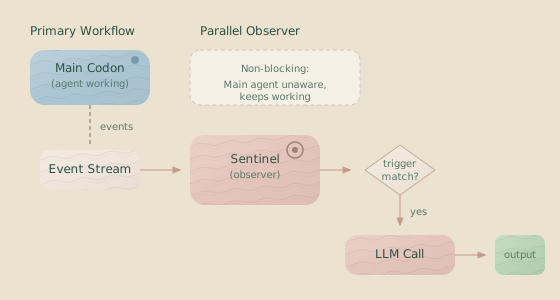
Every sentinel follows the same flow: events from the event stream are filtered by a trigger, batched by an execution strategy, and then processed by an LLM to produce output.
Configuration File Structure
Sentinel configuration is defined in JSON files with the following top-level structure:
{
  "id": "example-sentinel",
  "name": "Example Sentinel",
  "description": "Optional description of what this sentinel does",
  "model": "anthropic/claude-haiku-4-5",
  "trigger": {
    /* ... */
  },
  "execution": {
    /* ... */
  },
  "systemPromptFile": "./prompts/system.md",
  "systemPromptText": "Alternative inline system prompt",
  "userPromptFile": "./prompts/user.md",
  "userPromptText": "Alternative inline user prompt",
  "conversational": {
    /* ... */
  },
  "structuredOutput": {
    /* ... */
  },
  "llmParams": {
    /* ... */
  },
  "errorHandling": {
    /* ... */
  },
  "output": {
    /* ... */
  },
  "joinString": "\n---\n",
  "reportToWebsocket": {
    /* ... */
  }
}
Required Fields
| Field | Type | Description |
|---|---|---|
id | string | Unique identifier. Lowercase letters, numbers, hyphens only. Pattern: /^[a-z0-9-]+$/ |
name | string | Human-readable name for display. |
model | string | Full model ID (e.g., "anthropic/claude-haiku-4-5") or a short name (e.g., "haiku"). See Model Specification for options. |
trigger | object | Defines when the sentinel fires. See Triggers. |
execution | object | Defines how triggered events become LLM calls. See Execution Strategies. |
You must also provide at least one of userPromptFile or userPromptText.
Optional Fields
| Field | Type | Default | Description |
|---|---|---|---|
description | string | — | Optional description for documentation. |
systemPromptFile | string | string[] | — | Path(s) to system prompt file(s). |
systemPromptText | string | — | Inline system prompt text. |
userPromptFile | string | string[] | — | Path(s) to user prompt file(s). |
userPromptText | string | — | Inline user prompt text. |
conversational | object | — | Enable conversation history. See Conversational Mode. |
structuredOutput | object | — | Generate validated JSON. See Structured Output. |
llmParams | object | — | LLM generation parameters. See LLM Parameters. |
errorHandling | object | — | Error handling behavior. See Error Handling. |
output | object | — | Direct output configuration. See Output Configuration. |
joinString | string | "\n---\n" | Separator for log file entries. Only used for text output format. |
reportToWebsocket | object | — | Control WebSocket event emission. See Event Reporting. |
Triggers
Triggers define when a sentinel executes, either by matching single events or by detecting sequences of events.
Event Trigger
Fires when a specific event type occurs and meets all conditions.
{
  "trigger": {
    "type": "event",
    "on": ["assistant.action", "tool.result"],
    "conditions": [
      {
        "operator": "equals",
        "path": "isError",
        "value": true
      }
    ]
  }
}| Field | Type | Required | Description |
|---|---|---|---|
type | "event" | Yes | Discriminator field. |
on | string[] | Yes | Event types to match. Use "*" for a wildcard to match any event. |
conditions | Condition[] | No | Additional conditions that must all be met (AND logic). |
Available Event Types
The following events are routed to sentinels and will fire triggers:
| Event Type | Category | Description |
|---|---|---|
assistant.action | Agentic Backbone | Agent thinking, tool use, or messages. |
tool.result | Agentic Backbone | Results from tool executions. |
file.updated | Agentic Backbone | A file was created, modified, or deleted. |
filetree.updated | Agentic Backbone | File tree structure has changed. |
codon.started | Server State | Codon execution begins. |
codon.completed | Server State | Codon execution ends (fires during finalization, see Execution Model). |
token.usage | Server State | Token consumption statistics are updated. |
error | Server State | A generic error event occurred. |
info | Server State | An informational message was emitted. |
server.idle | Server State | The server is waiting for commands. |
state.snapshot | Server State | The current execution state. |
state.transition | Server State | An internal state machine transition occurred. |
checkpoint.list | Server State | List of available checkpoints. |
rollback.started | Server State | A rollback operation has started. |
rollback.progress | Server State | Rollback progress update. |
rollback.codonCheckpoint | Server State | A checkpoint was applied during rollback. |
rollback.rigCleanup | Server State | Rig directory was cleaned up during rollback. |
rollback.completed | Server State | The rollback has finished. |
* | — | Wildcard—matches any routed event type. |
The following events are not routed to sentinels (to prevent self-observation loops):
| Event Type | Category | Description |
|---|---|---|
sentinel.loaded | Sentinel | A sentinel has started. |
sentinel.triggered | Sentinel | A sentinel’s trigger has fired. |
sentinel.output | Sentinel | A sentinel has produced an LLM response. |
sentinel.error | Sentinel | A sentinel encountered an error. |
sentinel.unloaded | Sentinel | A sentinel has stopped. |
Sentinel events will not fire triggers. While sentinel event types pass
schema validation in trigger configurations, they are never routed to
sentinels at runtime. A sentinel configured to trigger on sentinel.output
will load successfully but will never fire.
Sequence Trigger
Fires when a specific pattern of events occurs in the event stream. This is useful for detecting repeated failures, specific workflows, or complex state changes.
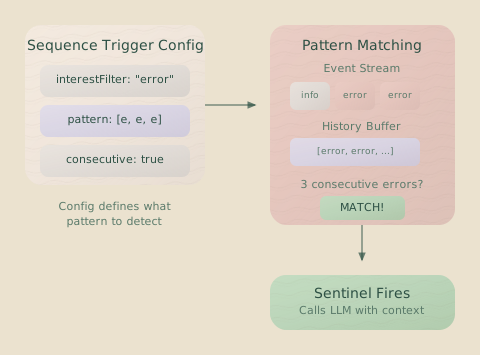
This example detects three consecutive tool errors:
{
  "trigger": {
    "type": "sequence",
    "interestFilter": {
      "on": ["tool.result"]
    },
    "pattern": [
      {
        "type": "tool.result",
        "conditions": [
          { "operator": "equals", "path": "isError", "value": true }
        ]
      },
      {
        "type": "tool.result",
        "conditions": [
          { "operator": "equals", "path": "isError", "value": true }
        ]
      },
      {
        "type": "tool.result",
        "conditions": [
          { "operator": "equals", "path": "isError", "value": true }
        ]
      }
    ],
    "options": {
      "consecutive": true
    }
  }
}| Field | Type | Required | Description |
|---|---|---|---|
type | "sequence" | Yes | Discriminator field. |
interestFilter.on | string[] | Yes | Event types to track in the history buffer. |
pattern | PatternStep[] | Yes | The sequence of events to detect (minimum 1 step). |
options.consecutive | boolean | No | If true (default), the events must occur consecutively. If false, other events can occur between pattern steps. |
Pattern Step
A pattern step defines one event in the sequence to be matched.
{
  "type": "tool.result",
  "conditions": [{ "operator": "equals", "path": "isError", "value": true }]
}| Field | Type | Required | Description |
|---|---|---|---|
type | string | Yes | The event type to match. Use "*" for a wildcard. |
conditions | Condition[] | No | Conditions that must be met for this step. |
History Limit: Sequence triggers maintain a history of up to 1000 events in memory.
Conditions
Conditions provide fine-grained control for both event and sequence triggers. All conditions within a conditions array use AND logic—every condition must pass for the trigger to fire.
{
  "conditions": [
    { "operator": "equals", "path": "isError", "value": true },
    { "operator": "greaterThan", "path": "duration", "value": 1000 }
  ]
}
Condition Operators
| Operator | Value Type | Description |
|---|---|---|
equals | string | number | boolean | null | Value is an exact match. |
notEquals | string | number | boolean | null | Value is not equal. |
in | (string | number)[] | Value is present in the array. |
notIn | (string | number)[] | Value is not present in the array. |
contains | string | String contains the specified substring. |
matches | string | String matches the specified regular expression. |
greaterThan | number | Value is numerically greater than. |
lessThan | number | Value is numerically less than. |
Path Syntax
Paths use dot notation to access nested fields within the data object of an event. For example, exitStatus.type accesses event.data.exitStatus.type.
{ "operator": "equals", "path": "exitStatus.type", "value": "success" }Validation: Condition paths are validated against the event’s schema when the configuration is loaded. An invalid path for the specified event type will cause a validation error.
Execution Strategies
The execution strategy determines how triggered events are batched into LLM calls. Sentinels can fire immediately on each trigger or batch events by time, quiet periods, or count.
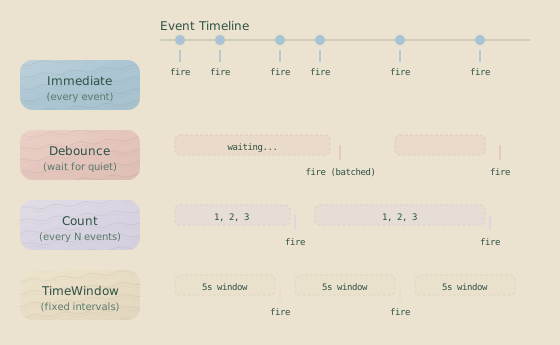
Immediate
Fires an LLM call for every trigger match.
{
  "execution": {
    "strategy": "immediate"
  }
}
Debounce
Waits for a period of inactivity (a “quiet period”) before firing an LLM call with all events accumulated during that time. Each new event resets the timer.
{
  "execution": {
    "strategy": "debounce",
    "milliseconds": 3000
  }
}| Field | Type | Constraints | Description |
|---|---|---|---|
milliseconds | number | 1–300000 | The quiet period in milliseconds (max 5 minutes). |
Count
Fires an LLM call after a specific number of trigger matches have occurred.
{
  "execution": {
    "strategy": "count",
    "threshold": 10
  }
}| Field | Type | Constraints | Description |
|---|---|---|---|
threshold | number | 1–1000 | The number of events to accumulate before firing. |
Time Window
Fires an LLM call on a fixed time interval, batching all events that occurred during that window.
{
  "execution": {
    "strategy": "timeWindow",
    "milliseconds": 30000
  }
}| Field | Type | Constraints | Description |
|---|---|---|---|
milliseconds | number | 1–3600000 | The window duration in milliseconds (max 1 hour). |
The timer for the next window starts only after the current one finishes processing. If an LLM call takes longer than the window duration, subsequent windows will be delayed. The schedule does not “catch up” to a fixed real-world clock.
Prompts
Every sentinel requires a user prompt, defined via either userPromptFile or userPromptText. System prompts are optional for single-shot sentinels but required for conversational mode.
Prompt Fields
| Field | Type | Description |
|---|---|---|
systemPromptFile | string | string[] | Path(s) to system prompt file(s). |
systemPromptText | string | Inline system prompt text. |
userPromptFile | string | string[] | Path(s) to user prompt file(s). |
userPromptText | string | Inline user prompt text. |
When you provide an array of file paths, the files are concatenated in order.
Template Syntax
Prompts use Eta templates, giving you access to the triggering events and codon context via the it object. See Template Context for all available properties.
Summarize these <%= it.events.length %> events:

<%= JSON.stringify(it.events, null, 2) %>
Template Context
| Property | Type | Description |
|---|---|---|
it.events | ServerEvent[] | Array of events that triggered this execution. |
it.codon.id | string | The ID of the current codon. |
it.codon.name | string | The name of the current codon. |
it.codon.description | string? | The optional description of the current codon. |
it.codon.startTime | Date | The start time of the codon execution. |
it.world.currentTime | Date | The timestamp when the trigger was queued. |
Queue Time vs. Execution Time: it.world.currentTime reflects when the
trigger was queued, not when the template runs. This provides a consistent
timestamp even if LLM execution is delayed.
Template Examples
Iterate over events:
<% for (const event of it.events) { %>
- <%= event.type %>: <%= event.data?.codonId || 'N/A' %>
<% } %>
Conditional content:
<% if (it.events.length > 10) { %>
High activity detected: <%= it.events.length %> events
<% } else { %>
Normal activity: <%= it.events.length %> events
<% } %>
Access the last event:
Last event: <%= JSON.stringify(it.events[it.events.length - 1]) %>Conversational Mode
For sentinels that need to maintain memory across invocations, conversational mode keeps a rolling history of previous user prompts and assistant responses. This allows the sentinel to build context over time.
{
  "conversational": {
    "trimmingStrategy": {
      "type": "maxTurns",
      "maxTurns": 5
    },
    "continueOnError": true
  }
}
System Prompt Required: Conversational sentinels must have
systemPromptFile or systemPromptText defined. This is enforced by
validation.
Conversational Fields
| Field | Type | Required | Description |
|---|---|---|---|
trimmingStrategy | object | Yes | The strategy for pruning the conversation history to prevent it from growing indefinitely. |
continueOnError | boolean | No | If true, the sentinel will continue with a potentially corrupted history after an LLM failure. Defaults to false. |
Trimming Strategies
You must choose a strategy to prune the conversation history.
maxTurns
Keeps the last N complete turns (a turn consists of one user message and one assistant response).
{
  "trimmingStrategy": {
    "type": "maxTurns",
    "maxTurns": 5
  }
}| Field | Type | Constraints | Description |
|---|---|---|---|
maxTurns | number | 1–100 | The number of turns to keep. |
maxTokens
Keeps the most recent messages that fit within a specified token limit.
{
  "trimmingStrategy": {
    "type": "maxTokens",
    "maxTokens": 4000
  }
}| Field | Type | Constraints | Description |
|---|---|---|---|
maxTokens | number | 1–100000 | The token budget for the history. |
Token counting uses exact counts from LLM responses when available, falling back to a text.length / 4 approximation for older messages.
History Persistence
Conversation history is persisted to .hankweave/sentinels/history/{sentinel-id}-codon-{codon-id}.json, allowing sentinels to resume their state after a server restart.
Structured Output
For machine-readable output, structured output mode generates validated JSON according to a Zod schema. The LLM’s response is parsed and validated before being written to the output file.
{
  "structuredOutput": {
    "output": "object",
    "schemaStr": "z.object({ score: z.number(), notes: z.string() })",
    "schemaName": "Evaluation",
    "schemaDescription": "Code evaluation result"
  }
}
Structured Output Fields
| Field | Type | Required | Description |
|---|---|---|---|
output | "object" | "array" | "enum" | Yes | The desired output mode. |
schemaStr | string | Conditional | An inline Zod schema definition as a string. |
schemaFile | string | Conditional | The path to a file containing a Zod schema. |
enumValues | string[] | Conditional | An array of allowed string values for enum mode. |
schemaName | string | No | A name for the schema, passed to the LLM. |
schemaDescription | string | No | A description for the schema, passed to the LLM. |
Schema Rules
Hankweave enforces these rules at load time:
- For
objectorarraymode, you must provide exactly one ofschemaStrorschemaFile. - For
enummode, you must provideenumValuesand must not provideschemaStrorschemaFile.
Output Modes
Object Mode
Generates a single JSON object that conforms to the schema.
{
  "structuredOutput": {
    "output": "object",
    "schemaStr": "z.object({ category: z.string(), confidence: z.number() })"
  }
}
Array Mode
Generates a JSON array of objects that conform to the schema.
{
  "structuredOutput": {
    "output": "array",
    "schemaStr": "z.array(z.object({ item: z.string(), count: z.number() }))"
  }
}
Enum Mode
Generates a single string value from a predefined list.
{
  "structuredOutput": {
    "output": "enum",
    "enumValues": ["urgent", "normal", "low-priority", "ignore"]
  }
}
Schema Files
For complex schemas, define them in a separate file and export the Zod schema as the default expression. The z object is automatically available in the file’s scope; no import is needed.
z.object({
  score: z.number().min(0).max(100),
  notes: z.string(),
  issues: z.array(z.string()).optional(),
});
Model Requirement: Structured output requires a model that supports tool calls. Using an incompatible model will cause a validation error at load time.
No joinString: The joinString property is invalid when
structuredOutput is configured. Structured output is always written in
NDJSON format (one JSON object per line).
LLM Parameters
Fine-tune the LLM’s generation process.
{
  "llmParams": {
    "temperature": 0.3,
    "maxOutputTokens": 4096,
    "maxRetries": 2
  }
}
LLM Parameter Fields
| Field | Type | Default | Constraints | Description |
|---|---|---|---|---|
temperature | number | 0 | 0–2 | Controls randomness. 0 is deterministic, higher values are more creative. |
maxOutputTokens | number | 8192 | 1–100000 | The maximum number of tokens to generate in the response. |
maxRetries | number | 2 | 0–5 | Number of retry attempts for transient API failures. |
Error Handling
Configure how the sentinel behaves when it encounters errors like network issues or API failures.
{
  "errorHandling": {
    "maxConsecutiveFailures": 5,
    "unloadOnFatalError": false
  }
}
Error Handling Fields
| Field | Type | Default | Description |
|---|---|---|---|
maxConsecutiveFailures | number | 3 | The number of consecutive failures before the sentinel unloads itself (min: 1). |
unloadOnFatalError | boolean | true | If true, the sentinel unloads on non-recoverable errors (e.g., bad template syntax). |
Error Categories
Hankweave distinguishes between different error types:
- Template Errors: Syntax errors in prompts that are guaranteed to fail on every execution.
- Configuration Errors: Invalid settings caught at load time. The sentinel will not start.
- Corruption Errors: Invalid data in the conversation history. Behavior depends on
continueOnError. - Resource Errors: Network timeouts or API failures. These are typically transient and retried.
A single successful LLM call resets the consecutive failure counter.
Output Configuration
By default, sentinel output is written to an auto-generated file. You can customize the format and location.
{
  "output": {
    "format": "text",
    "file": "narrator-output.md",
    "lastValueFile": "latest-summary.md"
  }
}
Output Fields
| Field | Type | Default | Description |
|---|---|---|---|
format | "text" | "json" | "jsonl" | text | The output file format. Controls both file extension (when auto-generating) and write behavior. |
file | string | (auto) | The output file path (maps to logFile — append-only log of all outputs). |
lastValueFile | string | — | Path to a file that is atomically replaced with the latest output on each generation. |
Priority chain: When a sentinel is attached to a codon,
settings.outputPaths (codon-level) takes precedence over output.*
(sentinel-level), which takes precedence over auto-generated paths. This lets
you define defaults in the sentinel config and override per-codon in
hank.json.
Output Format Behavior
The format field controls how text outputs are written to disk:
"text"(default): Plain text, separated byjoinString. File extension:.md."json"or"jsonl": Each text output is wrapped as a JSON line:{"text": "...", "timestamp": "...", "sentinelId": "..."}. File extension:.jsonor.jsonl. Useful for downstream parsing by pipelines or other tools.
When structuredOutput is configured, the format is always NDJSON regardless of this setting.
Path Conventions
File paths are resolved based on their structure:
- A single filename (e.g.,
"output.md"): Written to.hankweave/sentinels/outputs/{sentinel-id}/{filename}. - A relative path (e.g.,
"./logs/output.md"or"logs/output.md"): Written relative to the agent working directory (agentRoot/). This lets sentinels write outputs directly into the agent workspace.
These conventions apply to both file and lastValueFile, and to both sentinel-level (output.*) and codon-level (settings.outputPaths.*) paths.
Auto-generated Paths
If output.file is not specified (and no codon-level outputPaths.logFile is set), Hankweave generates a path automatically:
- Text:
.hankweave/sentinels/outputs/{id}/{id}-{codon}-{timestamp}.md - JSON/JSONL:
.hankweave/sentinels/outputs/{id}/{id}-{codon}-{timestamp}.{json|jsonl} - Structured:
.hankweave/sentinels/outputs/{id}/{id}-{codon}-{timestamp}.ndjson
Join String
For text output, joinString defines the separator between consecutive entries in the log file. It is not used for json, jsonl, or structured output.
{
  "joinString": "\n\n---\n\n"
}
Supported escape sequences include \n (newline), \t (tab), \r (carriage return), and \\ (backslash). The default is "\n---\n".
Event Reporting
By default, sentinels emit lifecycle, error, and output events to connected WebSocket clients. You can configure this to reduce noise.
{
  "reportToWebsocket": {
    "lifecycle": true,
    "errors": true,
    "outputs": true,
    "triggers": false
  }
}
Event Reporting Fields
| Field | Type | Default | Events Reported |
|---|---|---|---|
lifecycle | boolean | true | sentinel.loaded, sentinel.unloaded |
errors | boolean | true | sentinel.error |
outputs | boolean | true | sentinel.output |
triggers | boolean | false | sentinel.triggered (can be very verbose) |
Attaching to Codons
To use a sentinel, attach it to a codon in your hank.json file. You can reference an external configuration file or define the entire configuration inline.
{
  "hank": [
    {
      "id": "generate-code",
      "sentinels": [
        {
          "sentinelConfig": "./sentinels/narrator.sentinel.json"
        },
        {
          "sentinelConfig": {
            "id": "inline-sentinel",
            "name": "Inline Example",
            "model": "anthropic/claude-haiku-4-5",
            "trigger": { "type": "event", "on": ["*"] },
            "execution": { "strategy": "debounce", "milliseconds": 5000 },
            "userPromptText": "Summarize: <%= JSON.stringify(it.events) %>"
          },
          "settings": {
            "failCodonIfNotLoaded": true,
            "outputPaths": {
              "logFile": "custom-log.md",
              "lastValueFile": "current-state.md"
            },
            "reportToWebsocket": {
              "triggers": true
            }
          }
        }
      ]
    }
  ]
}
Sentinel Entry Structure
| Field | Type | Description |
|---|---|---|
sentinelConfig | string | SentinelConfig | Path to a .sentinel.json file or an inline configuration object. |
settings | object | Codon-specific overrides for the sentinel’s behavior. |
Codon-Level Settings
These settings allow you to reuse a single sentinel configuration with different behaviors for different codons.
{
  "settings": {
    "failCodonIfNotLoaded": true,
    "outputPaths": {
      "logFile": "custom-output.md",
      "lastValueFile": "current.md"
    },
    "reportToWebsocket": {
      /* ... */
    }
  }
}| Field | Type | Default | Description |
|---|---|---|---|
failCodonIfNotLoaded | boolean | false | If true, the codon will fail if this sentinel cannot be loaded. |
outputPaths.logFile | string | (from config) | Overrides the output.file path. |
outputPaths.lastValueFile | string | — | An additional output file that is atomically replaced with the latest value on each output. |
reportToWebsocket | object | (from config) | Overrides the reportToWebsocket configuration. |
lastValueFile vs. logFile: The logFile is append-only, creating a
history of all outputs. The lastValueFile is overwritten each time, making
it useful for dashboards or integrations that only need the current state.
Complete Examples
These battle-tested configurations cover common sentinel patterns.
Narrator Sentinel
The most common pattern: watch agent activity and produce human-readable summaries. Debouncing prevents spam during bursts of activity.
{
  "id": "narrator",
  "name": "Activity Narrator",
  "description": "Provides human-readable summaries of agent activities.",
  "model": "anthropic/claude-haiku-4-5",
  "trigger": {
    "type": "event",
    "on": ["assistant.action", "tool.result"]
  },
  "execution": {
    "strategy": "debounce",
    "milliseconds": 3000
  },
  "userPromptText": "Summarize what the agent just did:\n\n<%= JSON.stringify(it.events, null, 2) %>\n\nProvide a brief, clear summary.",
  "llmParams": {
    "temperature": 0.3,
    "maxOutputTokens": 2048
  },
  "output": {
    "format": "text",
    "file": "narrator.md"
  }
}
Conversational Narrator
When a sentinel needs to remember its previous outputs, conversational mode maintains history. This narrator builds on its previous summaries rather than repeating context.
{
  "id": "conversational-narrator",
  "name": "Conversational Narrator",
  "description": "Maintains context across events for coherent narration.",
  "model": "anthropic/claude-haiku-4-5",
  "trigger": {
    "type": "event",
    "on": ["assistant.action", "tool.result"]
  },
  "execution": {
    "strategy": "debounce",
    "milliseconds": 500
  },
  "systemPromptText": "You are a narrator maintaining context. Build on previous summaries without repeating yourself.",
  "userPromptText": "Summarize these events: <%= JSON.stringify(it.events, null, 2) %>",
  "conversational": {
    "trimmingStrategy": {
      "type": "maxTurns",
      "maxTurns": 5
    },
    "continueOnError": true
  },
  "output": {
    "format": "text",
    "file": "conversational-narrator.log"
  }
}
Error Pattern Detector
Sequence triggers are ideal for detecting patterns. This sentinel fires after three consecutive tool errors, which often indicates a systematic problem.
{
  "id": "error-detector",
  "name": "Error Pattern Detector",
  "description": "Detects when the agent encounters repeated errors.",
  "model": "anthropic/claude-haiku-4-5",
  "trigger": {
    "type": "sequence",
    "interestFilter": {
      "on": ["tool.result"]
    },
    "pattern": [
      {
        "type": "tool.result",
        "conditions": [
          { "operator": "equals", "path": "isError", "value": true }
        ]
      },
      {
        "type": "tool.result",
        "conditions": [
          { "operator": "equals", "path": "isError", "value": true }
        ]
      },
      {
        "type": "tool.result",
        "conditions": [
          { "operator": "equals", "path": "isError", "value": true }
        ]
      }
    ],
    "options": {
      "consecutive": true
    }
  },
  "execution": {
    "strategy": "immediate"
  },
  "userPromptText": "The agent encountered 3 consecutive errors. Analyze:\n\n<%= JSON.stringify(it.events, null, 2) %>\n\nProvide:\n1. Common cause analysis\n2. Suggested fixes\n3. Whether to continue or intervene",
  "output": {
    "format": "jsonl",
    "file": "error-patterns.jsonl"
  }
}
Cost Tracker with Conditions
Conditions filter triggers based on event data. This sentinel fires only when spending exceeds a threshold, helping to catch runaway costs.
{
  "id": "cost-tracker",
  "name": "Cost and Token Tracker",
  "description": "Monitors token usage and costs, alerting on high usage.",
  "model": "anthropic/claude-haiku-4-5",
  "trigger": {
    "type": "event",
    "on": ["token.usage"],
    "conditions": [
      {
        "operator": "greaterThan",
        "path": "totalCost",
        "value": 0.5
      }
    ]
  },
  "execution": {
    "strategy": "immediate"
  },
  "userPromptText": "High cost detected in codon <%= it.codon.id %>:\n\nTotal cost: $<%= it.events[0].data.totalCost %>\n\nAnalyze if this cost is justified.",
  "output": {
    "format": "jsonl",
    "file": "cost-alerts.jsonl"
  }
}
Code Review with Structured Output
Structured output enables programmatic use of a sentinel’s results. This QA sentinel reviews TypeScript files and returns validated JSON that downstream tools can consume.
{
  "id": "qa-review",
  "name": "QA Code Review",
  "description": "Reviews TypeScript files and provides structured feedback.",
  "model": "anthropic/claude-haiku-4-5",
  "trigger": {
    "type": "event",
    "on": ["file.updated"],
    "conditions": [
      {
        "operator": "matches",
        "path": "path",
        "value": "\\.ts$"
      }
    ]
  },
  "execution": {
    "strategy": "debounce",
    "milliseconds": 10000
  },
  "systemPromptText": "You are a senior TypeScript developer. Review code for correctness, style, and bugs.",
  "userPromptText": "Review these file changes:\n\n<% for (const e of it.events) { %>- <%= e.data.path %>\n<% } %>",
  "structuredOutput": {
    "output": "object",
    "schemaStr": "z.object({ issues: z.array(z.object({ severity: z.enum(['error', 'warning', 'info']), file: z.string(), line: z.number().optional(), message: z.string() })), summary: z.string(), overallScore: z.number().min(0).max(100) })",
    "schemaName": "CodeReview",
    "schemaDescription": "Structured code review feedback"
  }
}
Periodic Summary with Time Window
The timeWindow strategy fires on a fixed schedule regardless of event volume, making it ideal for periodic status updates.
{
  "id": "periodic-summary",
  "name": "30-Second Summary",
  "description": "Creates summaries every 30 seconds.",
  "model": "anthropic/claude-haiku-4-5",
  "trigger": {
    "type": "event",
    "on": [
      "assistant.action",
      "tool.result",
      "codon.started",
      "codon.completed"
    ]
  },
  "execution": {
    "strategy": "timeWindow",
    "milliseconds": 30000
  },
  "userPromptText": "Summarize the last 30 seconds of activity:\n\n<%= JSON.stringify(it.events, null, 2) %>",
  "output": {
    "format": "text",
    "file": "periodic-summaries.log"
  }
}
Tool Usage Analyzer with Count Strategy
The count strategy waits to accumulate N events before firing. This sentinel analyzes tool usage patterns after every 10 tool calls.
{
  "id": "tool-analyzer",
  "name": "Tool Usage Pattern Analyzer",
  "description": "Analyzes patterns in tool usage to identify inefficiencies.",
  "model": "anthropic/claude-haiku-4-5",
  "trigger": {
    "type": "event",
    "on": ["tool.result"]
  },
  "execution": {
    "strategy": "count",
    "threshold": 10
  },
  "userPromptText": "Analyze tool usage patterns from <%= it.events.length %> calls:\n\n<%= JSON.stringify(it.events, null, 2) %>\n\nIdentify:\n1. Most frequently used tools\n2. Success/failure rates\n3. Inefficient patterns\n4. Optimization suggestions",
  "output": {
    "format": "jsonl",
    "file": "tool-patterns.jsonl"
  }
}
Validation Rules
Hankweave validates sentinel configurations when they are loaded. The sentinel will fail to load if any of these rules are violated:
- Required user prompt: At least one of
userPromptFileoruserPromptTextmust be provided. - Conversational requires system prompt: If
conversationalis configured,systemPromptFileorsystemPromptTextis required. joinStringcompatibility:joinStringis only valid fortextoutput and cannot be used whenstructuredOutputis configured.output.formatcompatibility:output.formatcannot be used whenstructuredOutputis configured. Structured output format is determined by the schema.- Structured output schema rules:
objectorarraymode requires exactly one ofschemaStrorschemaFile.enummode requiresenumValuesand forbids schema definitions.
- ID format: The
idmust match the pattern/^[a-z0-9-]+$/. - Condition path validation: Paths in
conditionsare validated against the schemas of the specified event types.
Related Pages
- Sentinels — Conceptual overview and when to use sentinels.
- Codons — The execution units that sentinels attach to.
- Configuration Reference — Full
hank.jsonconfiguration options. - Execution Flow — How sentinels fit into the overall lifecycle.