State File Reference
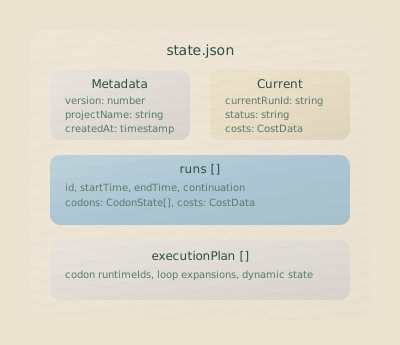
Everything Hankweave knows lives in one place: .hankweave/state.json. Every run you’ve started, every codon that’s executed, every checkpoint created, every dollar spent—it’s all here in a single JSON file.
For most day-to-day work, you won’t need to look at this file. The CLI and APIs expose all the necessary information. But when you’re building custom tooling, debugging unusual failures, or contributing to the runtime itself, this file is your source of truth.
Who is this for? This page primarily serves: - Contributing to Hankweave: Understanding state internals is essential for runtime development. - Building on Hankweave: Tool builders need to parse and interpret state for custom UIs. - Running Hanks (advanced): When troubleshooting unusual failures, direct state inspection can help.
File Locations
State files live in the .hankweave directory within your execution directory:
.hankweave/
├── state.json           # Current state (primary)
├── state.json.bak       # Backup from last successful save
├── state.json.tmp       # Temp file during atomic writes (should be cleaned up)
The .bak file is your safety net—if the primary file gets corrupted, Hankweave falls back to this backup automatically. The .tmp file is an implementation detail of atomic writes. If you see one on startup, it means the previous save didn’t complete cleanly, and the backup is your recovery point.
Top-Level Structure
At its root, the state file contains four fields:
{
  "runs": [...],                    // Array of all runs (newest first)
  "currentRunId": "abc123-...",     // Active run ID, or null if server stopped
  "initialCheckpoint": "sha...",    // First git commit SHA
  "executionPlan": [...]            // Flattened plan with loop expansions
}| Field | Type | Description |
|---|---|---|
runs | Run[] | All runs in reverse chronological order (newest first). |
currentRunId | RunId | null | The currently active run, or null if the server is not running. |
initialCheckpoint | string? | SHA of the initial git commit (the clean project state). |
executionPlan | ExecutionCodonEntry[] | A flattened execution plan with expanded loop iterations. |
Run Structure
Each run represents one complete server lifecycle—from the moment you start Hankweave to when it shuts down. Runs aren’t isolated; they form a tree through continuation relationships. When you roll back to a checkpoint and restart, the new run knows where it came from. This history enables rollback and retry workflows.
{
  "runId": "1736000000000-abc123-def456",
  "runFolder": "/path/to/.hankweave/runs/1736000000000-abc123-def456",
  "gitBranch": "run-1736000000000-abc123-def456",
  "startingConditions": { ... },
  "codons": [ ... ],
  "status": "running",
  "startTime": "2025-01-04T12:00:00.000Z",
  "endTime": "2025-01-04T12:05:00.000Z",
  "serverPid": 12345
}| Field | Type | Description |
|---|---|---|
runId | RunId | Unique identifier, also used as the git branch name. |
runFolder | string | Absolute path to run artifacts (logs, outputs). The folder name is the runId. |
gitBranch | string | Git branch for this run’s checkpoints. |
startingConditions | StartingConditions | How this run started (fresh or continuation). |
codons | CodonExecution[] | Ordered list of codon executions in this run. |
status | RunStatus | running, completed, failed, or crashed. |
startTime | string | ISO 8601 timestamp when the server started. |
endTime | string? | ISO 8601 timestamp when the server stopped. |
serverPid | number | Process ID, used for lock file validation and crash detection. |
Run Status Values
| Status | Description |
|---|---|
running | The server is actively executing. |
completed | All codons finished successfully. |
failed | The run stopped due to a codon failure. |
crashed | The server crashed (detected on recovery via a stale PID). |
The crashed status is special. Hankweave detects this on startup by checking whether a process with the serverPid from a running run still exists. If the PID is gone but the status is running, something went wrong.
Starting Conditions
Every run’s startingConditions explain how it began. This is the key to understanding the run tree: a fresh start has no parent, while a continuation knows exactly which run, codon, and checkpoint it came from.
Fresh start:
{
  "type": "fresh",
  "initialCheckpointSha": "abc123..."
}
Continuation (from rollback or retry):
{
  "type": "continuation",
  "source": {
    "runId": "previous-run-id",
    "afterCodon": "codon-2",
    "checkpointSha": "def456..."
  },
  "reason": "rollback"
}
The afterCodon field indicates the point in the previous run to continue from. If it’s null, the new run starts from the beginning of the source run. The checkpointSha is the exact git commit that was restored.
Codon Execution Types
Codon executions are the most dynamic part of the state file. They are stored as a discriminated union, where the status field determines the shape of the object and what data is available. For example, a codon with status preparing has minimal information, while a running codon includes live cost and token counts. Understanding this structure is crucial for building tools that inspect in-progress runs.
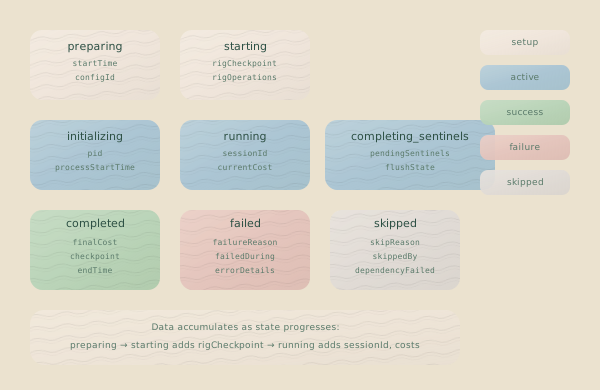
Base Fields (All States)
Every codon execution has these fields, regardless of status:
interface BaseCodon {
  codonId: CodonId; // References codon in hank.json
  startTime: string; // ISO 8601 timestamp
  loopContext?: {
    // Present if part of a loop
    loopId: CodonId;
    iteration: number; // 0-indexed
    codonIndexInLoop: number;
  };
}
PreparingCodon
The earliest state. The rig setup is running—copying files, executing commands—but the agent process hasn’t started yet.
{
  "codonId": "research",
  "startTime": "2025-01-04T12:00:00.000Z",
  "status": "preparing"
}
StartingCodon
The agent process is spawning. If there was a rig, its checkpoint is recorded here. Sentinels are loaded but have not yet fired.
{
  "codonId": "research",
  "startTime": "2025-01-04T12:00:00.000Z",
  "status": "starting",
  "rigSetupCheckpoint": "abc123...",
  "sentinels": {
    "loaded": [...],
    "totalCost": 0
  }
}
InitializingCodon
The process is alive, but the runtime is waiting for the agent to report its session ID. Hankweave knows the PID and log path, but the agent hasn’t started its work.
{
  "codonId": "research",
  "startTime": "2025-01-04T12:00:00.000Z",
  "status": "initializing",
  "rigSetupCheckpoint": "abc123...",
  "claudePid": 12345,
  "claudeLogPath": "runs/1736000000000-abc123/research-claude.log",
  "previousSessionId": "prev-session-uuid",
  "sentinels": { ... }
}
RunningCodon
The agent is executing. Costs, tokens, and message counts update as work progresses. If you’re building a live monitoring tool, this is the state you’ll be watching.
{
  "codonId": "research",
  "startTime": "2025-01-04T12:00:00.000Z",
  "status": "running",
  "rigSetupCheckpoint": "abc123...",
  "claudePid": 12345,
  "claudeSessionId": "session-uuid",
  "claudeLogPath": "runs/1736000000000-abc123/research-claude.log",
  "previousSessionId": "prev-session-uuid",
  "currentCost": 0.0234,
  "currentTokens": {
    "inputTokens": 1500,
    "outputTokens": 800,
    "cacheCreationTokens": 0,
    "cacheReadTokens": 500
  },
  "assistantMessageCount": 5,
  "sentinels": { ... }
}
CompletingSentinelsCodon
The main agent process has finished, but background sentinels are still completing their work. This state is structurally identical to RunningCodon and includes the same fields; it represents a final, brief phase before the codon is marked as completed.
{
  "codonId": "research",
  "status": "completing-sentinels"
  // ... same fields as RunningCodon
}
CompletedCodon (Terminal)
Success. All fields are final and will not be updated further. The finalCost and finalTokens are the authoritative numbers for this execution.
{
  "codonId": "research",
  "startTime": "2025-01-04T12:00:00.000Z",
  "status": "completed",
  "endTime": "2025-01-04T12:02:30.000Z",
  "claudeSessionId": "session-uuid",
  "claudeLogPath": "runs/1736000000000-abc123/research-claude.log",
  "exitCode": 0,
  "finalCost": 0.0312,
  "finalTokens": {
    "inputTokens": 2000,
    "outputTokens": 1200,
    "cacheCreationTokens": 0,
    "cacheReadTokens": 800
  },
  "resultMessageReceived": true,
  "rigSetupCheckpoint": "abc123...",
  "completionCheckpoint": "def456...",
  "sentinels": {
    "executed": [...],
    "totalCost": 0.0015
  }
}
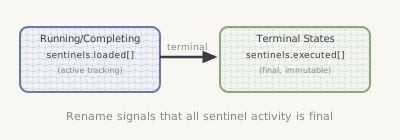
Sentinel Field Rename: When a codon enters a terminal state (completed,
failed, skipped), the sentinels.loaded array is renamed to
sentinels.executed. This signals that all sentinel activity is finalized.
FailedCodon (Terminal)
Something went wrong. The failedDuring and failureReason fields specify exactly where and why the failure occurred.
{
  "codonId": "research",
  "startTime": "2025-01-04T12:00:00.000Z",
  "status": "failed",
  "endTime": "2025-01-04T12:01:45.000Z",
  "failedDuring": "running",
  "claudePid": 12345,
  "claudeSessionId": "session-uuid",
  "claudeLogPath": "runs/1736000000000-abc123/research-claude.log",
  "exitCode": 1,
  "failureReason": {
    "type": "timeout",
    "retriable": true,
    "message": "API request timed out after 30s"
  },
  "partialCost": 0.0156,
  "partialTokens": { ... },
  "rigSetupCheckpoint": "abc123...",
  "errorCheckpoint": "ghi789...",
  "sentinels": {
    "executed": [...],
    "totalCost": 0.0008
  }
}
The failedDuring field is crucial for debugging. A failure during preparing is a rig setup problem, initializing points to a process startup issue, and running suggests an agent or API problem.
SkippedCodon (Terminal)
The user manually skipped this codon. If it was already running, you’ll see partial costs and tokens for the work done before the skip command was received.
{
  "codonId": "research",
  "startTime": "2025-01-04T12:00:00.000Z",
  "status": "skipped",
  "endTime": "2025-01-04T12:00:45.000Z",
  "skippedDuring": "running",
  "claudePid": 12345,
  "claudeSessionId": "session-uuid",
  "claudeLogPath": "runs/1736000000000-abc123/research-claude.log",
  "partialCost": 0.0089,
  "partialTokens": { ... },
  "assistantMessageCount": 3,
  "rigSetupCheckpoint": "abc123...",
  "skipCheckpoint": "jkl012...",
  "sentinels": {
    "executed": [...],
    "totalCost": 0.0004
  }
}
Execution Plan
The execution plan is the runtime’s roadmap—a flattened array of every codon that will run, with loop iterations already expanded. This is how Hankweave knows what to execute next.
{
  "executionPlan": [
    {
      "codon": { "id": "research", "name": "Research Phase", ... },
      "codonId": "research"
    },
    {
      "codon": { "id": "review", "name": "Review Iteration", ... },
      "codonId": "review#0",
      "loopContext": {
        "loopId": "review-loop",
        "iteration": 0,
        "codonIndexInLoop": 0
      }
    },
    {
      "codon": { "id": "review", "name": "Review Iteration", ... },
      "codonId": "review#1",
      "loopContext": {
        "loopId": "review-loop",
        "iteration": 1,
        "codonIndexInLoop": 0
      }
    }
  ]
}
Each entry contains three pieces of information:
| Field | Type | Description |
|---|---|---|
codon | Codon | The codon config from hank.json (always the inner codon, not a loop). |
codonId | CodonId | The runtime-generated ID, e.g., review#0 for a loop iteration. |
loopContext | object? | Present if this codon is part of a loop. |
Notice that the codon field always contains an actual codon, never a loop wrapper. The runtime “unrolls” loops into their constituent iterations.
Loop Context
When a codon comes from a loop, it carries context that makes resume and rollback possible:
loopContext: {
  loopId: CodonId; // ID of the containing loop from hank.json
  iteration: number; // Which iteration (0-indexed)
  codonIndexInLoop: number; // Position in the loop's `codons` array
}
Lazy Expansion: The execution plan expands loops one iteration at a time. It contains the current or next iteration of a loop, but does not pre-calculate all possible future iterations. When one iteration finishes, the runtime decides whether to expand the next one into the plan. See Loops for how termination decisions work.
Checkpoint References
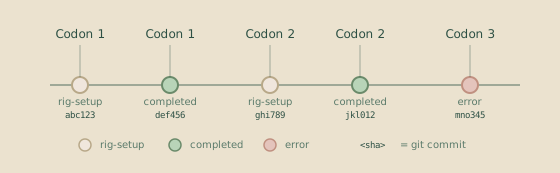
Checkpoints are git commit SHAs stored in the codon state, representing the file system at a specific moment. Each checkpoint type captures a different point in the codon lifecycle:
| Checkpoint Field | When Created | Purpose |
|---|---|---|
rigSetupCheckpoint | After rig operations complete | Roll back to a clean setup state. |
completionCheckpoint | After successful completion | Roll back to a successful state. |
errorCheckpoint | After a failure | Inspect the file state at the time of failure. |
skipCheckpoint | After a user skips a codon | Track the state when the skip occurred. |
The initialCheckpoint at the state’s top level is special: it captures the project’s pristine state before any codons have run. It’s the “reset to factory” checkpoint.
Sentinel State
Sentinel state is nested within each codon execution. While a codon is active, its sentinel data is in a loaded array. Once the codon reaches a terminal state (completed, failed, or skipped), that array is renamed to executed. This key change is a deliberate signal: when you see executed, you can be sure that all sentinel activity for that codon is finished and the statistics are final.
{
  "sentinels": {
    "loaded": [
      {
        "id": "narrator",
        "model": "claude-sonnet-4-20250514",
        "loadedAt": "2025-01-04T12:00:05.000Z",
        "llmCallCount": 12,
        "failedLLMCalls": 0,
        "lastLlmCallAt": "2025-01-04T12:02:25.000Z",
        "totalTriggers": 15,
        "totalCost": 0.0012,
        "status": "active"
      }
    ],
    "totalCost": 0.0012
  }
}| Field | Type | Description |
|---|---|---|
id | string | Sentinel identifier. |
model | string | Model used for LLM calls. |
loadedAt | string | When the sentinel started. |
unloadedAt | string? | When the sentinel stopped (if unloaded). |
llmCallCount | number | Total LLM calls made. |
failedLLMCalls | number | Number of LLM calls that failed. |
lastLlmCallAt | string? | Timestamp of the most recent LLM call. |
totalTriggers | number | Number of times the trigger fired. |
totalCost | number | Accumulated cost in USD. |
status | string | active or unloaded. |
unloadReason | string? | Why the sentinel was unloaded (if applicable). |
Reading State Programmatically
The state file is plain JSON, making it easy to build custom tooling. Just read and parse the file—no special libraries required.
import fs from "fs";

const state = JSON.parse(fs.readFileSync(".hankweave/state.json", "utf-8"));

// Find the current run
const currentRun = state.runs.find((r) => r.runId === state.currentRunId);

// Find failed codons
const failedCodons =
  currentRun?.codons.filter((c) => c.status === "failed") ?? [];

// Calculate total cost for all runs
const totalCost = state.runs.reduce((total, run) => {
  return (
    total +
    run.codons.reduce((runTotal, codon) => {
      if (codon.status === "completed") return runTotal + codon.finalCost;
      if (codon.status === "failed") return runTotal + codon.partialCost;
      if (codon.status === "running") return runTotal + codon.currentCost;
      return runTotal;
    }, 0)
  );
}, 0);
Don’t Write Directly: While reading state.json is safe, you should never
write to it directly, as this can corrupt your state. To modify state, use the
Hankweave CLI or official APIs to send commands.
State Validation
When Hankweave loads the state file, it performs validation. The structure must be correct, and references must resolve. Issues are reported as errors (which prevent continuation) or warnings.
interface StateValidation {
  valid: boolean;
  errors: ValidationError[];
  warnings: ValidationWarning[];
}

interface ValidationError {
  type: "missing_run" | "invalid_codon" | "corrupted_data";
  message: string;
}

interface ValidationWarning {
  type: "orphaned_folder" | "missing_checkpoint" | "cost_mismatch";
  message: string;
}| Error Type | Meaning |
|---|---|
corrupted_data | The state file’s JSON structure is invalid. |
missing_run | currentRunId references a run that doesn’t exist. |
invalid_codon | Codon data does not match the expected schema for its status. |
| Warning Type | Meaning |
|---|---|
orphaned_folder | A run folder exists on disk without a corresponding entry in state.json. |
missing_checkpoint | The state references a git SHA that does not exist in the repository. |
cost_mismatch | Cached costs do not match re-computed values. |
Recovery
If state.json is corrupted or unreadable, Hankweave automatically attempts to recover using state.json.bak. If both files are invalid, Hankweave starts with a fresh state, issuing a warning about the reset.
The recovery logic follows this sequence:
- Try to load and validate
state.json. - If it fails, try to load and validate
state.json.bak. - If both fail, create a new, empty state file.
Crash Detection
On startup, Hankweave checks for crashed runs. It scans for any run marked as running and checks if the process ID (serverPid) recorded in the state is still active on the system. If the process does not exist, the run’s status is updated to crashed. This ensures that unexpected shutdowns are correctly recorded.
Atomic Persistence
State is saved using an atomic write pattern to prevent corruption from partial writes, which is critical during active execution.
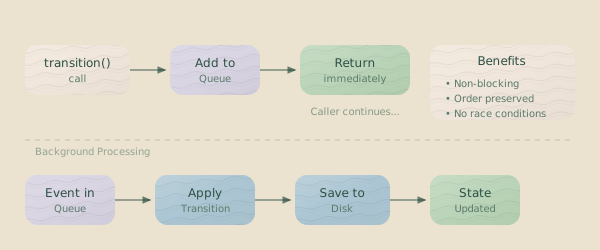
The sequence is:
- Backup the current
state.jsontostate.json.bak. - Write the new state to a temporary file,
state.json.tmp. - Atomically rename
state.json.tmptostate.json.
The final rename operation is atomic on POSIX-compliant file systems, meaning you are never left with a half-written file.
Common Inspection Tasks
These code patterns are useful for building tools that read state.json.
Find the Currently Running Codon
const currentRun = state.runs.find((r) => r.runId === state.currentRunId);
const runningCodon = currentRun?.codons.find(
  (c) => !["completed", "failed", "skipped"].includes(c.status),
);
Get the Last Successful Checkpoint
const completedCodons =
  currentRun?.codons.filter((c) => c.status === "completed") ?? [];
const lastSuccess = completedCodons[completedCodons.length - 1];
const checkpoint = lastSuccess?.completionCheckpoint;
Calculate Cost for the Current Run
const currentRun = state.runs.find((r) => r.runId === state.currentRunId);

const totalCost =
  currentRun?.codons.reduce((total, codon) => {
    let codonCost = 0;
    switch (codon.status) {
      case "completed":
        codonCost = codon.finalCost ?? 0;
        break;
      case "failed":
      case "skipped":
        codonCost = codon.partialCost ?? 0;
        break;
      case "running":
      case "completing-sentinels":
        codonCost = codon.currentCost ?? 0;
        break;
    }
    const sentinelCost = codon.sentinels?.totalCost ?? 0;
    return total + codonCost + sentinelCost;
  }, 0) ?? 0;
Find Why a Codon Failed
const failedCodon = currentRun?.codons.find((c) => c.status === "failed");
if (failedCodon) {
  console.log(`Failed during: ${failedCodon.failedDuring}`);
  console.log(`Reason: ${failedCodon.failureReason.message}`);
  console.log(`Retriable: ${failedCodon.failureReason.retriable}`);
  console.log(`Exit code: ${failedCodon.exitCode}`);
}
Related Pages
- State Machine — The formal model for codon transitions.
- Execution Thread — How runs connect across continuations.
- Checkpoints — Details on Git-based state persistence.
- Debugging — Using the state file for troubleshooting.